

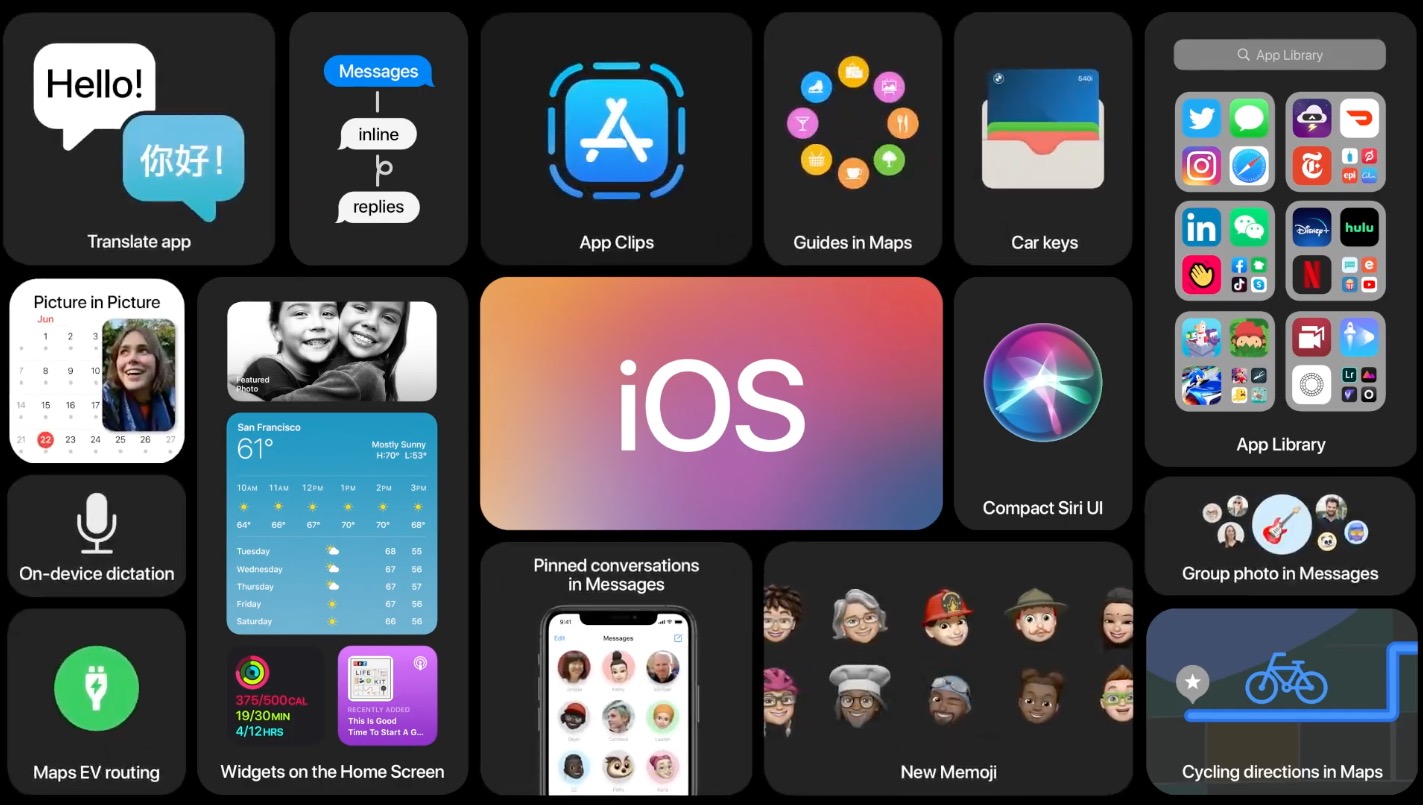

Apple held its WWDC virtual event today and unwrapped iOS 14, the latest version of its mobile operating system for iPhones. As you probably guessed, it takes a lot of ideas from Android, some of which have been on the platform since the beginning (or close to) and that Apple seemed hell-bent on ever adopting. But times change and smartphone operating systems mature, so Apple continuing to acknowledge Android’s greatness is an inevitable yearly event we look forward to.
Rather than put together one of those tired and played-out “Apple just stole everything from Android” posts, I figured we’d do it a bit different today. The world needs more positivity and so here’s a different take. After watching the WWDC stream, I can’t help but tip my cap back at Apple for looking at Android’s ideas and still finding ways to make them their own, or at the very least, make them slightly better in specific ways.
Home Screen, App Library and what appears to be an app drawer
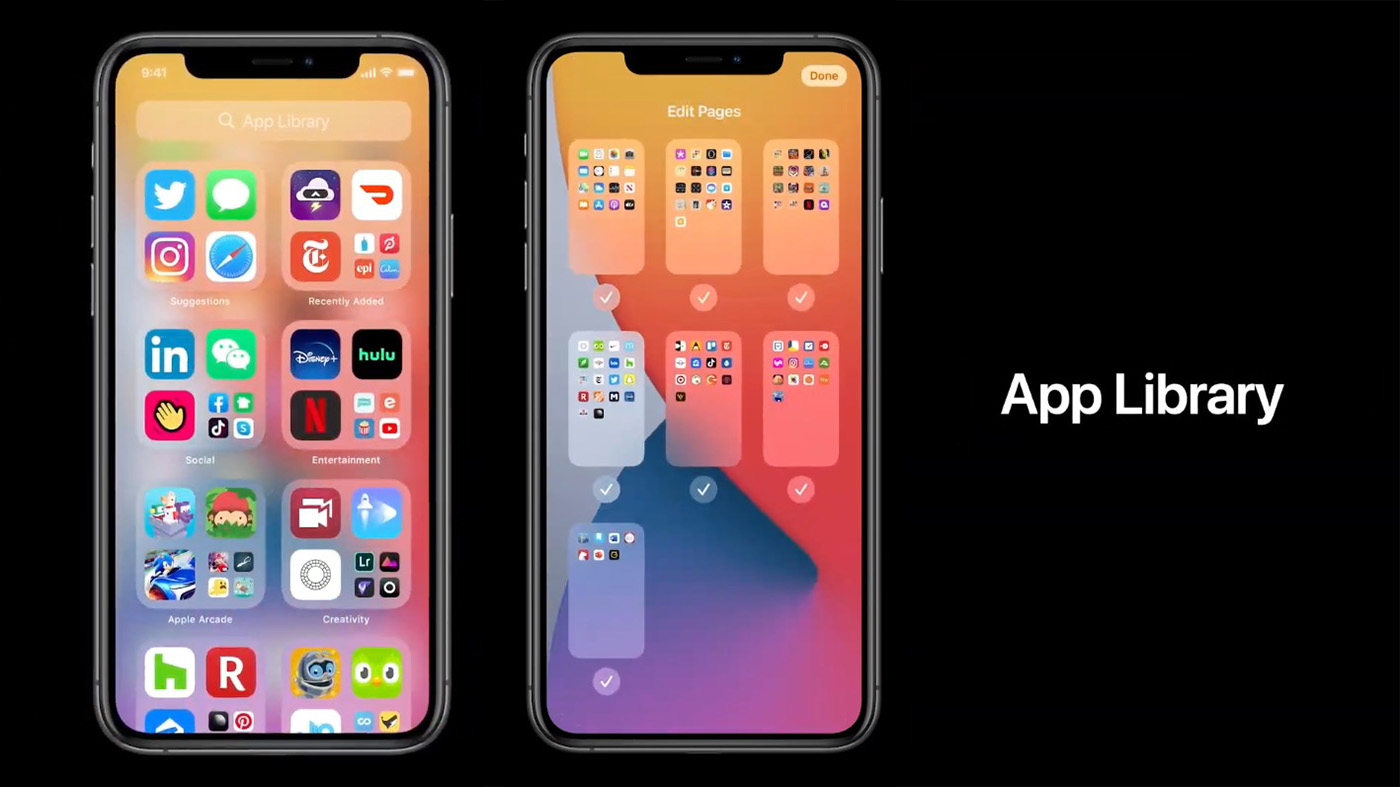
Apple kicked off iOS 14 talk by finally admitting that its app jukebox approach to home screens is a terrible way to organize a phone that has dozens and dozens of apps. To make the experience of managing apps more reasonable, they created the App Library and also will let users eliminate full pages from their home screen. Yes, this is like an Android app drawer and the ability to delete or add pages to your home screen as you see fit.
This is one of those changes that I’m not sure sounds amazing compared to Android, but it is a massive improvement over the previous iOS experience. Now, you have a couple of pages filled with your favorite apps along with a swipe from the right end of your page setup to get into the App Library. This App Library organizes apps into topics or categories, shows you recently used apps in each, and also lets you pull up an entire alphabetical list by tapping in a top search box.
Apple should probably just let you choose the alphabetical list as a default instead of the smart groupings, but hey, it’s a nice start. And maybe you’ll quickly adapt to where each grouping is located in the App Library, making it easier and quicker than ever to find what you need.
Home screen Widgets look nice
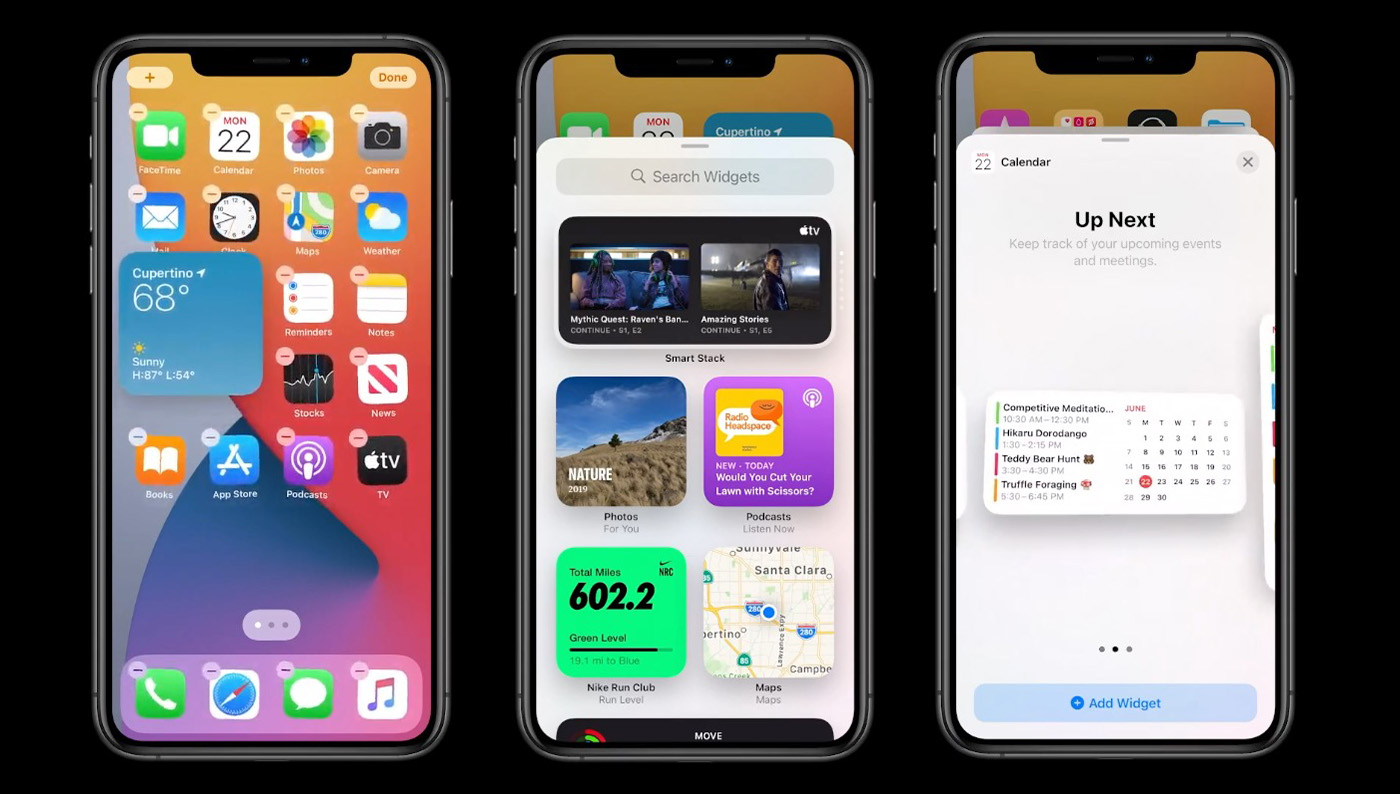
Apple is bringing widgets to home screens in their bid to allow users to actually own the experience on their iPhones for the first time. The widgets are just widgets, so that means you can place them anywhere, app shortcuts will smartly move out of the spots you want to place them, and there will be multiple sizes from some apps.
If you are looking for something unique here, it’s probably a widget Apple has called Smart Stack. Smart Stack is a changing widget that shows you information depending on time of day, your usage history, that sort of thing. It has multiple widgets within it, like weather and news and calendars. You can swipe between those as needed or they’ll smartly switch throughout the day (ex: switching from calendar to fitness recap at the end of a day). If you don’t want Apple’s Smart Stack, you’ll actually be able to make your own widget stack of up to 10 widgets (just drag them onto each other).
Overall, the UI is also much nicer than it is on any Android phone, most of which still use awful grid layouts that are sometimes confusing to navigate.
Picture-in-picture has a feature I need
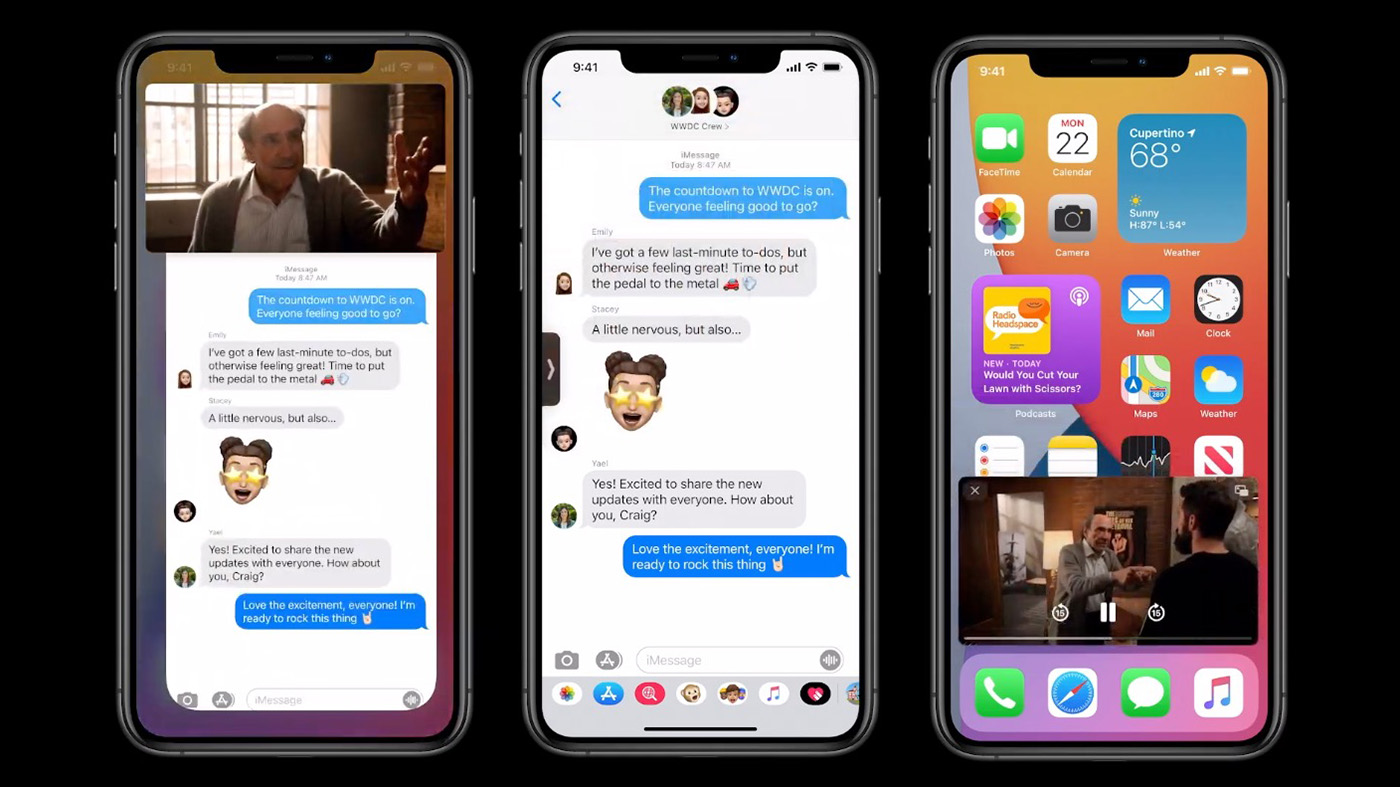
Apple is also introducing picture-in-picture for video, a concept that has been around for some time. For differences here, I like that Apple lets you pinch-to-zoom on the floating picture box to resize it. Google is only now allowing resizing in Android 11 and it’s certainly not as seamless as pinching on the floating box.
The other cool thing is the ability to slide a picture-in-picture window off to the side of the screen (center above), where you’ll still hear audio playing from the clip, it’s just that you may need the full screen for a minute to take care of a task. To bring the video back, you simply swipe out the a little arrow tab for the hidden video.
If you didn’t think the widgets were cool, how can you not be impressed by that?
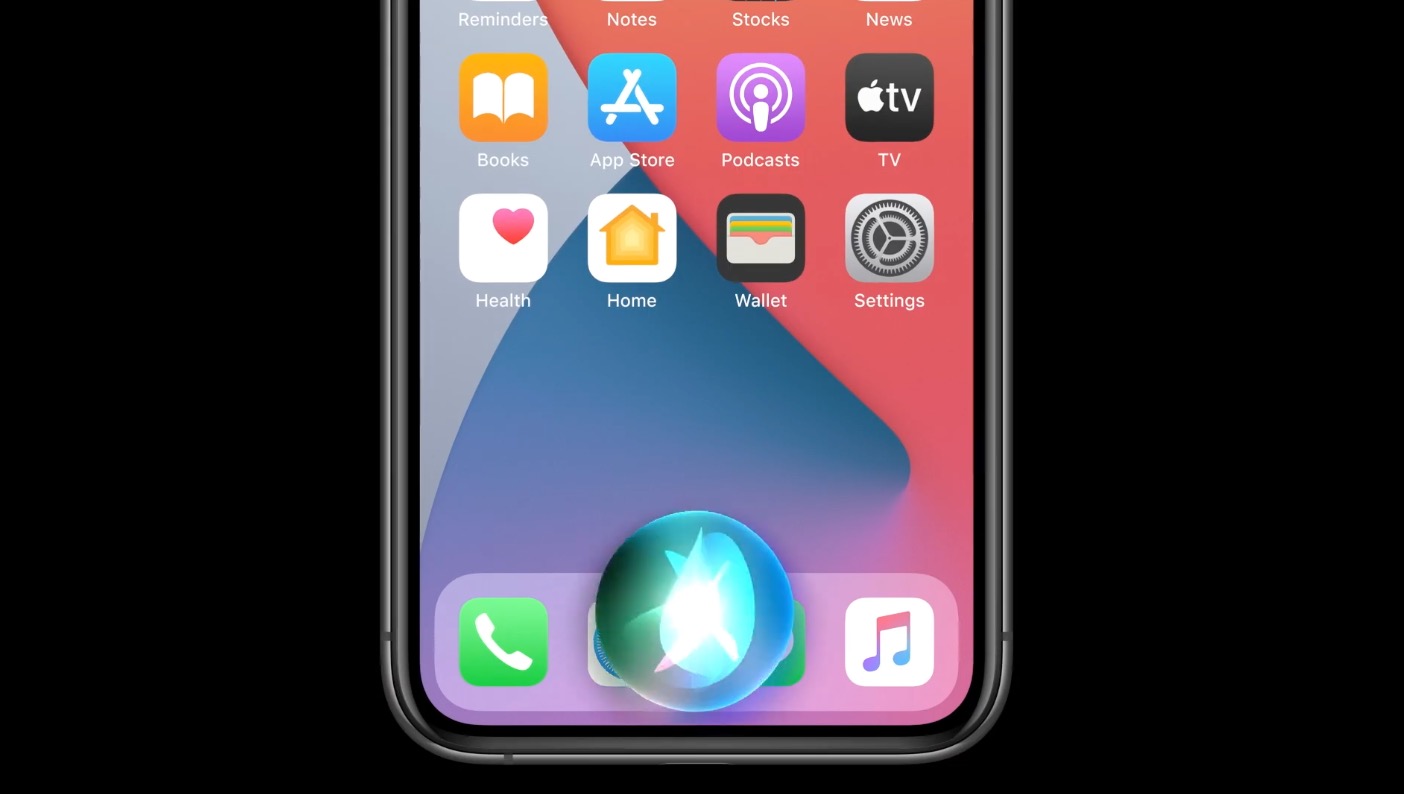
Speech-to-text goes on-device, translated conversations are here
OK, so this stuff isn’t improved over what Google has done, but Apple is now doing it, which is something.
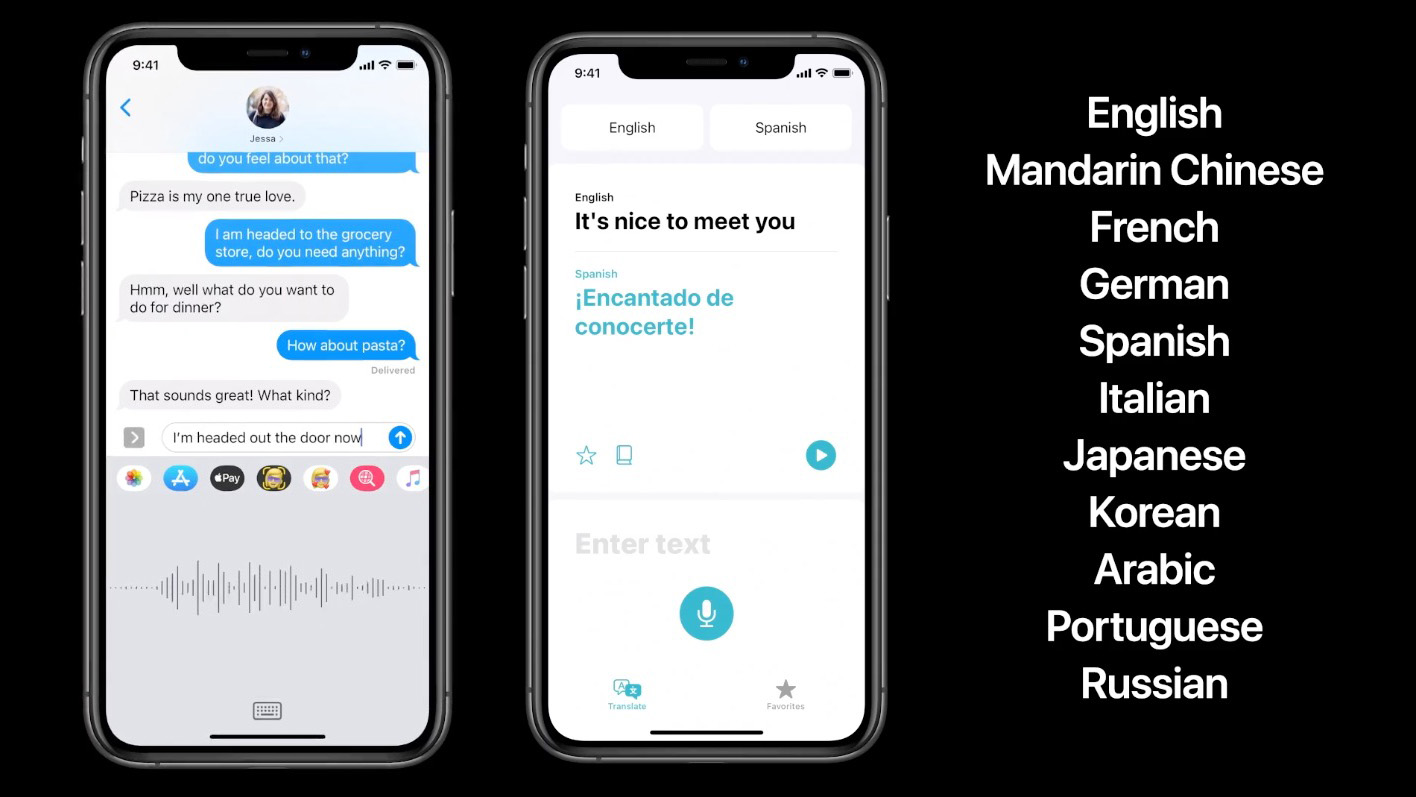
The first thing is that “leveraging the power of the neural engine,” Apple is now transcribing speech-to-text on-device to make it faster, more accurate, etc. They are also working on a new Translate app that lets you have conversations with people in different languages, all of which can happen offline. It’s just like the way Google does it.
Mentions, inline replies, improved visuals in Messages
Talking about Apple Messages (or iMessage) is never a fun topic for Android users. The level of pettiness surrounding cross-platform conversations has always been the stupidest shit ever, but Apple is adding a couple of cool new things to Messages in iOS 14.
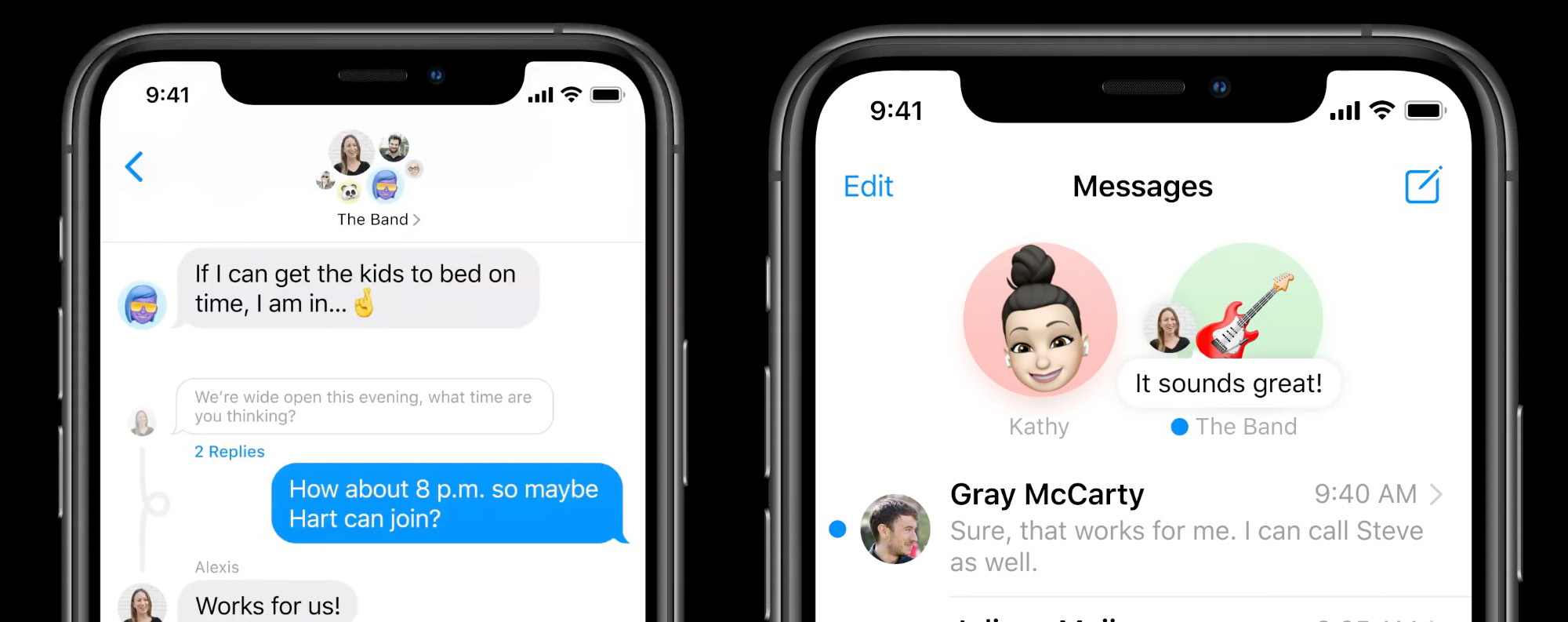
Two things that I’m not sure I care much about, but might be huge for you, are threaded or inline conversations and @ mentions. I have zero friends, so my group conversations don’t need to be threaded and I don’t have anyone to callout. I can see how you young social folk would love this stuff, though.
What I do think is cool, just from a UI perspective and an attention to detail thing, is the pinning of conversations and also a group preview or image. For pinning, when you pin a conversation in Messages to the top of your conversations list, you’ll see little profile images of people who have recently sent a message in that group (above right), plus the top of the group image shrinks or enlarges images of people depending on how recently they were active (above left).
Maps isn’t Google Maps, but it’s getting there!
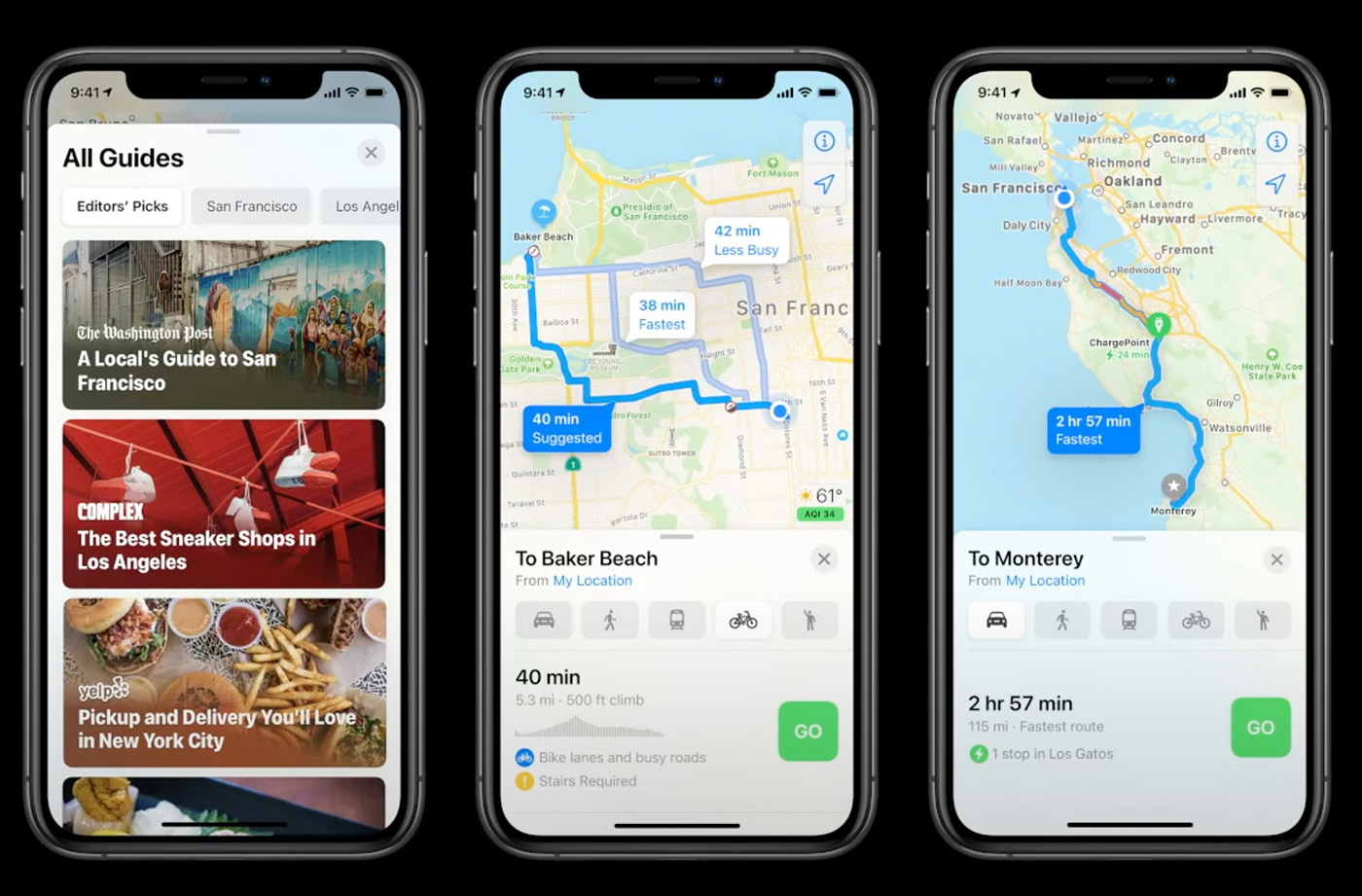
I’m not going to sit here and tell you that Apple Maps is anywhere close to being as good as Google Maps, but here are two cool new features coming to iOS 14:
- Apple Maps is getting a cycling directions experience in NYC, LA, San Francisco, Shanghai, and Beijing. Cool?
- Apple Maps is also getting an EV routing experience that adds charging stops along the route. Very cool.
Yay.
App Clips!
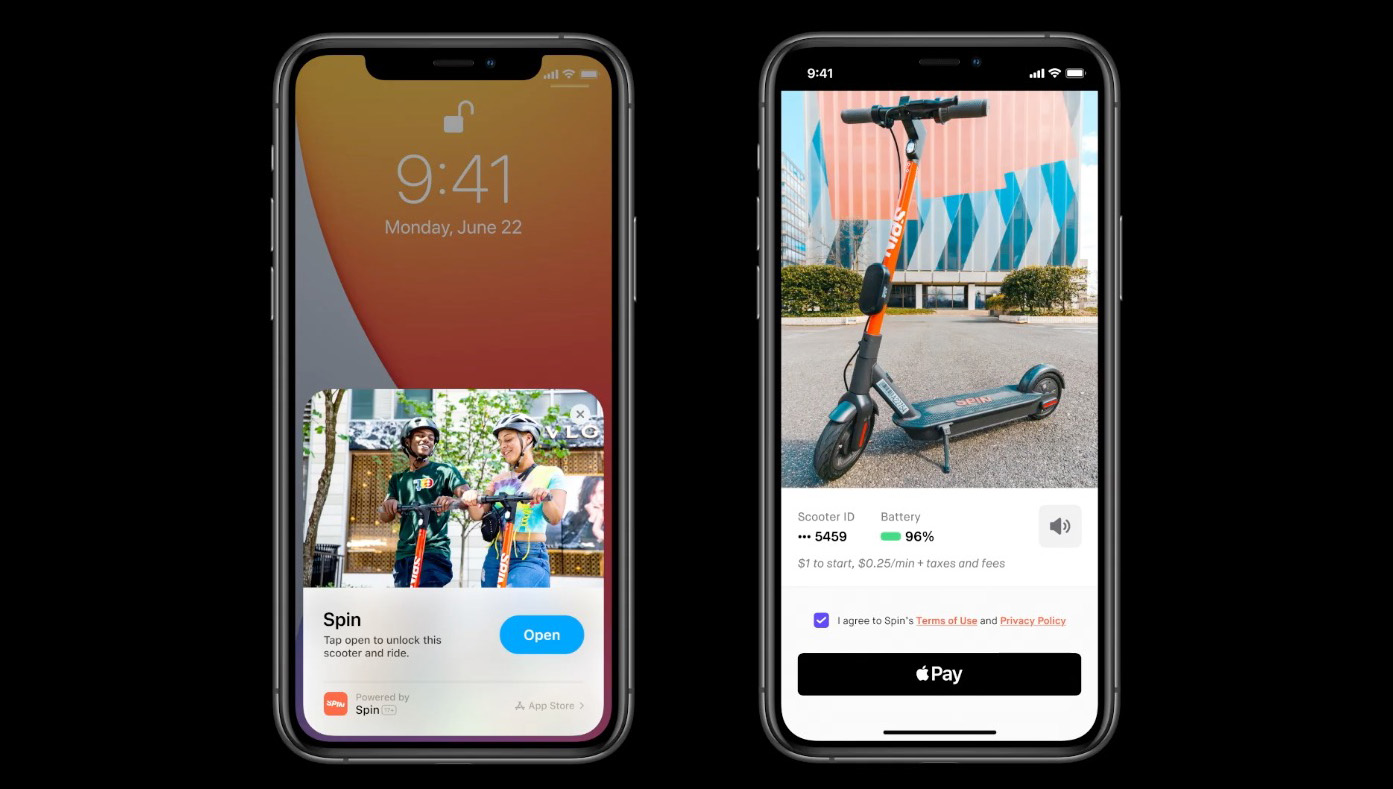
OK, this is most definitely cool. “What are App Clips?” you ask? Umm, it’s like a mash-up of Google’s instant apps, NFC, and the simplest way to do app-related stuff without ever installing the entire app experience of an app you might need that one time. Let me try to explain.
App Clips could be used in a situation where you are at a parking meter that needs a specific app in order for you to pay. You would tap (through NFC) a Clips tag that would then temporarily bring up a specific portion (under 10MB) of that parking app to let you pay to park. The app is never fully installed, it uses your secure login info from Apple to login, and uses Apple Pay to pay. That Clips version of the app then only hangs around “as long as you need them.”
Clips can also be used as shortcuts sent through a message or the web, to help you get businesses info who don’t have an app, or even as a shortcut in something like Apple Maps. Apple is creating a visual Clips icon you’ll look for in the real world to let you know that a Clips experience is available, but QR and NFC works too.
Home stuff
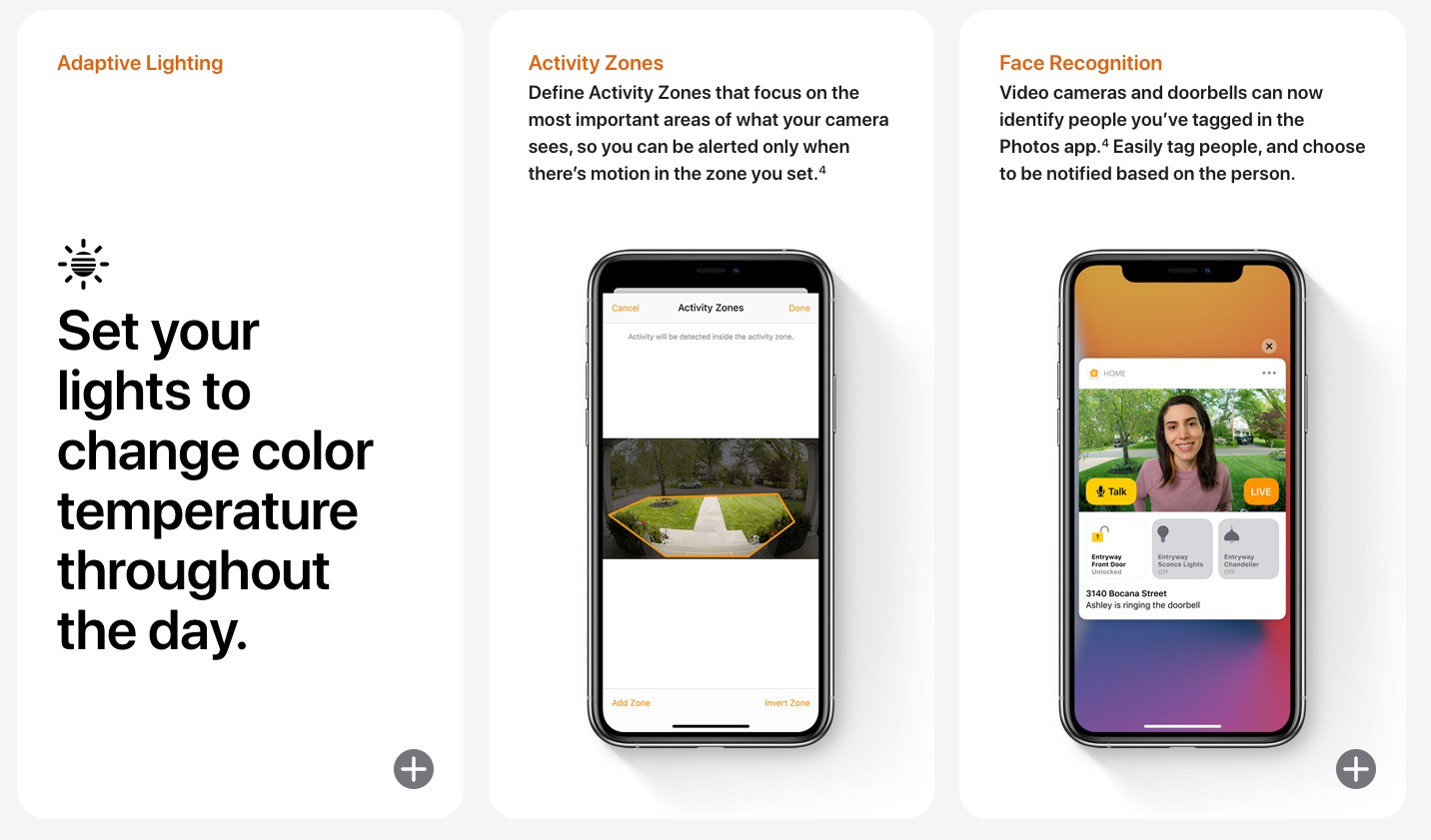
In the home department, Apple is improving their Home app in a number of ways, like through suggested automations of accessories added, better highlighting of accessories that need your attention based on what’s happening (ex: you leaving home), and letting you set supported lights to adapt color temperature throughout the day. Outside of those three features, Apple is doing two other things that I’m confused about because typically these features are paid services as a part of 3rd party smart home products.
The first is an activity zone setting where you can define which areas are important for your home security cameras to watch. The other is a facial recognition thing, where cameras can recognize faces you’ve tagged in Apple Photos and tell you about them. Apple says it’s doing these two things within the Home app, which sure sounds to me like they are getting around subscriptions and pro feature sets from 3rd party services and just giving you those goods. I hope I’m wrong there, because that seems like some lawsuit level stuff.
AirPods or auto-audio switching between devices
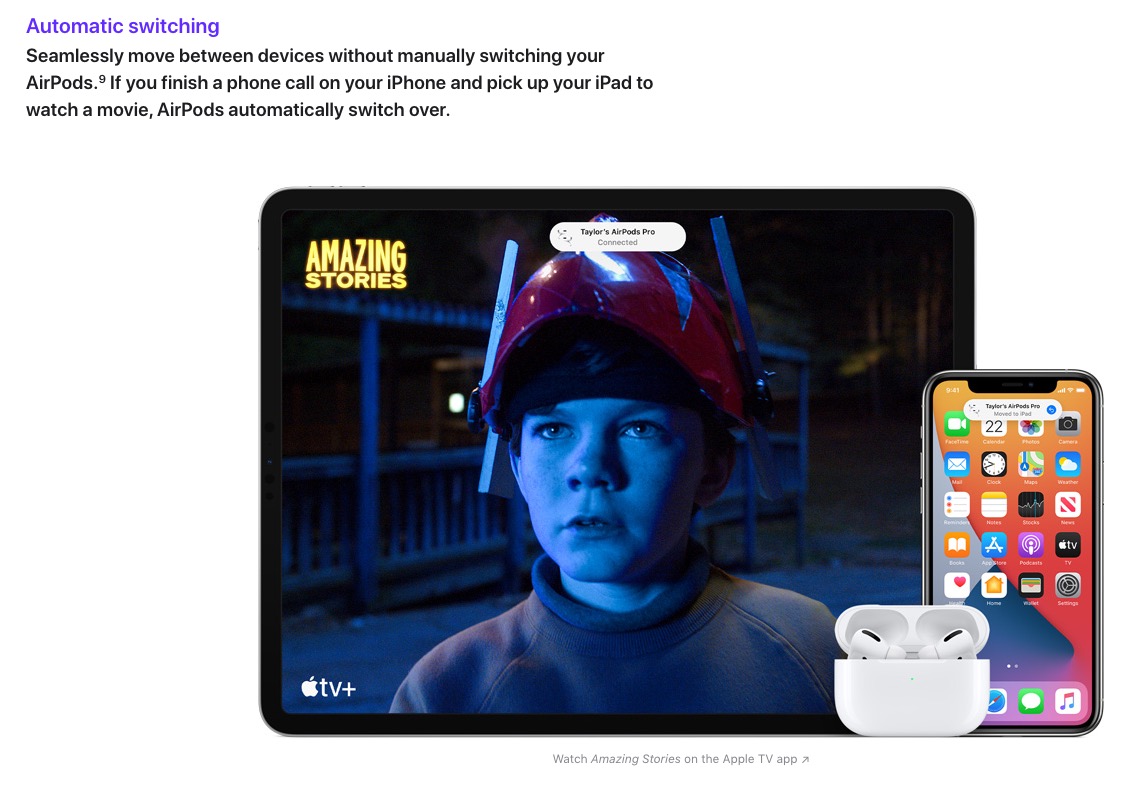
Imagine if you got a call on your Android phone which was connected to Pixel Buds, took that call, then hung-up and your Pixel Buds immediately switched over to your Pixel Slate because you picked it up and started using it. Would that be sweet? iOS 14 combined with an iPhone, iPad, and AirPods does that. You got us on this one, Apple.
And that’s just a look at the big stuff that Apple talked in detail about, so there could be more. Again, the point here wasn’t to show you all of the stuff that Apple had copied. In some ways, Apple (certainly) borrowed ideas from Android and then further improved upon them in ways you have to hope Google will take note of.
Oh, iOS 14 is supported back through the iPhone 6s too. Google, can we work on that too?
Every year Apple copies some Android features, tweaks a few, and says they are revolutionary. It’s beyond old at this point, and I really wish they would stop trying to make it sound like they are the best, when clearly they are a decade behind on some things. However, Google needs to take a ticket from Apples book on updates, two years is really kind of lame. I take good care of my devices and I have a Pixel XL that I used for over 3 years non-stop as my daily device that still works well, and the battery holds a good charge. There’s no reason they couldn’t update it.
Agreed to a certain extent. Apple has positioned themselves well to be able to go about things the way they do and get praise. And yup, google has no excuse not to update their phones as well as apples does.
I stayed away from the comments section in this article because I was afraid of what it’d look like but color me surprised. Almost all of ya’ll stayed mature and open to new information. I’m so proud.
https://uploads.disquscdn.com/images/8ee30843eebbdf9123a3bed4af19d20627abb9e687af552d33922c15af8e01ad.jpg
This was fun read.
I always skip one generation to the other company to see.
Iphone > Pixel > Iphone and so on… ( My last change was between Pixel 2 to iPhone XR and haven’t changed since yet)
And sadly my Pixels I just gave away to older relatives while the iPhones i managed to sell for good price because even if they are one year old they still receive updates are somewhat functional.
When will iMessage fall back to RCS vs SMS/MMS? That would be epic!
I immediately thought about googles instant apps when I saw the apps clips and thought are they still doing that? I guess it’s super convenient for pay for parking or renting some kind of scooter/bike how often am I really going to use those apps every once in a while thank god for offloading apps except when the app leaves a ton of stored data on your phone bigger than the app itself.
I thought the same thing.
All I need is away to set default apps and making the switch to iOS has never been easier.
I think this release allows for default browser and email client. Almost there!
Yeah, I ended up finding this on Engadget and in MKBHD’s video. While it wish it was system level, it’s a start. I think I’m going to seriously consider the switch this year.
Me too.
It’s about time they caught up to Android on a lot of things. I’m an Android fanboy for sure, but I love competition like this. It only benefits all of us. I have nothing against the Apple ecosystem, and really like the new look on a lot of things, but I’ll be sticking with Android thank you.
I’m excited about the smaller incoming call screen. I’m using the 11PM and still wondered why after all these years Apple never improved that. The other features are cool too, but I’m a cheap date lol. We’re able to finally jailbreak up to 13.5, so it’ll be awhile before I adopt iOS 14 after it releases.
Good read.
Honestly, widgets on android are a hot mess. You have some companies that give a care and put thought into them (Todoist) and then you have others that put a widget up as a shortcut to the app. Wait..why do you need something taking up so much real estate on your screen, that just tapping on the app itself will work fine?? So confusing.
As with other things, hoping that Apple having good widgets will drive the android counterpart app make good widgets.
I like a minimalistic approach to my home screen and Nova Launcher makes that possible.
I have the iOS 14 dev beta installed, and their main widget is seamless. Honestly, once they integrate a clock widget and dark sky data, it’s going to be pretty amazing.
How stable does it seem? Been itching to install it too.
IPHONE 5S from 2013 just got a security update 2-3 weeks ago.
SEVEN years of support…and counting.
Too bad Siri is still garbage. But nice to know they are finally giving users an option to clean up their home screens. But widgets? Really? Is it 2011? I don’t even use them outside of the Google search one.
I love widgets! I use 14 instances of 8 different widgets, and that doesn’t even include the Google one which I remove right away.
I love widgets! I use 14 instances of 8 different widgets, and that doesn’t even include the Google one which I remove right away.
Sticking with Android still !
Tight integration like this should have been on Androids spotlight for years. With no additional Pixel leaks surfacing ” A good thing” I hope to see something interesting whenever it decides to release. There still a lot of time for Android fixes with 11 on the horizon
“iOS 14 is supported back through the iPhone 6s” <<<---- And THIS is why I made an iPhone my daily driver. Qualcomm and Google always tout the power of their devices at launch but long term they just don't believe their own BS. If my Nexus 6 can run LineageOS just fine, which is based on Android 10 and made by a conglomerate of developers across the world, why can't Google give it an official version of Android 10? I mean really, if they want to charge iPhone-level prices they need to provide iPhone-level support.
Actually, iPhone 5s from 2013 got a security update 2-3 weeks ago…that makes it SEVEN years of support.
Maybe this will remind android devs that widgets still exist and should be updated from the old 2012 version they still have linked to their app. (no offense to devs, i know it’s a lot of work, but people will gravitate toward apps with better widget companions)
Spatial audio in AirPods Pro sounds amazing….
Apple has some big balls…I watched their prerecorded keynote “live” today, and thought it was so ridiculous that they started their MacOS presentation by saying that every other computer company has been trying to copy the Mac for the past 30 plus years, and failed…yet, they said this, following their iOS presentation in which they listed every new feature that they just copied from Android. Balls indeed.
It’s called courage
More gumption than courage.
I think arrogance is the word
Imma give apple a try when they get rid of the lightning charging shit. And start using Type-C instead.
They already have…in the new MacBooks, their “Thunderbolt 3” port has the same design as a USB-C port and accepts USB-C cables for power and data transfer. On the other side, I wish they actually had more than just those 2 ports on the newer Macbooks, namely ports I actually need like USB 3.0, sd card, and ethernet.
I think he’s referring to the iphone.
I think he’s referring to the iphone.
Not gonna happen. They will go portless instead
Types in Droid-Life.com / gets an Apple article.
No thanks
And yet just like any other content you don’t want to see – you ignore it and move on…
Sees content they don’t like, takes time to make comment on it, thereby drawing attention to themselves and their pointless comment.
If you don’t care, just drive on. You clearly care enough to comment ON THE ARTICLE.
You mention young social folk… makes me wonder about the average age of your readership. Maybe a good poll idea? I have this feeling we might be older than you think. 😛
Gosh that interface looks so attractive and everything seems even more seamless than ever before. If they are able to pull off the Mac stunt they said they are planning by the end of the year in addition to some kind of foldable iPad Pro, Android will look less and less appealing compared to iOS/Mac experience. Let’s be honest it’s Samsung that’s keeping android and especially the tablet segment up . They fight no matter what when google themselves gave up without thinking that when the foldable segment will pickup apps will need to be optimized for tablet use and not just some oversized phone apps. Apple has a lead there google also needs to fight and start taking tablet apps seriously.
It’s a matter of taste. My tastes differ from yours. I’ve used iOS in the past, and have an iPad Mini now, only because Google abandoned the Nexus 7, but Android is just so much better to use for me. I hate the way iOS handles many things…and I also hate the way it looks. Not to mention, I don’t want to wait for years to get basic OS improvements in functionality, and be overcharged while doing so.
“I don’t want to wait for years to get basic OS improvements in functionality, and be overcharged while doing so.” – The same could be said for Android though. RCS just starting becoming a thing, while Apple keeps improving iMessage. Also, many people would say the Pixel is over priced. Lets also not forget the crazy expensive Galaxy S 20 Ultra at $1500! At least Apple is giving iOS 14 all the way back to iPhone 6S, which was released in 2015. Good luck seeing ANY Android phone being supported that long. And this is coming from Android fan. You can sling mud both ways. It just comes down to preference.
I have no idea what iMessage is.
N00b!
This.
Definitely sticking with iPhone.
Can we get a fair comparison of home screens now instead of those stupid articles that all showered Android’s APP DRAWER being compared to the iOS home screen? I always HATED those articles.
Like back in the Apple vs Samsung lawsuit days? I always hated that too. Glad there’s someone else.
Excellent wrap-up and analysis ????????.
I too hope Android picks up on a few of those Apple ideas.
Does iOS have actionable notifications? I don’t think they do, do they?
Not really. The biggest place Android shines is it’s notifications, imo
Yeah you can reply to messages, archive/delete, … .what else do you do on Android?
WOW Welcome Back Ron!
sonofa…
Lol I miss Ron. His posts would set these comments on fire. Everytime! ????
I wonder if the widgets will effect the battery as they used to in Android.
From the battery to their processor and their screen they know how to consume way less power than the competition reason why they don’t stuff their iPhones with huge batteries so I would assume that they probably can minimize widget battery consumption as well. Not sure just speculating
iPhone 11 pro Max has a bigger battery than the Pixel 4 XL. Apple upped their battery game in the previous gen.
Can’t imagine it affecting it too much. Been using the 11 Pro for about a month now. I’m finding that I only need to charge it on the way to and from work. Even while doing that I am streaming music and running Carplay. Never had such a good battery experience with a phone until now.
I wish more articles on EVERYTHING were like this. No opinions, no attacking, just good old fashioned reporting on what happened. It’s refreshing and I thank you for this!
LoL
Umm, there were opinions.
Too positive for me. I miss the old grumpy, grouchy Kellen.
Oh he’s still here
Fakwors!