


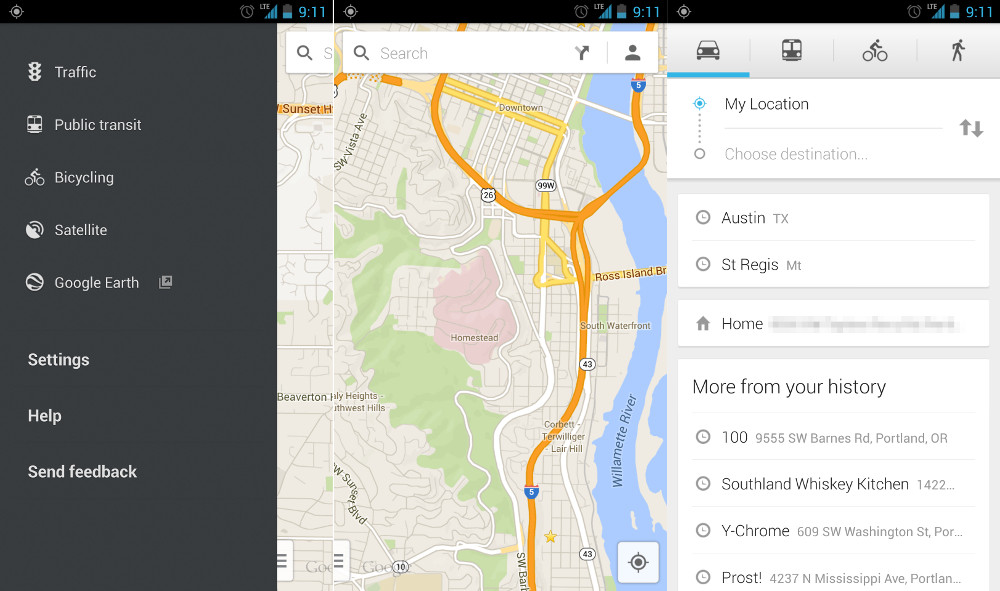
Remember the new Google Maps app for Android that we saw previewed back at Google I/O? It went live this evening for both phones and tablets! Well sort of. As is typical since I/O, Google is using their staged rollout method of releasing app updates, so there is a pretty damn good chance that you can’t download it yet. Sucks, right? But anyways, the new Maps is here!
We have only spent a couple of minutes with it, but the differences are noticeable almost immediately. You now have a much more open main map screen that gives you the opportunity to view more at all times. To access some of your favorite options (like bicycling, satellite, or traffic), you can swipe from the left on the tiny menu button tucked in the bottom left hand corner. But if you want to make a quick search or pull up nearby locations, feel free to tap in the search bar located at the top. If you want to get even more detailed, or want directions, tap the little directional icon that is situated in the search box.
Those are just some of the changes we are noticing up front, but there will likely be more tricks tucked inside this massive update. Feel free to share your findings in the comments!
Here is the changelog:
- New design for Android phones and tablets
- Enhanced navigation including live traffic updates, incident reports and dynamic rerouting
- Explore: A new way to browse and discover popular local places to eat, drink, shop, play and sleep
Note: If you can’t find it live in Google Play, feel free to stop by this link (mirror). Unfortunately, those links may only work for 4.2+.
According to Google Play, you have to be running Android 4.0.3+ in order to install this from Google Play.
Update: As many have pointed out in the comments, Offline maps are now gone after the update, and that is incredibly unfortunate. Latitude is also gone, but that’s likely because it is a part of Google+ now.
Update 2: Google has finally posted an announcement of the new Maps v7.0 with news of offline maps (they are still there!) and Latitude.
Cheers Dave!


I used to love google maps! Over the last 3 days I have came to hate it. This is the worst upgrade I have EVER experienced. What is GOOGLE thinking? How I wish I could go back to the old maps. Now I know what iPhone users experienced when they lost Google maps. I feel like I’ve lost it as well. Maybe I can get the Apple map app?
Really Google….. who is in charge of your testing program? Send them out the door.
Maps 7 – THE MOTHER OF ALL EPIC FAILS!
Maps 7.0 has been a terrible experience for me.
When I am using Navigation and get certain kinds of notifications, then come back to Navigation, I am faced with the “start location/destination” prompt (can’t get back to the active navigation screen), and if I try to re-type in those points, the application crashes, and continues to crash until I restart my phone. (It is a Galaxy S4)
Also, I strongly dislike having to type in my “starting point” (Just start where I am!)
Also, I often get a bogus “No Network Connection” error when typing in the locations, that never used to pop up (and my signal is very strong).
Are you guys kidding? This is the WORST update I’ve ever seen for any app. Fonts are thinner, letters seem faded, making it DANGEROUS to use while driving. (A navigation tool that cannot be used while driving. Not good.)
In the old version, when the red dot turned red, you click in the dot to see the traffic layer. Now, you need to completely EXIT navigation, then pull up MAPS,then navigate (somehow!) to the traffice layer, then restart Navigation and re-enter the desination info to get restarted again. All while driving at 65 mph? ARE YOU SERIOUS?
Obviously, the kid who redesigned this hasn’t gotten his drivers license yet. Otherwise he’d know that this can;t be used while driving.
Did I menton that this upgrade SUCKS?
Why was my places removed from this update. It was a great tool for work and they ruined it. I can’t believe there destroying this app. Google has stopped people from being able to rate this app. I guess the saw how far south this update was heading. I hope they kill this update soon.
I still haven’t gotten the update! I have a Verizon Galaxy S3 running Jellybean 4.1.2, is the staged rollout fiinished? Or are there others out there like me?
LAME. still no update. come on mannnnnn
I got the update last night and noticed I do not have the Explore option at all. Any ideas on why that wouldn’t be showing up?
what are the chances that uninstalling and then reinstalling will just install the new version?
That worked for me. Try it out.
i got the sideload to work…but its great that there’s other workarounds
Click on the search bar and scroll to the bottom and you will see “make this map area available offline”
Don’t support my places. Be careful !!!
Google Maps for the WIN…
Does anyone one have a link to the latest Version 6 in case this new version is crippled too much? (loss of stared places would be a killer for me)
Can’t get it to load. Something about a “parsing error”. Saw below that another Samsung S3 had issues. Hmmm…….. Will restart and try again.
Why is Google still doing the awful staged rollouts thing still?
I am hoping that one day they will add in live incident reporting like Waze… Living in Los Angeles, having real time updates makes a huge difference.
I don’t like it, didn’t have all “my places” any longer so I had to uninstall it and reinstall version 6 something from the market.
That’s because the capacitive menu button is supposed to die already. Menu buttons are so Gingerbread.
It’s not coming up for me, Note 2 / 4.1.2 / verizon / EST
Same here. Saw another member that did get it to work on their Note 2. I didn’t restart but nothing yet! Grrr….
I been turning on and off my phone, battery removed, and “checking for updates” its not that big of a deal, but I like it when my apps are up-to-date..
Yeah, same here. I’ll do a restart and after that a battery pull. If I don’t get it after that then I’ll wait it out too. No biggie.
Best part for me is that I noticed there are no more background running services. There used to be 2 and sometimes a third on that kept saying “restarting”. I always thought this was redundant as google already gets my location. NICE!
Disappointed that they got rid of the bigger text option that was included in the labs section. The writing is so tiny on my s4.
Google Plus works better, imo, then latitude for location tracking. I’m happy to see latitude go.
They had definitely given up on updating Latitude in Google Maps. It was struggling.
Navigation lost good functional UI. It’s a mess. I can’t use the zoomed out map anymore because detail of route is tiny and blended too much with other map details. Starred places list gone. Home button sometimes half way down screen. App crashes when switching away. It’s hard to back out to directions search to get alternate routes manually when you know Maps too you through a town adding 15 minutes of traffic lights it doesn’t account for. … I like that at least I could see the one accident on the map this morning looks cleaner but lost a lot.
If offline maps support is still there, I can’t find how to get to it.
I am liking the new look so far.
The offline maps feature is not included in today’s release of the new Google Maps app (version 7.0) for Android.
“We know a lot of you love offline maps, and we’ve included a special feature hidden in the app that allows you to pre-load an area of the map you need offline simply by going to that area in the app and typing “OK Maps” in the search box (or speaking “OK Maps” into your Android device). That area will then be pre-loaded to your device cache and accessible when you don’t have a connection. Just return to that area of the map, and it will be available to you.”
http://productforums.google.com/forum/m/#!category-topic/maps/mobile-android/Ck_Pd6UgZCU
All Google websites, services and apps will not load. Very strange as Ive never seen Google go down.
So if “OK Maps” on search is for offline maps than where does it go and how do I delete it or pull up the map?
KO Maps ?
Lost ability to “search nearby.” Sucks.
I believe you just search from the search bar
Here is the full scoop on Lattitude. It’s gone the way of Google Reader….
https://support.google.com/gmm/answer/3001634?p=maps_android_latitude&rd=1
Google Latitude will be retired on August 9th, 2013, so even if you don’t update the Map app the feature will stop working. I used latitude quite a bit, I’m disappointed to see it go.
Why is it that my phone doesnt show the update yet but it does for you guys? Running a GS4 on 4.2
Most everyone here installed it manually because of Google’s staged rollouts.
You can wait for it to be pushed to your device (maybe today, maybe next week) or you can find a link in the comments and install it yourself.
No Latitude option I’m a little sad about that but I can live with it! But no labs, no terrain options and no My Places which I use to pre-plan all my trips, holidays and night’s out, I am majorly raged!!
It still shows “Nearby Saved Places” not sure if that the same as My Places
It’s not. Being able to save a “my places” custom map on a computer before going on a trip, and then pulling it up and having instant access to everywhere you want to go was an amazing feature. I read somewhere that it will eventually be supported with this new version, but who knows when that will be. I wish more people used this feature so it would be a priority 🙁
Thnx for the link
For offline maps, search for “OK Maps” when you’re looking at what you want available offline.
Interesting. Sounds like something you would be able to do with Google Glass. “Ok Glass”
I just installed this via the mirror (couldn’t get Google Play to load up/refresh), and when I open and run it, I get a “no connection” error (maybe related to what’s going on with Google Play?). Anyone else?
Great design overall. Finally looks like a Jelly Bean app instead of an ICS/Gingerbread hybrid.
Love that they finally ditched the separate Nav app icon. I prefer the way they consolidated it into one app. The transition from looking up directions to actually navigating is quick and smooth. Totally seamless. Also, the navigation window doesn’t look like Gingerbread anymore.
I noticed if you tap the clock at the bottom of the navigation page you can switch from estimated arrival time > estimated time left > miles remaining. Very nice touch.
Uhm… where is Latitude?!
Gone… They want you to use Google+ which added location several months ago
Latitude has been killed by Google.
Well this is unfortunate. I use this on a daily basis to see where family and friends are…. disappointed.
Here you go: http://www.androidcentral.com/google-confirms-latitude-being-retired-august-9
It’s official. August 9 – Latitude is dead. I don’t really blame Google, hardly anybody used this feature.
If you still need this feature, just turn it on in Google+.
Thank you very much for this information. Does anyone know of a solid alternative?
You might try out Google+. Open the app, tap menu > Locations > Enable location sharing.
I honestly don’t know how well it works, since I don’t use these features, but you could give it a shot.
was playing with it last night, absolutely gorgeous design. love it
4.2 here… offline is working well.
Latitude is being retired next month: https://support.google.com/gmm/answer/3001634
FYI. CNET is showing to store the maps offline… So it looks like it’s just hidden… http://reviews.cnet.com/8301-13746_7-57593006-48/how-to-cache-offline-maps-in-google-maps-7.0/?part=rss&subj=news&tag=title
The UI is nice, but once again Google completely screws up their design language, not to mention take away one of Maps best features (offline maps). None of their other apps have this design, this doesn’t make any sense. All they did was port the iOS UI over and all of you are drooling over it.
Man o man how times have changed
*EDIT* – offline maps is there but buried, but still don’t like the new UI
Seeing as iOS is using Google new design language, is that such a bad thing? I mean honestly, the iOS apps looked more like an Android app than anything else.
This is true.
No more measure tool… This was REALLY useful. What a shame this is gone.
Yep, I used the measure tool quite often when checking out various pieces of property out in the field. Typical Google…giveth on one hand and taketh on the other. Otherwise, I like the non-claustrophobic UI and the speed improvements but it does feel less intuitive overall.
Anyone sort out how to get the zoom buttons (i.e. the +/-) back? There used to be an option in settings but I can’t find it now
Looks nice but street view is really fucked up. Low res, slow load, can’t
navigate…
Only for you. Looks great here, just like before.
How do I access Street View from the new Google Maps update?
Offline Maps is NOT GONE. Just enter ‘ok maps’ as the search term.
Street view is seriously f*kd up. Res is extremely low, can’t navigate.. Galaxy note 2
For Offline Maps, just write “ok maps” in the search bar
thats works! but with much smaller areas than on the old version. but why would they hide it like this?
I have no idea, maybe they want to improve this function but they wanted to release this version anyway
Saw somewhere if you type “Ok maps” in search menu of maps cached maps will be stored for offine
Individual icons within the app look really low-res on the DNA. I wonder if this is because I downloaded it from a third party and it’s not the correct update for a 1080p display.
I’m seeing the same thing on my GS3. I sideloaded this version: http://db.tt/hLk7mMnP
I’ll probably uninstall this version once I’m done playing with it and wait for the official one to be pushed to my phone. I can’t imagine Google gave us lo res images.
Just an FYI for anyone that was bummed about offline maps. Theres a way to do it but it takes a little bit more time:
http://techcrunch.com/2013/07/10/save-maps-offline-new-google-maps/
This is really beautiful, but I think I may have to just hold off on this. I love offline maps, and my Nexus is already slow as molasses anyway.
nice sharing.
http://www.serviceproz.net/WorkForcManagement.aspx
Looks like they combined maps and navigation into one app.
Has anyone tried Navigation yet? It may have some nice new features with traffic alerts, but I think the new UI is awful (for the driver… maybe good for a walker?)
I used it this morning, it’s really nice.
Tap the clock at the bottom to rotate from estimated arrival time > estimated time left > miles left. Pretty nice.
It has been for a long while.
The amount of people who dont actually read the articles and just post on here baffles me.Sad really.
Any idea how to bring up a list of all my stared places? Not just ones near me or recently searched?
@kellex:disqus , here is the APK from my Xoom running Stock 4.1.2 unrooted, so in
case you guys want to install it on devices lower than 4.2 you can use
this link:
https://copy.com/V3vFmgpRjNWs
or maybe this:
http://db.tt/hLk7mMnP
Kellex B here is the APK from my Xoom running Stock 4.1.2 unrooted, so in case you guys want to install it on devices lower than 4.2 you can use this link:
https://copy.com/V3vFmgpRjNWs
or maybe this:
http://db.tt/hLk7mMnP
Thank you so much! You’re awesome, it works on my S3
THESE WORK!!! Thank you man!
Here’s a nice tidbit: this new UI…ffinally matches the iOS version they released in December.
How about that, eh? *sigh*
I just found out that if you shake the phone, it will force close. The shake to bring up the feedback menu must be broken. It’s actually kind of funny.
I actually noticed the same thing and was about to post it when I saw you beat me to it lol
It works well for me actually. Submits feedback or error/bugs as desired.
You might need the latest version of Google Play Services.
Terrible. How can they release with less features?
*fewer
To respond: they just can. At the end of the day, they’ll do whatever the hell they want. Maybe it wasn’t used that much (it wasn’t very well advertised, in-app or otherwise). Maybe it was too much of a legal or logistical headache. I know I couldn’t get them when I traveled overseas, so maybe Google thought it wasn’t worth maintaining just for their Android app in the US.
Has anyone figured out how enable/show Google Latitude or make it so that you can have maps offline ? If Google at least axed latitude so that we now use the Google+ sharing location can anyone shed light onto this ? I’m going to miss Latitude if this is the case. It was one of features I really used in the previous version of Maps. Offline maps I could survive if it does not come back.
almost updated till i saw their update in the post. not going to update without offline maps. not going to let my GN be any slower than it already is.
Latitude is dead. Google is killing it off in favor of G+.
Google Latitude will be retired on August 9th, 2013
https://support.google.com/gmm/answer/3001634?p=maps_android_latitude&rd=1
It doesn’t quite feel like it was made for android. The action drawer does not feel like it does in other android apps, and it seems less smooth than previous versions, but hopefully these things will be fixed soon. There are some nice improvements though.
I love THIS: http://i.imgur.com/4D1pdd4.jpg
Just shows how much Android has become a beautiful UI. Slowly but surely.
Ooh that is really nice.
It’ll pop up when you tap on the “search bar.”
wheres labels? atms, gas stations, restaurants etc.
Can’t find it in Navigation.
Look in the screenshot I posted above. They’re there.
Dude, that’s Google Now/search. Why would I want that while I’m driving and using navigator?
Edit: Now I see it.
Kellex. Offline maps is still here.
http://reviews.cnet.com/8301-13746_7-57593006-48/how-to-cache-offline-maps-in-google-maps-7.0/
Good find. Hopefully Kellen updates the post with this.
It showed up in my Google News feed. Man, Google knows me way to well.
How did you get to that screen? 😛
It took a while to “kick in” I guess because I was looking for it, after seeing it on the app’s preview screenshots. But finally came across it after going back and forth into “search.”
Here’s where it pops up: http://i.imgur.com/wp7q9Xe.jpg
Ah okay looks awesome. Thanks!
P.S. You’re absolutely right about Android maturing in design. I was reminiscing over this screenshot I dug up in my documents the other day 😉
http://i.imgur.com/hgWKgSl.jpg
It’s like watching your little one grow right before your eyes…
*tear*
Wow Droid Life should really do an Android then and now article showing how the android UI and core apps have evolved. Steal This idea Kellex!
Wow, crap, I arrived shortly after this, can’t believe that! Rooted? We didn’t have screenshots, back then!
Haha I believe that was taken via USB debugging and the DDMS program.
How did you got explore screen ?
just installed on my note2 4.1x and its working.
Somehow I dont see Explore .
can you guide exactly how one get explore screen ?
It seems to pop up only when you’re viewing a “popular” area.
Go to a main city or downtown area near you on you map and then press the search bar. It should be there.
My best friend’s ex-wife makes $66 every hour on the internet. She has been out of work for eight months but last month her pay check was $19549 just working on the internet for a few hours. Read more here and go to home tab for more detail http://www.Pro67.com
Start working at home with Google! It’s by-far the best job Ive had. Last Monday I got a new Alfa Romeo from bringing in $7778. I started this 9 months ago and practically straight away started making more than $83 per hour. I work through this link,>>>>>>>> http://www.Pro67.com
It should work if you use a root file explorer. Copy and paste the .apk to your /system/app directory. Then, long press on the .apk and click properties. Change permissions to look like this:
[v] [v] [ ]
[v] [ ] [ ]
[v] [ ] [ ]
Oh, and then, reboot. Forgot that part.
worked…thanks for the tip!
I really don’t like the new web map of google maps.
Why can’t I right-click for options? Seems like a brain-dead solution for options.
Why is the satellite view in the lower left hand corner? Really doesn’t stand out hiding behind local photos.
Getting to see street view is a pain in the ass, why not just have the little yellow man available to drag at any point I want to?
I’m using the old google maps for now until google fixes these stupid flaws.
I’m putting my hope into that the app version is better than the web version.
I would have to agree with you on this. It looks pretty at first glance, but it’s impossible to find any options and painful to use. It takes minimal about 3 steps too far.
Probably why it’s beta.
I would imagine they want to align user experience across all platforms. With touch being the focus the right-click options are unfortunately going be removed.
Seeing as I can’t touch my non-touchscreen monitor, I figured right-clicking would be the next best alternative.
Then I would have to imagine they saw from where the majority of their maps traffic comes from made the decision. Personally I barely use it on my desktop and use it almost daily on my phone.
Few things:
-Where did Offline Maps go?
-Latitude?
-Wish they would merge Google Earth. I want 3D animations as a layer not a different app
But LOVE the new UI.
However, it is SLOW. Getting 22FPS :/
-Offline maps has been removed in this version sadly. But I think they will bring it back. Hopefully, it will be reworked and better integrated allowing for offline location search and navigation.
-Lattitude has been removed as far as i can tell.
-100% agree. No reason for another app.
Type “Ok Maps” or “Okay Maps” into the search box, hit enter and you can make it available offline.
I noticed the slow FPS on my gf’s iphone version. I was hoping they would not build the animations in the same way but apparently this did not happen. The low frame rate really bothers me. Hopefully they can fix this,
Running on a Nexus 4. Iphone fps has not been fixed
This is the FIRST time I get an update JUST as it releases. I should go play the lottery tomrrow.
Downloaded the apk to my Galaxy S3 and it’s telling me there’s a “Parsing error”. what
must be 4.2 and up 🙁
Supposed to be 4.0.3 and up.
I wish.
Not working on my Note 2 or S3. Similar comments on most other forums.
Looks like the apks we have are for 4.2+ but the update will work on 4.0.3+. We just need those other apks.
waiting on whatever comes first.
So did you notice the new Maps is very close to the iOS version… but with extra features?
I TAKE IT BACK!!!!
I installed it from the webtop version of the play store and it’s working on my Note 2! WHOOOOoooOOO
https://copy.com/V3vFmgpRjNWs
or maybe this:
http://db.tt/hLk7mMnP
what happened to offline maps?
http://reviews.cnet.com/8301-13746_7-57593006-48/how-to-cache-offline-maps-in-google-maps-7.0/
It sounds like this update may have removed some features. Is there a way to get back to the previous version if I try the update?
missing latitude :/
Yep…noticed that too…wonder if they are killing it off in favor of Google+ location which is currently terrible and has no ios support…
Yeah, it’s actually in the notes that this is why it was removed. It’s part of G+
What’s the difference between the traffic we have now and “live traffic updates” seems to me to be the same thing…
As i understand it, the traffic we have not does not change after it’s first routed. the updated maps will change with traffic conditions anywhere along your trip.
Can’t get either of the download links to install on my S3. Get the message “error parsing package”
I think you have to be on 4.2
you speak the truth.
How so?
My S3 is running 4.1.2 and apparently it’s supposed to work on devices 4.0.3+. Hmmm
Looks like the mirrors we have are for 4.2+. The Play store listing does say that the new Maps works on 4.0.3+, but there may be separate apks for that.
All those links installed fine on my 4.2 devices and failed on my 4.1 HTC One.
If you’re rooted, you could always change the app permissions and see if that works. I added the steps a few posts down.
How do we get to the “Explore” window shown in the Google Play listing? I wonder if some of the features just aren’t live yet…
It pops up when you tap on “search”
Here: http://i.imgur.com/wp7q9Xe.jpg
I’m guessing this got ditched in favor of Google+ location sharing. I’m not positive though