<?xml version="1.0" encoding="UTF-8"?><rss version="2.0"
	xmlns:content="http://purl.org/rss/1.0/modules/content/"
	xmlns:dc="http://purl.org/dc/elements/1.1/"
	xmlns:atom="http://www.w3.org/2005/Atom"
	xmlns:sy="http://purl.org/rss/1.0/modules/syndication/"
		>
<channel>
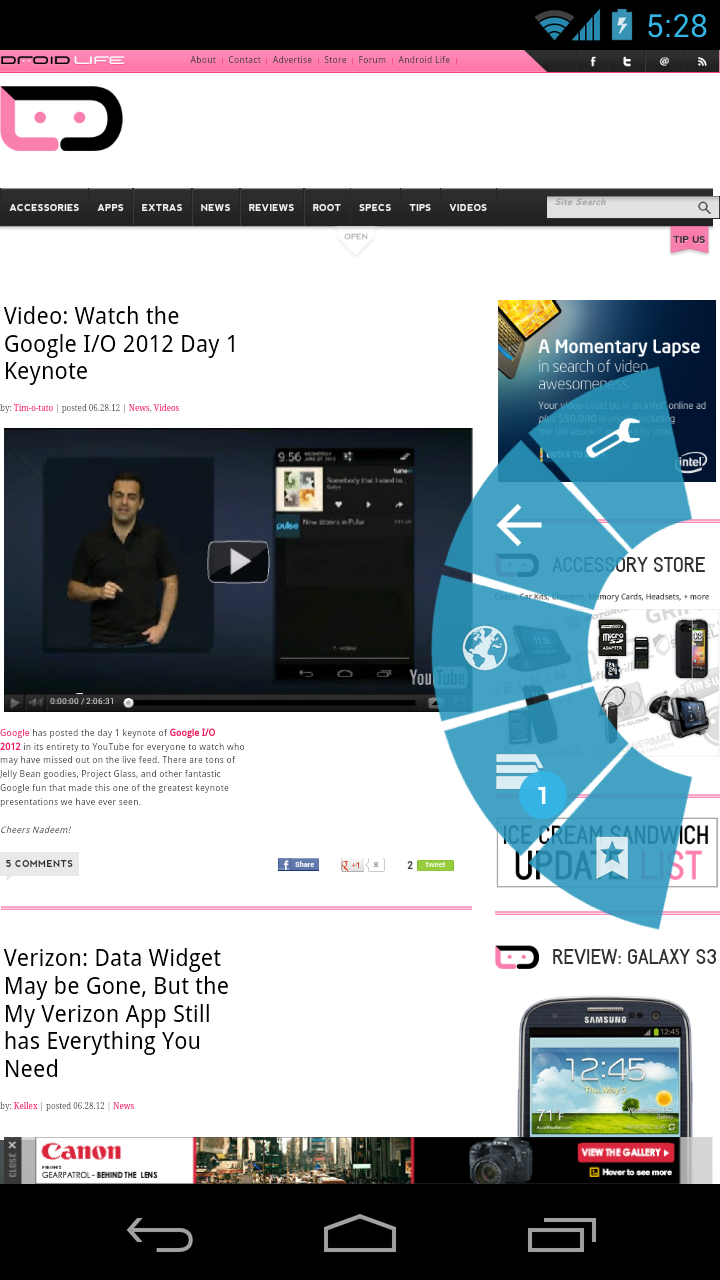
	<title>Comments on: Video:  Browser Quick Controls Get a Makeover in Jelly Bean</title>
	<atom:link href="http://www.droid-life.com/2012/06/28/video-browser-quick-controls-get-a-makeover-in-jelly-bean/feed/" rel="self" type="application/rss+xml" />
	<link>http://www.droid-life.com/2012/06/28/video-browser-quick-controls-get-a-makeover-in-jelly-bean/</link>
	<description>An intense Android news community bringing you the latest in phones, rooting, apps, and reviews.</description>
	<lastBuildDate>Sun, 19 May 2013 00:10:00 +0000</lastBuildDate>
	<sy:updatePeriod>hourly</sy:updatePeriod>
	<sy:updateFrequency>1</sy:updateFrequency>
	<generator>http://wordpress.org/?v=3.5.1</generator>
	<item>
		<title>By: Fahad Ayaz</title>
		<link>http://www.droid-life.com/2012/06/28/video-browser-quick-controls-get-a-makeover-in-jelly-bean/comment-page-1/#comment-1895557</link>
		<dc:creator>Fahad Ayaz</dc:creator>
		<pubDate>Sat, 30 Jun 2012 05:11:00 +0000</pubDate>
		<guid isPermaLink="false">http://www.droid-life.com/?p=74418#comment-1895557</guid>
		<description><![CDATA[I believe it&#039;s the stock browser for the Nexus 7, not for JB. There&#039;s still a separate browser there. Plus, Android&#039;s browser is open source. Chrome, though based on open source, is not.]]></description>
		<content:encoded><![CDATA[<p>I believe it&#8217;s the stock browser for the Nexus 7, not for JB. There&#8217;s still a separate browser there. Plus, Android&#8217;s browser is open source. Chrome, though based on open source, is not.</p>
]]></content:encoded>
	</item>
	<item>
		<title>By: Rippy</title>
		<link>http://www.droid-life.com/2012/06/28/video-browser-quick-controls-get-a-makeover-in-jelly-bean/comment-page-1/#comment-1895539</link>
		<dc:creator>Rippy</dc:creator>
		<pubDate>Sat, 30 Jun 2012 05:08:00 +0000</pubDate>
		<guid isPermaLink="false">http://www.droid-life.com/?p=74418#comment-1895539</guid>
		<description><![CDATA[Downloading now. Norwalk, CT]]></description>
		<content:encoded><![CDATA[<p>Downloading now. Norwalk, CT</p>
]]></content:encoded>
	</item>
	<item>
		<title>By: feztheforeigner</title>
		<link>http://www.droid-life.com/2012/06/28/video-browser-quick-controls-get-a-makeover-in-jelly-bean/comment-page-1/#comment-1894434</link>
		<dc:creator>feztheforeigner</dc:creator>
		<pubDate>Fri, 29 Jun 2012 17:18:00 +0000</pubDate>
		<guid isPermaLink="false">http://www.droid-life.com/?p=74418#comment-1894434</guid>
		<description><![CDATA[So there will no longer be flash support in Android? (Without downloading another browser ala dolphin or similar) ]]></description>
		<content:encoded><![CDATA[<p>So there will no longer be flash support in Android? (Without downloading another browser ala dolphin or similar) </p>
]]></content:encoded>
	</item>
	<item>
		<title>By: Bunklung</title>
		<link>http://www.droid-life.com/2012/06/28/video-browser-quick-controls-get-a-makeover-in-jelly-bean/comment-page-1/#comment-1894236</link>
		<dc:creator>Bunklung</dc:creator>
		<pubDate>Fri, 29 Jun 2012 15:27:00 +0000</pubDate>
		<guid isPermaLink="false">http://www.droid-life.com/?p=74418#comment-1894236</guid>
		<description><![CDATA[Does 4.1 stock browser also offer full screen in the labs sections of the settings menu? I dig full screen and Chrome browser for Android does not offer this, but a least the stock browser does.]]></description>
		<content:encoded><![CDATA[<p>Does 4.1 stock browser also offer full screen in the labs sections of the settings menu? I dig full screen and Chrome browser for Android does not offer this, but a least the stock browser does.</p>
]]></content:encoded>
	</item>
	<item>
		<title>By: r0lct</title>
		<link>http://www.droid-life.com/2012/06/28/video-browser-quick-controls-get-a-makeover-in-jelly-bean/comment-page-1/#comment-1894227</link>
		<dc:creator>r0lct</dc:creator>
		<pubDate>Fri, 29 Jun 2012 15:22:00 +0000</pubDate>
		<guid isPermaLink="false">http://www.droid-life.com/?p=74418#comment-1894227</guid>
		<description><![CDATA[Yeah,
I don&#039;t get the inconsistency either.


However with them pitching unified experience across platforms with this specific device that&#039;s only achievable with Chrome.  So they probably don&#039;t want regular users getting confused and using Browser then wondering why they can&#039;t do any of the stuff from the commercials.]]></description>
		<content:encoded><![CDATA[<p>Yeah,<br />
I don&#8217;t get the inconsistency either.</p>
<p>However with them pitching unified experience across platforms with this specific device that&#8217;s only achievable with Chrome.  So they probably don&#8217;t want regular users getting confused and using Browser then wondering why they can&#8217;t do any of the stuff from the commercials.</p>
]]></content:encoded>
	</item>
	<item>
		<title>By: Droid4LifeDawg</title>
		<link>http://www.droid-life.com/2012/06/28/video-browser-quick-controls-get-a-makeover-in-jelly-bean/comment-page-1/#comment-1894176</link>
		<dc:creator>Droid4LifeDawg</dc:creator>
		<pubDate>Fri, 29 Jun 2012 15:00:00 +0000</pubDate>
		<guid isPermaLink="false">http://www.droid-life.com/?p=74418#comment-1894176</guid>
		<description><![CDATA[Tap 4.1 four times fast, A Jelly Bean comes up, Tap that and He Smiles, Long Press the Smiling Jelly Bean and he multiplies...]]></description>
		<content:encoded><![CDATA[<p>Tap 4.1 four times fast, A Jelly Bean comes up, Tap that and He Smiles, Long Press the Smiling Jelly Bean and he multiplies&#8230;</p>
]]></content:encoded>
	</item>
	<item>
		<title>By: Greyhame</title>
		<link>http://www.droid-life.com/2012/06/28/video-browser-quick-controls-get-a-makeover-in-jelly-bean/comment-page-1/#comment-1894127</link>
		<dc:creator>Greyhame</dc:creator>
		<pubDate>Fri, 29 Jun 2012 13:30:00 +0000</pubDate>
		<guid isPermaLink="false">http://www.droid-life.com/?p=74418#comment-1894127</guid>
		<description><![CDATA[Now please implement these features into Chrome, make it the stock browser, and let the awesomeness ensue.]]></description>
		<content:encoded><![CDATA[<p>Now please implement these features into Chrome, make it the stock browser, and let the awesomeness ensue.</p>
]]></content:encoded>
	</item>
	<item>
		<title>By: Ryan Powell</title>
		<link>http://www.droid-life.com/2012/06/28/video-browser-quick-controls-get-a-makeover-in-jelly-bean/comment-page-1/#comment-1894123</link>
		<dc:creator>Ryan Powell</dc:creator>
		<pubDate>Fri, 29 Jun 2012 13:27:00 +0000</pubDate>
		<guid isPermaLink="false">http://www.droid-life.com/?p=74418#comment-1894123</guid>
		<description><![CDATA[Good point. I love Chrome and wouldn&#039;t switch back to the stock browser just for quick controls so I guess I&#039;ll never know if it&#039;s something I&#039;m missing out on.  All of this business with the Nexus 7 using Chrome as the stock browser but not for Jelly Bean on the Gnex is a real head scratcher to me.]]></description>
		<content:encoded><![CDATA[<p>Good point. I love Chrome and wouldn&#8217;t switch back to the stock browser just for quick controls so I guess I&#8217;ll never know if it&#8217;s something I&#8217;m missing out on.  All of this business with the Nexus 7 using Chrome as the stock browser but not for Jelly Bean on the Gnex is a real head scratcher to me.</p>
]]></content:encoded>
	</item>
	<item>
		<title>By: r0lct</title>
		<link>http://www.droid-life.com/2012/06/28/video-browser-quick-controls-get-a-makeover-in-jelly-bean/comment-page-1/#comment-1894120</link>
		<dc:creator>r0lct</dc:creator>
		<pubDate>Fri, 29 Jun 2012 13:22:00 +0000</pubDate>
		<guid isPermaLink="false">http://www.droid-life.com/?p=74418#comment-1894120</guid>
		<description><![CDATA[Because they want you in the omni box, that&#039;s where the Chrome experience begins and ends across all the platforms Chrome runs on.  They want the user experince to be consistent.

If you get comfortable with Chrome and the omni box you can get to your history/favs just as fast as quick controls. For tabs you have two options that are fast.  Menu button is also easily accessible.  My phone already had a back button, no need to hit an extra gesture to go back.


Would I want them on Chrome?  I guess, but I know I don&#039;t miss them much either.]]></description>
		<content:encoded><![CDATA[<p>Because they want you in the omni box, that&#8217;s where the Chrome experience begins and ends across all the platforms Chrome runs on.  They want the user experince to be consistent.</p>
<p>If you get comfortable with Chrome and the omni box you can get to your history/favs just as fast as quick controls. For tabs you have two options that are fast.  Menu button is also easily accessible.  My phone already had a back button, no need to hit an extra gesture to go back.</p>
<p>Would I want them on Chrome?  I guess, but I know I don&#8217;t miss them much either.</p>
]]></content:encoded>
	</item>
	<item>
		<title>By: r0lct</title>
		<link>http://www.droid-life.com/2012/06/28/video-browser-quick-controls-get-a-makeover-in-jelly-bean/comment-page-1/#comment-1894117</link>
		<dc:creator>r0lct</dc:creator>
		<pubDate>Fri, 29 Jun 2012 13:16:00 +0000</pubDate>
		<guid isPermaLink="false">http://www.droid-life.com/?p=74418#comment-1894117</guid>
		<description><![CDATA[But they do...]]></description>
		<content:encoded><![CDATA[<p>But they do&#8230;</p>
]]></content:encoded>
	</item>
	<item>
		<title>By: r0lct</title>
		<link>http://www.droid-life.com/2012/06/28/video-browser-quick-controls-get-a-makeover-in-jelly-bean/comment-page-1/#comment-1894116</link>
		<dc:creator>r0lct</dc:creator>
		<pubDate>Fri, 29 Jun 2012 13:14:00 +0000</pubDate>
		<guid isPermaLink="false">http://www.droid-life.com/?p=74418#comment-1894116</guid>
		<description><![CDATA[With there being no Flash support in 4.1/JB there&#039;s not going to be much reason to stick with it over Chrome.]]></description>
		<content:encoded><![CDATA[<p>With there being no Flash support in 4.1/JB there&#8217;s not going to be much reason to stick with it over Chrome.</p>
]]></content:encoded>
	</item>
	<item>
		<title>By: michael arazan</title>
		<link>http://www.droid-life.com/2012/06/28/video-browser-quick-controls-get-a-makeover-in-jelly-bean/comment-page-1/#comment-1894015</link>
		<dc:creator>michael arazan</dc:creator>
		<pubDate>Fri, 29 Jun 2012 07:08:00 +0000</pubDate>
		<guid isPermaLink="false">http://www.droid-life.com/?p=74418#comment-1894015</guid>
		<description><![CDATA[TY ZEP, I didn&#039;t know this.]]></description>
		<content:encoded><![CDATA[<p>TY ZEP, I didn&#8217;t know this.</p>
]]></content:encoded>
	</item>
	<item>
		<title>By: Greig Fields</title>
		<link>http://www.droid-life.com/2012/06/28/video-browser-quick-controls-get-a-makeover-in-jelly-bean/comment-page-1/#comment-1893989</link>
		<dc:creator>Greig Fields</dc:creator>
		<pubDate>Fri, 29 Jun 2012 06:14:00 +0000</pubDate>
		<guid isPermaLink="false">http://www.droid-life.com/?p=74418#comment-1893989</guid>
		<description><![CDATA[See, the one thing that you all are forgetting about putting quick controls in chrome is the tab switching. The gesture that is currently used for tab switching and the gesture used for quick controls (swiping in from the edge of the screen) are the same, so for google to put one in, they have to get rid of the other (unless they think of another gesture for quick controls)]]></description>
		<content:encoded><![CDATA[<p>See, the one thing that you all are forgetting about putting quick controls in chrome is the tab switching. The gesture that is currently used for tab switching and the gesture used for quick controls (swiping in from the edge of the screen) are the same, so for google to put one in, they have to get rid of the other (unless they think of another gesture for quick controls)</p>
]]></content:encoded>
	</item>
	<item>
		<title>By: MrSteve920</title>
		<link>http://www.droid-life.com/2012/06/28/video-browser-quick-controls-get-a-makeover-in-jelly-bean/comment-page-1/#comment-1893987</link>
		<dc:creator>MrSteve920</dc:creator>
		<pubDate>Fri, 29 Jun 2012 06:09:00 +0000</pubDate>
		<guid isPermaLink="false">http://www.droid-life.com/?p=74418#comment-1893987</guid>
		<description><![CDATA[I wrote a really nasty response to you, but it probably won&#039;t make it through the moderators. :D    If it does, well, you&#039;ll see it.]]></description>
		<content:encoded><![CDATA[<p>I wrote a really nasty response to you, but it probably won&#8217;t make it through the moderators. <img src='http://www.droid-life.com/wp-includes/images/smilies/icon_biggrin.gif' alt=':D' class='wp-smiley' />     If it does, well, you&#8217;ll see it.</p>
]]></content:encoded>
	</item>
	<item>
		<title>By: Motorola Zine</title>
		<link>http://www.droid-life.com/2012/06/28/video-browser-quick-controls-get-a-makeover-in-jelly-bean/comment-page-1/#comment-1893962</link>
		<dc:creator>Motorola Zine</dc:creator>
		<pubDate>Fri, 29 Jun 2012 05:36:00 +0000</pubDate>
		<guid isPermaLink="false">http://www.droid-life.com/?p=74418#comment-1893962</guid>
		<description><![CDATA[That same like my Motorola Xoom Verizon Wireless stock browser when fist time release.]]></description>
		<content:encoded><![CDATA[<p>That same like my Motorola Xoom Verizon Wireless stock browser when fist time release.</p>
]]></content:encoded>
	</item>
</channel>
</rss>

<!-- Performance optimized by W3 Total Cache. Learn more: http://www.w3-edge.com/wordpress-plugins/

Page Caching using apc
Database Caching 10/36 queries in 0.054 seconds using apc
Object Caching 669/701 objects using apc

 Served from: www.droid-life.com @ 2013-05-18 17:16:14 by W3 Total Cache -->