

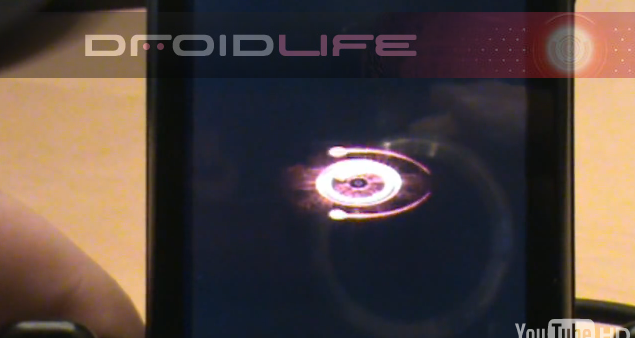
The Droid Incredible made its big screen debut last night in Verizon’s latest Droid campaign commercial series. In this new spot, we also saw for the second time, the new Droid Eye boot animation which for whatever reason, failed to actually make it onto the device. It’s definitely an upgrade from the original version we’ve seen on our Motorola Droid and we needed to get our hands on it.
So yesterday, we challenged readers to snag video of the new Droid Eye and turn it into a new boot animation for the Motorola Droid. And sure enough, one of them did it.
Update: Just realized after glancing back to the commercial post, that the real boot animation from the Incredible was posted if you own an Incredible. I’ll try to get instructions up on how to install that later.
Check it…
Installation instructions…
1. You have to be rooted in order to do this. (Rooting info here.)
2. Download Root Explorer from the market. (It’s a paid app.)
3. Download the Droid Incredible boot anim: bootanimation.zip
4. If you downloaded via PC, mount your Droid and drop the .zip file onto your SD card.
*DO NOT UNZIP OR RENAME*
5. Unmount your Droid.
6. Open Root Explorer, tap on “sdcard” and locate bootanimation.zip.
7. Long press on bootanimation.zip and choose “Move”.
8. Hit the back button once and locate the “data” folder.
9. Tap and open “data” and then “local”.
*If your /data/local/ folder already has a bootanimation.zip then you can skip to step 11. If it is missing, proceed to step 10. We need to find it!
10. Since you did not have a bootanimation.zip in your /data/local/ folder we need to find it. There is a search function in Root Explorer which can find it. Or, you can navigate straight to /system/media/ which is where I found mine. Once you find it, return to your to your SD card, long press on the bootanimation.zip that you downloaded and select “move” one more time. Now navigate to the folder which is holding your current bootanimation.zip and proceed to step 11.
11. Hit “Paste” which should be an option at the bottom of your screen.
11. If there is already a bootanimation.zip file, let Root Explorer overwrite it.
12. Back out of Root Explorer, reboot your phone, and BAM!
13. Enjoy your the first ever Droid Incredible boot animation.
Comments or questions? Pretty slick right?
Huge cheers to Greg for sending this over!


Pingback: Accounting Basics
Pingback: Blackheads
Pingback: Watch The Rum Diary Online
Pingback: A Very Harold and Kumar Christmas Full Movie
Pingback: Watch The Rum Diary Full Movie
Pingback: Watch 11-11-11 Online
Pingback: Watch The Rum Diary Full Movie
Pingback: Watch Puss In Boots Online
Pingback: Final Countdown
Pingback: dYcxcgcvfgg
Pingback: buy proxies
Pingback: Ycxcgdf
Pingback: Google
Pingback: property casualty insurance
Pingback: Flash Animation Video by pixelgenio.com « Nasty Habits
Pingback: Events Multimedia Presents 3d Walkthrough Animation « Nasty Habits
Pingback: webdesign company of sriyaditha.flv « Nasty Habits
Pingback: animation movie « Nasty Habits
Pingback: 3d animation « Nasty Habits
Pingback: Adobe Photoshop CS3 – Timeline Animation « Nasty Habits
Pingback: u2 stand up comedy type animation afx « Nasty Habits
Pingback: Best graphic animation company in sriyaditha.flv « Nasty Habits
Pingback: Portfolio of Mahesh Birhade – Multimedia & Animation Professional « Nasty Habits
Pingback: Adobe Flash Animation Tutorial : Flash Animation Tutorial: Creating Tweening « Nasty Habits
Pingback: ActionScript 3.0 Intro 32: Interactive Animation « Nasty Habits
Pingback: Adobe Flash Animation Tutorial : Flash Animation Tutorial: Creating Key Frames « Nasty Habits
Pingback: ActionScript 3 Animation 10: Slideshow: Size « Nasty Habits
Pingback: ADB Push not working - Android Forums
Pingback: ActionScript 3 Animation 19: Animate in a Circle « Nasty Habits
Pingback: Droid 2 Star Wars R2D2 Boot Animation - Droid Forum - Verizon Droid & the Motorola Droid Forum
Pingback: ActionScript 3 Animation 5: Animating Diagonally « Nasty Habits
Pingback: ActionScript 3 Animation 23: Multiple Movie Clips « Nasty Habits
Pingback: Animation Sample Posted by Geminimedia « Nasty Habits
Pingback: ActionScript 3 Animation 8: Slideshow: Set Stage « Nasty Habits
Pingback: Animation in Chandigarh- http://www.morphacademy.com/ « Nasty Habits
Pingback: ActionScript 3 Animation 21: Adjusting Depths « Nasty Habits
Pingback: Where can I get Hudson boot cut jeans in a light wash? | Best Home Improvement cost
Pingback: Art Gallery Intro Animation (3D & Flash) by Serenity Media Studios « Nasty Habits
Pingback: Oxygen Animation Studio 2010.wmv « Nasty Habits
Pingback: DROID Incredible OTA Update Coming Tomorrow? - Droid Life: A Droid Community Blog
Pingback: Aryans: Logo Animation « Nasty Habits
Pingback: Deku Design Motion Graphic Animation – Web Design Surrey « Nasty Habits
Pingback: Typography animation « Nasty Habits