

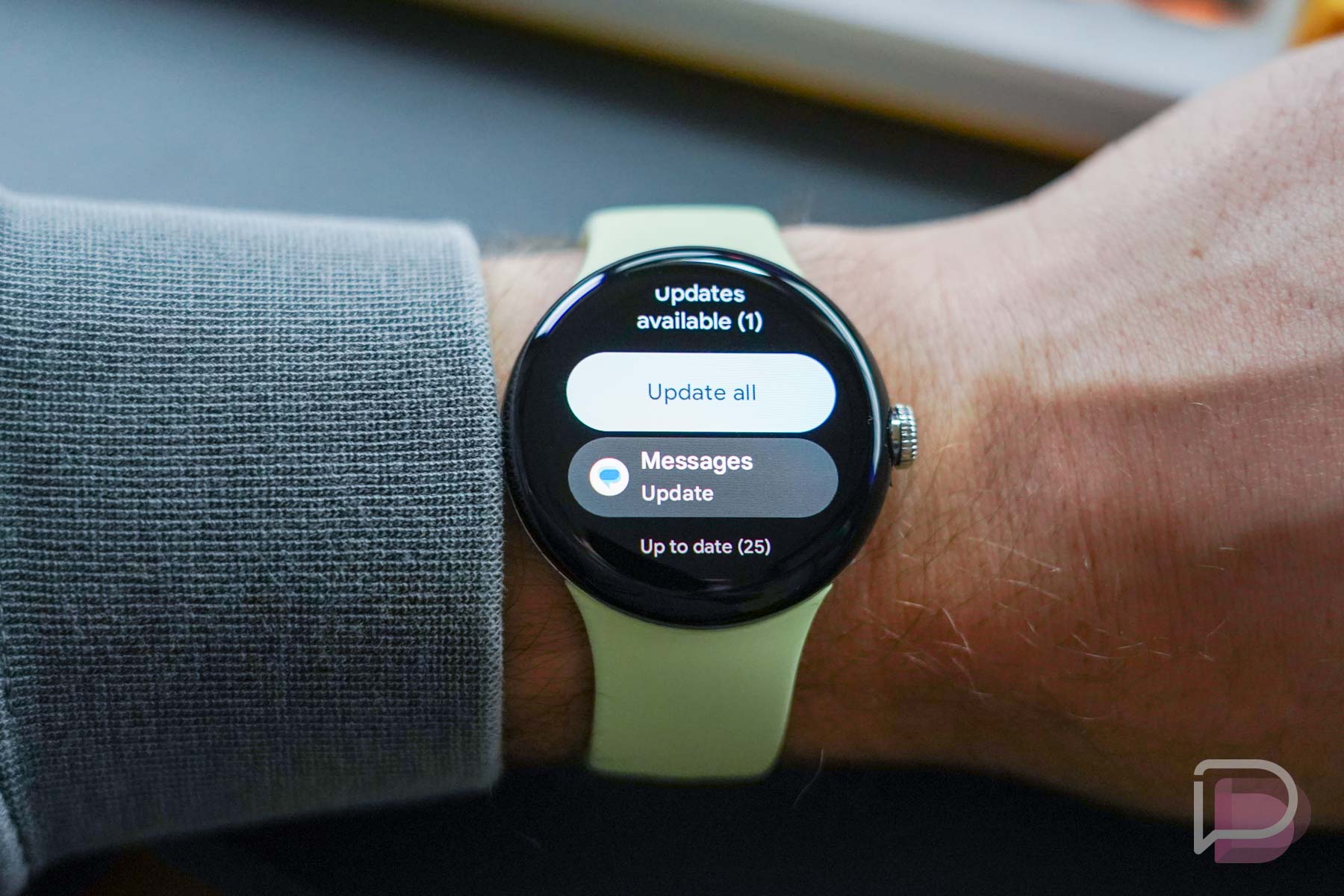

Owning a Google Pixel Watch means another device that has updates to be on the lookout for. And not just system updates with new versions of Wear OS, I’m talking about app updates for all of the applications your watch has installed. Take this as a reminder to update those regularly, just like you do on your phone.
I bring this up because out of the box, the Pixel Watch has a whole bunch of app updates in addition to a day-1 system update. If you don’t realize that on your own, I can tell you right now that your Pixel Watch may not have all of the features it should or there may be unnecessary bugs you could squash.
As an example, after testing a review unit Pixel Watch for several days before switching to one I had purchased for daily use, I ran into missing items on the new watch, like certain complications in watch faces that I couldn’t set. It took me the longest time to figure out what was wrong. I had already installed the first system update, but then casually ventured into the Play Store on the watch only to find 21 apps needing updates. I updated those and all was good again in Pixel Watch world.
Should there be issues on your Pixel Watch or maybe you simply haven’t checked for updates in a while, please do – right now.
To check for app updates on a Pixel Watch, do the following:
- Click the side button to open the app drawer
- Scroll down to “Play Store” and tap it
- Scroll to the bottom and tap “Manage apps”
- If you have app updates, you’ll see them here
- You can tap “Update all” or tap each individually to update them
And since we brought it up, here’s how to check for system updates on a Pixel Watch:
- Swipe down the quick tiles menu from the top
- Tap the Settings button
- Scroll to the bottom and tap “System”
- Tap “System updates” to see if there is new software available
OK, enjoy your updated Pixel Watch.


8 year ago my LG Android watch had 1 day battery life.
2022 Pixel watch still has 1 day battery life. Even with most things disabled
Sure the Pixel has better sensors now, but why have we grown to just accept 1 day as the standard for a Smart watch when Health watches with almost 80-90% of the features will get 6-14 days depending on what one you get and will be anyplace from $100 less to $300 less to purchase? Even vs FitBits other offerings, the Versa is cheaper and seems to really only be missing Google Home vs the Pixel, but lasts 600% longer. I cant wrap my head round this.
Health watches cant do many things smart watches do. Guess what? Mechanical watches get battery life for years. They are different products for different customers. If you want a health watch…get one. Your LG Android watch from 8 years ago was also much bigger and clunkier, so seems like there has been improvement.
all 5 of the people who bought one
It’s actually been backordered through all major retailers and theres a vibrant community of owners on Reddit. Sorry, you’re unaware in your bubble.
Side Note: My Pix7Pro just had two updates available and now shows Google Play System Update of Oct 2022 instead of July 2022 now ????
The ‘update all’ function is very unreliable on my pixel watch. Often it will update only one or two and then give up and stop. Other times it won’t update Google apps but only 3rd party apps. On all occasions I have had to tap directly into the app page and update individually. It is very cumbersome. I wish there was a better progress indication on the update list page It just says pending, installing. If you tap into the app page you can see the progress but there needs to be a better overview.
Also while we’re here….
Sometimes if I’m browsing an app page on the play store, I get stuck. Find that I can’t back out of said app page. If I try to go back the play store closes. I want to go from app page to main play store page but I can’t navigate back to the main play store page. When I open the play store again it will go directly back to the app page and not open to the main page of the play store. It is incredibly frustrating.
Don’t forget to check for updates…
WHY!? These shits should update theirselves, automatically. E.v.e.r.y.t.i.m.e
Then people would complain that they want to manually update things when they want to.
Oh yea, because bad updates never happen. smh
I heard some other users having problems with Burn-in. Have you experienced this?
screen burn already? That’s gotta be one poor oled!
Google mentioned that it was image retention, not screen burn in.
Still, that’s really really bad on a brand new product.
If you owned it, you would know that it’s not.
Ok Google shill…
https://9to5google.com/2022/10/20/pixel-watch-screen-burn-in/
I have not heard many good things about this watch. Sad really, they took a long time preparing it for market.
Yeah, I was hoping to get one over the holidays, but with all these issues, I may just wait for a Gen 2. Hopefully that comes sooner rather than later.
Check out Reddit. Many people are enjoying it.
Just turned on the flashlight app on mine. No burn-in yet.
Doesnt have burn in. It has image retention. If it happens, it goes away in a minute or two.