<?xml version="1.0" encoding="UTF-8"?><rss version="2.0"
	xmlns:content="http://purl.org/rss/1.0/modules/content/"
	xmlns:dc="http://purl.org/dc/elements/1.1/"
	xmlns:atom="http://www.w3.org/2005/Atom"
	xmlns:sy="http://purl.org/rss/1.0/modules/syndication/"
		>
<channel>
	<title>Comments on: Quick Tip:  Accessing Google Now on the HTC DROID DNA</title>
	<atom:link href="http://www.droid-life.com/2012/11/29/quick-tip-accessing-google-now-on-the-htc-droid-dna/feed/" rel="self" type="application/rss+xml" />
	<link>http://www.droid-life.com/2012/11/29/quick-tip-accessing-google-now-on-the-htc-droid-dna/</link>
	<description>An intense Android news community bringing you the latest in phones, rooting, apps, and reviews.</description>
	<lastBuildDate>Wed, 22 May 2013 02:13:00 +0000</lastBuildDate>
	<sy:updatePeriod>hourly</sy:updatePeriod>
	<sy:updateFrequency>1</sy:updateFrequency>
	<generator>http://wordpress.org/?v=3.5.1</generator>
	<item>
		<title>By: zurginator</title>
		<link>http://www.droid-life.com/2012/11/29/quick-tip-accessing-google-now-on-the-htc-droid-dna/comment-page-1/#comment-2667449</link>
		<dc:creator>zurginator</dc:creator>
		<pubDate>Sat, 08 Dec 2012 14:24:00 +0000</pubDate>
		<guid isPermaLink="false">http://www.droid-life.com/?p=90624#comment-2667449</guid>
		<description><![CDATA[It&#039;s just as easy with on-screen though. Contrary to popular belief, you don&#039;t need to click the home button and wait, you just swipe up from the bottom of the device.]]></description>
		<content:encoded><![CDATA[<p>It&#8217;s just as easy with on-screen though. Contrary to popular belief, you don&#8217;t need to click the home button and wait, you just swipe up from the bottom of the device.</p>
]]></content:encoded>
	</item>
	<item>
		<title>By: Chris Gustafson</title>
		<link>http://www.droid-life.com/2012/11/29/quick-tip-accessing-google-now-on-the-htc-droid-dna/comment-page-1/#comment-2623767</link>
		<dc:creator>Chris Gustafson</dc:creator>
		<pubDate>Fri, 30 Nov 2012 18:10:00 +0000</pubDate>
		<guid isPermaLink="false">http://www.droid-life.com/?p=90624#comment-2623767</guid>
		<description><![CDATA[No, add the Google icon, not the voice search icon.]]></description>
		<content:encoded><![CDATA[<p>No, add the Google icon, not the voice search icon.</p>
]]></content:encoded>
	</item>
	<item>
		<title>By: normmcgarry</title>
		<link>http://www.droid-life.com/2012/11/29/quick-tip-accessing-google-now-on-the-htc-droid-dna/comment-page-1/#comment-2623256</link>
		<dc:creator>normmcgarry</dc:creator>
		<pubDate>Fri, 30 Nov 2012 16:39:00 +0000</pubDate>
		<guid isPermaLink="false">http://www.droid-life.com/?p=90624#comment-2623256</guid>
		<description><![CDATA[If you long-press the menu button, it opens Google Now.]]></description>
		<content:encoded><![CDATA[<p>If you long-press the menu button, it opens Google Now.</p>
]]></content:encoded>
	</item>
	<item>
		<title>By: Immolate</title>
		<link>http://www.droid-life.com/2012/11/29/quick-tip-accessing-google-now-on-the-htc-droid-dna/comment-page-1/#comment-2622944</link>
		<dc:creator>Immolate</dc:creator>
		<pubDate>Fri, 30 Nov 2012 15:36:00 +0000</pubDate>
		<guid isPermaLink="false">http://www.droid-life.com/?p=90624#comment-2622944</guid>
		<description><![CDATA[Verizon Note 2 uses a long press on the menu button. Long press home brings up your running applications. Long press on the back-up button brings up the multi-view side bar. But if you want Google Now on a Note  2 from a device that&#039;s off, you just hit you power button or home button to turn on the lock screen, then swipe up the Google Now icon. 


Short of a dedicated hardware key (rather have one for the camera if we had one), an icon on the lock screen is the quickest way to get to Google Now. I think anyone can do that in Jellybean, right?]]></description>
		<content:encoded><![CDATA[<p>Verizon Note 2 uses a long press on the menu button. Long press home brings up your running applications. Long press on the back-up button brings up the multi-view side bar. But if you want Google Now on a Note  2 from a device that&#8217;s off, you just hit you power button or home button to turn on the lock screen, then swipe up the Google Now icon. </p>
<p>Short of a dedicated hardware key (rather have one for the camera if we had one), an icon on the lock screen is the quickest way to get to Google Now. I think anyone can do that in Jellybean, right?</p>
]]></content:encoded>
	</item>
	<item>
		<title>By: Symbiotx</title>
		<link>http://www.droid-life.com/2012/11/29/quick-tip-accessing-google-now-on-the-htc-droid-dna/comment-page-1/#comment-2622925</link>
		<dc:creator>Symbiotx</dc:creator>
		<pubDate>Fri, 30 Nov 2012 15:31:00 +0000</pubDate>
		<guid isPermaLink="false">http://www.droid-life.com/?p=90624#comment-2622925</guid>
		<description><![CDATA[I think it&#039;s important to get your hands on them.  I love my DNA.  Everyone knows the drawbacks, but I absolutely love this phone.  I haven&#039;t been this excited about a phone since the original Droid.  Feels great, looks amazing, good call quality, loud sound, and I personally like Sense, great lockscreen.  It&#039;s really up to you and what you&#039;re looking for.]]></description>
		<content:encoded><![CDATA[<p>I think it&#8217;s important to get your hands on them.  I love my DNA.  Everyone knows the drawbacks, but I absolutely love this phone.  I haven&#8217;t been this excited about a phone since the original Droid.  Feels great, looks amazing, good call quality, loud sound, and I personally like Sense, great lockscreen.  It&#8217;s really up to you and what you&#8217;re looking for.</p>
]]></content:encoded>
	</item>
	<item>
		<title>By: William_Morris</title>
		<link>http://www.droid-life.com/2012/11/29/quick-tip-accessing-google-now-on-the-htc-droid-dna/comment-page-1/#comment-2622737</link>
		<dc:creator>William_Morris</dc:creator>
		<pubDate>Fri, 30 Nov 2012 14:37:00 +0000</pubDate>
		<guid isPermaLink="false">http://www.droid-life.com/?p=90624#comment-2622737</guid>
		<description><![CDATA[Kellen will never be able to live this down, will he?]]></description>
		<content:encoded><![CDATA[<p>Kellen will never be able to live this down, will he?</p>
]]></content:encoded>
	</item>
	<item>
		<title>By: EC8CH</title>
		<link>http://www.droid-life.com/2012/11/29/quick-tip-accessing-google-now-on-the-htc-droid-dna/comment-page-1/#comment-2622600</link>
		<dc:creator>EC8CH</dc:creator>
		<pubDate>Fri, 30 Nov 2012 14:01:00 +0000</pubDate>
		<guid isPermaLink="false">http://www.droid-life.com/?p=90624#comment-2622600</guid>
		<description><![CDATA[Here&#039;s my fav:


http://www.droid-life.com/wp-content/uploads/2012/05/headphone-good.gif]]></description>
		<content:encoded><![CDATA[<p>Here&#8217;s my fav:</p>
<p><a href="http://www.droid-life.com/wp-content/uploads/2012/05/headphone-good.gif" rel="nofollow">http://www.droid-life.com/wp-content/uploads/2012/05/headphone-good.gif</a></p>
]]></content:encoded>
	</item>
	<item>
		<title>By: michael arazan</title>
		<link>http://www.droid-life.com/2012/11/29/quick-tip-accessing-google-now-on-the-htc-droid-dna/comment-page-1/#comment-2622438</link>
		<dc:creator>michael arazan</dc:creator>
		<pubDate>Fri, 30 Nov 2012 13:22:00 +0000</pubDate>
		<guid isPermaLink="false">http://www.droid-life.com/?p=90624#comment-2622438</guid>
		<description><![CDATA[2 words, Note 2, it has more functionality and a better screen and processor than the GS3, and bigger battery than the gs3 and dna. I would trade the bigger screen, more functions, better software, and bigger battery to the DNA screen and same old crappy sense]]></description>
		<content:encoded><![CDATA[<p>2 words, Note 2, it has more functionality and a better screen and processor than the GS3, and bigger battery than the gs3 and dna. I would trade the bigger screen, more functions, better software, and bigger battery to the DNA screen and same old crappy sense</p>
]]></content:encoded>
	</item>
	<item>
		<title>By: BrianPowell12</title>
		<link>http://www.droid-life.com/2012/11/29/quick-tip-accessing-google-now-on-the-htc-droid-dna/comment-page-1/#comment-2622436</link>
		<dc:creator>BrianPowell12</dc:creator>
		<pubDate>Fri, 30 Nov 2012 13:21:00 +0000</pubDate>
		<guid isPermaLink="false">http://www.droid-life.com/?p=90624#comment-2622436</guid>
		<description><![CDATA[That brings up Search rather than Now.  I still do that more often than not because I use voice search all the time. But I do with there was an easier way to get to now.]]></description>
		<content:encoded><![CDATA[<p>That brings up Search rather than Now.  I still do that more often than not because I use voice search all the time. But I do with there was an easier way to get to now.</p>
]]></content:encoded>
	</item>
	<item>
		<title>By: John</title>
		<link>http://www.droid-life.com/2012/11/29/quick-tip-accessing-google-now-on-the-htc-droid-dna/comment-page-1/#comment-2622292</link>
		<dc:creator>John</dc:creator>
		<pubDate>Fri, 30 Nov 2012 12:33:00 +0000</pubDate>
		<guid isPermaLink="false">http://www.droid-life.com/?p=90624#comment-2622292</guid>
		<description><![CDATA[ahh...thx]]></description>
		<content:encoded><![CDATA[<p>ahh&#8230;thx</p>
]]></content:encoded>
	</item>
	<item>
		<title>By: droidbeat</title>
		<link>http://www.droid-life.com/2012/11/29/quick-tip-accessing-google-now-on-the-htc-droid-dna/comment-page-1/#comment-2621884</link>
		<dc:creator>droidbeat</dc:creator>
		<pubDate>Fri, 30 Nov 2012 10:20:00 +0000</pubDate>
		<guid isPermaLink="false">http://www.droid-life.com/?p=90624#comment-2621884</guid>
		<description><![CDATA[DNA is awesome! I&#039;m loving it. Large beautiful screen in a pocketable size. And HTC has made great touches throughout that improve the experience. Great keyboard, folder icons show apps side by side, auto text reflow, etc. The radios inside seem strong, too. And volume gets nicely high.]]></description>
		<content:encoded><![CDATA[<p>DNA is awesome! I&#8217;m loving it. Large beautiful screen in a pocketable size. And HTC has made great touches throughout that improve the experience. Great keyboard, folder icons show apps side by side, auto text reflow, etc. The radios inside seem strong, too. And volume gets nicely high.</p>
]]></content:encoded>
	</item>
	<item>
		<title>By: Larizard</title>
		<link>http://www.droid-life.com/2012/11/29/quick-tip-accessing-google-now-on-the-htc-droid-dna/comment-page-1/#comment-2621882</link>
		<dc:creator>Larizard</dc:creator>
		<pubDate>Fri, 30 Nov 2012 10:17:00 +0000</pubDate>
		<guid isPermaLink="false">http://www.droid-life.com/?p=90624#comment-2621882</guid>
		<description><![CDATA[depends on which aspect of the phone you value more: battery life, screen quality, price, user interface, rooting, etc. If you can hold off til CES, I think it would be worth it seeing what stuff they got for next year. But that&#039;s the non-first adopter in me talking.]]></description>
		<content:encoded><![CDATA[<p>depends on which aspect of the phone you value more: battery life, screen quality, price, user interface, rooting, etc. If you can hold off til CES, I think it would be worth it seeing what stuff they got for next year. But that&#8217;s the non-first adopter in me talking.</p>
]]></content:encoded>
	</item>
	<item>
		<title>By: Chris Gustafson</title>
		<link>http://www.droid-life.com/2012/11/29/quick-tip-accessing-google-now-on-the-htc-droid-dna/comment-page-1/#comment-2621609</link>
		<dc:creator>Chris Gustafson</dc:creator>
		<pubDate>Fri, 30 Nov 2012 08:59:00 +0000</pubDate>
		<guid isPermaLink="false">http://www.droid-life.com/?p=90624#comment-2621609</guid>
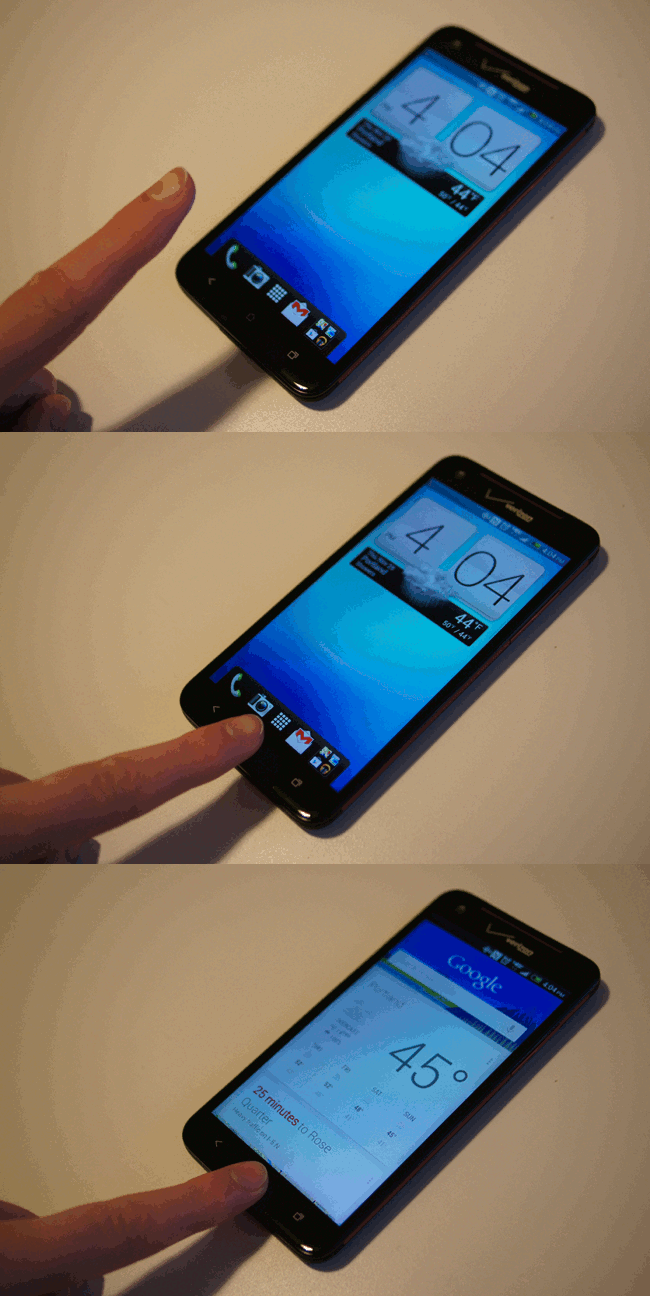
		<description><![CDATA[To access it from the lockscreen, just add the Google Search icon to your launch bar.]]></description>
		<content:encoded><![CDATA[<p>To access it from the lockscreen, just add the Google Search icon to your launch bar.</p>
]]></content:encoded>
	</item>
	<item>
		<title>By: Toys Samurai</title>
		<link>http://www.droid-life.com/2012/11/29/quick-tip-accessing-google-now-on-the-htc-droid-dna/comment-page-1/#comment-2620750</link>
		<dc:creator>Toys Samurai</dc:creator>
		<pubDate>Fri, 30 Nov 2012 04:11:00 +0000</pubDate>
		<guid isPermaLink="false">http://www.droid-life.com/?p=90624#comment-2620750</guid>
		<description><![CDATA[Frankly, this is how Google Now should be launched. With a hardware button, you can bring it up without looking at it, then say &quot;Google&quot; to do a voice search.]]></description>
		<content:encoded><![CDATA[<p>Frankly, this is how Google Now should be launched. With a hardware button, you can bring it up without looking at it, then say &#8220;Google&#8221; to do a voice search.</p>
]]></content:encoded>
	</item>
	<item>
		<title>By: Guest</title>
		<link>http://www.droid-life.com/2012/11/29/quick-tip-accessing-google-now-on-the-htc-droid-dna/comment-page-1/#comment-2620466</link>
		<dc:creator>Guest</dc:creator>
		<pubDate>Fri, 30 Nov 2012 02:58:00 +0000</pubDate>
		<guid isPermaLink="false">http://www.droid-life.com/?p=90624#comment-2620466</guid>
		<description><![CDATA[Long press the capacitive menu button on the Note 2.]]></description>
		<content:encoded><![CDATA[<p>Long press the capacitive menu button on the Note 2.</p>
]]></content:encoded>
	</item>
</channel>
</rss>

<!-- Performance optimized by W3 Total Cache. Learn more: http://www.w3-edge.com/wordpress-plugins/

Page Caching using apc
Database Caching 9/35 queries in 0.026 seconds using apc
Object Caching 661/691 objects using apc

 Served from: www.droid-life.com @ 2013-05-21 20:25:30 by W3 Total Cache -->