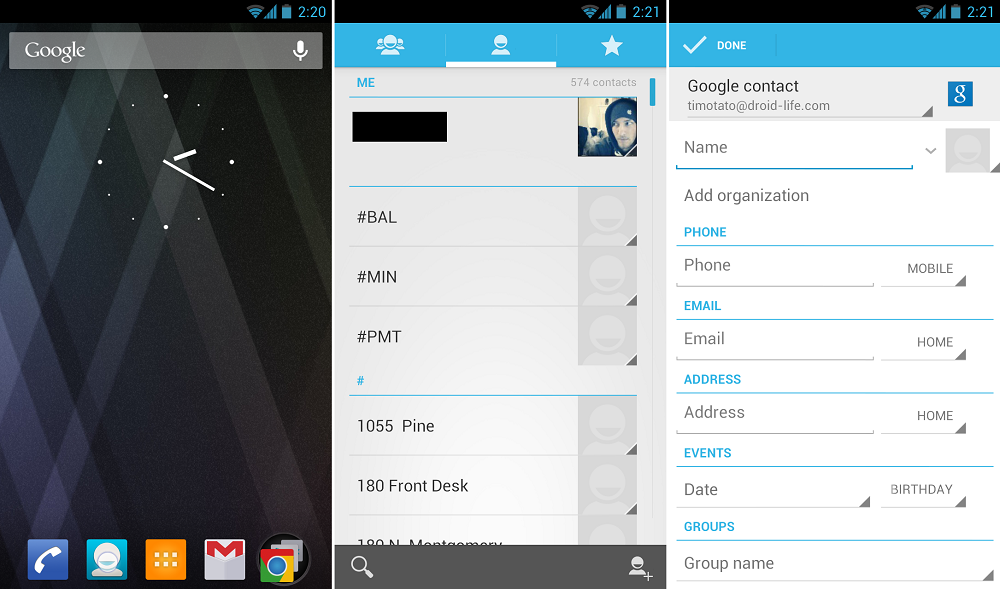
<?xml version="1.0" encoding="UTF-8"?><rss version="2.0"
	xmlns:content="http://purl.org/rss/1.0/modules/content/"
	xmlns:dc="http://purl.org/dc/elements/1.1/"
	xmlns:atom="http://www.w3.org/2005/Atom"
	xmlns:sy="http://purl.org/rss/1.0/modules/syndication/"
		>
<channel>
	<title>Comments on: How to: Add a Contact to Your Google Account on Jelly Bean [Beginners&#039; Guide]</title>
	<atom:link href="http://www.droid-life.com/2012/08/15/how-to-add-a-contact-to-your-google-account-on-jelly-bean-beginners-guide/feed/" rel="self" type="application/rss+xml" />
	<link>http://www.droid-life.com/2012/08/15/how-to-add-a-contact-to-your-google-account-on-jelly-bean-beginners-guide/</link>
	<description>An intense Android news community bringing you the latest in phones, rooting, apps, and reviews.</description>
	<lastBuildDate>Wed, 19 Jun 2013 00:02:00 +0000</lastBuildDate>
	<sy:updatePeriod>hourly</sy:updatePeriod>
	<sy:updateFrequency>1</sy:updateFrequency>
	<generator>http://wordpress.org/?v=3.5.1</generator>
	<item>
		<title>By: skltr21</title>
		<link>http://www.droid-life.com/2012/08/15/how-to-add-a-contact-to-your-google-account-on-jelly-bean-beginners-guide/comment-page-1/#comment-2325441</link>
		<dc:creator>skltr21</dc:creator>
		<pubDate>Thu, 04 Oct 2012 19:25:00 +0000</pubDate>
		<guid isPermaLink="false">http://www.droid-life.com/?p=79205#comment-2325441</guid>
		<description><![CDATA[it looks as if they removed this feature..... really annoying.]]></description>
		<content:encoded><![CDATA[<p>it looks as if they removed this feature&#8230;.. really annoying.</p>
]]></content:encoded>
	</item>
	<item>
		<title>By: carlisimo</title>
		<link>http://www.droid-life.com/2012/08/15/how-to-add-a-contact-to-your-google-account-on-jelly-bean-beginners-guide/comment-page-1/#comment-2067295</link>
		<dc:creator>carlisimo</dc:creator>
		<pubDate>Mon, 20 Aug 2012 19:02:00 +0000</pubDate>
		<guid isPermaLink="false">http://www.droid-life.com/?p=79205#comment-2067295</guid>
		<description><![CDATA[I&#039;m new to Android (on a Nexus S - I wanted JB on a smaller phone) and I&#039;m finding these quite handy.  I didn&#039;t actually need help figuring out how to add contacts, but the question about the star (in the comment above yours) was something I would&#039;ve asked.]]></description>
		<content:encoded><![CDATA[<p>I&#8217;m new to Android (on a Nexus S &#8211; I wanted JB on a smaller phone) and I&#8217;m finding these quite handy.  I didn&#8217;t actually need help figuring out how to add contacts, but the question about the star (in the comment above yours) was something I would&#8217;ve asked.</p>
]]></content:encoded>
	</item>
	<item>
		<title>By: Tristan the Marine</title>
		<link>http://www.droid-life.com/2012/08/15/how-to-add-a-contact-to-your-google-account-on-jelly-bean-beginners-guide/comment-page-1/#comment-2052364</link>
		<dc:creator>Tristan the Marine</dc:creator>
		<pubDate>Fri, 17 Aug 2012 16:48:00 +0000</pubDate>
		<guid isPermaLink="false">http://www.droid-life.com/?p=79205#comment-2052364</guid>
		<description><![CDATA[Now I&#039;m no child when it comes to Android... But is there any way to get it to display ONLY contacts with phone numbers? It was in the stock GS3 ICS software, but after flashing to the JB build I see nothing.]]></description>
		<content:encoded><![CDATA[<p>Now I&#8217;m no child when it comes to Android&#8230; But is there any way to get it to display ONLY contacts with phone numbers? It was in the stock GS3 ICS software, but after flashing to the JB build I see nothing.</p>
]]></content:encoded>
	</item>
	<item>
		<title>By: Master O'Disaster</title>
		<link>http://www.droid-life.com/2012/08/15/how-to-add-a-contact-to-your-google-account-on-jelly-bean-beginners-guide/comment-page-1/#comment-2048329</link>
		<dc:creator>Master O'Disaster</dc:creator>
		<pubDate>Thu, 16 Aug 2012 18:06:00 +0000</pubDate>
		<guid isPermaLink="false">http://www.droid-life.com/?p=79205#comment-2048329</guid>
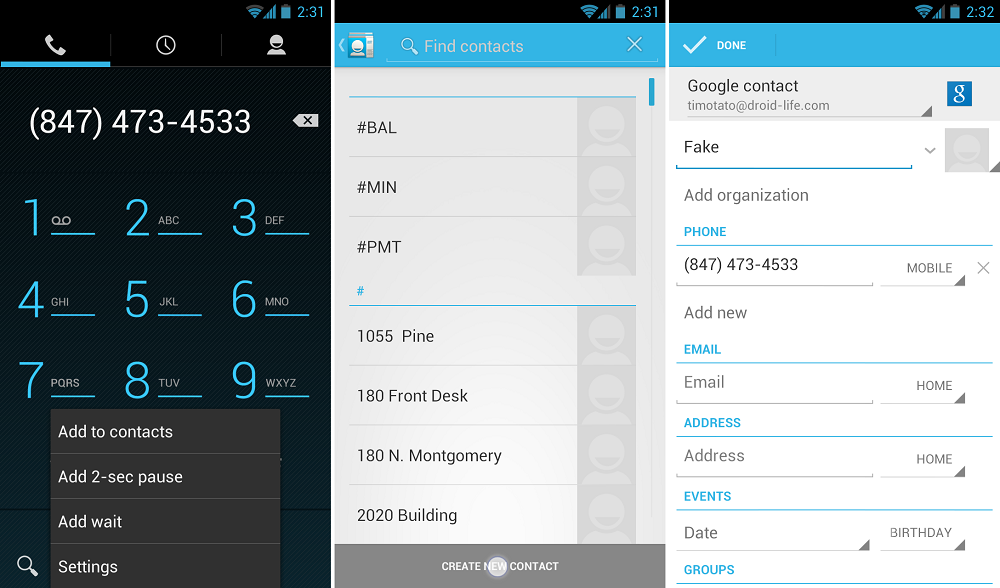
		<description><![CDATA[No, this is to add a new phone number + the associated contact information.]]></description>
		<content:encoded><![CDATA[<p>No, this is to add a new phone number + the associated contact information.</p>
]]></content:encoded>
	</item>
	<item>
		<title>By: enob</title>
		<link>http://www.droid-life.com/2012/08/15/how-to-add-a-contact-to-your-google-account-on-jelly-bean-beginners-guide/comment-page-1/#comment-2047722</link>
		<dc:creator>enob</dc:creator>
		<pubDate>Thu, 16 Aug 2012 15:13:00 +0000</pubDate>
		<guid isPermaLink="false">http://www.droid-life.com/?p=79205#comment-2047722</guid>
		<description><![CDATA[Is this just for calling people?]]></description>
		<content:encoded><![CDATA[<p>Is this just for calling people?</p>
]]></content:encoded>
	</item>
	<item>
		<title>By: TheDrizzle</title>
		<link>http://www.droid-life.com/2012/08/15/how-to-add-a-contact-to-your-google-account-on-jelly-bean-beginners-guide/comment-page-1/#comment-2047496</link>
		<dc:creator>TheDrizzle</dc:creator>
		<pubDate>Thu, 16 Aug 2012 13:59:00 +0000</pubDate>
		<guid isPermaLink="false">http://www.droid-life.com/?p=79205#comment-2047496</guid>
		<description><![CDATA[Because HTC puts their own software on your phone. Get a nexus device or root your phone to get that dialer.]]></description>
		<content:encoded><![CDATA[<p>Because HTC puts their own software on your phone. Get a nexus device or root your phone to get that dialer.</p>
]]></content:encoded>
	</item>
	<item>
		<title>By: Travis Gary</title>
		<link>http://www.droid-life.com/2012/08/15/how-to-add-a-contact-to-your-google-account-on-jelly-bean-beginners-guide/comment-page-1/#comment-2047353</link>
		<dc:creator>Travis Gary</dc:creator>
		<pubDate>Thu, 16 Aug 2012 13:03:00 +0000</pubDate>
		<guid isPermaLink="false">http://www.droid-life.com/?p=79205#comment-2047353</guid>
		<description><![CDATA[it marks your contact as a favorite.   you can also do this in your gmail under contacts.


then when your in the dialer, and you flip to the far right section,  favorites show up first then contacts.]]></description>
		<content:encoded><![CDATA[<p>it marks your contact as a favorite.   you can also do this in your gmail under contacts.</p>
<p>then when your in the dialer, and you flip to the far right section,  favorites show up first then contacts.</p>
]]></content:encoded>
	</item>
	<item>
		<title>By: tjhrulz</title>
		<link>http://www.droid-life.com/2012/08/15/how-to-add-a-contact-to-your-google-account-on-jelly-bean-beginners-guide/comment-page-1/#comment-2047262</link>
		<dc:creator>tjhrulz</dc:creator>
		<pubDate>Thu, 16 Aug 2012 12:28:00 +0000</pubDate>
		<guid isPermaLink="false">http://www.droid-life.com/?p=79205#comment-2047262</guid>
		<description><![CDATA[I want to see the reactions of people who come here who actually need help with this stuff when they scroll down to the comments section]]></description>
		<content:encoded><![CDATA[<p>I want to see the reactions of people who come here who actually need help with this stuff when they scroll down to the comments section</p>
]]></content:encoded>
	</item>
	<item>
		<title>By: Android Developer</title>
		<link>http://www.droid-life.com/2012/08/15/how-to-add-a-contact-to-your-google-account-on-jelly-bean-beginners-guide/comment-page-1/#comment-2046618</link>
		<dc:creator>Android Developer</dc:creator>
		<pubDate>Thu, 16 Aug 2012 07:29:00 +0000</pubDate>
		<guid isPermaLink="false">http://www.droid-life.com/?p=79205#comment-2046618</guid>
		<description><![CDATA[It&#039;s a wonderful guidance to add contacts to Google account.]]></description>
		<content:encoded><![CDATA[<p>It&#8217;s a wonderful guidance to add contacts to Google account.</p>
]]></content:encoded>
	</item>
	<item>
		<title>By: michael arazan</title>
		<link>http://www.droid-life.com/2012/08/15/how-to-add-a-contact-to-your-google-account-on-jelly-bean-beginners-guide/comment-page-1/#comment-2046509</link>
		<dc:creator>michael arazan</dc:creator>
		<pubDate>Thu, 16 Aug 2012 06:40:00 +0000</pubDate>
		<guid isPermaLink="false">http://www.droid-life.com/?p=79205#comment-2046509</guid>
		<description><![CDATA[Should rewrite title for JellyBean and/ or Ice Cream Sandwich]]></description>
		<content:encoded><![CDATA[<p>Should rewrite title for JellyBean and/ or Ice Cream Sandwich</p>
]]></content:encoded>
	</item>
	<item>
		<title>By: Palmer Nyako</title>
		<link>http://www.droid-life.com/2012/08/15/how-to-add-a-contact-to-your-google-account-on-jelly-bean-beginners-guide/comment-page-1/#comment-2046058</link>
		<dc:creator>Palmer Nyako</dc:creator>
		<pubDate>Thu, 16 Aug 2012 03:31:00 +0000</pubDate>
		<guid isPermaLink="false">http://www.droid-life.com/?p=79205#comment-2046058</guid>
		<description><![CDATA[i wish icons on android were that symmetrical sometimes tbh.]]></description>
		<content:encoded><![CDATA[<p>i wish icons on android were that symmetrical sometimes tbh.</p>
]]></content:encoded>
	</item>
	<item>
		<title>By: ChrisTraeger1</title>
		<link>http://www.droid-life.com/2012/08/15/how-to-add-a-contact-to-your-google-account-on-jelly-bean-beginners-guide/comment-page-1/#comment-2045893</link>
		<dc:creator>ChrisTraeger1</dc:creator>
		<pubDate>Thu, 16 Aug 2012 02:34:00 +0000</pubDate>
		<guid isPermaLink="false">http://www.droid-life.com/?p=79205#comment-2045893</guid>
		<description><![CDATA[HEY KLEENEX U THINK MAYBE YOU COULD DO A GUIDE ON HOWTA UNINSTALL AN APP FROM JELLY BEAN MAN??!???]]></description>
		<content:encoded><![CDATA[<p>HEY KLEENEX U THINK MAYBE YOU COULD DO A GUIDE ON HOWTA UNINSTALL AN APP FROM JELLY BEAN MAN??!???</p>
]]></content:encoded>
	</item>
	<item>
		<title>By: ChrisTraeger1</title>
		<link>http://www.droid-life.com/2012/08/15/how-to-add-a-contact-to-your-google-account-on-jelly-bean-beginners-guide/comment-page-1/#comment-2045880</link>
		<dc:creator>ChrisTraeger1</dc:creator>
		<pubDate>Thu, 16 Aug 2012 02:30:00 +0000</pubDate>
		<guid isPermaLink="false">http://www.droid-life.com/?p=79205#comment-2045880</guid>
		<description><![CDATA[I&#039;ll admit in the beginning I thought this was a good laugh but looking back these things can come in handy for the newbies. Like you said, it should be in it&#039;s own section, perhaps off to the right... where it says &quot;Guide to the Galaxy Nexus&quot;... maybe...]]></description>
		<content:encoded><![CDATA[<p>I&#8217;ll admit in the beginning I thought this was a good laugh but looking back these things can come in handy for the newbies. Like you said, it should be in it&#8217;s own section, perhaps off to the right&#8230; where it says &#8220;Guide to the Galaxy Nexus&#8221;&#8230; maybe&#8230;</p>
]]></content:encoded>
	</item>
	<item>
		<title>By: Adam Collins</title>
		<link>http://www.droid-life.com/2012/08/15/how-to-add-a-contact-to-your-google-account-on-jelly-bean-beginners-guide/comment-page-1/#comment-2045375</link>
		<dc:creator>Adam Collins</dc:creator>
		<pubDate>Thu, 16 Aug 2012 00:34:00 +0000</pubDate>
		<guid isPermaLink="false">http://www.droid-life.com/?p=79205#comment-2045375</guid>
		<description><![CDATA[WHO DOESN&#039;T KNOW HOW TO DO THIS]]></description>
		<content:encoded><![CDATA[<p>WHO DOESN&#8217;T KNOW HOW TO DO THIS</p>
]]></content:encoded>
	</item>
	<item>
		<title>By: paladaxar</title>
		<link>http://www.droid-life.com/2012/08/15/how-to-add-a-contact-to-your-google-account-on-jelly-bean-beginners-guide/comment-page-1/#comment-2045271</link>
		<dc:creator>paladaxar</dc:creator>
		<pubDate>Thu, 16 Aug 2012 00:04:00 +0000</pubDate>
		<guid isPermaLink="false">http://www.droid-life.com/?p=79205#comment-2045271</guid>
		<description><![CDATA[Haha...my favorite game now is to browse through the comments and try to figure out which ones are facetious and which ones are legitimate questions -- because at this level of a &quot;tutorial&quot;, they both look the same :)]]></description>
		<content:encoded><![CDATA[<p>Haha&#8230;my favorite game now is to browse through the comments and try to figure out which ones are facetious and which ones are legitimate questions &#8212; because at this level of a &#8220;tutorial&#8221;, they both look the same <img src='http://www.droid-life.com/wp-includes/images/smilies/icon_smile.gif' alt=':)' class='wp-smiley' /> </p>
]]></content:encoded>
	</item>
</channel>
</rss>

<!-- Performance optimized by W3 Total Cache. Learn more: http://www.w3-edge.com/wordpress-plugins/

Page Caching using apc
Database Caching 6/31 queries in 0.072 seconds using apc
Object Caching 661/683 objects using apc

 Served from: www.droid-life.com @ 2013-06-18 17:14:11 by W3 Total Cache -->