<?xml version="1.0" encoding="UTF-8"?><rss version="2.0"
	xmlns:content="http://purl.org/rss/1.0/modules/content/"
	xmlns:dc="http://purl.org/dc/elements/1.1/"
	xmlns:atom="http://www.w3.org/2005/Atom"
	xmlns:sy="http://purl.org/rss/1.0/modules/syndication/"
		>
<channel>
	<title>Comments on: How to Force Landscape Tablet UI on the Nexus 7 Tablet</title>
	<atom:link href="http://www.droid-life.com/2012/07/05/how-to-force-landscape-tablet-ui-on-the-nexus-7-tablet/feed/" rel="self" type="application/rss+xml" />
	<link>http://www.droid-life.com/2012/07/05/how-to-force-landscape-tablet-ui-on-the-nexus-7-tablet/</link>
	<description>An intense Android news community bringing you the latest in phones, rooting, apps, and reviews.</description>
	<lastBuildDate>Sat, 18 May 2013 06:17:00 +0000</lastBuildDate>
	<sy:updatePeriod>hourly</sy:updatePeriod>
	<sy:updateFrequency>1</sy:updateFrequency>
	<generator>http://wordpress.org/?v=3.5.1</generator>
	<item>
		<title>By: My 2 cents</title>
		<link>http://www.droid-life.com/2012/07/05/how-to-force-landscape-tablet-ui-on-the-nexus-7-tablet/comment-page-1/#comment-2498183</link>
		<dc:creator>My 2 cents</dc:creator>
		<pubDate>Mon, 05 Nov 2012 22:58:00 +0000</pubDate>
		<guid isPermaLink="false">http://www.droid-life.com/?p=74974#comment-2498183</guid>
		<description><![CDATA[to paraphrase Dianne&#039;s last response: &quot;We don&#039;t like it that way, so you shouldn&#039;t either.&quot; My response is: Why not make this a choice? If users don&#039;t like it, they&#039;ll pick your way. Having just bought an N7 after using a 10 inch tablet for over a year, I guarantee you that I want the tablet UI regardless of what Dianne thinks up in her ivory tower.]]></description>
		<content:encoded><![CDATA[<p>to paraphrase Dianne&#8217;s last response: &#8220;We don&#8217;t like it that way, so you shouldn&#8217;t either.&#8221; My response is: Why not make this a choice? If users don&#8217;t like it, they&#8217;ll pick your way. Having just bought an N7 after using a 10 inch tablet for over a year, I guarantee you that I want the tablet UI regardless of what Dianne thinks up in her ivory tower.</p>
]]></content:encoded>
	</item>
	<item>
		<title>By: Johnny</title>
		<link>http://www.droid-life.com/2012/07/05/how-to-force-landscape-tablet-ui-on-the-nexus-7-tablet/comment-page-1/#comment-2346919</link>
		<dc:creator>Johnny</dc:creator>
		<pubDate>Sun, 07 Oct 2012 14:17:00 +0000</pubDate>
		<guid isPermaLink="false">http://www.droid-life.com/?p=74974#comment-2346919</guid>
		<description><![CDATA[How to force auto rotation even on desktop on samsung galaxy tab 2 running AOKP rom]]></description>
		<content:encoded><![CDATA[<p>How to force auto rotation even on desktop on samsung galaxy tab 2 running AOKP rom</p>
]]></content:encoded>
	</item>
	<item>
		<title>By: Like</title>
		<link>http://www.droid-life.com/2012/07/05/how-to-force-landscape-tablet-ui-on-the-nexus-7-tablet/comment-page-1/#comment-2253688</link>
		<dc:creator>Like</dc:creator>
		<pubDate>Tue, 25 Sep 2012 20:39:00 +0000</pubDate>
		<guid isPermaLink="false">http://www.droid-life.com/?p=74974#comment-2253688</guid>
		<description><![CDATA[I love it this way! ]]></description>
		<content:encoded><![CDATA[<p>I love it this way! </p>
]]></content:encoded>
	</item>
	<item>
		<title>By: JLam</title>
		<link>http://www.droid-life.com/2012/07/05/how-to-force-landscape-tablet-ui-on-the-nexus-7-tablet/comment-page-1/#comment-1965979</link>
		<dc:creator>JLam</dc:creator>
		<pubDate>Thu, 26 Jul 2012 14:46:00 +0000</pubDate>
		<guid isPermaLink="false">http://www.droid-life.com/?p=74974#comment-1965979</guid>
		<description><![CDATA[why can&#039;t you just use the rotation locker app? it stays in the notification bar and you can force landscape when you need it to ;)]]></description>
		<content:encoded><![CDATA[<p>why can&#8217;t you just use the rotation locker app? it stays in the notification bar and you can force landscape when you need it to <img src='http://www.droid-life.com/wp-includes/images/smilies/icon_wink.gif' alt=';)' class='wp-smiley' /> </p>
]]></content:encoded>
	</item>
	<item>
		<title>By: Nerdrow</title>
		<link>http://www.droid-life.com/2012/07/05/how-to-force-landscape-tablet-ui-on-the-nexus-7-tablet/comment-page-1/#comment-1949161</link>
		<dc:creator>Nerdrow</dc:creator>
		<pubDate>Sat, 21 Jul 2012 22:48:00 +0000</pubDate>
		<guid isPermaLink="false">http://www.droid-life.com/?p=74974#comment-1949161</guid>
		<description><![CDATA[The play store issue is the only real drawback, some apps appear incompatible and you lose the movies &amp; books sections altogether, but if you have a rooted phone and Google Drive its not the end of the world.  I set density to 177 (high as you can go to force tablet layout) and used an app called BigFont to set the base systemwide font-size to 110%, its just about perfect size for this screen IMO.  I just prefer the tablet layout for apps where its significantly different (YouTube for example).  Apex is still better than the stock launcher on Jelly Bean if the auto-rotate is an issue for you.]]></description>
		<content:encoded><![CDATA[<p>The play store issue is the only real drawback, some apps appear incompatible and you lose the movies &amp; books sections altogether, but if you have a rooted phone and Google Drive its not the end of the world.  I set density to 177 (high as you can go to force tablet layout) and used an app called BigFont to set the base systemwide font-size to 110%, its just about perfect size for this screen IMO.  I just prefer the tablet layout for apps where its significantly different (YouTube for example).  Apex is still better than the stock launcher on Jelly Bean if the auto-rotate is an issue for you.</p>
]]></content:encoded>
	</item>
	<item>
		<title>By: jeesung</title>
		<link>http://www.droid-life.com/2012/07/05/how-to-force-landscape-tablet-ui-on-the-nexus-7-tablet/comment-page-1/#comment-1942088</link>
		<dc:creator>jeesung</dc:creator>
		<pubDate>Thu, 19 Jul 2012 20:47:00 +0000</pubDate>
		<guid isPermaLink="false">http://www.droid-life.com/?p=74974#comment-1942088</guid>
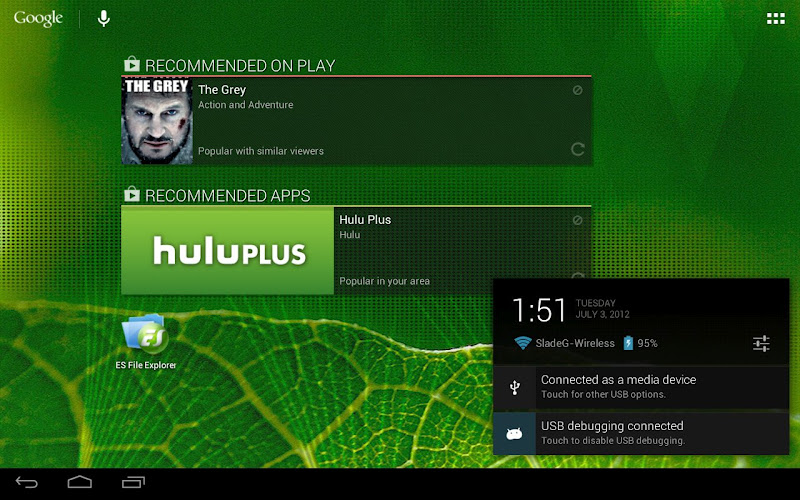
		<description><![CDATA[didn&#039;t realize the dead space (sides in landscape (like to the left of the widgets in the picture) and bottom in portrait). 


you&#039;ll need another launcher to make the most of the home screens with this mod]]></description>
		<content:encoded><![CDATA[<p>didn&#8217;t realize the dead space (sides in landscape (like to the left of the widgets in the picture) and bottom in portrait). </p>
<p>you&#8217;ll need another launcher to make the most of the home screens with this mod</p>
]]></content:encoded>
	</item>
	<item>
		<title>By: jeesung</title>
		<link>http://www.droid-life.com/2012/07/05/how-to-force-landscape-tablet-ui-on-the-nexus-7-tablet/comment-page-1/#comment-1942073</link>
		<dc:creator>jeesung</dc:creator>
		<pubDate>Thu, 19 Jul 2012 20:43:00 +0000</pubDate>
		<guid isPermaLink="false">http://www.droid-life.com/?p=74974#comment-1942073</guid>
		<description><![CDATA[i used Wug Fresh&#039;s toolkit
http://www.wugfresh.com/dev/nexus-root-toolkit/ ]]></description>
		<content:encoded><![CDATA[<p>i used Wug Fresh&#8217;s toolkit<br />
<a href="http://www.wugfresh.com/dev/nexus-root-toolkit/" rel="nofollow">http://www.wugfresh.com/dev/nexus-root-toolkit/</a> </p>
]]></content:encoded>
	</item>
	<item>
		<title>By: Raven</title>
		<link>http://www.droid-life.com/2012/07/05/how-to-force-landscape-tablet-ui-on-the-nexus-7-tablet/comment-page-1/#comment-1937348</link>
		<dc:creator>Raven</dc:creator>
		<pubDate>Wed, 18 Jul 2012 15:16:00 +0000</pubDate>
		<guid isPermaLink="false">http://www.droid-life.com/?p=74974#comment-1937348</guid>
		<description><![CDATA[I disagree.  I run my 7&quot; Acer A100 in landscape 99% of the time and after spending yesterday playing with my new Nexus 7 I am already annoyed by the enforced portrait mode.]]></description>
		<content:encoded><![CDATA[<p>I disagree.  I run my 7&#8243; Acer A100 in landscape 99% of the time and after spending yesterday playing with my new Nexus 7 I am already annoyed by the enforced portrait mode.</p>
]]></content:encoded>
	</item>
	<item>
		<title>By: Fomdoo</title>
		<link>http://www.droid-life.com/2012/07/05/how-to-force-landscape-tablet-ui-on-the-nexus-7-tablet/comment-page-1/#comment-1937067</link>
		<dc:creator>Fomdoo</dc:creator>
		<pubDate>Wed, 18 Jul 2012 13:09:00 +0000</pubDate>
		<guid isPermaLink="false">http://www.droid-life.com/?p=74974#comment-1937067</guid>
		<description><![CDATA[How is it that you were able to enable root access for ES file manager?  As far as I know the tablet doesn&#039;t come rooted.]]></description>
		<content:encoded><![CDATA[<p>How is it that you were able to enable root access for ES file manager?  As far as I know the tablet doesn&#8217;t come rooted.</p>
]]></content:encoded>
	</item>
	<item>
		<title>By: Mike</title>
		<link>http://www.droid-life.com/2012/07/05/how-to-force-landscape-tablet-ui-on-the-nexus-7-tablet/comment-page-1/#comment-1934509</link>
		<dc:creator>Mike</dc:creator>
		<pubDate>Tue, 17 Jul 2012 23:52:00 +0000</pubDate>
		<guid isPermaLink="false">http://www.droid-life.com/?p=74974#comment-1934509</guid>
		<description><![CDATA[it&#039;s right next to the settings icon. you will not find it in settings]]></description>
		<content:encoded><![CDATA[<p>it&#8217;s right next to the settings icon. you will not find it in settings</p>
]]></content:encoded>
	</item>
	<item>
		<title>By: Mike</title>
		<link>http://www.droid-life.com/2012/07/05/how-to-force-landscape-tablet-ui-on-the-nexus-7-tablet/comment-page-1/#comment-1934505</link>
		<dc:creator>Mike</dc:creator>
		<pubDate>Tue, 17 Jul 2012 23:51:00 +0000</pubDate>
		<guid isPermaLink="false">http://www.droid-life.com/?p=74974#comment-1934505</guid>
		<description><![CDATA[you don&#039;t have to do anything. When you pull down on the top drawer tab there is an icon that you can touch to unlock the orientation. that is it. some people should not mess with things they don&#039;t know about..]]></description>
		<content:encoded><![CDATA[<p>you don&#8217;t have to do anything. When you pull down on the top drawer tab there is an icon that you can touch to unlock the orientation. that is it. some people should not mess with things they don&#8217;t know about..</p>
]]></content:encoded>
	</item>
	<item>
		<title>By: HTC1</title>
		<link>http://www.droid-life.com/2012/07/05/how-to-force-landscape-tablet-ui-on-the-nexus-7-tablet/comment-page-1/#comment-1899633</link>
		<dc:creator>HTC1</dc:creator>
		<pubDate>Thu, 05 Jul 2012 18:37:00 +0000</pubDate>
		<guid isPermaLink="false">http://www.droid-life.com/?p=74974#comment-1899633</guid>
		<description><![CDATA[He just wants it. I understand completely. He can rant if he wants!!!!!!!! Not all of us have patience like you must have. I want my stuff NOW also.]]></description>
		<content:encoded><![CDATA[<p>He just wants it. I understand completely. He can rant if he wants!!!!!!!! Not all of us have patience like you must have. I want my stuff NOW also.</p>
]]></content:encoded>
	</item>
	<item>
		<title>By: Nick</title>
		<link>http://www.droid-life.com/2012/07/05/how-to-force-landscape-tablet-ui-on-the-nexus-7-tablet/comment-page-1/#comment-1899623</link>
		<dc:creator>Nick</dc:creator>
		<pubDate>Thu, 05 Jul 2012 18:30:00 +0000</pubDate>
		<guid isPermaLink="false">http://www.droid-life.com/?p=74974#comment-1899623</guid>
		<description><![CDATA[I think the way you wrote the article is confusing people. The reason people wanted the density change to tablet ui doesn&#039;t have anything to do with using the tablet in landscape, the reason was because the phone ui uses a bottom nav bar and top status bar which wastes a lot of screen space, the tablet ui uses only the bottom system bar for everything and places all the controls on the bottom of the screen, which allows for more screen real estate for apps. ]]></description>
		<content:encoded><![CDATA[<p>I think the way you wrote the article is confusing people. The reason people wanted the density change to tablet ui doesn&#8217;t have anything to do with using the tablet in landscape, the reason was because the phone ui uses a bottom nav bar and top status bar which wastes a lot of screen space, the tablet ui uses only the bottom system bar for everything and places all the controls on the bottom of the screen, which allows for more screen real estate for apps. </p>
]]></content:encoded>
	</item>
	<item>
		<title>By: EC8CH</title>
		<link>http://www.droid-life.com/2012/07/05/how-to-force-landscape-tablet-ui-on-the-nexus-7-tablet/comment-page-1/#comment-1899555</link>
		<dc:creator>EC8CH</dc:creator>
		<pubDate>Thu, 05 Jul 2012 18:04:00 +0000</pubDate>
		<guid isPermaLink="false">http://www.droid-life.com/?p=74974#comment-1899555</guid>
		<description><![CDATA[I&#039;m preordered.... can&#039;t wait!]]></description>
		<content:encoded><![CDATA[<p>I&#8217;m preordered&#8230;. can&#8217;t wait!</p>
]]></content:encoded>
	</item>
	<item>
		<title>By: PC_Tool</title>
		<link>http://www.droid-life.com/2012/07/05/how-to-force-landscape-tablet-ui-on-the-nexus-7-tablet/comment-page-1/#comment-1899519</link>
		<dc:creator>PC_Tool</dc:creator>
		<pubDate>Thu, 05 Jul 2012 17:56:00 +0000</pubDate>
		<guid isPermaLink="false">http://www.droid-life.com/?p=74974#comment-1899519</guid>
		<description><![CDATA[Yep.  I think I&#039;ll just use &quot;CM&quot; from now on to avoid confusion....]]></description>
		<content:encoded><![CDATA[<p>Yep.  I think I&#8217;ll just use &#8220;CM&#8221; from now on to avoid confusion&#8230;.</p>
]]></content:encoded>
	</item>
</channel>
</rss>

<!-- Performance optimized by W3 Total Cache. Learn more: http://www.w3-edge.com/wordpress-plugins/

Page Caching using apc
Database Caching 6/31 queries in 0.101 seconds using apc
Object Caching 659/681 objects using apc

 Served from: www.droid-life.com @ 2013-05-17 23:56:40 by W3 Total Cache -->