<?xml version="1.0" encoding="UTF-8"?><rss version="2.0"
	xmlns:content="http://purl.org/rss/1.0/modules/content/"
	xmlns:dc="http://purl.org/dc/elements/1.1/"
	xmlns:atom="http://www.w3.org/2005/Atom"
	xmlns:sy="http://purl.org/rss/1.0/modules/syndication/"
		>
<channel>
	<title>Comments on: Chrome to Mobile Lets You Share Web Pages From Your PC to Your Phone &#8211; Yeah It&#8217;s Exactly Like Chrome to Phone</title>
	<atom:link href="http://www.droid-life.com/2012/02/08/chrome-to-mobile-lets-you-share-web-pages-from-your-pc-to-your-phone-yeah-its-exactly-like-chrome-to-phone/feed/" rel="self" type="application/rss+xml" />
	<link>http://www.droid-life.com/2012/02/08/chrome-to-mobile-lets-you-share-web-pages-from-your-pc-to-your-phone-yeah-its-exactly-like-chrome-to-phone/</link>
	<description>An intense Android news community bringing you the latest in phones, rooting, apps, and reviews.</description>
	<lastBuildDate>Sun, 19 May 2013 12:25:00 +0000</lastBuildDate>
	<sy:updatePeriod>hourly</sy:updatePeriod>
	<sy:updateFrequency>1</sy:updateFrequency>
	<generator>http://wordpress.org/?v=3.5.1</generator>
	<item>
		<title>By: Hokuspokus</title>
		<link>http://www.droid-life.com/2012/02/08/chrome-to-mobile-lets-you-share-web-pages-from-your-pc-to-your-phone-yeah-its-exactly-like-chrome-to-phone/comment-page-1/#comment-1416698</link>
		<dc:creator>Hokuspokus</dc:creator>
		<pubDate>Fri, 17 Feb 2012 04:46:00 +0000</pubDate>
		<guid isPermaLink="false">http://www.droid-life.com/?p=60829#comment-1416698</guid>
		<description><![CDATA[One better: https://market.android.com/details?id=com.chefgon.clipbird
This one can sync your clipboard. Android-&gt;PC, PC-&gt;Android, Android-&gt;Android, PC-&gt;PC. really cool! ]]></description>
		<content:encoded><![CDATA[<p>One better: <a href="https://market.android.com/details?id=com.chefgon.clipbird" rel="nofollow">https://market.android.com/details?id=com.chefgon.clipbird</a><br />
This one can sync your clipboard. Android-&gt;PC, PC-&gt;Android, Android-&gt;Android, PC-&gt;PC. really cool! </p>
]]></content:encoded>
	</item>
	<item>
		<title>By: Ian Ward</title>
		<link>http://www.droid-life.com/2012/02/08/chrome-to-mobile-lets-you-share-web-pages-from-your-pc-to-your-phone-yeah-its-exactly-like-chrome-to-phone/comment-page-1/#comment-1392619</link>
		<dc:creator>Ian Ward</dc:creator>
		<pubDate>Fri, 10 Feb 2012 21:15:00 +0000</pubDate>
		<guid isPermaLink="false">http://www.droid-life.com/?p=60829#comment-1392619</guid>
		<description><![CDATA[ew]]></description>
		<content:encoded><![CDATA[<p>ew</p>
]]></content:encoded>
	</item>
	<item>
		<title>By: Anonymous</title>
		<link>http://www.droid-life.com/2012/02/08/chrome-to-mobile-lets-you-share-web-pages-from-your-pc-to-your-phone-yeah-its-exactly-like-chrome-to-phone/comment-page-1/#comment-1388888</link>
		<dc:creator>Anonymous</dc:creator>
		<pubDate>Thu, 09 Feb 2012 20:50:00 +0000</pubDate>
		<guid isPermaLink="false">http://www.droid-life.com/?p=60829#comment-1388888</guid>
		<description><![CDATA[Chrome to Mobile and tab sync are two different things, guys. C2M lets you explicitly send a tab to your phone, whereas tab sync just lists the metadata of all of your tabs on your computer on your phone, letting you click on them to open them on your phone.
Tab Sync can be enabled in about:flags, and I think it&#039;s automatically enabled in the dev and beta channels (versions 18+). Once you enable it, go to chrome://settings/syncSetup and make sure Open Tabs is checked.]]></description>
		<content:encoded><![CDATA[<p>Chrome to Mobile and tab sync are two different things, guys. C2M lets you explicitly send a tab to your phone, whereas tab sync just lists the metadata of all of your tabs on your computer on your phone, letting you click on them to open them on your phone.<br />
Tab Sync can be enabled in about:flags, and I think it&#8217;s automatically enabled in the dev and beta channels (versions 18+). Once you enable it, go to chrome://settings/syncSetup and make sure Open Tabs is checked.</p>
]]></content:encoded>
	</item>
	<item>
		<title>By: Anonymous</title>
		<link>http://www.droid-life.com/2012/02/08/chrome-to-mobile-lets-you-share-web-pages-from-your-pc-to-your-phone-yeah-its-exactly-like-chrome-to-phone/comment-page-1/#comment-1387475</link>
		<dc:creator>Anonymous</dc:creator>
		<pubDate>Thu, 09 Feb 2012 13:04:00 +0000</pubDate>
		<guid isPermaLink="false">http://www.droid-life.com/?p=60829#comment-1387475</guid>
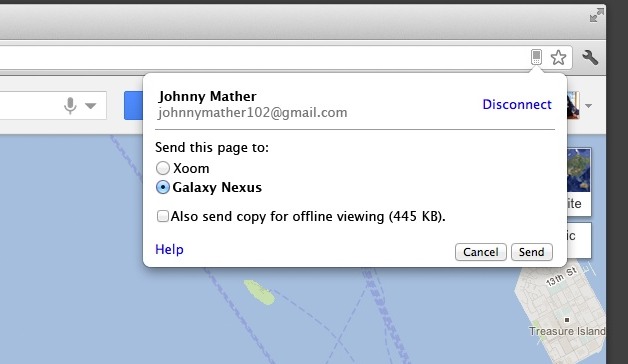
		<description><![CDATA[Well, I think the main difference is that ChromeToMobile syncs automagically, whereas ChromeToPhone required you to manually send a page to your phone.  So right now I have 4 tabs open on my desktop, and if I open Chrome on my Galaxy Nexus I see my 4 tabs already waiting. 

Yet to be seen is how much syncing this does and if it causes battery drain like google+ or photos or any of the other syncing services that tend to hang up in the GN.]]></description>
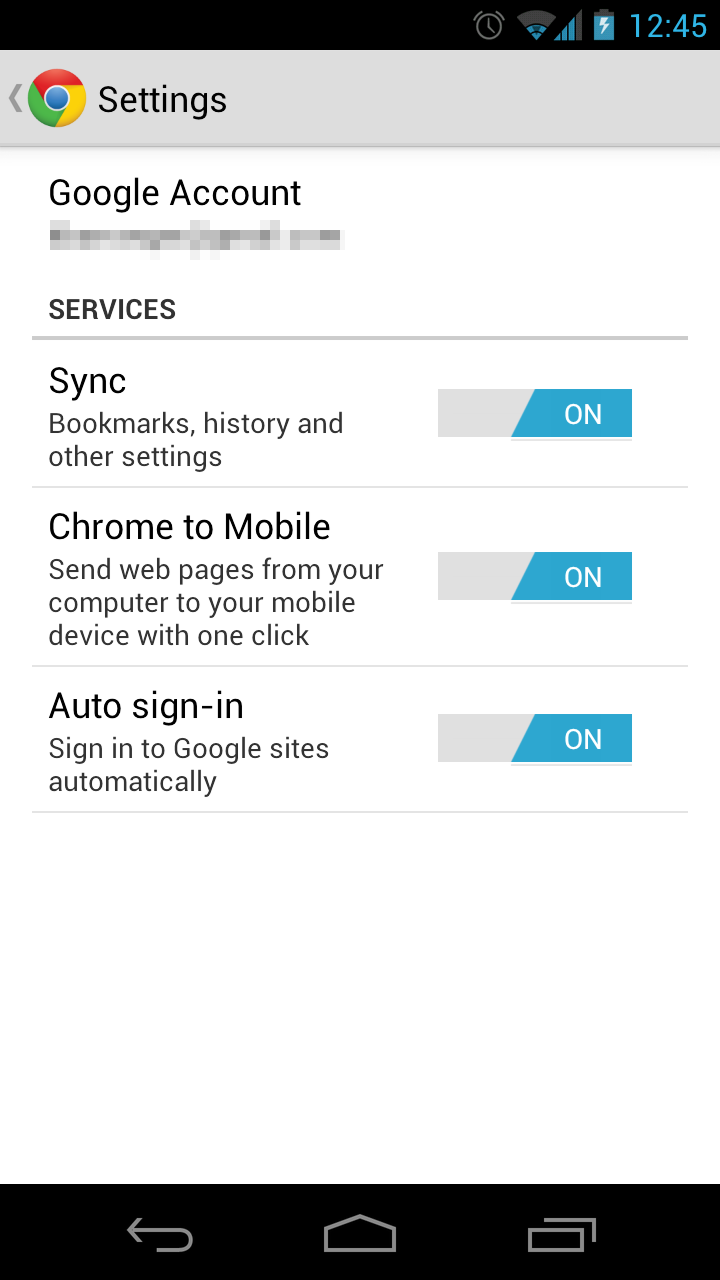
		<content:encoded><![CDATA[<p>Well, I think the main difference is that ChromeToMobile syncs automagically, whereas ChromeToPhone required you to manually send a page to your phone.  So right now I have 4 tabs open on my desktop, and if I open Chrome on my Galaxy Nexus I see my 4 tabs already waiting. </p>
<p>Yet to be seen is how much syncing this does and if it causes battery drain like google+ or photos or any of the other syncing services that tend to hang up in the GN.</p>
]]></content:encoded>
	</item>
	<item>
		<title>By: Noyfb</title>
		<link>http://www.droid-life.com/2012/02/08/chrome-to-mobile-lets-you-share-web-pages-from-your-pc-to-your-phone-yeah-its-exactly-like-chrome-to-phone/comment-page-1/#comment-1386761</link>
		<dc:creator>Noyfb</dc:creator>
		<pubDate>Thu, 09 Feb 2012 08:47:00 +0000</pubDate>
		<guid isPermaLink="false">http://www.droid-life.com/?p=60829#comment-1386761</guid>
		<description><![CDATA[chrome to phone never worked on my gnex, maybe this will]]></description>
		<content:encoded><![CDATA[<p>chrome to phone never worked on my gnex, maybe this will</p>
]]></content:encoded>
	</item>
	<item>
		<title>By: Judah Richardson</title>
		<link>http://www.droid-life.com/2012/02/08/chrome-to-mobile-lets-you-share-web-pages-from-your-pc-to-your-phone-yeah-its-exactly-like-chrome-to-phone/comment-page-1/#comment-1386488</link>
		<dc:creator>Judah Richardson</dc:creator>
		<pubDate>Thu, 09 Feb 2012 07:20:00 +0000</pubDate>
		<guid isPermaLink="false">http://www.droid-life.com/?p=60829#comment-1386488</guid>
		<description><![CDATA[I use Fox to Phone anyway (Firefox user) :) ]]></description>
		<content:encoded><![CDATA[<p>I use Fox to Phone anyway (Firefox user) <img src='http://www.droid-life.com/wp-includes/images/smilies/icon_smile.gif' alt=':)' class='wp-smiley' />  </p>
]]></content:encoded>
	</item>
	<item>
		<title>By: Anonymous</title>
		<link>http://www.droid-life.com/2012/02/08/chrome-to-mobile-lets-you-share-web-pages-from-your-pc-to-your-phone-yeah-its-exactly-like-chrome-to-phone/comment-page-1/#comment-1385220</link>
		<dc:creator>Anonymous</dc:creator>
		<pubDate>Wed, 08 Feb 2012 21:44:00 +0000</pubDate>
		<guid isPermaLink="false">http://www.droid-life.com/?p=60829#comment-1385220</guid>
		<description><![CDATA[except for the Chrome app itself]]></description>
		<content:encoded><![CDATA[<p>except for the Chrome app itself</p>
]]></content:encoded>
	</item>
	<item>
		<title>By: John</title>
		<link>http://www.droid-life.com/2012/02/08/chrome-to-mobile-lets-you-share-web-pages-from-your-pc-to-your-phone-yeah-its-exactly-like-chrome-to-phone/comment-page-1/#comment-1385217</link>
		<dc:creator>John</dc:creator>
		<pubDate>Wed, 08 Feb 2012 21:43:00 +0000</pubDate>
		<guid isPermaLink="false">http://www.droid-life.com/?p=60829#comment-1385217</guid>
		<description><![CDATA[just you =/]]></description>
		<content:encoded><![CDATA[<p>just you =/</p>
]]></content:encoded>
	</item>
	<item>
		<title>By: koveleski</title>
		<link>http://www.droid-life.com/2012/02/08/chrome-to-mobile-lets-you-share-web-pages-from-your-pc-to-your-phone-yeah-its-exactly-like-chrome-to-phone/comment-page-1/#comment-1385073</link>
		<dc:creator>koveleski</dc:creator>
		<pubDate>Wed, 08 Feb 2012 21:03:00 +0000</pubDate>
		<guid isPermaLink="false">http://www.droid-life.com/?p=60829#comment-1385073</guid>
		<description><![CDATA[F*&amp;k. I just logged into my chrome and apparently had some bookmarks in the cloud previously and it just overwrote everything I had locally. %&amp;$%&amp;*$*$#*]]></description>
		<content:encoded><![CDATA[<p>F*&amp;k. I just logged into my chrome and apparently had some bookmarks in the cloud previously and it just overwrote everything I had locally. %&amp;$%&amp;*$*$#*</p>
]]></content:encoded>
	</item>
	<item>
		<title>By: Anonymous</title>
		<link>http://www.droid-life.com/2012/02/08/chrome-to-mobile-lets-you-share-web-pages-from-your-pc-to-your-phone-yeah-its-exactly-like-chrome-to-phone/comment-page-1/#comment-1384920</link>
		<dc:creator>Anonymous</dc:creator>
		<pubDate>Wed, 08 Feb 2012 20:12:00 +0000</pubDate>
		<guid isPermaLink="false">http://www.droid-life.com/?p=60829#comment-1384920</guid>
		<description><![CDATA[Chrome to Phone does more in regards to app-specific links and text copying, but Chrome to Mobile is important in that it allows for multiple device management. That&#039;s pretty huge, actually. I booted up my old OG the other day to play around with it and instantly had like 20 links pop up that I had previously Chrome to Phone&#039;d with my Nexus. I do wish CtM had more of these other features, though, or that it just used CtP and added the device management feature.

Also, this is just an opinion but I like Chrome to Mobile in the Omnibox more than Chrome to Phone next to the settings button.]]></description>
		<content:encoded><![CDATA[<p>Chrome to Phone does more in regards to app-specific links and text copying, but Chrome to Mobile is important in that it allows for multiple device management. That&#8217;s pretty huge, actually. I booted up my old OG the other day to play around with it and instantly had like 20 links pop up that I had previously Chrome to Phone&#8217;d with my Nexus. I do wish CtM had more of these other features, though, or that it just used CtP and added the device management feature.</p>
<p>Also, this is just an opinion but I like Chrome to Mobile in the Omnibox more than Chrome to Phone next to the settings button.</p>
]]></content:encoded>
	</item>
	<item>
		<title>By: Anonymous</title>
		<link>http://www.droid-life.com/2012/02/08/chrome-to-mobile-lets-you-share-web-pages-from-your-pc-to-your-phone-yeah-its-exactly-like-chrome-to-phone/comment-page-1/#comment-1384816</link>
		<dc:creator>Anonymous</dc:creator>
		<pubDate>Wed, 08 Feb 2012 19:46:00 +0000</pubDate>
		<guid isPermaLink="false">http://www.droid-life.com/?p=60829#comment-1384816</guid>
		<description><![CDATA[If you already had tabs open, it won&#039;t come up until you refresh it. ]]></description>
		<content:encoded><![CDATA[<p>If you already had tabs open, it won&#8217;t come up until you refresh it. </p>
]]></content:encoded>
	</item>
	<item>
		<title>By: Anonymous</title>
		<link>http://www.droid-life.com/2012/02/08/chrome-to-mobile-lets-you-share-web-pages-from-your-pc-to-your-phone-yeah-its-exactly-like-chrome-to-phone/comment-page-1/#comment-1384742</link>
		<dc:creator>Anonymous</dc:creator>
		<pubDate>Wed, 08 Feb 2012 19:18:00 +0000</pubDate>
		<guid isPermaLink="false">http://www.droid-life.com/?p=60829#comment-1384742</guid>
		<description><![CDATA[Not Necessarily, because PremiumPass works just fine on my Chrome For Android :-) ]]></description>
		<content:encoded><![CDATA[<p>Not Necessarily, because PremiumPass works just fine on my Chrome For Android <img src='http://www.droid-life.com/wp-includes/images/smilies/icon_smile.gif' alt=':-)' class='wp-smiley' />  </p>
]]></content:encoded>
	</item>
	<item>
		<title>By: Chris Gustafson</title>
		<link>http://www.droid-life.com/2012/02/08/chrome-to-mobile-lets-you-share-web-pages-from-your-pc-to-your-phone-yeah-its-exactly-like-chrome-to-phone/comment-page-1/#comment-1384569</link>
		<dc:creator>Chris Gustafson</dc:creator>
		<pubDate>Wed, 08 Feb 2012 18:10:00 +0000</pubDate>
		<guid isPermaLink="false">http://www.droid-life.com/?p=60829#comment-1384569</guid>
		<description><![CDATA[And you can select which device to send it to Which you can&#039;t with Chrome to phone.]]></description>
		<content:encoded><![CDATA[<p>And you can select which device to send it to Which you can&#8217;t with Chrome to phone.</p>
]]></content:encoded>
	</item>
	<item>
		<title>By: Kiril</title>
		<link>http://www.droid-life.com/2012/02/08/chrome-to-mobile-lets-you-share-web-pages-from-your-pc-to-your-phone-yeah-its-exactly-like-chrome-to-phone/comment-page-1/#comment-1384515</link>
		<dc:creator>Kiril</dc:creator>
		<pubDate>Wed, 08 Feb 2012 17:54:00 +0000</pubDate>
		<guid isPermaLink="false">http://www.droid-life.com/?p=60829#comment-1384515</guid>
		<description><![CDATA[Yup, those are all hook-ups in the apps themselves. Just like clicking on a YouTube link anywhere will ask Browser or YouTube. Theoretically, the new extension should also work with YouTube, Market, Voice, Music, etc... although it probably doesn&#039;t work with all.]]></description>
		<content:encoded><![CDATA[<p>Yup, those are all hook-ups in the apps themselves. Just like clicking on a YouTube link anywhere will ask Browser or YouTube. Theoretically, the new extension should also work with YouTube, Market, Voice, Music, etc&#8230; although it probably doesn&#8217;t work with all.</p>
]]></content:encoded>
	</item>
	<item>
		<title>By: PyroHoltz</title>
		<link>http://www.droid-life.com/2012/02/08/chrome-to-mobile-lets-you-share-web-pages-from-your-pc-to-your-phone-yeah-its-exactly-like-chrome-to-phone/comment-page-1/#comment-1384348</link>
		<dc:creator>PyroHoltz</dc:creator>
		<pubDate>Wed, 08 Feb 2012 17:16:00 +0000</pubDate>
		<guid isPermaLink="false">http://www.droid-life.com/?p=60829#comment-1384348</guid>
		<description><![CDATA[When Google streamlined their privacy policy they needed to find something for all those extra folks to do. 

So, they recreate existing products and change the names slightly.]]></description>
		<content:encoded><![CDATA[<p>When Google streamlined their privacy policy they needed to find something for all those extra folks to do. </p>
<p>So, they recreate existing products and change the names slightly.</p>
]]></content:encoded>
	</item>
</channel>
</rss>

<!-- Performance optimized by W3 Total Cache. Learn more: http://www.w3-edge.com/wordpress-plugins/

Page Caching using apc
Database Caching 8/36 queries in 0.094 seconds using apc
Object Caching 668/700 objects using apc

 Served from: www.droid-life.com @ 2013-05-19 05:50:27 by W3 Total Cache -->