<?xml version="1.0" encoding="UTF-8"?><rss version="2.0"
	xmlns:content="http://purl.org/rss/1.0/modules/content/"
	xmlns:dc="http://purl.org/dc/elements/1.1/"
	xmlns:atom="http://www.w3.org/2005/Atom"
	xmlns:sy="http://purl.org/rss/1.0/modules/syndication/"
		>
<channel>
	<title>Comments on: Tip:  DROIDX and 2 Gingerbread Wireless Tether Work-Around (Updated)</title>
	<atom:link href="http://www.droid-life.com/2011/06/07/tip-droidx-gingerbread-wireless-tether-work-around/feed/" rel="self" type="application/rss+xml" />
	<link>http://www.droid-life.com/2011/06/07/tip-droidx-gingerbread-wireless-tether-work-around/</link>
	<description>An intense Android news community bringing you the latest in phones, rooting, apps, and reviews.</description>
	<lastBuildDate>Wed, 19 Jun 2013 21:49:00 +0000</lastBuildDate>
	<sy:updatePeriod>hourly</sy:updatePeriod>
	<sy:updateFrequency>1</sy:updateFrequency>
	<generator>http://wordpress.org/?v=3.5.1</generator>
	<item>
		<title>By: Tedm</title>
		<link>http://www.droid-life.com/2011/06/07/tip-droidx-gingerbread-wireless-tether-work-around/comment-page-1/#comment-1449810</link>
		<dc:creator>Tedm</dc:creator>
		<pubDate>Sun, 26 Feb 2012 19:23:00 +0000</pubDate>
		<guid isPermaLink="false">http://www.droid-life.com/?p=35616#comment-1449810</guid>
		<description><![CDATA[This is idiotic.  The major reason VZW does not sell rooted phones is rooting them allows users to break them and every time some n00b returns a &quot;broken&quot; phone (one with perfectly good hardware but software screwed up on it) to the Verizon store, it costs VZW money.  VZW has to ship the phone back to China where some 20 cent an hour guy sits there all day long resetting phones, then it&#039;s shipped back to the VZW store to replace the next n00b&#039;s &quot;broken&quot; phone.  VZW already has enough &quot;used&quot; phones in their system to more than cover the n00b&#039;s who can&#039;t read the instructions to reset their phone, and that&#039;s non-rooted phones where the n00b&#039;s can&#039;t even do anything serious to the phone.

VZW has an interest in maintaining the fiction that if you return a rooted phone to the VZW store under warranty that they will send the black helicopters to break down your door at night and drag you away kicking and screaming, simply because they figure if your grownup enough to root your phone your grownup enough to support it yourself.

As for tethering that&#039;s another support sinkhole.  When GrandMaw Kettle who is paying the $20 a month tether fee has her grandkids over to play their Xbox and they can&#039;t get it to associate with her phone, so they can online game, that&#039;s at least an hour support call right there that easily eats up that $20 a month support fee.  Or better yet the call from high-power-salesdroid at a customer site who loses a half million dollar deal because his $20 a month tethering demo failed at a critical point, and who by gawd is going to call up and chew the head off somebody, he&#039;s not going to be happy until he&#039;s called back about 10 times and abused every support person within an inch of their life.

I support an ISP and if I had a dollar for every time I play stupid and pretend I don&#039;t know anything about wireless I&#039;d be rich - some of the questions people ask are literally unbelievable.  They want to know why they can&#039;t turn on their laptop out in the middle of a soccer field and get their wireless in their house that&#039;s 10 miles away, they want to know why they can&#039;t get on the base unit in the duplex next door which has a concrete cinderblock firewall in between them, you name it.  VZW knows exactly what those people are like and they probably break even on their support costs and the tethering fees.

The only reason VZW throws up a few roadblocks to tethering is that they don&#039;t want all the n00b&#039;s tethering without paying a support fee, because it&#039;s those n00bs who are costing them money.  Trust me VZW knows how to make a phone that can&#039;t be tethered, just implement the radio software in a burned ROM instead of an EEPROM and the only way your gonna tether that puppy is by unsoldering and replacing a surface mount memory chip.  Course it would be non-upgradable and thus more expensive but it ain&#039;t impossible.

Read between the lines, kid, there&#039;s a reason rooting is difficult but not impossible.  Too scary for you, fine, get out of the kitchen, stay out of the big boys way.]]></description>
		<content:encoded><![CDATA[<p>This is idiotic.  The major reason VZW does not sell rooted phones is rooting them allows users to break them and every time some n00b returns a &#8220;broken&#8221; phone (one with perfectly good hardware but software screwed up on it) to the Verizon store, it costs VZW money.  VZW has to ship the phone back to China where some 20 cent an hour guy sits there all day long resetting phones, then it&#8217;s shipped back to the VZW store to replace the next n00b&#8217;s &#8220;broken&#8221; phone.  VZW already has enough &#8220;used&#8221; phones in their system to more than cover the n00b&#8217;s who can&#8217;t read the instructions to reset their phone, and that&#8217;s non-rooted phones where the n00b&#8217;s can&#8217;t even do anything serious to the phone.</p>
<p>VZW has an interest in maintaining the fiction that if you return a rooted phone to the VZW store under warranty that they will send the black helicopters to break down your door at night and drag you away kicking and screaming, simply because they figure if your grownup enough to root your phone your grownup enough to support it yourself.</p>
<p>As for tethering that&#8217;s another support sinkhole.  When GrandMaw Kettle who is paying the $20 a month tether fee has her grandkids over to play their Xbox and they can&#8217;t get it to associate with her phone, so they can online game, that&#8217;s at least an hour support call right there that easily eats up that $20 a month support fee.  Or better yet the call from high-power-salesdroid at a customer site who loses a half million dollar deal because his $20 a month tethering demo failed at a critical point, and who by gawd is going to call up and chew the head off somebody, he&#8217;s not going to be happy until he&#8217;s called back about 10 times and abused every support person within an inch of their life.</p>
<p>I support an ISP and if I had a dollar for every time I play stupid and pretend I don&#8217;t know anything about wireless I&#8217;d be rich &#8211; some of the questions people ask are literally unbelievable.  They want to know why they can&#8217;t turn on their laptop out in the middle of a soccer field and get their wireless in their house that&#8217;s 10 miles away, they want to know why they can&#8217;t get on the base unit in the duplex next door which has a concrete cinderblock firewall in between them, you name it.  VZW knows exactly what those people are like and they probably break even on their support costs and the tethering fees.</p>
<p>The only reason VZW throws up a few roadblocks to tethering is that they don&#8217;t want all the n00b&#8217;s tethering without paying a support fee, because it&#8217;s those n00bs who are costing them money.  Trust me VZW knows how to make a phone that can&#8217;t be tethered, just implement the radio software in a burned ROM instead of an EEPROM and the only way your gonna tether that puppy is by unsoldering and replacing a surface mount memory chip.  Course it would be non-upgradable and thus more expensive but it ain&#8217;t impossible.</p>
<p>Read between the lines, kid, there&#8217;s a reason rooting is difficult but not impossible.  Too scary for you, fine, get out of the kitchen, stay out of the big boys way.</p>
]]></content:encoded>
	</item>
	<item>
		<title>By: Tedm</title>
		<link>http://www.droid-life.com/2011/06/07/tip-droidx-gingerbread-wireless-tether-work-around/comment-page-2/#comment-1449758</link>
		<dc:creator>Tedm</dc:creator>
		<pubDate>Sun, 26 Feb 2012 18:57:00 +0000</pubDate>
		<guid isPermaLink="false">http://www.droid-life.com/?p=35616#comment-1449758</guid>
		<description><![CDATA[official GB is NOT unrootable, please don&#039;t spread misconceptions.]]></description>
		<content:encoded><![CDATA[<p>official GB is NOT unrootable, please don&#8217;t spread misconceptions.</p>
]]></content:encoded>
	</item>
	<item>
		<title>By: Android User</title>
		<link>http://www.droid-life.com/2011/06/07/tip-droidx-gingerbread-wireless-tether-work-around/comment-page-5/#comment-1384305</link>
		<dc:creator>Android User</dc:creator>
		<pubDate>Wed, 08 Feb 2012 17:08:00 +0000</pubDate>
		<guid isPermaLink="false">http://www.droid-life.com/?p=35616#comment-1384305</guid>
		<description><![CDATA[Worked well for my Droid 2 Global just like redpoppa said I used CDMA 1X (QSC 60x5)]]></description>
		<content:encoded><![CDATA[<p>Worked well for my Droid 2 Global just like redpoppa said I used CDMA 1X (QSC 60&#215;5)</p>
]]></content:encoded>
	</item>
	<item>
		<title>By: Alex</title>
		<link>http://www.droid-life.com/2011/06/07/tip-droidx-gingerbread-wireless-tether-work-around/comment-page-1/#comment-1335202</link>
		<dc:creator>Alex</dc:creator>
		<pubDate>Wed, 25 Jan 2012 18:41:00 +0000</pubDate>
		<guid isPermaLink="false">http://www.droid-life.com/?p=35616#comment-1335202</guid>
		<description><![CDATA[holy crap.  i can&#039;t believe this actually worked for me.  thanks.]]></description>
		<content:encoded><![CDATA[<p>holy crap.  i can&#8217;t believe this actually worked for me.  thanks.</p>
]]></content:encoded>
	</item>
	<item>
		<title>By: redpoppa</title>
		<link>http://www.droid-life.com/2011/06/07/tip-droidx-gingerbread-wireless-tether-work-around/comment-page-5/#comment-1329286</link>
		<dc:creator>redpoppa</dc:creator>
		<pubDate>Mon, 23 Jan 2012 18:04:00 +0000</pubDate>
		<guid isPermaLink="false">http://www.droid-life.com/?p=35616#comment-1329286</guid>
		<description><![CDATA[I have droid 2 rooted via http://rootzwiki.com/topic/5307-guide-root-or-unroot-your-droid-x/

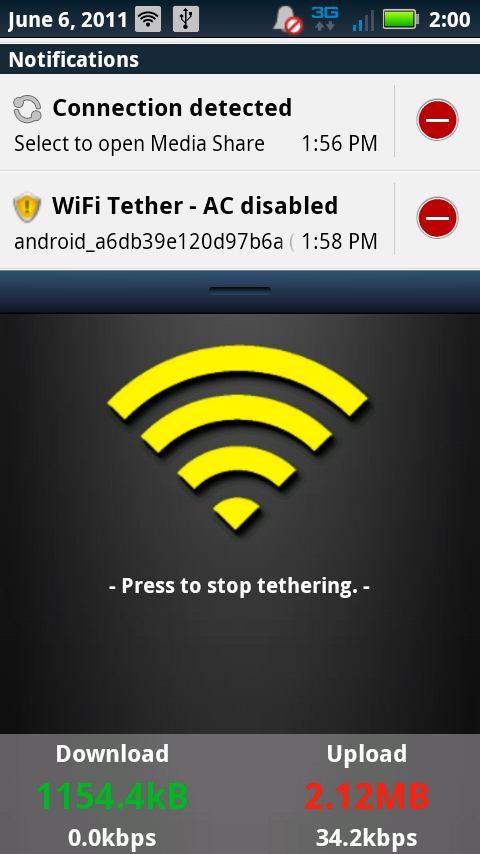
running wifi tether wifi_tether_v3_1-beta11.apk  found here : http://code.google.com/p/android-wifi-tether/downloads/list

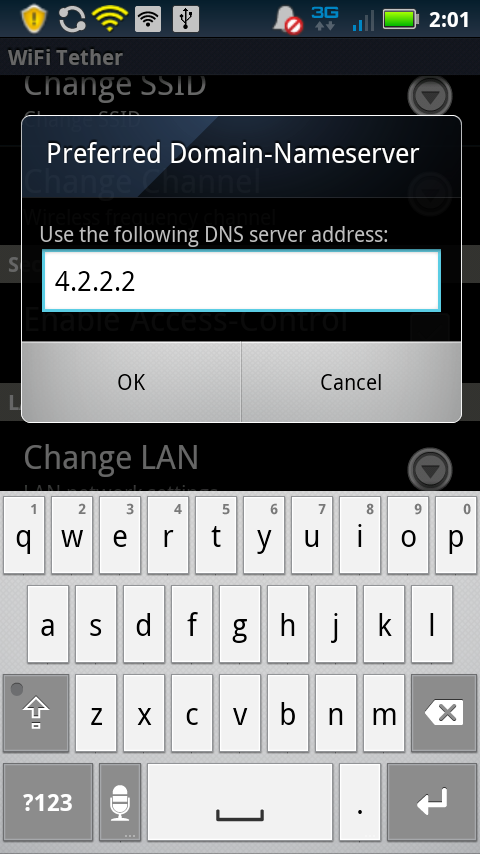
Then I kept getting the verizon webpage after changing all the wifi tether settings dns phone type etc. 

So I went to this page http://forum.xda-developers.com/showthread.php?t=1182940

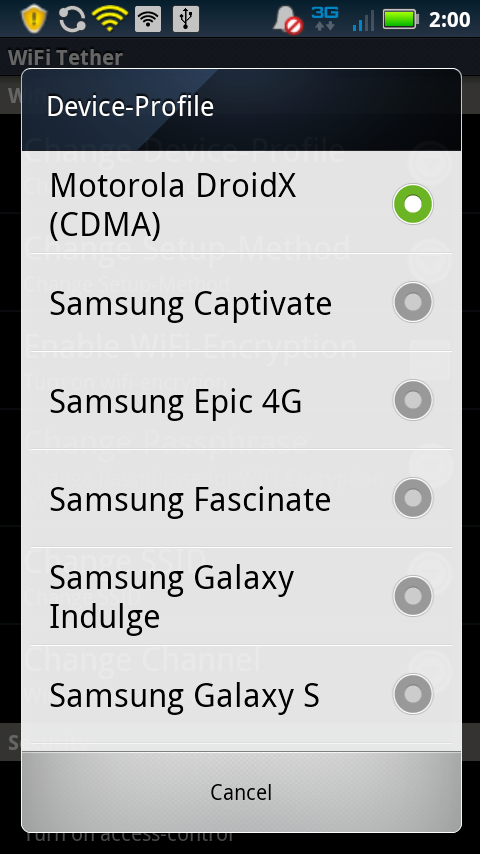
followed all the instructions but for : I selected CDMA 1x (MSM 7500) w/ Android

That didn&#039;t work with the droid 2 so i had to select like in the picture I selected CDMA 1X (QSC 60x5)

Then it worked like a charm

Good luck]]></description>
		<content:encoded><![CDATA[<p>I have droid 2 rooted via <a href="http://rootzwiki.com/topic/5307-guide-root-or-unroot-your-droid-x/" rel="nofollow">http://rootzwiki.com/topic/5307-guide-root-or-unroot-your-droid-x/</a></p>
<p>running wifi tether wifi_tether_v3_1-beta11.apk  found here : <a href="http://code.google.com/p/android-wifi-tether/downloads/list" rel="nofollow">http://code.google.com/p/android-wifi-tether/downloads/list</a></p>
<p>Then I kept getting the verizon webpage after changing all the wifi tether settings dns phone type etc. </p>
<p>So I went to this page <a href="http://forum.xda-developers.com/showthread.php?t=1182940" rel="nofollow">http://forum.xda-developers.com/showthread.php?t=1182940</a></p>
<p>followed all the instructions but for : I selected CDMA 1x (MSM 7500) w/ Android</p>
<p>That didn&#8217;t work with the droid 2 so i had to select like in the picture I selected CDMA 1X (QSC 60&#215;5)</p>
<p>Then it worked like a charm</p>
<p>Good luck</p>
]]></content:encoded>
	</item>
	<item>
		<title>By: Lnk2net</title>
		<link>http://www.droid-life.com/2011/06/07/tip-droidx-gingerbread-wireless-tether-work-around/comment-page-1/#comment-1300566</link>
		<dc:creator>Lnk2net</dc:creator>
		<pubDate>Sat, 14 Jan 2012 18:07:00 +0000</pubDate>
		<guid isPermaLink="false">http://www.droid-life.com/?p=35616#comment-1300566</guid>
		<description><![CDATA[I am having the same problem.  Would you share your resolution with me please.]]></description>
		<content:encoded><![CDATA[<p>I am having the same problem.  Would you share your resolution with me please.</p>
]]></content:encoded>
	</item>
	<item>
		<title>By: Mitchell Price</title>
		<link>http://www.droid-life.com/2011/06/07/tip-droidx-gingerbread-wireless-tether-work-around/comment-page-5/#comment-1249539</link>
		<dc:creator>Mitchell Price</dc:creator>
		<pubDate>Sun, 01 Jan 2012 02:11:00 +0000</pubDate>
		<guid isPermaLink="false">http://www.droid-life.com/?p=35616#comment-1249539</guid>
		<description><![CDATA[THANK YOU SO MUCH!!!!!!!!!!!!!!!! I&#039;ve tried a million different things over the past 2 days, and changing the DNS is what did it!!!!!!!!!]]></description>
		<content:encoded><![CDATA[<p>THANK YOU SO MUCH!!!!!!!!!!!!!!!! I&#8217;ve tried a million different things over the past 2 days, and changing the DNS is what did it!!!!!!!!!</p>
]]></content:encoded>
	</item>
	<item>
		<title>By: Italybrew</title>
		<link>http://www.droid-life.com/2011/06/07/tip-droidx-gingerbread-wireless-tether-work-around/comment-page-2/#comment-1241095</link>
		<dc:creator>Italybrew</dc:creator>
		<pubDate>Thu, 29 Dec 2011 20:41:00 +0000</pubDate>
		<guid isPermaLink="false">http://www.droid-life.com/?p=35616#comment-1241095</guid>
		<description><![CDATA[need some help locating the system/app folder, i have done everything else you mentioned and get routed to the verizon page when tethering.  thanks!]]></description>
		<content:encoded><![CDATA[<p>need some help locating the system/app folder, i have done everything else you mentioned and get routed to the verizon page when tethering.  thanks!</p>
]]></content:encoded>
	</item>
	<item>
		<title>By: Matt</title>
		<link>http://www.droid-life.com/2011/06/07/tip-droidx-gingerbread-wireless-tether-work-around/comment-page-5/#comment-1231658</link>
		<dc:creator>Matt</dc:creator>
		<pubDate>Wed, 28 Dec 2011 01:46:00 +0000</pubDate>
		<guid isPermaLink="false">http://www.droid-life.com/?p=35616#comment-1231658</guid>
		<description><![CDATA[Gingerbread (2.3.3) Motorola Droid 2, rooted

tethering will not work for me, I tried both of those device profiles and they didnt work.
Idk what to do from here :/ are there any other ways to get past it?]]></description>
		<content:encoded><![CDATA[<p>Gingerbread (2.3.3) Motorola Droid 2, rooted</p>
<p>tethering will not work for me, I tried both of those device profiles and they didnt work.<br />
Idk what to do from here :/ are there any other ways to get past it?</p>
]]></content:encoded>
	</item>
	<item>
		<title>By: Firefightenn</title>
		<link>http://www.droid-life.com/2011/06/07/tip-droidx-gingerbread-wireless-tether-work-around/comment-page-5/#comment-1071570</link>
		<dc:creator>Firefightenn</dc:creator>
		<pubDate>Wed, 30 Nov 2011 03:39:00 +0000</pubDate>
		<guid isPermaLink="false">http://www.droid-life.com/?p=35616#comment-1071570</guid>
		<description><![CDATA[Where is the wireless tether app it is gone from the market. Is there a new one out or something else. Update zaped my droid x had to do a total reset.]]></description>
		<content:encoded><![CDATA[<p>Where is the wireless tether app it is gone from the market. Is there a new one out or something else. Update zaped my droid x had to do a total reset.</p>
]]></content:encoded>
	</item>
	<item>
		<title>By: Marcopolo_1919</title>
		<link>http://www.droid-life.com/2011/06/07/tip-droidx-gingerbread-wireless-tether-work-around/comment-page-5/#comment-1070631</link>
		<dc:creator>Marcopolo_1919</dc:creator>
		<pubDate>Tue, 29 Nov 2011 22:40:00 +0000</pubDate>
		<guid isPermaLink="false">http://www.droid-life.com/?p=35616#comment-1070631</guid>
		<description><![CDATA[I followed all the instructions to root my Droid X.  I installed wireless tether and followed the direction about setting the device profile.  When I connect to my Droid X with my android tablet, i am immediately sent to the Verizon Mobile Hotspot page...What am i doing wroing?]]></description>
		<content:encoded><![CDATA[<p>I followed all the instructions to root my Droid X.  I installed wireless tether and followed the direction about setting the device profile.  When I connect to my Droid X with my android tablet, i am immediately sent to the Verizon Mobile Hotspot page&#8230;What am i doing wroing?</p>
]]></content:encoded>
	</item>
	<item>
		<title>By: BP</title>
		<link>http://www.droid-life.com/2011/06/07/tip-droidx-gingerbread-wireless-tether-work-around/comment-page-5/#comment-1065127</link>
		<dc:creator>BP</dc:creator>
		<pubDate>Mon, 28 Nov 2011 20:34:00 +0000</pubDate>
		<guid isPermaLink="false">http://www.droid-life.com/?p=35616#comment-1065127</guid>
		<description><![CDATA[Droid X with Gingerbread.  Just rooted and using Wireless Tether App.  My laptop can recognize the device and connect, but when I try to load a web page it times out like there is no internet connection...any troubleshooting tips??]]></description>
		<content:encoded><![CDATA[<p>Droid X with Gingerbread.  Just rooted and using Wireless Tether App.  My laptop can recognize the device and connect, but when I try to load a web page it times out like there is no internet connection&#8230;any troubleshooting tips??</p>
]]></content:encoded>
	</item>
	<item>
		<title>By: Tarpon</title>
		<link>http://www.droid-life.com/2011/06/07/tip-droidx-gingerbread-wireless-tether-work-around/comment-page-2/#comment-1064920</link>
		<dc:creator>Tarpon</dc:creator>
		<pubDate>Mon, 28 Nov 2011 19:52:00 +0000</pubDate>
		<guid isPermaLink="false">http://www.droid-life.com/?p=35616#comment-1064920</guid>
		<description><![CDATA[Can you please explain how to &quot;flash the TBH teather patch?&quot;]]></description>
		<content:encoded><![CDATA[<p>Can you please explain how to &#8220;flash the TBH teather patch?&#8221;</p>
]]></content:encoded>
	</item>
	<item>
		<title>By: CoquiLostInNY</title>
		<link>http://www.droid-life.com/2011/06/07/tip-droidx-gingerbread-wireless-tether-work-around/comment-page-5/#comment-1056347</link>
		<dc:creator>CoquiLostInNY</dc:creator>
		<pubDate>Sat, 26 Nov 2011 20:01:00 +0000</pubDate>
		<guid isPermaLink="false">http://www.droid-life.com/?p=35616#comment-1056347</guid>
		<description><![CDATA[I just rooted my Moto Droid X w. 2.3.3 and installed the latest version of WT as of today.  The problem is it after I connected my laptop and went to view a site I get redisrected to Verizon&#039;s Hotspot page.  Any ideas on how to get around this?  ]]></description>
		<content:encoded><![CDATA[<p>I just rooted my Moto Droid X w. 2.3.3 and installed the latest version of WT as of today.  The problem is it after I connected my laptop and went to view a site I get redisrected to Verizon&#8217;s Hotspot page.  Any ideas on how to get around this?  </p>
]]></content:encoded>
	</item>
	<item>
		<title>By: Arleneeliza</title>
		<link>http://www.droid-life.com/2011/06/07/tip-droidx-gingerbread-wireless-tether-work-around/comment-page-5/#comment-1054069</link>
		<dc:creator>Arleneeliza</dc:creator>
		<pubDate>Sat, 26 Nov 2011 05:28:00 +0000</pubDate>
		<guid isPermaLink="false">http://www.droid-life.com/?p=35616#comment-1054069</guid>
		<description><![CDATA[Is this still working?  The download isn&#039;t coming up]]></description>
		<content:encoded><![CDATA[<p>Is this still working?  The download isn&#8217;t coming up</p>
]]></content:encoded>
	</item>
</channel>
</rss>

<!-- Performance optimized by W3 Total Cache. Learn more: http://www.w3-edge.com/wordpress-plugins/

Page Caching using apc
Database Caching 5/38 queries in 0.308 seconds using apc
Object Caching 657/693 objects using apc

 Served from: www.droid-life.com @ 2013-06-19 14:52:10 by W3 Total Cache -->