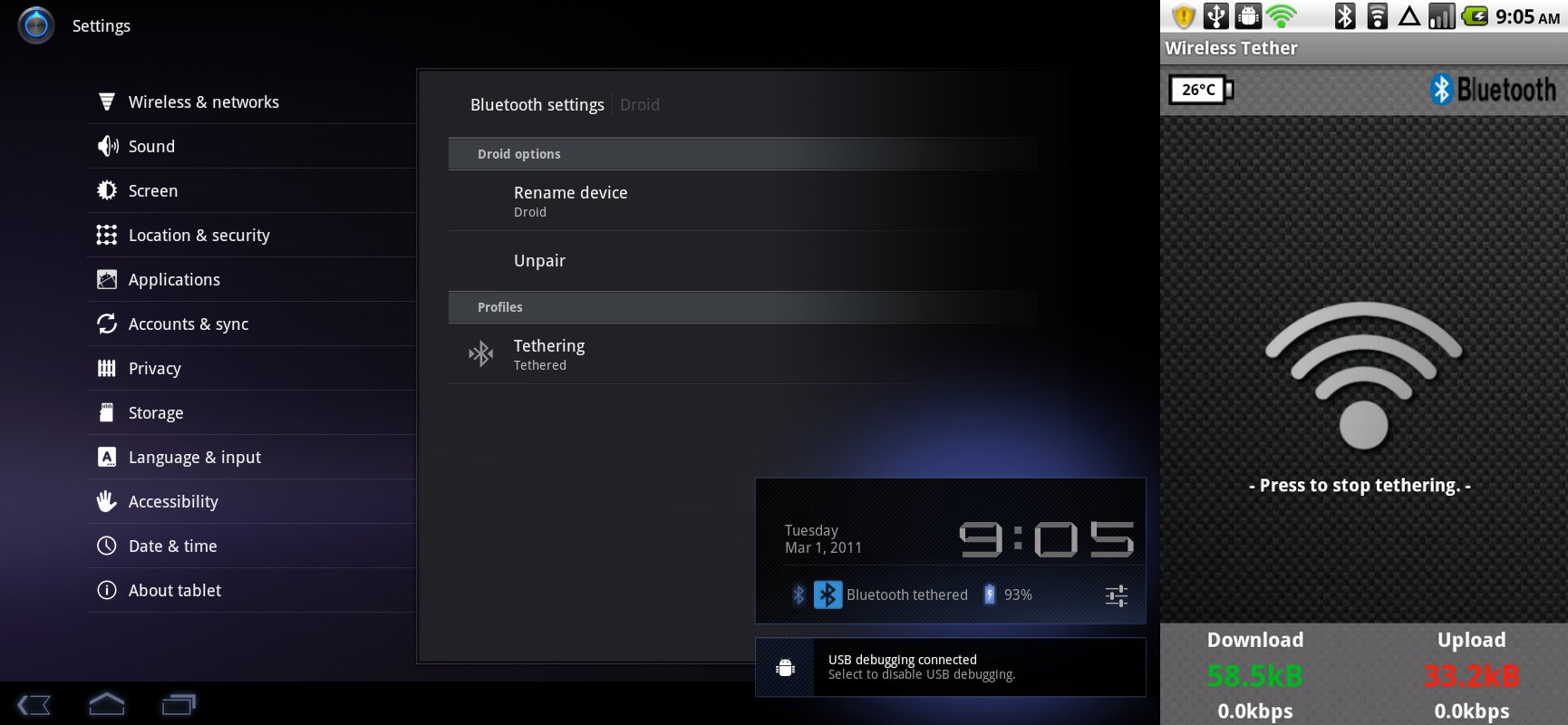
<?xml version="1.0" encoding="UTF-8"?><rss version="2.0"
	xmlns:content="http://purl.org/rss/1.0/modules/content/"
	xmlns:dc="http://purl.org/dc/elements/1.1/"
	xmlns:atom="http://www.w3.org/2005/Atom"
	xmlns:sy="http://purl.org/rss/1.0/modules/syndication/"
		>
<channel>
	<title>Comments on: How to:  Bluetooth Tether to Motorola XOOM Using Original DROID</title>
	<atom:link href="http://www.droid-life.com/2011/03/01/how-to-bluetooth-tether-to-motorola-xoom-using-original-droid/feed/" rel="self" type="application/rss+xml" />
	<link>http://www.droid-life.com/2011/03/01/how-to-bluetooth-tether-to-motorola-xoom-using-original-droid/</link>
	<description>An intense Android news community bringing you the latest in phones, rooting, apps, and reviews.</description>
	<lastBuildDate>Sat, 18 May 2013 09:53:00 +0000</lastBuildDate>
	<sy:updatePeriod>hourly</sy:updatePeriod>
	<sy:updateFrequency>1</sy:updateFrequency>
	<generator>http://wordpress.org/?v=3.5.1</generator>
	<item>
		<title>By: Funvirginian</title>
		<link>http://www.droid-life.com/2011/03/01/how-to-bluetooth-tether-to-motorola-xoom-using-original-droid/comment-page-2/#comment-1183634</link>
		<dc:creator>Funvirginian</dc:creator>
		<pubDate>Mon, 19 Dec 2011 07:58:00 +0000</pubDate>
		<guid isPermaLink="false">http://www.droid-life.com/?p=27319#comment-1183634</guid>
		<description><![CDATA[This is pretty dead now right with latest versions of Xoom is releases?]]></description>
		<content:encoded><![CDATA[<p>This is pretty dead now right with latest versions of Xoom is releases?</p>
]]></content:encoded>
	</item>
	<item>
		<title>By: Ctcstudios</title>
		<link>http://www.droid-life.com/2011/03/01/how-to-bluetooth-tether-to-motorola-xoom-using-original-droid/comment-page-2/#comment-1067170</link>
		<dc:creator>Ctcstudios</dc:creator>
		<pubDate>Tue, 29 Nov 2011 04:15:00 +0000</pubDate>
		<guid isPermaLink="false">http://www.droid-life.com/?p=27319#comment-1067170</guid>
		<description><![CDATA[What kind of crap is this? I bought this xoom so i can use it with my camera and not have a USB cord, so basicly, the xoom Bluetooth is useless without seven or eight steps to download each photo. For the extra bucks ,obviously the I pad is well worth the price since apple at least worked out the bugs in the most basic functions of the device before releasing it for sale. It is a ripoff plain and simple the way I see it. Wifi, and Bluetooth are the methods by which the device wirelessly connects to other devices, and 50% of that does not function, therefore it is a 200.00 device, which I will ask for a 50% refund for, or simply return the device since it is clearly defective by design. All of cameras work flawlessly with my 6 year old laptop with a 15.00 Bluetooth USB plug, shame on Motorola for duping the public by touting this tablet as a functioning device. I did figure I could live with turning it sideways to send an email every time but now I am pissed off. It goes back to best buy tomorrow, and I&#039;ll upgrade to the I pad, or get a cheap laptop, either way I will be way ahead.]]></description>
		<content:encoded><![CDATA[<p>What kind of crap is this? I bought this xoom so i can use it with my camera and not have a USB cord, so basicly, the xoom Bluetooth is useless without seven or eight steps to download each photo. For the extra bucks ,obviously the I pad is well worth the price since apple at least worked out the bugs in the most basic functions of the device before releasing it for sale. It is a ripoff plain and simple the way I see it. Wifi, and Bluetooth are the methods by which the device wirelessly connects to other devices, and 50% of that does not function, therefore it is a 200.00 device, which I will ask for a 50% refund for, or simply return the device since it is clearly defective by design. All of cameras work flawlessly with my 6 year old laptop with a 15.00 Bluetooth USB plug, shame on Motorola for duping the public by touting this tablet as a functioning device. I did figure I could live with turning it sideways to send an email every time but now I am pissed off. It goes back to best buy tomorrow, and I&#8217;ll upgrade to the I pad, or get a cheap laptop, either way I will be way ahead.</p>
]]></content:encoded>
	</item>
	<item>
		<title>By: Sam</title>
		<link>http://www.droid-life.com/2011/03/01/how-to-bluetooth-tether-to-motorola-xoom-using-original-droid/comment-page-2/#comment-901995</link>
		<dc:creator>Sam</dc:creator>
		<pubDate>Sun, 30 Oct 2011 01:02:00 +0000</pubDate>
		<guid isPermaLink="false">http://www.droid-life.com/?p=27319#comment-901995</guid>
		<description><![CDATA[I frigging love you.  This works for the Samsung galaxy tab 10.1!  The wifi tether app is no longer in the market but can be downloaded separately (Google android-wifi-tether).  You need to download version 2 of the app (not version 3!) to get the tether over Bluetooth option. Make sure your application settings allow apps to be installed from unknown sources.  I had to put my tablet into airplane mode and then turn on Bluetooth, but it works!]]></description>
		<content:encoded><![CDATA[<p>I frigging love you.  This works for the Samsung galaxy tab 10.1!  The wifi tether app is no longer in the market but can be downloaded separately (Google android-wifi-tether).  You need to download version 2 of the app (not version 3!) to get the tether over Bluetooth option. Make sure your application settings allow apps to be installed from unknown sources.  I had to put my tablet into airplane mode and then turn on Bluetooth, but it works!</p>
]]></content:encoded>
	</item>
	<item>
		<title>By: Twizdt</title>
		<link>http://www.droid-life.com/2011/03/01/how-to-bluetooth-tether-to-motorola-xoom-using-original-droid/comment-page-2/#comment-862841</link>
		<dc:creator>Twizdt</dc:creator>
		<pubDate>Sat, 22 Oct 2011 15:58:00 +0000</pubDate>
		<guid isPermaLink="false">http://www.droid-life.com/?p=27319#comment-862841</guid>
		<description><![CDATA[any update on having to reboot to reconnect through bluetooth yet?
]]></description>
		<content:encoded><![CDATA[<p>any update on having to reboot to reconnect through bluetooth yet?</p>
]]></content:encoded>
	</item>
	<item>
		<title>By: DeanM</title>
		<link>http://www.droid-life.com/2011/03/01/how-to-bluetooth-tether-to-motorola-xoom-using-original-droid/comment-page-2/#comment-809440</link>
		<dc:creator>DeanM</dc:creator>
		<pubDate>Wed, 12 Oct 2011 15:42:00 +0000</pubDate>
		<guid isPermaLink="false">http://www.droid-life.com/?p=27319#comment-809440</guid>
		<description><![CDATA[This exact same thing happens to me. It works on first pair but if I disconnect and connect later it won&#039;t tether. But as you said the reboot worked. But is there a way to troubleshoot this without rebooting? It works but it&#039;s annoying to have to do every time :/]]></description>
		<content:encoded><![CDATA[<p>This exact same thing happens to me. It works on first pair but if I disconnect and connect later it won&#8217;t tether. But as you said the reboot worked. But is there a way to troubleshoot this without rebooting? It works but it&#8217;s annoying to have to do every time :/</p>
]]></content:encoded>
	</item>
	<item>
		<title>By: Juddcharlesw</title>
		<link>http://www.droid-life.com/2011/03/01/how-to-bluetooth-tether-to-motorola-xoom-using-original-droid/comment-page-2/#comment-560676</link>
		<dc:creator>Juddcharlesw</dc:creator>
		<pubDate>Sat, 20 Aug 2011 03:35:00 +0000</pubDate>
		<guid isPermaLink="false">http://www.droid-life.com/?p=27319#comment-560676</guid>
		<description><![CDATA[FYI - After I disconnected the tether it would not work again afterwards. That is, until I rebooted my Xoom. Then it is back in business again. Have you tried rebooting your devices?]]></description>
		<content:encoded><![CDATA[<p>FYI &#8211; After I disconnected the tether it would not work again afterwards. That is, until I rebooted my Xoom. Then it is back in business again. Have you tried rebooting your devices?</p>
]]></content:encoded>
	</item>
	<item>
		<title>By: Juddcharlesw</title>
		<link>http://www.droid-life.com/2011/03/01/how-to-bluetooth-tether-to-motorola-xoom-using-original-droid/comment-page-2/#comment-560647</link>
		<dc:creator>Juddcharlesw</dc:creator>
		<pubDate>Sat, 20 Aug 2011 03:12:00 +0000</pubDate>
		<guid isPermaLink="false">http://www.droid-life.com/?p=27319#comment-560647</guid>
		<description><![CDATA[I just followed these instructions with an OG Droid and a 3G Xoom running 3.2. It&#039;s working fine here. Both the Droid and Xoom are rooted. No custom ROMs on either, just root access for overclocking kernels. Not sure if that is the difference between us or not, but it&#039;s working great for me.]]></description>
		<content:encoded><![CDATA[<p>I just followed these instructions with an OG Droid and a 3G Xoom running 3.2. It&#8217;s working fine here. Both the Droid and Xoom are rooted. No custom ROMs on either, just root access for overclocking kernels. Not sure if that is the difference between us or not, but it&#8217;s working great for me.</p>
]]></content:encoded>
	</item>
	<item>
		<title>By: Jhot0150</title>
		<link>http://www.droid-life.com/2011/03/01/how-to-bluetooth-tether-to-motorola-xoom-using-original-droid/comment-page-1/#comment-514191</link>
		<dc:creator>Jhot0150</dc:creator>
		<pubDate>Sun, 07 Aug 2011 15:31:00 +0000</pubDate>
		<guid isPermaLink="false">http://www.droid-life.com/?p=27319#comment-514191</guid>
		<description><![CDATA[this is where i get to also. did you ever get it to work? any help would be appreciated?]]></description>
		<content:encoded><![CDATA[<p>this is where i get to also. did you ever get it to work? any help would be appreciated?</p>
]]></content:encoded>
	</item>
	<item>
		<title>By: Unithy</title>
		<link>http://www.droid-life.com/2011/03/01/how-to-bluetooth-tether-to-motorola-xoom-using-original-droid/comment-page-2/#comment-513183</link>
		<dc:creator>Unithy</dc:creator>
		<pubDate>Sun, 07 Aug 2011 06:45:00 +0000</pubDate>
		<guid isPermaLink="false">http://www.droid-life.com/?p=27319#comment-513183</guid>
		<description><![CDATA[I couldn&#039;t figured out why my Xoom could tether to other phones, and my Droid could tether to other tablets. Now I know and I know how to fix this! Thanks very much.]]></description>
		<content:encoded><![CDATA[<p>I couldn&#8217;t figured out why my Xoom could tether to other phones, and my Droid could tether to other tablets. Now I know and I know how to fix this! Thanks very much.</p>
]]></content:encoded>
	</item>
	<item>
		<title>By: Jfkountz</title>
		<link>http://www.droid-life.com/2011/03/01/how-to-bluetooth-tether-to-motorola-xoom-using-original-droid/comment-page-2/#comment-501272</link>
		<dc:creator>Jfkountz</dc:creator>
		<pubDate>Thu, 04 Aug 2011 01:10:00 +0000</pubDate>
		<guid isPermaLink="false">http://www.droid-life.com/?p=27319#comment-501272</guid>
		<description><![CDATA[Grrr. The above does not work on my Droid1-Xoom. 
I looked through postings which suggested I need a patch, but my droid doesn&#039;t show a file called &quot;network.so&quot; in the files, and that is the thing I&#039;m supposed to alter in order to fix the bluetooth issue.
grrrrr.]]></description>
		<content:encoded><![CDATA[<p>Grrr. The above does not work on my Droid1-Xoom. <br />
I looked through postings which suggested I need a patch, but my droid doesn&#8217;t show a file called &#8220;network.so&#8221; in the files, and that is the thing I&#8217;m supposed to alter in order to fix the bluetooth issue.<br />
grrrrr.</p>
]]></content:encoded>
	</item>
	<item>
		<title>By: Boone</title>
		<link>http://www.droid-life.com/2011/03/01/how-to-bluetooth-tether-to-motorola-xoom-using-original-droid/comment-page-2/#comment-467490</link>
		<dc:creator>Boone</dc:creator>
		<pubDate>Tue, 26 Jul 2011 16:32:00 +0000</pubDate>
		<guid isPermaLink="false">http://www.droid-life.com/?p=27319#comment-467490</guid>
		<description><![CDATA[I just purchased my Xoom wifi so it was running 3.2 within an hour of turning it on. Trying to tether to a D2G running 2.2. I DID SEE THIS WORK TWO DAYS AGO. When it worked, there were both blue tooth icons in the Xoom - the big one for bluetooth and the smaller one for the tether. I have not done anything with firmware since and today I am getting the same deal - everything looks like it should be working but there is no internet access. The tether bluetooth icon is now not appearing. It transfers files fine. After making sure I was in a no-hot-spot zone, I tried turning off airplane mode on the Xoom and, after thinking about it for a while, that restarted my Xoom. Twice. So there is something off...]]></description>
		<content:encoded><![CDATA[<p>I just purchased my Xoom wifi so it was running 3.2 within an hour of turning it on. Trying to tether to a D2G running 2.2. I DID SEE THIS WORK TWO DAYS AGO. When it worked, there were both blue tooth icons in the Xoom &#8211; the big one for bluetooth and the smaller one for the tether. I have not done anything with firmware since and today I am getting the same deal &#8211; everything looks like it should be working but there is no internet access. The tether bluetooth icon is now not appearing. It transfers files fine. After making sure I was in a no-hot-spot zone, I tried turning off airplane mode on the Xoom and, after thinking about it for a while, that restarted my Xoom. Twice. So there is something off&#8230;</p>
]]></content:encoded>
	</item>
	<item>
		<title>By: Threebanger</title>
		<link>http://www.droid-life.com/2011/03/01/how-to-bluetooth-tether-to-motorola-xoom-using-original-droid/comment-page-2/#comment-464964</link>
		<dc:creator>Threebanger</dc:creator>
		<pubDate>Tue, 26 Jul 2011 02:46:00 +0000</pubDate>
		<guid isPermaLink="false">http://www.droid-life.com/?p=27319#comment-464964</guid>
		<description><![CDATA[Same boat as well.]]></description>
		<content:encoded><![CDATA[<p>Same boat as well.</p>
]]></content:encoded>
	</item>
	<item>
		<title>By: sharp12</title>
		<link>http://www.droid-life.com/2011/03/01/how-to-bluetooth-tether-to-motorola-xoom-using-original-droid/comment-page-2/#comment-450306</link>
		<dc:creator>sharp12</dc:creator>
		<pubDate>Fri, 22 Jul 2011 14:49:00 +0000</pubDate>
		<guid isPermaLink="false">http://www.droid-life.com/?p=27319#comment-450306</guid>
		<description><![CDATA[I&#039;m right there with you...just tried this morning since the 3.2 update and bamm...can&#039;t get internet on Xoom!]]></description>
		<content:encoded><![CDATA[<p>I&#8217;m right there with you&#8230;just tried this morning since the 3.2 update and bamm&#8230;can&#8217;t get internet on Xoom!</p>
]]></content:encoded>
	</item>
	<item>
		<title>By: Lineman3705</title>
		<link>http://www.droid-life.com/2011/03/01/how-to-bluetooth-tether-to-motorola-xoom-using-original-droid/comment-page-2/#comment-438268</link>
		<dc:creator>Lineman3705</dc:creator>
		<pubDate>Tue, 19 Jul 2011 23:46:00 +0000</pubDate>
		<guid isPermaLink="false">http://www.droid-life.com/?p=27319#comment-438268</guid>
		<description><![CDATA[I feel ur pain. We cant be the only 2 ppl experiencing this. S.O.S Devs!]]></description>
		<content:encoded><![CDATA[<p>I feel ur pain. We cant be the only 2 ppl experiencing this. S.O.S Devs!</p>
]]></content:encoded>
	</item>
	<item>
		<title>By: Anonymous</title>
		<link>http://www.droid-life.com/2011/03/01/how-to-bluetooth-tether-to-motorola-xoom-using-original-droid/comment-page-2/#comment-437368</link>
		<dc:creator>Anonymous</dc:creator>
		<pubDate>Tue, 19 Jul 2011 20:07:00 +0000</pubDate>
		<guid isPermaLink="false">http://www.droid-life.com/?p=27319#comment-437368</guid>
		<description><![CDATA[Turn off your system and reboot. Tethering should now work. Unfortunately this is just a temporary fix as when you disconnect you will need to reboot the Xoom to connect again.]]></description>
		<content:encoded><![CDATA[<p>Turn off your system and reboot. Tethering should now work. Unfortunately this is just a temporary fix as when you disconnect you will need to reboot the Xoom to connect again.</p>
]]></content:encoded>
	</item>
</channel>
</rss>

<!-- Performance optimized by W3 Total Cache. Learn more: http://www.w3-edge.com/wordpress-plugins/

Page Caching using apc
Database Caching 10/30 queries in 0.231 seconds using apc
Object Caching 662/682 objects using apc

 Served from: www.droid-life.com @ 2013-05-18 03:13:12 by W3 Total Cache -->