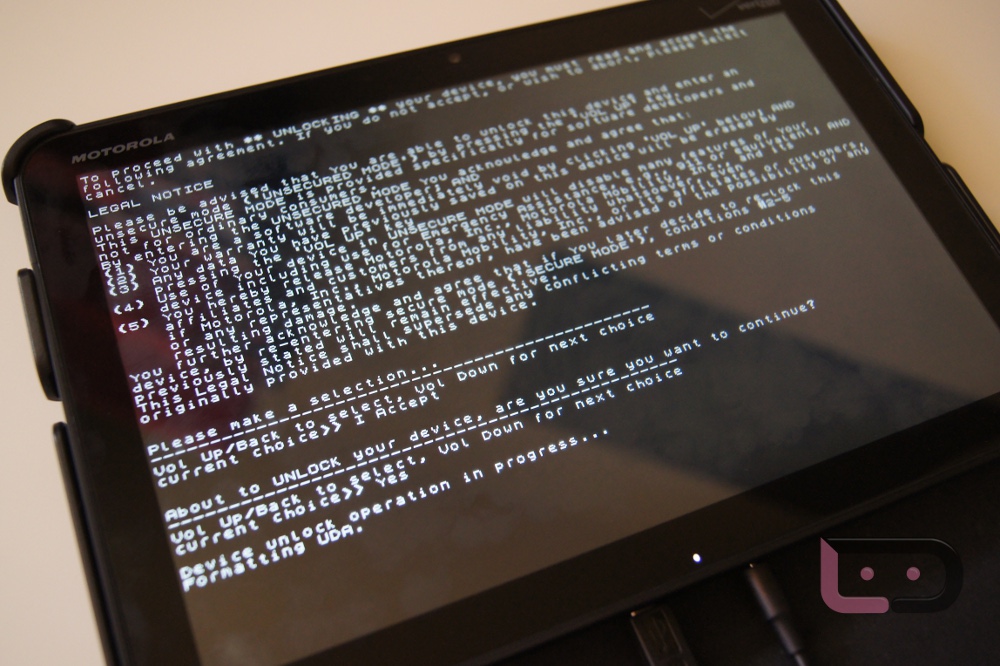
<?xml version="1.0" encoding="UTF-8"?><rss version="2.0"
	xmlns:content="http://purl.org/rss/1.0/modules/content/"
	xmlns:dc="http://purl.org/dc/elements/1.1/"
	xmlns:atom="http://www.w3.org/2005/Atom"
	xmlns:sy="http://purl.org/rss/1.0/modules/syndication/"
		>
<channel>
	<title>Comments on: How to:  Unlock the Motorola XOOM Bootloader</title>
	<atom:link href="http://www.droid-life.com/2011/02/25/how-to-unlock-the-motorola-xoom-bootloader/feed/" rel="self" type="application/rss+xml" />
	<link>http://www.droid-life.com/2011/02/25/how-to-unlock-the-motorola-xoom-bootloader/</link>
	<description>An intense Android news community bringing you the latest in phones, rooting, apps, and reviews.</description>
	<lastBuildDate>Sun, 19 May 2013 06:50:00 +0000</lastBuildDate>
	<sy:updatePeriod>hourly</sy:updatePeriod>
	<sy:updateFrequency>1</sy:updateFrequency>
	<generator>http://wordpress.org/?v=3.5.1</generator>
	<item>
		<title>By: jared fulton</title>
		<link>http://www.droid-life.com/2011/02/25/how-to-unlock-the-motorola-xoom-bootloader/comment-page-1/#comment-1987060</link>
		<dc:creator>jared fulton</dc:creator>
		<pubDate>Wed, 01 Aug 2012 00:45:00 +0000</pubDate>
		<guid isPermaLink="false">http://www.droid-life.com/?p=27116#comment-1987060</guid>
		<description><![CDATA[Will this method still work wirh jelly bean?]]></description>
		<content:encoded><![CDATA[<p>Will this method still work wirh jelly bean?</p>
]]></content:encoded>
	</item>
	<item>
		<title>By: Sweetmontreal Com</title>
		<link>http://www.droid-life.com/2011/02/25/how-to-unlock-the-motorola-xoom-bootloader/comment-page-1/#comment-1663578</link>
		<dc:creator>Sweetmontreal Com</dc:creator>
		<pubDate>Thu, 03 May 2012 12:16:00 +0000</pubDate>
		<guid isPermaLink="false">http://www.droid-life.com/?p=27116#comment-1663578</guid>
		<description><![CDATA[Great feature............

 Thanks
 
]]></description>
		<content:encoded><![CDATA[<p>Great feature&#8230;&#8230;&#8230;&#8230;</p>
<p> Thanks<br />
 </p>
]]></content:encoded>
	</item>
	<item>
		<title>By: Sean Ottaway</title>
		<link>http://www.droid-life.com/2011/02/25/how-to-unlock-the-motorola-xoom-bootloader/comment-page-1/#comment-1486837</link>
		<dc:creator>Sean Ottaway</dc:creator>
		<pubDate>Thu, 08 Mar 2012 23:41:00 +0000</pubDate>
		<guid isPermaLink="false">http://www.droid-life.com/?p=27116#comment-1486837</guid>
		<description><![CDATA[im stuck on the shift+right click command prompt i cant open one someone plz help me!]]></description>
		<content:encoded><![CDATA[<p>im stuck on the shift+right click command prompt i cant open one someone plz help me!</p>
]]></content:encoded>
	</item>
	<item>
		<title>By: Darknessabides</title>
		<link>http://www.droid-life.com/2011/02/25/how-to-unlock-the-motorola-xoom-bootloader/comment-page-1/#comment-1349711</link>
		<dc:creator>Darknessabides</dc:creator>
		<pubDate>Mon, 30 Jan 2012 05:53:00 +0000</pubDate>
		<guid isPermaLink="false">http://www.droid-life.com/?p=27116#comment-1349711</guid>
		<description><![CDATA[it won&#039;t bring up the type....It&#039;s just the Dual Core screen with Starting fastboot at the top...Someone help! I can&#039;t turn it off]]></description>
		<content:encoded><![CDATA[<p>it won&#8217;t bring up the type&#8230;.It&#8217;s just the Dual Core screen with Starting fastboot at the top&#8230;Someone help! I can&#8217;t turn it off</p>
]]></content:encoded>
	</item>
	<item>
		<title>By: Shter26</title>
		<link>http://www.droid-life.com/2011/02/25/how-to-unlock-the-motorola-xoom-bootloader/comment-page-1/#comment-1170137</link>
		<dc:creator>Shter26</dc:creator>
		<pubDate>Fri, 16 Dec 2011 17:14:00 +0000</pubDate>
		<guid isPermaLink="false">http://www.droid-life.com/?p=27116#comment-1170137</guid>
		<description><![CDATA[Hi,
My XOOM cannot be power up. I already tried &quot;volume up and power bottom&quot; solution. Did not work.
Any idea? 
Thank in advance]]></description>
		<content:encoded><![CDATA[<p>Hi,<br />
My XOOM cannot be power up. I already tried &#8220;volume up and power bottom&#8221; solution. Did not work.<br />
Any idea? <br />
Thank in advance</p>
]]></content:encoded>
	</item>
	<item>
		<title>By: Naj1978</title>
		<link>http://www.droid-life.com/2011/02/25/how-to-unlock-the-motorola-xoom-bootloader/comment-page-1/#comment-1006515</link>
		<dc:creator>Naj1978</dc:creator>
		<pubDate>Thu, 17 Nov 2011 07:59:00 +0000</pubDate>
		<guid isPermaLink="false">http://www.droid-life.com/?p=27116#comment-1006515</guid>
		<description><![CDATA[Okay well I hope someone might see this. I know it has been awhile but I just got a demo xoom and I&#039;m unable to remove the demo software on it so I was going to try this and then eventually root it as well to fix my issue. 

I was hoping to find a video tutorial on youtube but they seem to assume that you already know what your doing. This has actually been the best written instructions I have come across. 

So here is my issue. I have downloaded everything I&#039;m supposed to and I can get to step 5 with no problem but then when I type in fastboot oem unlock it pops up a warning saying there is no valid external or internal path or something along those lines, I&#039;m not at my main computer right now. Any ideas what I&#039;m doing wrong or how I could fix it? 

I read on another page that it is possible that the command won&#039;t work if I&#039;m not using the actual motorola cable that came with the xoom. I&#039;m actually using the cable from my LG android phone. If that is the case it shouldn&#039;t work for when I type in adb reboot bootloader right? However it does work and I get to the screen showing,  “Starting Fastboot Protocol Support.” 

Anyway if anyone has any suggestions I would really appreciate it. Thanks. 
 ]]></description>
		<content:encoded><![CDATA[<p>Okay well I hope someone might see this. I know it has been awhile but I just got a demo xoom and I&#8217;m unable to remove the demo software on it so I was going to try this and then eventually root it as well to fix my issue. </p>
<p>I was hoping to find a video tutorial on youtube but they seem to assume that you already know what your doing. This has actually been the best written instructions I have come across. </p>
<p>So here is my issue. I have downloaded everything I&#8217;m supposed to and I can get to step 5 with no problem but then when I type in fastboot oem unlock it pops up a warning saying there is no valid external or internal path or something along those lines, I&#8217;m not at my main computer right now. Any ideas what I&#8217;m doing wrong or how I could fix it? </p>
<p>I read on another page that it is possible that the command won&#8217;t work if I&#8217;m not using the actual motorola cable that came with the xoom. I&#8217;m actually using the cable from my LG android phone. If that is the case it shouldn&#8217;t work for when I type in adb reboot bootloader right? However it does work and I get to the screen showing,  “Starting Fastboot Protocol Support.” </p>
<p>Anyway if anyone has any suggestions I would really appreciate it. Thanks. </p>
]]></content:encoded>
	</item>
	<item>
		<title>By: me</title>
		<link>http://www.droid-life.com/2011/02/25/how-to-unlock-the-motorola-xoom-bootloader/comment-page-1/#comment-958375</link>
		<dc:creator>me</dc:creator>
		<pubDate>Tue, 08 Nov 2011 21:40:00 +0000</pubDate>
		<guid isPermaLink="false">http://www.droid-life.com/?p=27116#comment-958375</guid>
		<description><![CDATA[when it comes to the &quot;fastboot oem unlock&quot; it doesn&#039;t recognize it and does nothing
]]></description>
		<content:encoded><![CDATA[<p>when it comes to the &#8220;fastboot oem unlock&#8221; it doesn&#8217;t recognize it and does nothing</p>
]]></content:encoded>
	</item>
	<item>
		<title>By: 022579</title>
		<link>http://www.droid-life.com/2011/02/25/how-to-unlock-the-motorola-xoom-bootloader/comment-page-1/#comment-954113</link>
		<dc:creator>022579</dc:creator>
		<pubDate>Tue, 08 Nov 2011 08:32:00 +0000</pubDate>
		<guid isPermaLink="false">http://www.droid-life.com/?p=27116#comment-954113</guid>
		<description><![CDATA[&quot;normal&quot; users maybe shouldn&#039;t have their device unlocked. I unlock mine because it gives me that much more to go for, to reach for. I am not satisfied with what someone gives me and tells me that&#039;s what I get (which is the #1 reason I&#039;m not an Apple fan)]]></description>
		<content:encoded><![CDATA[<p>&#8220;normal&#8221; users maybe shouldn&#8217;t have their device unlocked. I unlock mine because it gives me that much more to go for, to reach for. I am not satisfied with what someone gives me and tells me that&#8217;s what I get (which is the #1 reason I&#8217;m not an Apple fan)</p>
]]></content:encoded>
	</item>
	<item>
		<title>By: Chelun</title>
		<link>http://www.droid-life.com/2011/02/25/how-to-unlock-the-motorola-xoom-bootloader/comment-page-1/#comment-786527</link>
		<dc:creator>Chelun</dc:creator>
		<pubDate>Fri, 07 Oct 2011 16:14:00 +0000</pubDate>
		<guid isPermaLink="false">http://www.droid-life.com/?p=27116#comment-786527</guid>
		<description><![CDATA[when i did step number 3 it gave me an error:
C:Program Files (x86)Androidandroid-sdkplatform-tools&gt;adb reboot bootloadererror: protocol fault (no status)
But it reboot my xoom, but when i did step number 6, it said:
C:Program Files (x86)Androidandroid-sdkplatform-tools&gt;fastboot oem unlockand nothing happened!!!
Please some help!!!!]]></description>
		<content:encoded><![CDATA[<p>when i did step number 3 it gave me an error:<br />
C:Program Files (x86)Androidandroid-sdkplatform-tools&gt;adb reboot bootloadererror: protocol fault (no status)<br />
But it reboot my xoom, but when i did step number 6, it said:<br />
C:Program Files (x86)Androidandroid-sdkplatform-tools&gt;fastboot oem unlockand nothing happened!!!<br />
Please some help!!!!</p>
]]></content:encoded>
	</item>
	<item>
		<title>By: Ghost Stalker</title>
		<link>http://www.droid-life.com/2011/02/25/how-to-unlock-the-motorola-xoom-bootloader/comment-page-1/#comment-546259</link>
		<dc:creator>Ghost Stalker</dc:creator>
		<pubDate>Tue, 16 Aug 2011 20:34:00 +0000</pubDate>
		<guid isPermaLink="false">http://www.droid-life.com/?p=27116#comment-546259</guid>
		<description><![CDATA[I noticed something, The LTE modem status is off when you hold both volume buttons and the power button on power up.  I think there might be a way to turn it on without sending it in.  Why would they put in a hardware slot without supporting software?  With an unlocked bootloader, there might be a way to change the setting to on.  I will investigate and let y&#039;all know what I find.]]></description>
		<content:encoded><![CDATA[<p>I noticed something, The LTE modem status is off when you hold both volume buttons and the power button on power up.  I think there might be a way to turn it on without sending it in.  Why would they put in a hardware slot without supporting software?  With an unlocked bootloader, there might be a way to change the setting to on.  I will investigate and let y&#8217;all know what I find.</p>
]]></content:encoded>
	</item>
	<item>
		<title>By: Jaybone5k</title>
		<link>http://www.droid-life.com/2011/02/25/how-to-unlock-the-motorola-xoom-bootloader/comment-page-1/#comment-257954</link>
		<dc:creator>Jaybone5k</dc:creator>
		<pubDate>Mon, 28 Mar 2011 07:20:00 +0000</pubDate>
		<guid isPermaLink="false">http://www.droid-life.com/?p=27116#comment-257954</guid>
		<description><![CDATA[i&#039;m unable to connect my xoom to the sdk for some reason, it doesn&#039;t see that i&#039;m connect when i do the commands]]></description>
		<content:encoded><![CDATA[<p>i&#8217;m unable to connect my xoom to the sdk for some reason, it doesn&#8217;t see that i&#8217;m connect when i do the commands</p>
]]></content:encoded>
	</item>
	<item>
		<title>By: Wes Campbell</title>
		<link>http://www.droid-life.com/2011/02/25/how-to-unlock-the-motorola-xoom-bootloader/comment-page-1/#comment-257254</link>
		<dc:creator>Wes Campbell</dc:creator>
		<pubDate>Sat, 26 Mar 2011 22:23:00 +0000</pubDate>
		<guid isPermaLink="false">http://www.droid-life.com/?p=27116#comment-257254</guid>
		<description><![CDATA[it&#039;s easier than this... z4root... ]]></description>
		<content:encoded><![CDATA[<p>it&#8217;s easier than this&#8230; z4root&#8230; </p>
]]></content:encoded>
	</item>
	<item>
		<title>By: nepholex</title>
		<link>http://www.droid-life.com/2011/02/25/how-to-unlock-the-motorola-xoom-bootloader/comment-page-1/#comment-238215</link>
		<dc:creator>nepholex</dc:creator>
		<pubDate>Tue, 08 Mar 2011 04:20:00 +0000</pubDate>
		<guid isPermaLink="false">http://www.droid-life.com/?p=27116#comment-238215</guid>
		<description><![CDATA[Whaaaaatt?]]></description>
		<content:encoded><![CDATA[<p>Whaaaaatt?</p>
]]></content:encoded>
	</item>
	<item>
		<title>By: Baitz4</title>
		<link>http://www.droid-life.com/2011/02/25/how-to-unlock-the-motorola-xoom-bootloader/comment-page-1/#comment-237231</link>
		<dc:creator>Baitz4</dc:creator>
		<pubDate>Sun, 06 Mar 2011 23:00:00 +0000</pubDate>
		<guid isPermaLink="false">http://www.droid-life.com/?p=27116#comment-237231</guid>
		<description><![CDATA[I did the unlock successfully and then when i try to go into the market i get an &quot;your client is out-of-date, it should be updated automatically shortly.&quot; error and it never updates... heelp please.]]></description>
		<content:encoded><![CDATA[<p>I did the unlock successfully and then when i try to go into the market i get an &#8220;your client is out-of-date, it should be updated automatically shortly.&#8221; error and it never updates&#8230; heelp please.</p>
]]></content:encoded>
	</item>
	<item>
		<title>By: Elyh Lapetina</title>
		<link>http://www.droid-life.com/2011/02/25/how-to-unlock-the-motorola-xoom-bootloader/comment-page-1/#comment-237203</link>
		<dc:creator>Elyh Lapetina</dc:creator>
		<pubDate>Sun, 06 Mar 2011 20:08:00 +0000</pubDate>
		<guid isPermaLink="false">http://www.droid-life.com/?p=27116#comment-237203</guid>
		<description><![CDATA[thats not true anymore...]]></description>
		<content:encoded><![CDATA[<p>thats not true anymore&#8230;</p>
]]></content:encoded>
	</item>
</channel>
</rss>

<!-- Performance optimized by W3 Total Cache. Learn more: http://www.w3-edge.com/wordpress-plugins/

Page Caching using apc
Database Caching 6/27 queries in 0.220 seconds using apc
Object Caching 658/671 objects using apc

 Served from: www.droid-life.com @ 2013-05-19 00:12:56 by W3 Total Cache -->