

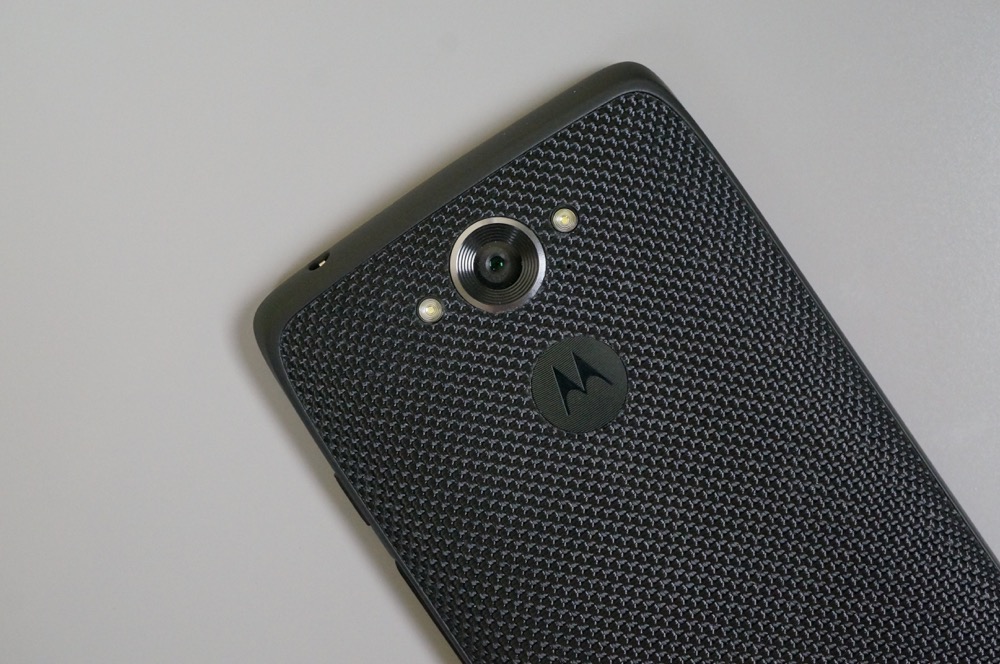

With Android 5.0, Google introduced support for guest accounts and additional users on phones. This is the type of feature that may not be of use to everyone at all times, but it certainly is a welcomed addition to a maturing platform, as it’s there for those who need it. When Google pushed Android 5.1 a few months after 5.0, they didn’t remove the feature. Although, if you are a DROID Turbo owner who recently updated to Android 5.1 (it’s rolling out now to all by the way), you are probably wondering where it is.
According to numerous readers of ours who have received the update either through the soak or today’s official rollout, Guest mode and multi-user account setup is no where to be found on the DROID Turbo post-update. While we don’t have a Turbo in house to check ourselves, we had readers not only look throughout settings, but also perform a search through Lollipop’s new settings search functionality. It’s not there. If you tap on your avatar in the notification pulldown, which would normally be a way to quickly switch users in Lollipop, users are being greeted with a pop-up G+ contact card of themselves.
We have also been told that members of the soak test have taken to Motorola’s forums to express their disappointment in this feature being left out.
The whole situation is odd because Verizon listed it as a feature on the phone in their changelog for the update. The images below are clearly from the Turbo too, because the Turbo has capacitive touch buttons that won’t show in screenshots, just like we are seeing here:
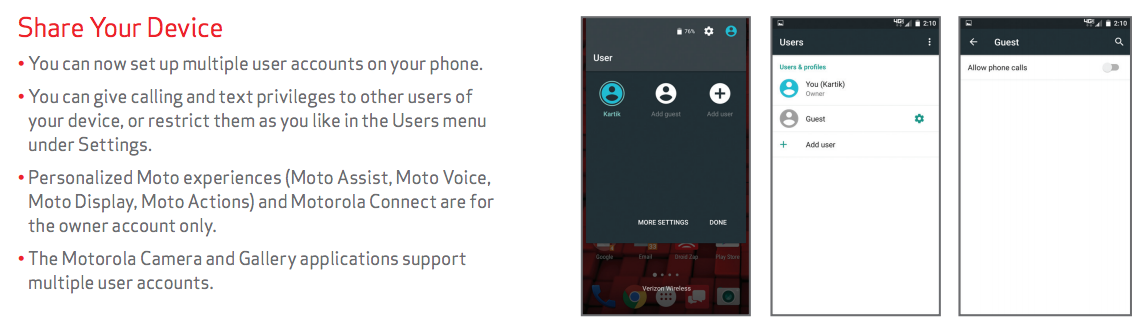
Motorola, on the other hand, did not list it.
Here is the feature in action on a stock Android device, which is basically what the DROID Turbo is.
[responsive_vid]
Tough to say why it’s gone or if it’ll arrive in a later update. But for now, if you were hoping to take advantage of Guest mode or setup accounts for additional users on your Turbo, you are out of luck.
I was wondering what that was, it just showed up last night but how do I get it off my notification bar? When I click on it nothing happens and I get contact doesnt exist. I have no use for it and want it off my bar help please.
Who really cares. This phone is rock solid. I have never had a phone I was as satisfied with as the Droid Turbo on 5.1. Coming to this from an HTC M8 was like night and day. Most times I avoided looking at my M8 because I hated it for some reason…….. except during fantasy football of course.
This update is driving me nuts. Can’t get rid of the intrusive floating notifications, the google search bar keeps shifting up on my screen so i can’t see it, can’t disable the multilanguage quick switch key on the keyboard like you used to. I really haven’t followed lollipop at all, but this is really what people were excited for?
If I had to guess, its Verizon not Motorola that is keeping the feature out. It is a feature that probably broke Verizon backup.
Who cares about guest and multi user support? I’m the only one that is using this device. I love the update!
Is it human nature to always dig for something to bitch about no matter how good an update is?
I would get it if we were talking about an update to a tablet.
I’m the only person using my phone. I think I speak for the consumers who bought this device when I say this, nobody else is using my phone. I don’t want other people touching my phone it’s mine get your own. Of the 5 people this affects wah. Honestly who shares phones? My girl uses iPhone I use Android. For the general user base this is true. I don’t know a single person who shares phones with their significant other. 99.9% of couples have their own phones. And I’m certainly not sharing with kids, kids are destructive. I can’t think of a single reason this “feature” would be useful in any way.
Uh huh. So based on your personal preferences this feature shouldn’t be included in phones for Anyone?
Name 1 good reason for it that the target audience of this phone will ever use it for. I just wish they saved space and removed all the vzw bloat as well.
Letting your kids use it. There’s one.
That’s a really bad reason. I take it you don’t have kids. They’re clumsy and destructive, I’m not letting my 5 year old anywhere near a 700 dollar pocket computer that he can drop on the pavement, get wet, throw in a toilet. I’d most likely let him play with a cheap 50 dollar Android phone… Stupid bad reason… Next…
So here’s an issue for some of us. Can’t setup Android for Work with this update. When it was 4.4.4 you could at least install the app and use it, but now that’s no longer possible because you arent supposed to need it with 5.0 and >.
I don’t see smart unlock any longer….
Just found it… had to enable it in Trusted Agents.
This just in, Motorola phones are NOT Nexus phones
The little blue profile icon wouldn’t do anything for me until I went into contacts and set up my contact info. Now when I select the blue profile button it simply brings up my contact card.
Never buying a moto device again (besides low end throw away phones)… I want to root for them, but they constantly let me down.
Every phone seems to have it’s downsides. The great thing about Motorola phones, in the past at least, was the superior radios.
Did anyone lose signal with their update?
On July 1st I lost all signal for a couple of hours around 4 O’Clock. My indicator on the right of my notification bar showed a couple of bars and an exclamation point. I couldn’t make a call or access data. Then today I heard from a friend that VZWs network was down in my area. Central PA.
Turbo user here,
What about that stock Android security feature where it uses a combination of face unlock & PIN/pattern/password? (eg. it uses face unlock by default, but when it doesn’t work, it automatically prompts for an alternate password method.) it’s a really nice feature actually. You don’t have to enter a password 3/4 of the time!
I had that feature AND Lollipop in *December* on my old rooted Note II.
This phone man… If it weren’t for that wondrous active display sensor feature….
It’s there, you need to go to Settings > Security > Trust Agents and turn on Smart Lock
Thanks!
Less dissapointed now.
Droid Life has been complaining about the lack of updates for more months than I can count, and they don’t have a device in house to test this?
As a Turbo owner, I could care less about not having this feature. I will never use it.
*couldn’t care less*
Boom! Grammared
Happy now?
Even so, it should still be there.
Don’t the galaxies also not have this feature?
LG G3 had this taken out too.
Yup, but I can SEE it if I install Nova Launcher and go through the shortcuts/actions. It’s in there on my Note Edge. Just can’t do anything with it. The “add account” is missing.
I guess it’s useful for others, but I really don’t see a point in a guest/multi user feature for my phone; it’s not like I’m going to share use of it. It makes more sense on something like a tablet, which is much more likely to be share by multiple people.
Parents give their kids phones all the time. This feature should be on every phone by default. It’s a great feature that is perfect if you need it and completely out of the way if you don’t.
Fair point, never thought about sharing it with your kids.
Maybe we’ll get it next July, when we get the 5.1.1 update? ….
Maybe it simply conflicted with all the crap Motorola was forced to load on there by Verizon. That wouldn’t surprise me in the least.
Their bloat is on plenty of other devices that still have guest mode.
The way it is completely missing like this leads me to believe Moto screwed up and probably has a boolean in their build process to enable it or disable.
Would a fairly large feature like that really be disabled or enabled with a simple boolean? Seems far too easy to mess that one up.
If their overlay was setup that way. I can’t fathom any other way to accidentally miss that unless it was intentional.
turbo owners waited 9 months for lollipop and complain about 1 feature. beggers cant be choosers
To be fair, if you publicly advertise a feature of your software and then don’t include it, you’d be a *little* pissed wouldn’t you? And as you said… it did take about 9 months.
True, but its an advertised feature.
Pretty obvious disconnect between Moto and VZW… Verizon actually has proper screenshots and lists it in their changlog, meaning they must have tested it.
Yeah cause Screenshots means it’s running on an actual real live device.
Are you pretending the change log doesn’t exist too?
It’s probably a small number of users who utilize those features, but it’s still stupid of Moto to have left them out. Shame on them.
Its particularly useful for developers who hand their devices over to testers 😉 I could have sworn I saw that someone posted a way to get at it via settings, just not the notification shade or lockscreen.
I was just about to ask why anyone would want a “guest” mode on their device. Maybe I’m just paranoid, but even with a guest mode I wouldnt let anyone hang onto my phone for more than a quick second. This is a fair point, I hadnt thought about Devs who would be handing out their app for people to try.
I use Guest mode all the time for my kids on my N6. They watch YouTube/YouTube Kids and don’t mess with my side of the phone.
Great feature, sorry Turbo users
This.
How else can I keep my kids from seeing my X-rated Tumblr accounts and Porn Star Tweets.
RIGHT??
By being a good parent and not letting your kids touch your phone? Just a thought.
Pin YouTube?
I do that also, but button mashing children can get passed this.
They cracked your phone password/PIN? They work for the NSA?
Yes, I’m hoping my investment in these children will eventually pay me back when they apply 🙂
Yeah, hopefully they don’t put you in a home. LOL
Not sure if you have kids, but with them everything is instantaneously. If they have a PIN/lock pattern blocking them from clicking, your phone is done. I give them Guest Mode to have full control over the device that they can mess up as they see fit. Younger kids (typically under 3) can use pinning effectively, but the older ones want options.
Whatever works for you! I haven’t had anyone break a pinned app and/or get into my password protected device yet. Guess I’m just lucky.
Have you watched them do it so you can prevent it/report the exploit? It isn’t supposed to be defeatable.
I think the older culprit watches my input and then replicates (I even turned off the show pattern button). Need to remember to hide my lock pattern when unlocking.
…Except another shortsight is that pinning doesn’t work if you use Smart Lock with trusted devices/locations.
It’s great way to share your device between family members and close friends. I like to log into my families devices under my account to show them paid apps and what they can do sometimes.