

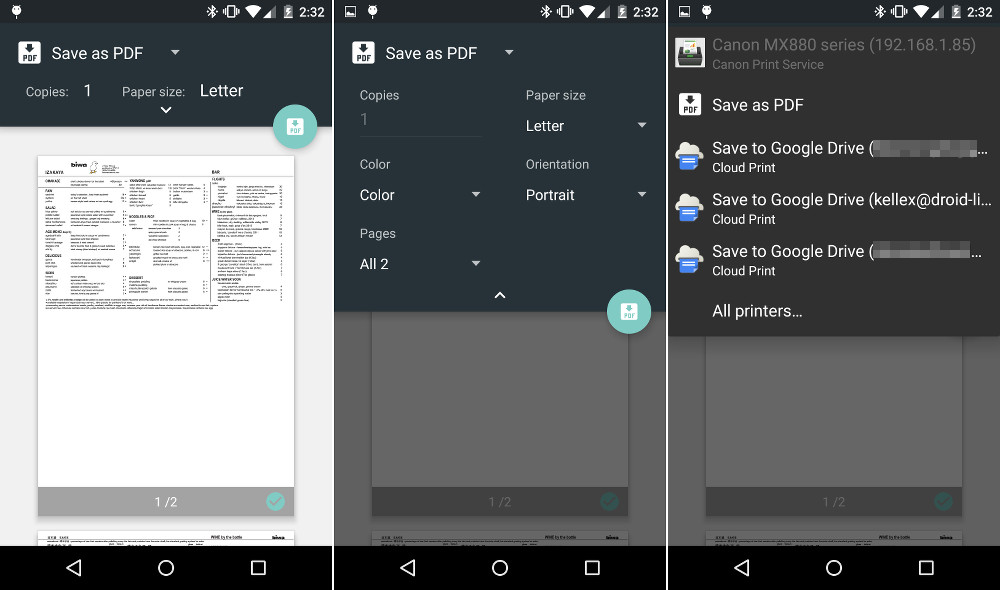

In Android 5.0 “Lollipop,” Google included a brand new printing UI that now shows you a print preview before you either print a document to your local printer, save as a PDF to your device, or save to the cloud. You can manually select and de-select individual pages as well. These may seem like a small changes, especially to those who rarely print anything and hold an actual piece of paper these days, but the UI is incredibly well done and is yet another example of how far smartphone operating systems have come.
With the previous printing UI, the only screen you would see was a pop-up that asked for you to choose from a handful of pulldown menus and settings. It worked. It got the job done. But again, this new UI with full print previews, a Material Design layout, the option to select or de-select specific pages, and more, is pretty nice.
These little things are adding up to Lollipop being our favorite Android release yet.
Here are the rest of the Android 5.0 feature highlights we have covered so far.



and still no double sided option, is it so hard to implement?
Can you select what page to print from a multi-tabbed Google Sheets document? Not on KitKat.
Slightly off-topic, but haven’t seen any mention of it anywhere on these “Android 5.0 Feature” segments. Any indication that “Universal Data Controls” will be included in 5.0?
I can’t get over how awful the new onscreen buttons are.
its android
just change it
Is there an option to print directly to a printer like in iOS (can’t believe I said that) instead of the print job having to go out to the internet and then back to the LAN?
KitKat introduced a new printing framework that lets users install print services from manufacturers. These print services include the necessary drivers to allow devices to print directly to the printer over LAN.
Here are the print services for some popular vendors:
Canon: https://play.google.com/store/apps/details?id=jp.co.canon.android.printservice.plugin
Epson: https://play.google.com/store/apps/details?id=com.epson.mobilephone.android.epsonprintserviceplugin
HP: https://play.google.com/store/apps/details?id=com.hp.android.printservice
Samsung: https://play.google.com/store/apps/details?id=com.sec.app.samsungprintservice
Google Cloud Print: https://play.google.com/store/apps/details?id=com.google.android.apps.cloudprint
Also, in the third screenshot above, it looks like there is a network printer in the list (though disabled). So yes, it’s still an option in Lollipop.
Awesome find, thank you!
Wish you could reduce size of document, too! Alas, that option isn’t even available on most desktops.
Hallelujah. This was desperately needed
Nice. The Xperia Z3 just got the Android 5.0 update.
sike 🙁
Nobody wouldve believe that either way. Its not even officially out for Nexus devices lool
.