

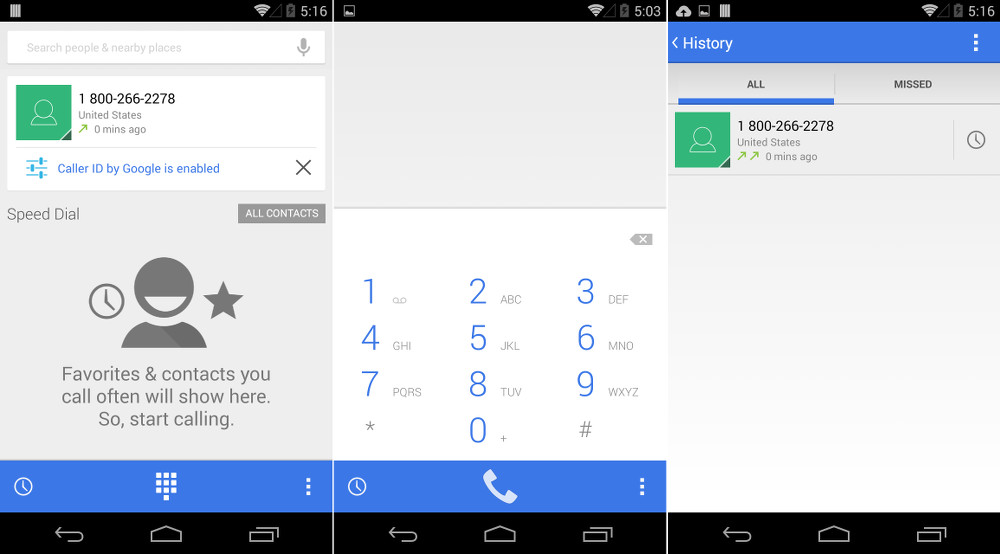

Android 4.4.3 is going to slowly rollout over the next couple of days, now that the update has hit AOSP and the factory images have been released. As that happens and more people get their hands on the new goodness, we will undoubtedly find subtle changes here and there that Google has tossed in. The first that we are noticing is a brand new skinned dialer that carries a much lighter theme than we saw in builds below 4.4.3.
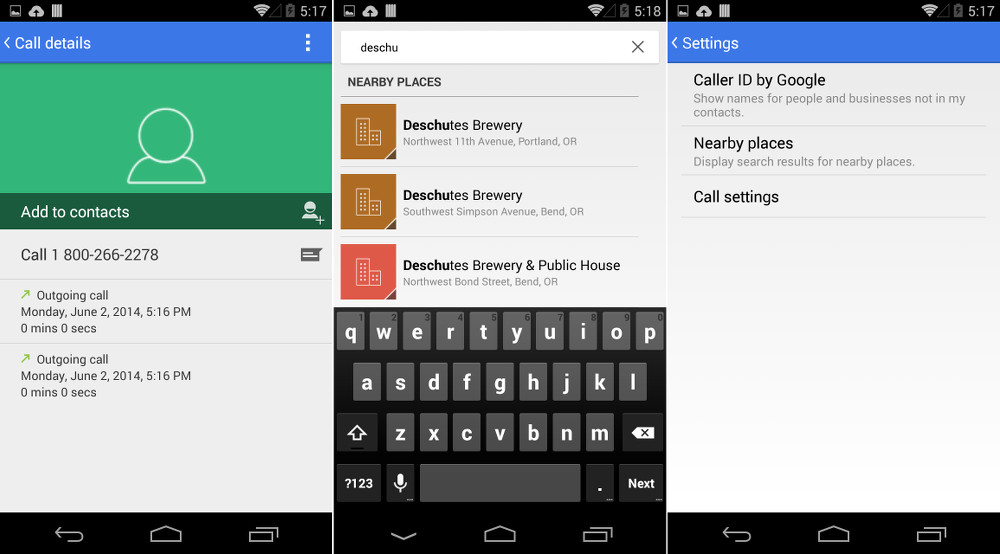
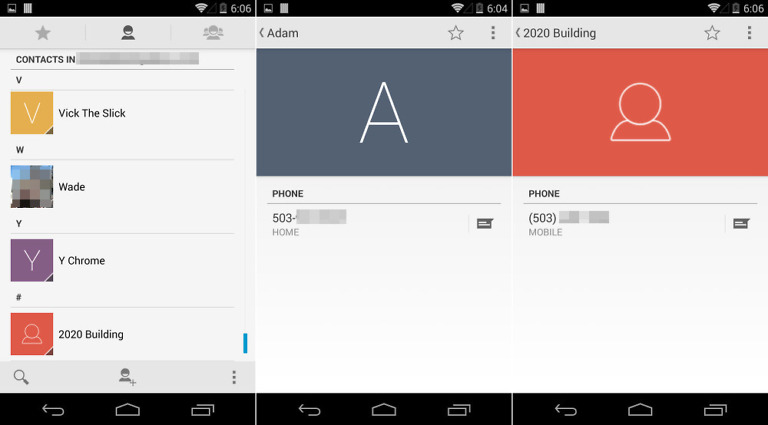
This dialer has actually been seen before, thanks to the official @GoogleNexus Twitter account that accidentally used a screenshot from the new dialer back in April. The new skin, as you can see, includes all sorts of blue, white, and grey, rather than the blue, black, and white combo that we have seen up until now. There are also subtle changes to the history page, where a history button has been used in favor of the previous dialer’s call logo. You will see new green colors in places where you don’t have a contact image. Previously, Google used a grey icon.
So not a huge change, but definitely a bunch of little things to go along with the color switch.
If you don’t want to wait for the OTA to hit your device, you can always flash a factory image to get things like this new dialer. Just keep in mind that flashing a factory image will completely wipe your phone clean. You will lose everything.
This is awful. Just continues the trend to the plain (as in plain boring) design.
Well I sure hope there is more to 4.4.3 than this, in my opinion, useless change (a few better dialers on the Play Store).
Google rocks!!!
The new dialer seems impressive. Well, I still not updated my Nexus 5 with this much awaited 4.4.3 KitKat version. I am facing quick battery drainage problem from
last 4 months due to camera bug. Once I fully charged my device on qi charger, I will definitely update this version in order to get rid of this issue.
can we do caller ID by google on non-nexus 5s with this? I guess there’s no way you would know, but wondering if theres rumors about that.
Deschutes makes some super tasty beers!
I digg the search for epic brew!
Oh, and the new dialer.
a dialer..BFD.
I wish they would bring back the swipe gesture to switch between contacts, dialer and history.
Android FTW !!!
Would it be available for 4.4.2 kit Kat in the devices like moto g !!!!
i like the colour scheme of the dialer now, dont like the white. much rather have the black
I’m a dark fan my self. Love the sense dialer for that
Hopefully the Moto X gets it fast again like they have with recent updates!
Very interested to see how long Moto takes with this update. It’s one thing to get a couple quick updates out and impress some people, but to do it consistently for every update, now that’s really impressive.
yeah we shall see. I’d be surprised actually despite what happened the past couple updates.
I’d be surprised as well. The Moto X is pretty far into its life cycle and Motorola is probably hard at work on the X+1. I doubt they’ll give the X as much attention when no one’s watching as they did right after it was released.
But like I said, if they do, then I’ll be really impressed.
I’m not counting on it. They took a while for 4.4.2, or at least the Verizon variant did. I’m wondering if they’ll get the Google Dialer as well, considering it wasn’t included in 4.4 initially.
No offense, but I’d blame Verizon for that one. Not Moto.
No offense taken. You’re right, I just can’t remember if it took a while for other carriers to jump on it for the Moto X or not.
This helped take some of the sting out of the Blackhawks losing last night 🙂
Google just told Tim Crook how do you like them Apples now.
over a dialer?
get over your self. google is more professional then that
Yes they are, but apparently Apple isn’t.
Can we side load this new dialer app to replace my current one?
Yes and available at Android police with work around.
This is what I get for not researching the locked bootloader on my VZW Note 3. Touchwiz makes my soft parts twitch. I miss AOSP on my GS3, but can’t have that back because my chick is loving CM11 over her now sold iPhone 5. Meh.
Sorry but…meh?
People are still saying “meh”?
I didn’t know what else to say!
Then meh it is!
Rather get a Google Voice update.
apk has to be up somewhere
This update removes almost all similarity with the Ice Cream Sandwich dialer, which itself was radically different from the Gingerbread dialer. Each evolves in visual polish, yet they maintain (and even improve!) their ease of use.
Over in Apple-land all they can manage is to back-port Android features and make every single UI element uncomfortably flat. lol
Ha! That gingerbread dialer brings back some memories.
samsung still uses those top tabs…
Wow I forgot about pre-ICS dialer/UI. Oh the uggliness, Oh the OG Droid..
In most ways the ICS dialer was a (good) skin of the GB dialer. Different tabs, but largely the same underpinnings.
The KK dialer is a completely different beast.
Can’t wait for the OTA to flash via TWRP. However, I will miss omnirom until they catch up.
If you get rid of the “-w” in the “fastboot -w update image-hammerhead-ktu84m.zip” command in the flash-all.bat file then you will not wipe your phone clean and can update by flashing the recovery image.
I guess I did not know that! And now I’m super excited to know it.
Could that cause some typical “dirty flash” issues?
Not at all if you’re coming from stock ROM (custom ROMs are very tricky).
In fact it’s an even cleaner flash than OTA since it literally reflashes your entire device partitions back to stock (with exception of system/app personal data of course).
How would one remove the “-w” in the .bat file?
http://www.howtogeek.com/176284/how-to-upgrade-your-nexus-device-without-waiting-by-flashing-a-factory-image/
Wipe cache and dalvik if you go that route
Whoever made the nakasi script is a sadistic bastard. There is an extra “fastboot erase userdata” at the beginning of the script, in addition to the -w. This was not in the hammerhead script, and I don’t remember it in the nakasi script for other images either. Remember to read the entire script, you guys.
On different sites/forums, I’m reading different instructions on how to flash factory image and I’m all confused now. This is my current device status –
Stock 4.4.2 ROM
Unlocked, Rooted
XPosed Framework + Modules
Franco Kernel latest
How do I flash the 4.4.3 factory image so that at the end, everything above remains same except I bump up to stock 4.4.3? Please help.
http://forum.xda-developers.com/google-nexus-5/general/info-nexus-5-ota-help-desk-t2523217
Thanks for the link. I had read that one already and found it more confusing than clarifying. The OP made so much effort to make everything clear though. I guess my brain is just overloaded today.
Are factory image and update zip two different things? IIRC, when I had updated to 4.4.2, the zip was some 40-50 MB and I had just flashed it like any other flashable zip. I might be going crazy, what with both Android and ios worlds throwing party on the same day.
Piece of cake! If you have the SDK installed, with ‘this’ update all you need to do is flash the boot and system images. The bootloader did not change, the kernel (boot.img) and the system changed. Been updated for a little bit now. The boot.img and system.img need to be inside the platform-tools folder to make it easier. Boot into the boot loader or plug in your phone to your device, open a command prompt inside the platform-tools folder of the sdk (shift right click). Type adb reboot bootloader hit enter, then, fastboot flash boot boot.img, enter, fastboot flash system system.img, enter, fastboot reboot, but better yet before rebooting unplug your phone and use the volume button and power button to get to your recovery and flash the supersu zip that is in your storage, wipe cache and dalvik. ENJOY!
Thanks for the detailed explanation. I now read a post on AP that explains that flashing ota zip would be easier than trying to flash factory image. I will wait for that.
That will work! As long as there has not been any changes in the system, otherwise you will get an unexpected contents error or some such thing, even if flashing in recovery. If your stock not rooted then you ‘should’ be okay!
Check out nexus root tool kit, its the easiest way
Used this method & worked like a charm, no user data lost
Also can extract the individual img files and flash them over the appropriate partitions, making sure to not flash the recovery image.
Fina-f*cking-lly
Project Hera is coming true!!
fingers crossed
What’s project Hera?
http://www.androidpolice.com/2014/04/06/rumor-googles-plan-to-bridge-chrome-android-and-search-to-do-everything-on-your-device/
Thanks. Forgot about this one =P
It’s a little sad that here of all places we have to say “Google it”.
or you could not be a dick and just explain…
settle down
“Hera” is Hindi/Urdu for diamond (in the language of Android/Chrome’s lead, Sundar).
So, we have Silver, we have Diamond. I wonder if there’s any other precious items we can expect.