

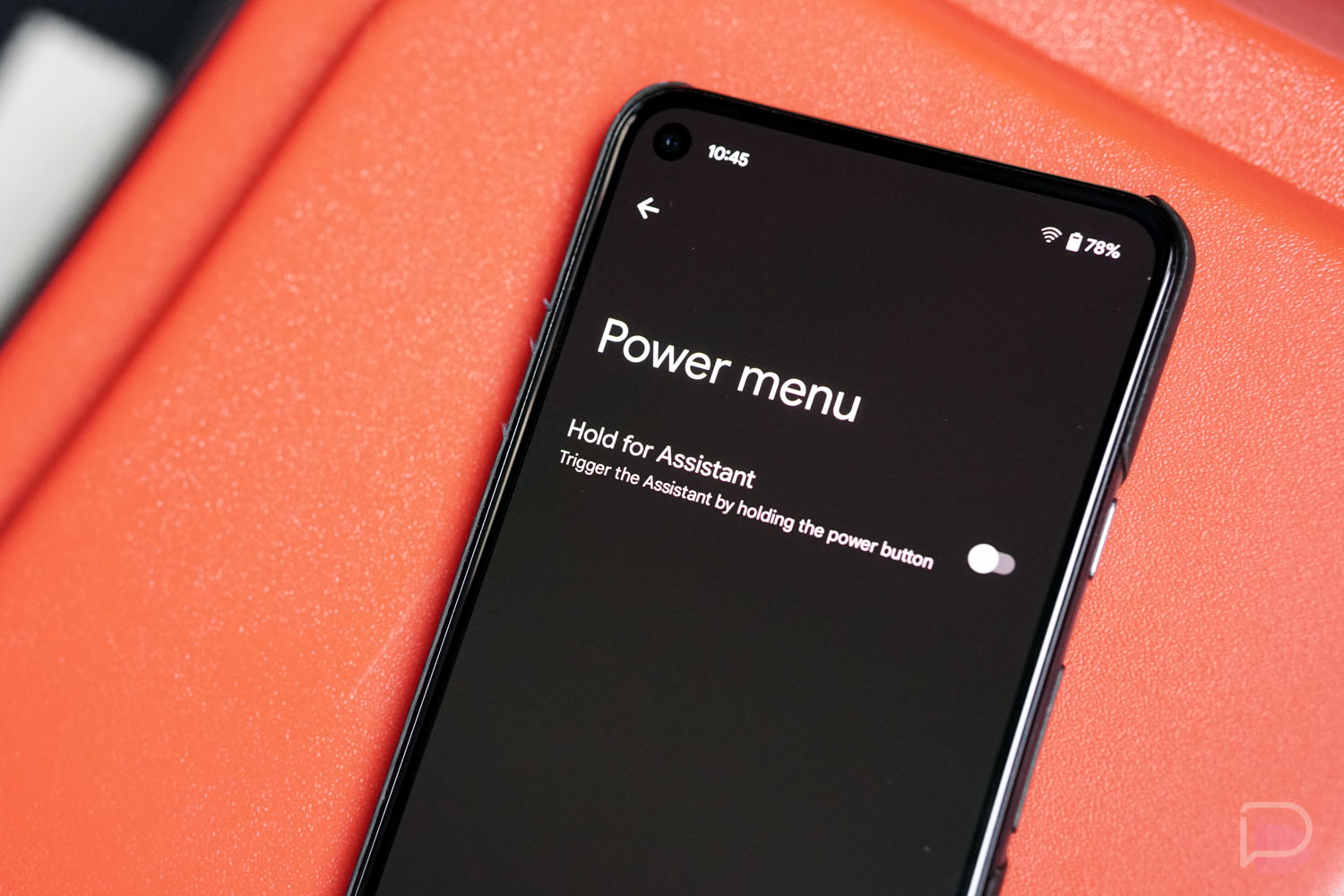

It’s no secret that Google wants you to use Google Assistant as much as possible. Not only is it a useful tool for smartphone owners to take advantage of, but it’s a way for Google to show off the smart tech they continue to advance, plus I’m sure they gather all sorts of interesting (????) data from it.
Because it’s such an important tool for Google, they are putting it in everything and everywhere, so that if you are in need of help, the Assistant is there. The thing is, it’s starting to feel like we’re getting the Google Assistant in too many places. Like, some of these areas could be used for other stuff, right?
As example, this reddit thread is pretty pissed right now at Google for removing the Home/Device Controls section from the power menu in Android 12 and turning it into a Quick Settings shortcut. The reason Google is removing this option from the power menu seems to be because they want the power button to be a shortcut to accessing Google Assistant. In the new Android 12 Beta 2, you can indeed set power to access it.
I can’t say I blame folks for being upset about this change as we basically had a single Android release with that power button shortcut and I finally started getting used to it, only to now have to change my phone behavior again. Going forward with Android 12, those home controls that I use every night to adjust lights and the thermostat are now in a new place, all because Google wants the Assistant in another spot.
If you own a Google Pixel right now, here are all of the ways (I can currently think of) you can access Google Assistant:
- Shouting “OK Google” or “Hey Google”
- Tapping the Assistant shortcut in the bottom search bar of the Pixel Launcher
- Swiping in from either the left or right corner
- Long-pressing the home button (with 3-button setup)
- Tapping the Assistant app in the app drawer
- Squeezing the side of your phone (Pixel 2-4)
- Tapping the mic icon in the Google Assistant Snapshot
- Long-pressing the power button (new)
- Using the new Quick Tap gesture (new)
Now, I can understand adding Assistant as a shortcut to the power button. If your phone is in your pocket and you need the Assistant yet don’t want to shout at it, one of the quickest ways to get into it would be long-pressing power. But if you don’t plan on accessing that way because there are all of those ways above I just mentioned, and rather than Google erasing a bunch of stuff from the power menu they just introduced in Android 11, maybe they could have given us more control over long-press on power? Because they also removed Google Pay from the power menu and instead put it as a shortcut on the lock screen for some reason.
I think on one hand I get why Google is putting Assistant in as many places as possible. I actually like that we can find it so easily. On the other hand, we should be able to replace it in places as we see fit. The new Quick Tap gesture, as an example, can be fully customized to do a number of actions while the power button shortcut can’t. If I’m remembering correctly, the squeezy Active Edge feature never did let you customize to any app and was really just an Assistant shortcut.
Maybe the real question should be, “Can there be too many Google Assistant options?” Maybe some of you want the 9 or 10 ways you currently have because access should never be too far away. I just wish we had a bit more control. Google gives it to us in some places but not others.

i really wish i could remap a few of these shortcuts because i literally only use the search bar to get to the assistant (on purpose anyway). the power menu was a bit of a mess as it was because Pay isn’t available with any worthwhile banks here, but there’s just so much of android that *could* be a cool framework for any app to take advantage, like eclair-era contact and photo syncing, and is instead just an annoying way for google to push their own services. it obviously makes business sense, but it hurts the platform.
i really wish i could remap a few of these shortcuts because i literally only use the search bar to get to the assistant (on purpose anyway). the power menu was a bit of a mess as it was because Pay isn’t available with any worthwhile banks here, but there’s just so much of android that *could* be a cool framework for any app to take advantage, like eclair-era contact and photo syncing, and is instead just an annoying way for google to push their own services. it obviously makes business sense, but it hurts the platform.
wow….im being moderated by droidlife? why? I have been contributing here for 10 years
You try to post a pic or link? Or more than one cuss word?
a link to googs issue tracker
Wrap link with <*code> <*/code>. Without the *.
I just wish I could get Google assistant to SHUT THE FCK UP…I regularly hit the assistant button and ask a question I KNOW will result in a web search, it’s just often faster and easier to tap and speak, so I do it…but…it ALWAYS yells out the answer at full volume, just reading the text of what it pulled up to me.
If I’m HOLDING THE DAMN PHONE then I don’t need Google to read it to me!
The “hands free only” option DOESN’T CUT IT, Google (doesn’t work for me, as again, it ALWAYS, blurts the answer out even when I’m holding my phone…drives me nuts). And, that’s not just on my current phone, I switch phones a lot, it’s on every phone I’ve ever had and I always double check to make sure it’s not set to on.
We really need a NEVER(!!!) option for gods sake.
I wouldn’t use a never option, but it would be nice for them to look to see if the sensors have movement and be smart enough to shut her up.
There are more ways to get to the Assistant when you use a headset. To answer your final question, yes, there can be too many ways to open the Assistant. Unfortunately, giving the users a choice is no longer in Google’s play book. It’s the Google Way or No Way.
@Kellan Note, that reddit post you linked to was created by the creator of Tasker, so not some random user.
Assistant isn’t even that useful that it needs 8 different ways to invoke it. I’m pretty pissed at this change. It’s a regression for no reason.
Google is bad about changing its mind about stuff all the time, but this is a pretty big change after only introducing it last year. I kind of lock a more robust power menu. Like, why not leave the power menu and simply add an Assistant shortcut within the home controls and Pay stuff?
Seems like Google is reducing options as the years go on..
Agreed …. to date I think I’ve use it once maybe twice. Far as I’m concerned they can keep Assistant, I’m not helpless. Be honest I dont use voice stuff on anything and have no plans to start. Heck when possible on anything I buy I disable it entirely like the cable remote from Comsuck, or replacing the remote for the Fire Cube….etc. Bad enough we barely have privacy anymore I dont need to add fuel to the fire and let some device be listening all the time for a command from me.
I definitely will want long press power button for Assistant if I’m losing the squeeze option. I use Assistant often, power button menu options?…not so much.
The other nightmare is when you have Google Home / Nests / minis and your phone and trying to get the right device to respond.
This is honestly such a nightmare. If you’re not careful, you might intend to set a timer on your phone and then leave the house only to realize well past the timer that the timer started on your mini, but for some mind baffling reason it doesn’t sync with your phone. So you miss your timer while at home the mini is going of non-stop.
I just got replaced my Google Wifi with Nest Wifi. I now have like 25 devices responding every time.
After some help from another comment thread, I now have assistant in exactly one shortcut on my phone (the search bar button) and I couldn’t be happier. I started using android because I could customize it for me, and in spite of the material you push for 12, there seems to be less and less ways to make my phone work for how I use it every update. Assistant can be great, and it shines (when it understands me) in smart speaker type devices, or in a pinch on android tv when i don’t feel like typing something out with a dpad. If I have my phone, personally i’m gonna use my fingers to do nearly anything on it, I don’t need a robot voice to take 3 extra steps to get things done.
I miss the Squeeze
I access Google Assistant two ways, voice and squeezing the sides of the phone. Don’t need any other way.
Google is like a puppy in a roomful of shiny toys. ????????♂️
Wish I could get to the home shortcuts using the quick tap on the back of the phone.
Or sometimes just saying to your child “ok girlie” while your phone is in your pocket only to have it listen to your conversation with your child as both your hands are full trying to comb their hair and keep them still 😉
Still waiting on custom hot words…
“Jarvis, you up?”
“Kneel before Zod”
“Save Martha”
https://media0.giphy.com/media/4SY40ExbxfyOyD91VI/giphy.gif
Keep dreaming.