

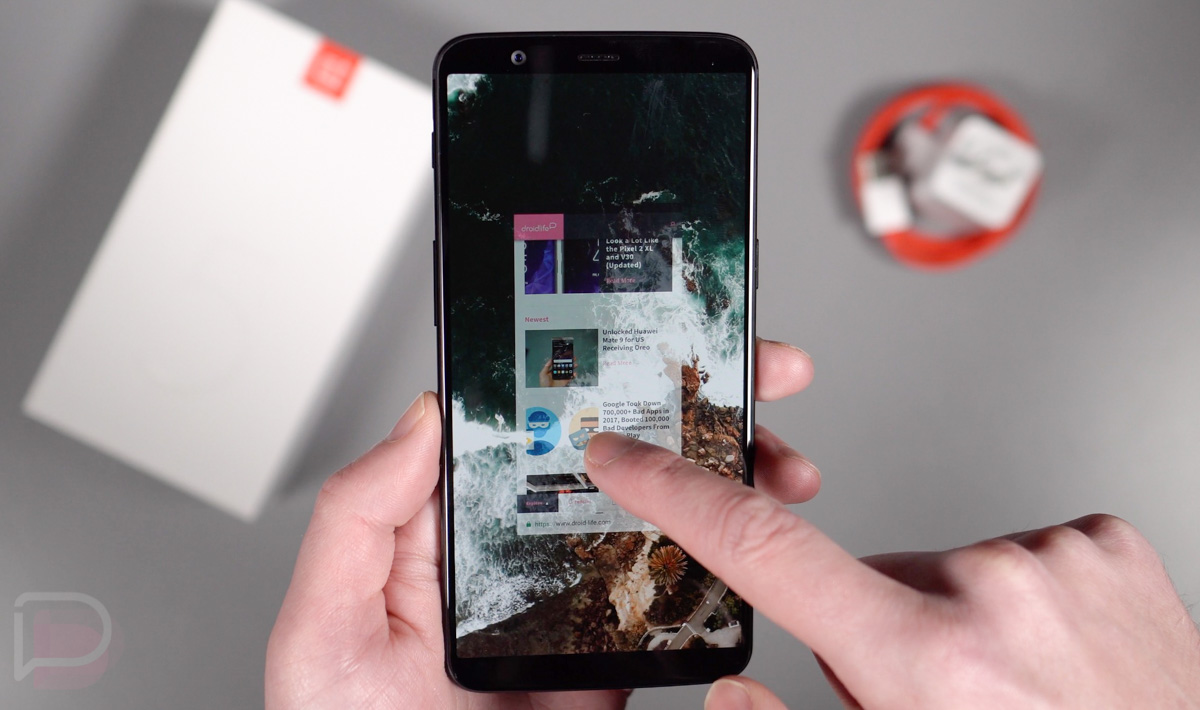

OnePlus pushed a new Oreo Beta build (Beta 3) to the OnePlus 5T today that brings with it a pretty big new feature called Navigation Gestures. As the name suggests, this new feature takes away the standard Android navigation and replaces it with gestures. Thinking iPhone X? We are too! It’s actually a lot like that.
In the video here, we show exactly how these new Navigation Gestures work one the OnePlus 5T (our review) and share some thoughts on whether or not this could be an Android future. The basics, though, are as follows.
You swipe up from the middle-bottom edge of the phone to go back to the Android home screen. If you swipe up from either the right or left sides, that gesture acts as a back button. Need the app switcher? Swipe up from the middle-bottom and then hold the screen for a second. And that’s it! It’s pretty easy, but also kind of weird, since this isn’t how Android phones typically work. Then again, we won’t be shocked if Motorola implements something very similar with its new line of phones this year, starting with the Moto X5.
To grab the new Oreo Beta 3 for the OnePlus 5T, hit up this thread. You can buy the OnePlus 5T here.
What do you guys think? Ready for navigation gestures on other Android phones? Would you rather Google just stick with buttons?




BTW – for those talking about copying things – have a look how MeeGo worked on the Nokia N9. Gesture based navigation.
It actually looks like a better UX than iOS on the iPhone X based on this demo for ‘back’ function
Multitasking is ok – works.
But the iPhone X has swiping left/right along bottom for moving apps and that is really useful I find.
Top 10 Best Budget Smartphones of 2018
THEY ARE SO CHEAP
https://youtu.be/TFoNuzsGiAo
his seems totally useless. Solution in search of a problem.
Sounds great but OnePlus need to make these gestures more smooth and they also need to make app switcher fast.
I wonder where they got that idea?
While i think this will be the next major feature I still hope Manufacturers give people options without making us feel limited.
Don’t like it. Even the gesture to turn on the flash light from a black screen does not always work. These new ones would seem to be slower than just using the virtual buttons.
I imagine google has been working on something like this for a while. After all, when apps go to full screen mode you have to swipe up on the navigation bar area to bring it back.
This seems totally useless. Solution in search of a problem. Just silly
Ahem… I think you mean “OnePlus 5T Picks Up HP TouchPad / WebOS Gesture Navigation from 2011/2012”.
What about alt + tab or split screen?
My main concern.
I love this phone. I bought the Pixel 2 XL and didn’t really think it was worth the price tag so I sold it on swappa got most of my money back. I am sorta a OnePlus fan boy, but still. This phone just keeps getting better. The only thing I miss from the P2XL is the camera..
I used to be big into flashing and beta’s and having the newest things first, but I’m tired of hassle. eye REALLY want to try this out so I may have to break my rules lol. Looks fantastic.
http://www.trendsportals.com/2018/01/instagram-feature.html
Also take a look towards new instagram feature
I think I’d like the OPTION to use one or the other. Bake it into Android (or just the “Pixel Android Experience”) and let users choose to use the Nav buttons or the gestures; that way, if it’s a phone that you really want to own, you won’t be locked into only using gestures or only using Nav Buttons.
But…doesn’t gesture navigation eliminate the quick toggle (double clicking the overview button)?
I feel this would annoy me more often then I would enjoy it, particularly when surfing through web pages.
I get the impression I would accidentally swipe to home/back when scrolling through a page quickly, particularly because I often hold and use my phone with one hand which often leaves swiping near the bottom of the screen.
Its also added to oneplus 3 open beta but the device has a homebutton and there is no option to set it up.
Nova will have this in no time! I love it! More screen! Cheers!
Nova has had gestures for a while, up, down, two fingers up, two fingers down, you can select for what, they might add some of them but that’s nothing new.
As a OP5T user, I downloaded the Beta 3 earlier. I will say that it seems cool, but it’s a learning curve. This also kills one hand use. On Beta 2 I had the navigation hidden and I could flick it up and then hit the button. I liked that better. Overall the phone is killer and all the extras they bake in are very useful – so who knows, maybe this will get easier.
after using the iPhone X for the last month as a devout Android fan, I can say that gestures are the future no doubt. It’s seamless and easy and frees up screen real estate. It feels natural.
Google will surely follow suit in the next couple years
I was going to say exactly this.
Is there an app that emulates this behavior?
Plenty
I like Swipe Navigation, I’ve been using it for years. You have to be rooted to permanently hide the nav bar and to get full functionality. It’s pretty much the only reason I root anymore. LMT and GMD have gestures and pie navigation, but I never liked them as much.
“but but Apple copies but but”
Seems you’re new to android world, there’s many apps on the play store that can replicate this…
Which app?
The Swipe app has been around for an extremely long time. I used it back when I was still on my S3.
I swiped to shut down my first iphone… 8 years ago.
How is that relevant? That has nothing to do with gestures.
Apple copied gestures from Palm Pre, welcome to 2009 ????
sorry if nobody saw it or used it how did they copy it?
They all copy each other. Technology is like fashion – old is new again…
Not only this is a WebOS feature and not Apple at all, I’ve been using LMK launcher to do this since KitKat lol
BBOS 10
Navs are still better. This might be better implemented on the Razer phone.
I do like this better than how OEMs have the option that basically puts the Nav bar in immersive mode. Then you have to swipe up for the buttons and tap whatever you want. So this is a good replacement for that.
Home and Overview gestures are fine, which isn’t surprising since they’re identical to iOS. But back is unintuitive and not a good solution. There’s nothing natural about swiping up on the side to go back. It’s also missing a fast way to change between apps, like double tapping the button on Android, or swiping sideways on iOS. If Google ever brings gestures to Android, I hope they do better than this.
I wasn’t sure how I would like the gesture navigation when I got my iPhone X, it feels completely natural to me now though. The only thing I would say that oneplus is missing here is the ability to quick swap between apps like you could do by double tapping the multitasking button on the nav bar. I don’t really like the home bar constantly being visible on the iPhone X, but it does allow you to swipe horizontally across it to quickly swap back and forth between apps. Also, the back gesture in the browser needs to be swiping from the left edge to the right like apple has it, that feels perfect.
One of the few things Apple got right was the gestures. I really think Android could use these all around to make a better experience. Nav buttons are garbage compared to this. So much more intuitive
100% disagree. It’s faster to use direct button instead of some sign language.