

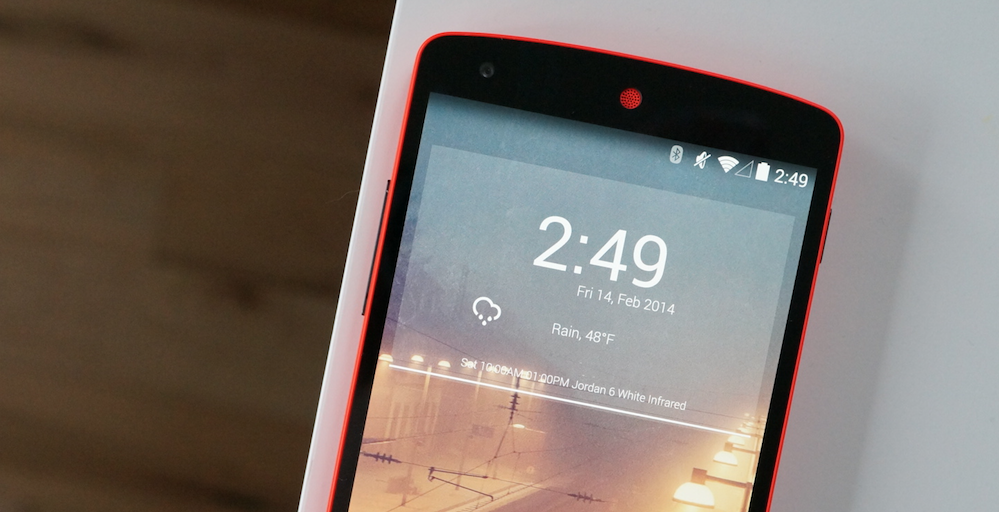

Way back in the day, Android widgets were my thing. I rocked Beautiful Widgets, a Gmail widget, DashClock, Sound Search widget, and a few more that I can’t recall right off. These days, I feel old and lame, using a single widget from the stock Clock app on my phone. It’s not very cool.
Times have changed, I suppose. I don’t feel the need to have all of that information cluttering my home screen, and instead, I was a minimalistic look with quick access to the apps I frequently use. It might have also been the performance drag some widgets caused due to improper optimizations made for Android. Whatever the cause was, at this point, I’m over widgets.
Tell us, do you still widgets? If so, which ones can’t you live without?
 Loading ...

Absolutely my home screen right now
Plain Jane. 1 widget, all gesture.
“my room mate Mary Is getting paid on the internet $98/hr”…..!kj147ytwo days ago grey MacLaren. P1 I bought after earning 18,512 Dollars..it was my previous month’s payout..just a little over.17k Dollars Last month..3-5 hours job a day…with weekly payouts..it’s realy the simplest. job I have ever Do.. I Joined This 7 months. ago. and now making over hourly. 87 Dollars…Learn. More right Here !kj147y:➽:➽:.➽.➽.➽.➽ http://GlobalSuperJobsReportsEmploymentsProfitableGetPay-Hour$98…. .★★★★★★★★★★★★★★★★★★★★★★★★★★★★★★★★★★★★★★★★★★★★★★★★★★★★::::::!kj147y….,……..
Chronus Clock +Weather and Chronus Calendar on the home screen. And more. Chronus on inside screens.
I use the Google Clock Widget & the Play Music WIdget… If I feel like getting fancy I’ll download Kustom Live Widgets… But that’s about it.
Yes (mainly clocks)
ClockQ is all that remains on the Home screen, but if I swipe right (or is it left?) I still use widgets for Timely, AudioManager Pro, WeatherBug (the old one), and Power Toggles (once the default Power Bar went NLA). Old habits die hard.
On my homescreen: Chronus clock & calendar, Project Fi data usage widget and Signal Spy widget letting me know what provider my phone is connected to at any given time. Google email, Play Music and Weather Timeline widgets on different screens. I guess I still use a lot of widgets.
Weather and calendar… this to me is one of Androids great advantages over iOS.
Timely Clock & Calendar.
Why the time duplication? My eyesight is poor. 🙁
Simple, yet refined
Not using widgets on Android is like not charging your battery on your hybrid car.
Really, Widgets should be a HUGE focus of Android phones and their marketing. It’s the #1 thing that makes them unique and adds high functionality instead of just being an “App Delivery Tool”.
Most people who said no probably aren’t even using Android. What they mean is that they Can’t use widgets.
I use a Google Keep widget to keep my to-do list in front of me. I used to use one for weather and one for Google sound search, but Google Now eventually made those widgets unnecessary.
for sure. i got 3 screens and widget on each one taking up most of the left and right screens. just a star wars clock on the center (home) screen. when i first read the title, i thought “of course, it’s Android. He must mean lockscreen widgets”. which, by the way, became a thing of the past for me as soon as i got my Moto X with Moto Display. but heck yeah, i use homescreen widgets. I’m honestly surprised at such a high “no” vote. but i’m glad that you have the option on your Android device and you’re happy, as opposed to no option at all.
Outside of Timely I haven’t used widgets on a regular basis since Jelly Bean. I guess I took the minimalist look Google wants to push literally.
I too like to keep the most used on my home screen, however I do place my widgets such as gmail, keep, and detailed weather forecasts on the additional home screens to the left and right…
Widgets are basically the best multi-tasking option on mobile. It’s an easy way to zip from app to app, conglomerating information from multiple sources without having to actually open anything or use the card-based app switcher, which is still a relatively cumbersome solution. I have five home screens with at least one widget on each. Far left I have my app folders with my Google Fit widget (step counter), middle left I have a full screen twitter widget (Plume), center (main) screen I have clock, weather, and search widgets, middle right I have Google Play Music and Google Now widgets, and far right I have a calendar widget. With this set up, probably fifty percent of the time I’m actually looking at my phone is on the home screen, which is a good thing. Most of the stuff I need is just a swipe away.
Clean and simple with DashClock Widget with Nova Beta with N Style Folders on Nexus 6 – 6.0.1 Also been trying out Drupe (4 dots on right hand side)
Weather Timeline has a fantastic and minimal widget that I use every day. App is pretty awesome too.
Technically. I have just the clock widget
Yes, but only those I actually use and want information from without opening the full app. I have the google calendar widget and the weather timeline widget. that’s it. Those are the only two apps on my phone I need at-a-glance info from.
I want Kindle to put out a widget that lets me save a book on the home screen. I want the cover of the book to be the widget and clicking it should open that book. I don’t think Google Play Books has this, either. Seems simple enough, but my requests have gone unheeded.
As for widgets I am currently using:
* Moto widget for time, date, and weather
* Google news widget (Genie)
* Calendar
* Audible (large)
* Google Voice
* Google Play library
I use 2: a clock/weather widget on my main and a calender widget one swipe over… I settled on that 4 or 5 years ago when Nova became my launcher.
Also I use the Philips hue widget on the next screen over…. But it’s not nearly as sexy.
Yep. Weather Timeline widget up top plus dashclock for notifications of email, text, and upcoming calendar items.
I still use DashClock.
yah
Dirty screen protector.
Widgets were great shortcuts for me. But more and more apps are removing them (facebook, iheartradio, etc) and now I hardly use them because “out of sight, out of mind”…
Only a few, but they’re important to me. Calendar widget, Newstand widget, and Google news widget. I don’t want to be out of the loop if something good happens.
I still use widgets, but only have a couple these days. I also notice through my last 3 phones that I have set up the home screen almost identical to each other. I guess I’ve became a creature of habit and like to know exactly where a app or widget is with a scroll to the right or left or opening of a certain folder.
I like widgets still. I use Keep and I use Beautiful Widgets for a small home screen clock.
Absolutely. Widgets are one of my favorite features of Android. I usually have about 20 across my 5 screens.
The Google Calendar Widget is a must have! I just wish the main home screen wasn’t the far-left panel and was the center instead. I currently have three screens and need to swipe twice to get to my third screen when I’d much prefer only needing to choose left or right from the home screen.
Does the S7 edge panel count?
Not on my home screen, but I use the Bacon Reader widget on a side screen. Used to use calendar, but the side panel on the edge removed the need for that.
1Weather and Business calendar 2 in agenda view. Definite must haves.
I don’t. I try to keep my home screen as clean as possible.
This is clean?
For me, it is.
I only use 2 religiously… 1) Project Fi data use and 2) Google Fit. Both are circles and can be sized to match so they actually look like they go together.
Still holding off on rooting the 6P, I will prob get back into UCCW or Zooper once I do.
Why wait? I use UCCW and KLWP on my stock Note 4 and may add Zooper as well since I’ve seen so much clean stuff done with it. Plenty of functionality to be had without root.
https://www.dropbox.com/s/rh57laedkgdv12d/Screenie.png?dl=0
I like a minimalist home screen as well. Smart Launcher Pro can be set up to keep the screen empty until you need access to programs. Then one touch of the screen will make whichever apps you like visible, and there you go…
Still? Lol, I’m not sure it’s a thing to be “over”, as if they’re some gimmick. As with most features, you either find them useful or you don’t and your layout is either functional or not. I’m also an iOS user and widgets are present there, too, just shifted into their notification and control centers.
But in answer to the question, my Android home screen widgets include news, calendar, music, podcast and Shazam. I could live without them, but modern phones handle them just fine.
I don’t understand why you wouldn’t use widgets. App drawer aside, it’s the biggest differentiator between iOS and Android when it comes to the homescreen.
I use the stock clock and Google Calendar and that’s it. Back when I had my droid 2 and bionic, etc I used power toggle widgets, cpu, ram and battery widgets, and all other sorts of useless crap. Less is more.
I use an agenda widget, weather widget and the google now widget
Just Chronus. I have one other home screen, but it only has my RSA token on it from EZ Token to get into work things.
Google Play Music, Google Calendar, Keep, and My Verizon Data widget…
Zooper Widget
Page 1: has Simple Weather widget up top Page 2:google calendar full size widget Page 3:
.tasks full size
page 4:Google play music widget. 1×4,VLC music widget.1×4, Amazon prime music widget.1×4 Spotify music widget. 1×4
Been the same for years. No battery issues or performance issues on my HTC m9 on ViperROM
If you want a minimalistic look just get an iPhone. ,)
My setup
I’m using a notepad widget, the 1-Touch Speed Up from Droid Optimizer and also lots of on/off widgets for wifi, mobile data connection, GPS etc.. My most used apps are on the same homescreen page, so all together I try to have the quickest access possible 😀
Could not live without my today calendar widget. We have such a busy schedule I love having it on my home screen. Just a quick glance shows me where we need to be and when. The clock and weather are nice to have too.
I don’t understand why people need clock and weather –clocks in the stat bar, and how often do you need to know the weather? Agenda or calendar I get
What widget is that on the article?
zero widgets for about 3 yrs now. information is so easy to access now its no need to clutter ur home screen.
Android Pro Widgets isn’t really updated anymore, but they have the best month-long calendar app on the app store. The advantage is that you can display actual words on the widget, so I can see what I have going on during any given day at a glance, rather than having to open a calendar app. I like seeing the whole month so I can plan ahead a bit.
I’m using Business calendar agenda widget. Also weather widget.
wow i’m getting some interesting ideas to “borrow” for iOS 10. Thanks guys!
On my N7 a Beautiful Widgets single line weather only widget and the Netflix widget on one screen, Google Now (or whatever the widget is called now) on a second screen but it never populates with any cards except weather since the change to “now on tap”
I have one widget, clock/weather combo and the biggest reason I don’t use more is because they all have a different theme/style and look, they don’t fit together at all.
Zooper widget pro , with Timely as the on tap action.
Just depends. I recently got KWLP so I’d say it counts as many integrated widgets. Sometimes I keep it super simple though.
https://www.dropbox.com/s/sky4t42v196l3xf/Lazyfk.png?dl=0
I have at least 20 widgets on 5 screens, and 12 on the lockscreen. (Yaaay Kitkat!)
A phone without widgets is not an Android phone for me.
I don’t care for them anymore personally. I only have one screen, basic clock and weather nothing else lol.
I still don’t understand people’s redundant use of clock widgets when the time is already shown.
Bigger is Better
I have my statusbar clock hidden (N Default feature) so my clock homescreen probably wouldn’t scratch your OCD.
Being able to hide the clock took away one of my last reasons to root… However, I have a feeling the clock in the statusbar will reappear as a permanent fixture in the N final release, much the same as they removed the dark themese and night mode stuff in N DP3.
Edit: fixed word derp
Helps set alarms easily when I come back from the bar and I can’t navigate my app drawer haha. Also it’s nice to have the current weather shown at all times.
Would that be mt vernon WA? If so I’m sorry 🙁
a“my room mate Mary Is getting paid on the internet $98/hr”…..!kj234ytwo days ago grey MacLaren. P1 I bought after earning 18,512 Dollars..it was my previous month’s payout..just a little over.17k Dollars Last month..3-5 hours job a day…with weekly payouts..it’s realy the simplest. job I have ever Do.. I Joined This 7 months. ago. and now making over hourly. 87 Dollars…Learn. More right Here !kj234y:➽:➽:.➽.➽.➽.➽ http://GlobalSuperJobsReportsEmploymentsProfitableGetPay-Hour$98…. .★★★★★★★★★★★★★★★★★★★★★★★★★★★★★★★★★★★★★★★★★★★★★★★★★★★★::::::!kj234y….,….
I always keep coming back to the UCCW widget skins I had created couple of years ago. This is what I’m using right now.
I also keep a widget of Google Keep and another of UpTo Calendar that shows me some public events.
That wallpaper is cool! Could you post or tell where you got it?
It’s from the wallpaper app Backdrops.
Thanks
I’ve always liked the Sony weather widget.
Doesn’t have to clutter the screen if you don’t want them to.
Yes. Weather, clock and alarm and also schedule and result for my fav soccer team.
Clock and Google Search on main screen. Full size calendar (month view) on 2nd screen. Full size Google Play Music on 3rd screen (I like how it shows the full album art along with controls when you resize it to full screen), and a full size collage of my wife/kids picture.
Only the Today Calendar Widget, only the agenda widget, not the actual calendar.
If it wasn’t for my RSS widget (gReader Pro), I probably would have no idea what was going on on DL…
Pretty much only a clock/weather widget (Weather timeline) and that’s it. I have my most used apps on my homescreen and a few other apps in folders. I do have Poweramp, Fenix, calendar and a voice recorder widget on a side screen but not on my home screen
Use might be a very strong word. I have the Calendar widget (which I barely touch anymore) and the Newsstand widget mainly just to fill space. Sometimes a good article pops up though.
I’ve been thinking there needs to be a widget revolution for a while. I feel like more innovative things could be done to make them a standout feature again. IDK.
Just wiped my phone today but here’s the temp 75% setup.
I use a zooper clock widget, calendar and to do widget, and TV Show widget.
Always have only used one since the beginning. Also only have a single home screen. Never found a need for more than one. My widget is just a clock and weather one so it’s a pretty normal to have. I think it’s HD Widgets which looks great IMO
I use the turbo 2 command center on my 6p.
I use Chronos Flex widget to show the time, weather, and my calendar on my home screen.
HD widgets current + 3 day 4×1 with somewhat minimal icons
I’m not completely over them but I am near where Tim is (though it’s nice to have the option – like a radar widget when I know storms are comin’). My phones have gotten to the point where I don’t want it telling me what to look at, I want to choose when/how I look at what I look at. Look at look at look at… 😐
Google Keep
Google Agenda
Whatsapp preview
I keep my home screen widgets the same on every phone just changing themes. Home page: Beautiful Widgets with a shortcut to my alarm and Yahoo Weather. One page with Keep, Play Music, and TuneIn. A third page with a month view calendar and agenda list.
My home screen (only one page) is entirely widgets. If I want an app that’s not on the sticky row, I go to the app drawer.
Still? Seriously? Why wouldn’t you use widgets? Because you’re on an iPhone?
Calendar, Fi, Newstand, news and weather, Fit, G+: I’m a widget junkie. Without them I would feel I have an iPhone.
Does a bear s**t in the woods?
Since DL is trippin on the size of the image.
Of course dude, that’s the whole reason Android is better. Have fun with your iPhone Tim.
Better is subjective.
Yes, it can also be a noun, verb, adverb, or an adjective. Good point.
I use the Verizon data usage widget.
I have a 1weather and a Month widget on my main home, a Feedly on another and a Trip It on another.
A great way to reduce widget-clutter is with “Snap Swipe Drawer”. This app creates an overlay panel that you can pull down over whatever app you’re running to see a pallet of widgets. Very handy.
Thanks for that – didn’t know it existed. Ironically, that basically mimics what iOS does with its widgets now…
Just a Zooper clock widget. I don’t like clutter.
HD widgets in 4×1 and Google Calendar on my home screen on every phone.
Isn’t HD Widgets abandoned?
I dont use any, my watch has all the info i need
More like ‘widget’. As in, clock.
Transparent weather clock, battery widget reborn and Widgetzoid.
News and weather from Google at the moment.
I like HD Widgets on my home screen. I have the weather function linked to Weather Underground, the clock function linked to Timely, and the date function linked to Outlook’s Calendar. I love the look, the size, and the functions.
Currently using Weather Timeline (as clock and weather). Then also have Business Calendar Pro showing my agenda on a full-screen widget to the right of my main home screen. When I had an HTC One, I also used Blinkfeed – if I could find an app with a comparable widget, I would install it on its own screen to the left of my main home screen; that was always my favorite way to browse my Twitter feed.
Of course people are using them! If they weren’t, they would just have a boring apple-like phone.
I never really used widgets. I tried some off and on, but nothing ever mattered.
I still use widgets, my current setup has got two widgets my music player and Google ears (the old one).
Home screen has PowerAmp 2×4 and Eye in the Sky, left screen has Google Now, right screen has Google Calendar and Evernote. It’s been almost the exact same layout ever since I got my first Acer Liquid E in 2010.
I prefer a clean home screen with a second screen having my work calendar so I can see meetings. Unfortunately, Google Now launcher doesn’t really allow for an empty first screen with stuff on a second one, so at the very bottom right corner I have a quick dial icon. Then on the second screen I have my calendar. That’s it.
I still use the HD widgets clock and weather combo on my main screen, and the stock calendar widget on a second screen.
I bet Tim’s next post will be about how he became an iOS user. Anyway, I like to have a few essential information (for me) right at my home screen:
Don’t forget sex on June 17th. Wouldn’t want to miss that appointment
LOL
I’ll put a note on the refrigerator door just to make sure 😐
Sex is short for Sexta, which is the brazilian portuguese translation of Friday.
WHOOOSH!
That was the sound of the joke, it flew RIGHT over your head! Did you see that?
What setup do you have? I like it.
Nova Launcher with TeslaUnread
Muzei (…for wallpapers)
DashClock Widget (…currency, battery stats, weather)
Event Flow Widget (…for calendar)
Power Toggles (…for music)
Whiteout Icons
Got a link for the Whiteout icons – can’t find them in the Play store… THanks!
Thanks man!
Yep. Digital clock, Keep and Power Toggles
Using my Nexus 6p as a temp phone… Have a weather widget, My Verizon data, and Google Play Music widget on the home screen.
Samsung edge. Google keep. Google now. Other than that, just a couple of apps . I like clean and simple on the main screen.
A Setup I had back in February. I change my setup every few weeks usually just depend. Always trying to get the best looking and most efficant setup.
Home screen has a few icons for my most used apps. From there, swipe right to check out my Weather Timeline widget, or swipe left and view my Today Calendar widget. That’s it.
I voted yes, but it’s nowhere near as much as I did before. I remember those days with dash clock and beautiful widgets. Now, my main homescreen is just like yours, a clock widget (chronus) w/ minimal weather. Lately I actually scaled back to only having icons in the dock (2 rows with 6 apps each and an app drawer button). I do still use widgets on my two other screens though. I have a minimal RSS widget for news on the screen to the left and Month Calendar Widget on the screen to the right along with some other handy but less frequently used apps like the calculator, Reddit, and some games.
Example below, although usually the clock is centered at top. I ditched google search bar too a long time ago since the home button shortcut is my go-to.
I just now saw that I could do that. Thanks for the heads up! Google search bar is gone.
I use a weather widget and a bunch of sticky note widgets (on a different home screen).
Yes, on EVERY SINGLE SCREEN, in fact, I have more widgets than icons, since app drawer and Swipepad are good enough for most stuff, and folders exist. But I even use a lock scree widget still (Chronus Flex time/date/weather) thanks to an xposed module that inserts it into Marshmallow’s lock screen in place of the boring clock.
basically the clock. on my 6p i have a month calendar widget, but on my s7 i use the AOD for that.
I used to run just the fit and the two folders. But a week ago I decided to clutter things up a bit. So far… I am enjoying the added info.
spotify, GPM, and google keep.
Yes, current setup.
Mind giving me a rundown of your set up? I especially love the wallpaper.
Yes love the wallpaper!
It’s from my icon pack Retrorika!
Absolutely, the wallpaper is from my icon pack Retrorika, the weather is 1weather and the clock is Timely.
AWESOME!
1Weather for the win!
+1 on your comment approach.
purchasing now
Nice icons. Which are they?
Retrorika!
that is a really nice setup.
Thanks man!
“my room mate Mary Is getting paid on the internet $98/hr”…..!kj234ytwo days ago grey MacLaren. P1 I bought after earning 18,512 Dollars..it was my previous month’s payout..just a little over.17k Dollars Last month..3-5 hours job a day…with weekly payouts..it’s realy the simplest. job I have ever Do.. I Joined This 7 months. ago. and now making over hourly. 87 Dollars…Learn. More right Here !kj234y:➽:➽:.➽.➽.➽.➽ http://GlobalSuperJobsReportsEmploymentsProfitableGetPay-Hour$98…. .★★★★★★★★★★★★★★★★★★★★★★★★★★★★★★★★★★★★★★★★★★★★★★★★★★★★::::::!kj234y….,….a
“my room mate Mary Is getting paid on the internet $98/hr”…..!kj147ytwo days ago grey MacLaren. P1 I bought after earning 18,512 Dollars..it was my previous month’s payout..just a little over.17k Dollars Last month..3-5 hours job a day…with weekly payouts..it’s realy the simplest. job I have ever Do.. I Joined This 7 months. ago. and now making over hourly. 87 Dollars…Learn. More right Here !kj147y:➽:➽:.➽.➽.➽.➽ http://GlobalSuperJobsReportsEmploymentsProfitableGetPay-Hour$98…. .★★★★★★★★★★★★★★★★★★★★★★★★★★★★★★★★★★★★★★★★★★★★★★★★★★★★::::::!kj147y….,……
looks great, you just need to clean up your notification bar lol.
Only so much I can do on TouchWiz! I was hiding it for awhile though.
which lockscreen is this?
Locksreeen? Do you mean launcher? I use Nova launcher.
I have TW as well. It would go a long way to cleaning up, just by turning off the battery percentage. It takes up a LOT of room. That screen is beautiful, though. Well played!
Download that Battery Percentage Enabler in the Play Store. it will enable the Battery % inside the battery icon, then turn off the & in the Battery settings.
Also, go to the Galaxy App store and download Good Lock, it will make those notification icons stock lookin’
Plus, it will make the quick settings like Stock Android.
how did you change the colors?
See the fourth icon? Those are the Good Lock settings. Change the default “routine” and change it to the desired color. Samsung is constantly making updates to that app, making it better every time.
Also, on the Good Lock settings, turn OFF the Lock Screen wallpaper and when you play music, the full album art will show.
Oh man this is awesome, thanks man! Now if only I could disable the actual quick settings from the notification bar i’d be golden haha
I already suggested it to them. On the Advanced Options, turn off everything for the best experience. The next app update should be this Monday. They constantly take suggestions, so make your voice heard in the reviews. Enjoy your stock looking touchwiz 🙂
P. S. If you haven’t done already, go to the theme store and download the Material Theme. 😉
I’ve already got that one 🙂
Oh man I had no idea this existed, thanks man! Installing it now!
Jumping from a Nexus to TouchWiz was hard, but then I went and tinkered with everything possible to make it look as stock as possible.
I did the same thing when I went from my GNex to the GS4. That, the G3 and G4 all got Nova and Vanilla enhancements. Now I’m back to a Nexus 5x and loving stock android again, but I’m missing the G4’s camera lol. Grass is always greener.
I love it when we all share stuff instead of throwing poop. Warms my heart. lol
Nice isn’t it?
The solution is don’t buy Samsung. The solution is always Nexus. Buy Nexus. Then you can start with a clean slate on a phone that is fast and simple without the cruft.
While that would be nice, their hardware isn’t up to snuff. Samsung has been pushing out the best cameras on phones for years now, which is important to me, and they’ve upped their game with software updates. While ToucheWiz has significantly improved over the years, and I’d obviously rather have stock android, I can customize it enough to make it mine.
MODS! Can we STICKY this whole discussion? 😉
fills up over half of notif. bar. stupid touch wiz
That’s super pretty. Background image? share please?
Sure thing, here you go man!
Dude you rock!
Thanks buddy! Great background paired with muzei! https://uploads.disquscdn.com/images/50ecb2c7a2c6073bd1d52ea6e37638a12c3dd82d38c6eb95b87121a57d4018f1.png https://uploads.disquscdn.com/images/e9fa157cef6c2ddbfa6e73f765e10008952e1c12f6416fad9a80a094a4b41aba.png
That icon pack is not free. Are you the owner of the app/artwork?
Crap that didn’t even dawn on me! No I’m not the owner of the app/artwork, taking the post down now. I bought the app so long ago I didn’t remember I had to pay for it!
Honestly curious…why do you put the time on your home screen when it’s always visible in the top right corner + your lock screen?
I use it for the date and the alarm clock mostly, the time isn’t that useful to me. I was hiding my notification bar for awhile, which made it more useful but recently turned the bar back on. That plus the widget acts as a shortcut to my alarm clock if I need to set a different alarm for whatever reason.
care to share what your using?
Sure thing! I posted it above but here it is again: the wallpaper is from my icon pack Retrorika, the weather is 1weather and the clock is Timely.
Just curious, which Galaxy device? I’m assuming S6 or later as that looks like the Samsung Pay “edge” at the bottom?
Note 5
what weather widget is that?
EDIT nm i didn’t read far enough down. 😛
Nice set-up! Do you mind sharing where you got the wallpaper? Edit: Nevermind! Sorry, should have kept reading. I was a little too excited! 🙂
haha it’s all good!
Yeah, that looks clean. Nice work.
Thanks man!
Calendar, Clock, and Google Search are the only widgets I use.
Zooper widgets for my date/time widget, Google Now Widget, Play Music (So I can play music without having to open the app) and calendar widget
Google Search and stock Clock on main screen, Google Song Search, Google Play Music Controls on left screen, Google scroll-able Calendar on Right screen.
That’s actually really close to my own setup, except I have Google Song Search and Play Music on the right screen becuase I still use GNL so the “left screen” is google now.
I kind of think of google now as a widget almost… It’s like, the evolution of widgets… Kinda
aix weather, google calendar, and many others.
Google search that’s it…
I use a custom zooper widget I made myself that tells me the time, what wifi network I’m connected to, when my next alarm is and what my battery percentage is. All in the space of 5 x 1.5 on my home screen thanks to Nova Launcher pro
yes here is my current setup. Nexus 6 on M
too busy. Keep It Simple.
This setup is about efficiency I’ve done the simple approach many times. I change my setup often but I just flashed back to M from Dev Preview 3 of N so this is what I am rocking this week.
IMO keep the center home screen simple and calm. hide the busy shiiit on the left and right screens. i like a calming center screen not one that makes me nervous.
Well then you have OCD issues I hate having to go to another page when I can just view it right there.
my Widgets set up –
LEFT HAND – Power Toggles Widget by Painless Apps, eWeatherHD Hourly Weather WIdget, Volume Control Widgets by Adam Wolfe Gordon
CENTER – Fancy Widget H7C Big Clock
RIGHT HAND – Jorte 4×5 Monthly Widget
Luckily it’s his home screen and not yours.
no shiiiiit?
I actually really like Popup Widget. You can hide widgets behind icons and access them with a simple swipe. Much cleaner.
I’d forgotten about Popup Widget because of how “behind the scenes” it is on my homescreen. Love that one, too.
Can you do Pop-up on Nova or is it Action only?
Yup. I use Nova and Popup together.
Gmail, notes Pandora, and play music
The only widgets I use are a people widget for quick calling or texting favorites in my contacts, and a weather widget. Otherwise I like a clean screen.
Love me some Zooper!
Just widgets for Tweetings and Bacon Reader now.
Timely/calendar/music/
DashClock for notification feed and a custom zooper widget with clock, date, battery progress bar and next alarm
Fancy Widgets H7C Widget
September 20th, 2010?
obviously a stock image and not my phone. this widget does though bring me back to my first Android – the OG HTC EVO 4G! it copies the HTC Sense Widget from way back in the day of 2010.
Just teasing. I bet there’s a skin/icon/widget pack out there now that resembles early android for a cool “retro” look.
My goodness, that looks dreadful! Android sure has come a long way.
the big clock widget is still crisper than most clock widgets today. i like skeuomorphism for my clock.
I love Notes Widget Reminder. Super-simple notes/task widget that syncs via Google Drive with all of my devices. Allows background to have custom colors/transparency, and adding a new note/task can be done right on my homescreen WITHOUT going into an app, which is fantastic.
(I’d use Google Keep’s widget were it not for the blazing white.)
Widgets are like one of the best things on Android! Rocking the Weather Timeline, Todoist, Event Flow Calendar, and Fenix widget on my home screens.
Right with you Tim…stock clock app is all I need. I have gestures on Nova set to apps I use daily.
Nova gestures FTW. I save/backup my setup to every phone.
Swipe Up brings me to Play Store! i’m OCD about App Updates constantly checking for them WTF!
My setup. Coming from a G4, I also had double tap to lock, but it messes with Nexus/MM lock/fingerprint settings, requiring a PIN Everytime so I disabled it.
yes i have the double tap to lock set up on my N6P now but i never use it for same reason – breaks Nexus Imprint. hoping someday Google fixes it. nice to use if cops try to steal your phone you can lock it w password quickly. cops can compel your fingerprint not your password. so quick double tap lock has some value.
I know what you mean. I have https://play.google.com/store/apps/details?id=com.devhomc.myapps installed so everytime I swipe up it will bring the installed app’s list right away.
ohhhhh this App looks good! installing now i didn’t know about this one! i will try it! THANKS!!!!!!!!!!!!!!!!!!!!! EDIT – I just installed it! I LOVE IT!!!! it saves an extra step! THANKS!!!!!!!!!!!!!!!!!
not sure why my prior post was deleted but again – THANKS for recommending this App! it’s AWESOME!!!!!!!!!! i had no idea such an app existed!!! it saves a step/swipe or two when quickly checking for App Updates in the Play Store! swipe up and i’m good!
I thought I was the only one! Lol
I have ONLY widgets on my home screens. Swipe up gesture to get to app drawer. Super specific to my taste but i love it!
The icons in your dock – are those folders where you just replaced the folder image with a single icon? Or are those swipe gestures to open a folder? If it’s the latter, I’m struggling to find out how to make that happen.
Correct. They are folders. Long press each one to change the icon, swipe gesture, etc. You can choose from stock icons or an icon pack if installed. The cool thing is that if you assign an icon from an icon pack, then uninstall the icon pack, the new icons stay put!
I like minimal clutter and maximum accessibility. =)
Wow, I didn’t know Nova can do that! Amazing, thanks! ^^
I did have only the stock clock widget, but if you enable rotation on the homescreen, there is a bug that causes it to not resize properly when you go back to portrait. I’ve settled on Chronus because its pretty basic but will give me weather as well as time.
tasker plug in widgets all day long. Turning on and off my TV and other home network stuff. And weather widget
The only widget I use is the Google search bar and Chronus: Home & Lock Weather Widget.
I use a Calendar widget. Mostly because I use my calendar to track video game releases. easier to use a widget to quickly view upcoming releases than to open up the app.
Weather with time and a text one as a reminder. My mom asked me if she could have the text widget. Though I laughed in her face and said not that I’m aware of because your on iOS.