

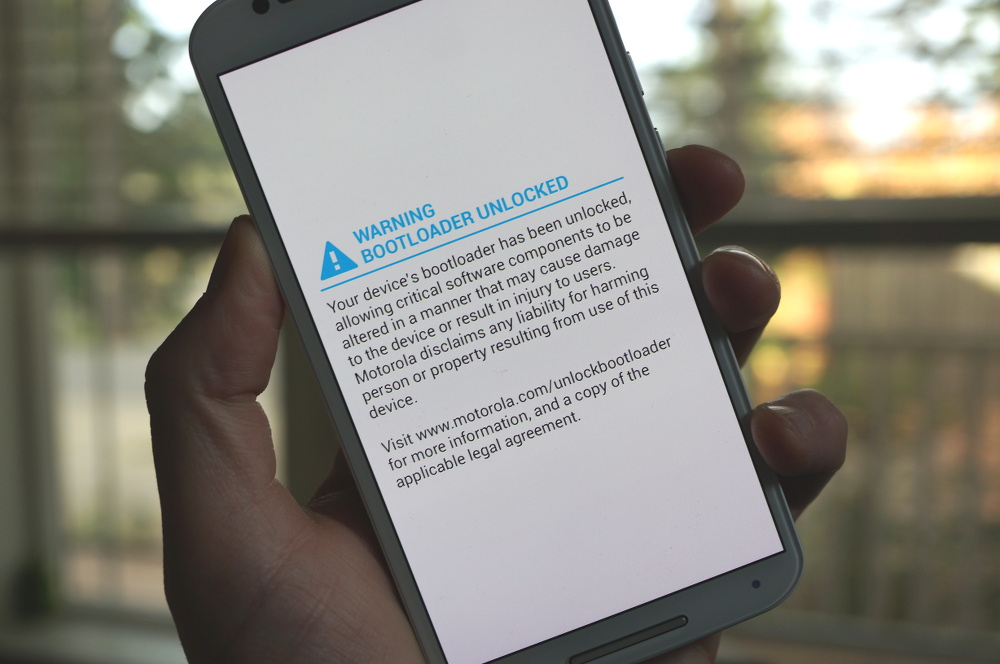

According to a Google support page, a small change should be hitting select Android devices in the future, most likely Nexus devices, one which will inform you if your smartphone or tablet is secure for using. Upon boot, if you happen to be an OS tinkerer and flash custom OS images, you may see one of the follow warnings.
A Yellow warning will inform you that your device has loaded a different OS, allowing you to either dismiss the warning or instructing you to follow a link that gives instructions on how to flash the stock image file for your device. An Orange warning means the device software can’t be checked for corruption. The same options are offered – you can either dismiss and continue using your phone, or flash a stock image. A Red warning, which looks somewhat scary, indicates the device is corrupt and “can’t be trusted.”
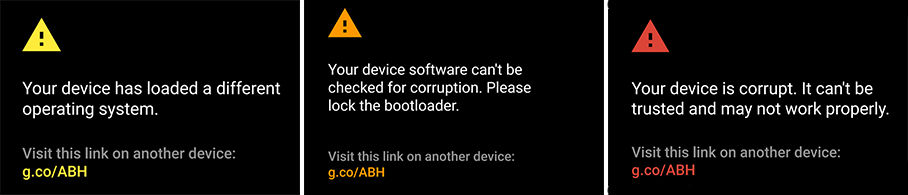
Of course, if you tinker, then it is likely that all of these warnings will be seen from time to time and you won’t need to worry about it. However, if you do not tinker, and you somehow come across these warnings, it may be a good idea to go ahead and flash a fresh image to your device, just to be safe.
It is reported that these changes may come preloaded with Android M, but that has yet to be confirmed by Google. Regardless of when it comes, it is nice of Google to be proactively looking out for users, even if they will likely cause a bit of annoyance for frequent custom ROM flashers.


To GOOGLE, if you happen to read these forums….
These messages are a big bold notification to BADDIES that they could potentially take advantage of the device.
SHAME ON YOU FOR REDUCING SECURITY IN THIS MANNER!
My suggestion for PROPERLY securing these devices;
1) New fastboot oem command; fastboot oem install_user_key
** with the new user key installed, allow use of userkey to enable all fastboot functions normally enabled by “fastboot oem unlock”, but without actually unlocking.
2) Replace setting “enable oem unlock” with “enable oem install_user_key” — this option only works when the *oem* key is active. Further updates to the user key have to be authenticated using the user key.
3) fastboot oem unlock and other “secure” functions should require validation using the active key.
(note: fastboot oem unlock will still be relevant for “bench” development devices, but not for user devices)
4) Show installed key fingerprint on the bootloader menu.
5) Update adbd to operate in a secure/encrypted mode (ssh tunnel) using the user installed keys.
6) Treat secure via the user key the same as secure via the oem key. No crazy warnings if it passes all the security tests.
Enable all of the security notices/warnings, but check based on whatever is the user-installed key.
Note that this problem also increases owner recoverability;
I.e., that situation where some dumb user changes system/boot/recovery to something unbootable, then relocks the bootloader. This would allow them to fix that, as long as they still have access to the key.
I had a similar warning when I flashed Android M on my N6 after unsuccesfully rooting. The url presented didnt exist though
That would suck!
My 1st gen Moto X Dev Edition sears my eyeballs with the unlock warning if I boot up my device in the dark, since it is at full brightness, and all white… It needs a “frak off, I know” box. I’ve been planning to flash a replacement .gif, but have been too lazy.
Lame. Give us a break.
I wonder where this message is present at…the bootloader or recovery level. I wonder if a custom kernel can be used to bypass this message.
It’s not coming to MY boot screen (Moto X 1st gen)… because I’m perfectly happy with the way it works now (on KitKat) and I’m not accepting any more updates for it (including Lollipop). I froze the MotorolaOTA process with TB. If it ain’t broke, don’t fix it.
Damn your so cool
You’re
But Lollipop is way better… you must be one of those people that thinks technology should never progress and things must always stay the same .-.
Just like those people who’d refuse to install iOS 7.
If that were true, I wouldn’t have bought a developer edition Moto X, unlocked it and rooted it. No, I’m just one of those people who’s been burned repeatedly by thinking I HAVE to have the latest/greatest version of the OS only to end up with a buggy, unreliable, or (in the case of my Nexus 7) UNUSABLE device while waiting for Google to fix all the bugs. I’m through being their beta tester. My phone was designed to run KitKat – and it does so flawlessly. I love it and I don’t want it screwed up. My next phone will run whatever the current version of Android is at that time – and it will remain on that. Besides, what in Lollipop makes it “way better” than KitKat that is worth risking the excellent user experience I’m currently getting? That said, once Lollipop hits the Verizon Moto X en masse and after a couple of months I don’t see any reports about ANY problems with it, I MIGHT consider installing it. Maybe. Or maybe I’ll just buy a new phone that was designed to run it.
Wow that is one of the dumbest things I have read today. First lollipop is known to be the #vistapop of android releases.
Can I be you? Just for a day?
Sure! Let me pencil you in for the day my daughter’s college tuition payment is due. Bring money.
I won’t have to! I’ll make her work for her own money and tuiton the way I have to! Look, I’m already a better parent than you!
I don’t know about that, but certainly a bigger A-hole.
LMFAO what a guy
Google is already annoying custom ROM flashers with their All Access service. Granted it’s more the labels’ fault than Google’s but the whole device limit is ridiculous when half of them are filled by the same device.
And there’s also a REMOVE limit.
You can only remove 4 devices per year! The only fix for when that happens is to call Google Music support .-.
Then they claim they’ll remove them just the one time. Not sure if you can do it multiple, haven’t tried.
Goddamnit why can’t Google just let me live with my virus in peace
Sounds like a Valtrex commercial
If you jumped through a bunch of hoops to have it done with official tools. It should show boot loader successfully unlocked!
I don’t see the point unless this is for people who buy phones second hand.
Custom roms will remove this pointless feature for sure. A simple flag change will do it so it just doesn’t check.
Unless it’s an eFuse like Samsungs have.
That can be removed as well. It’s just a matter that you have to lose Knox, but then anyone flashing custom roms should not be worried about warranties as they are voided anyway.
This already is in Android M. I see it everyday.
Great, something to look forward to. Google needs to spend their energies on something more useful. I know I unlocked the bootloader, I don’t need a reminder every time I reboot.
Completely pointless wasn’t the unlock padlock icon enough?
What about if someone buys a used phone from someone that was unlocked prior to the purchase? An average user wouldn’t know otherwise.
Well the average user wouldn’t know in the 1st place because the seller should unroot etc before sale. Eliminating that popup; assuming that the popup would remove after relocking the bootloader.
Pretty presumptuous to say that the seller would lock it back up. My point is the only reason that screen exists is for the user that has an unlocked phone that isn’t aware of it.
You win some, you lose some.
http://pedestriantv-prod.s3.amazonaws.com/images%2Farticle%2F2012%2F11%2F18%2FEmma-Stone-Meh.gif
HOT!
GET A BEST TOP165-CAREER ::: @1md6.
bc.
http://www.27Best3Careers01AdvisersPort/top/pin
///////////////////////////////////////////////////////////////////////////////////