


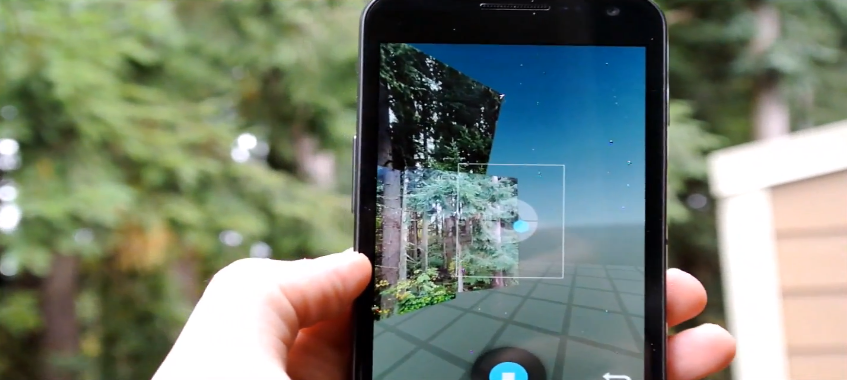
Today, we posted up the camera apk from Android 4.2. We have finally pulled ourselves away from the desk long enough to go outside and try out Photo Sphere which we’re very happy with so far. Down below, I go over the basic enchantments that Google has done with the app’s UI and then after that I take Photo Sphere on a test drive. Check it out.
To get your hands on the new camera apk from 4.2, check here.
[youtube]http://youtu.be/pMDxBmxKkdQ?hd=1[/youtube]
To see the 3D image I took, visit my Google+ post right here.
Has anyone had the “Tiny Planet” icon pop up in gallery view??? I have it for one image (a JPG) and no others, regardless the image type.
It’s a pretty cool feature. Fun to play with. I just can’t get it to pop up in a consistent way…
Love the new camera. However I think I may be one of the only people who uses the “silly faces” function in video recording. So far this feature is missing form the video settings!!!
Anyone know if it will show up in the “final” build??? My kids love the feature and I really don’t want to have to keep flashing the “old” gallery and camera to have the silly faces
cool lock screen, what app is that?
Does anyone have force closes when clicking on edit or crop?
quick question. what’s the size of each sub-picture in the sphere? like in MP…
So if your editing from pressing the three circles and pull down or across or split the pic in a swipe motion it shows the original next to the edited… neat
Am I supposed to be able to view these in 3d on my phone and if so, how?
do i need to be rooted?
This camera worked fine on Xenon HD with no FC’s and functioning camera. Problem I had was when I woke up the Android OS drained my battery. Went from a fully charged battery to 68% in overnight (approx 5hrs) and culprit was Android OS. Nice camera but not worth the battery drain. Restored my phone through a backup and all is okay.
I hope Google gets a patent on this before apple releases This on their next iPhone and calls it revolutionary…
THEN they’ll patent it and sue anyone who uses it because they “invented” it….
So I know very little about photography, but keep hearing people rave about how Android 4.2 will have HDR. Is HDR a hardware thing or software? Will it be available on my Gnex when I upgrade it to 4.2?
http://en.wikipedia.org/wiki/High_dynamic_range_imaging
The Droid Inc4 has an HDR setting in the Camera.
Tim what’s with the Apple hat on G+, are you undercover? 😛
Not to whine but here’s where updates matter. I showed this to co-workers with RAZR and GS3 devices and the first thing they ask is when they are going to get it. Absolute awesome feature to market but they can’t as it’ll just point out how none of the phones out actually have it. Hopefully there are Nexus phones coming to Verizon in the future or I can convince them to open up a ATT account.
it doesnt work with Droid Bionic yet = (
Now you too can make the same Sorry Excuse For 3D Technology used in Street View to make your own horribly disfigured images!
Ok so being awesome and having to much going on (yeah I messed up) I have a non working gallery on my gnex. how to fix? any idea’s….
did you back up or rename your original Gallery2.apk? Take a nandroid backup?
Obligatory, OMG wur can I gut dat background!!1!
When you are doing the photosphere, don’t move the camera.. keep it in place, and just rotate it. Waving your hand around ruins the photos.. Don’t know if I explained that correctly..
That’s what i thought. Apparently, it’s hooked to the gyroscope, so moving the camera itself will ruin the shot. just keep in steady, and just tilt it left, right, up, or down. But I bet Tim was having a hard time doing that with a second camera in his other hand.
doesn’t that make 360 degree photos impossible?
https://plus.google.com/109935300030221964806/posts
But my iPhone has Panorama! Haha! Another exciting Google innovation for sure!
This is much more than Panorama, btw most phones have panorama.
You actually took me serious??
maybe /s would make it more obvious? lol
Sadly, you’re right. iPhone and Microsoft have the option for the “PhotoSynth” application and I have been waiting for a long time on a Android replacement for it. I’m damn excited its here now though.
doesn’t Microsoft own that software there’s a old app that they made for iOS
yes, photosynth
right you are. http://photosynth.net/
What’s that wallpaper?
This feature really took my breathe away like no other feat of technology has in recent memory. Cool features like this make me proud to be an android fanboi!! How could anyone not think this is amazing?? I would LOVE to learn how this whole process works, the algorithms in place etc, that allowed google to make this a reality!
Tim, did you just say “Arre yaar” frustrated by having to tilt your camera too much up to demo Photosphere? I clutched my stomach laughing. Fun to hear Hindi words in a otherwise English video. 😀
behra hai kya
Pii ke baitha hai kya?
Just noticed, but if you go into the gallery from the Camera part of the app, where it’s like a film reel, you can swipe the picture up to delete it. 😀
You can swipe up or down to delete it. This actually came Jelly bean 4.1 I believe.
The .zip DL posted earlier causes editing and photosphere crashes. Anyone have newer .zips?
http://forums.androidcentral.com/verizon-galaxy-nexus-rooting-roms-hacks/220830-jelly-bean-4-2-camera.html
(the original man to post this for all others to source)
Very cool, can’t wait to play around with this.
Interesting stuff.
https://plus.google.com/u/0/111572376878395796428/posts
UIUC Quad!
https://plus.google.com/u/0/102903511928047222342/posts/hQ53hPr3Egd
Anyone have a clue what’s wrong here? this is the kind of junk I’m getting when I try it https://plus.google.com/111592093681947862193/posts/7iiuTyGGJrB
the first two I took did that as well. i tried some more stuff that was farther away and it seemed to help
As Arnold says in twins… you moved too soon!
“There’s a science behind it, but……. I don’t know it” hahaha best quote Ever lol!
I lold so hard @ that one
Apple’s panorama mode just looks lame compared to this. 😛
https://plus.google.com/u/0/117873390072039897110/posts/fVDfKaGnsyW
tried it out on the front of my house. amazing!
Can this work on 4.0.4? Do you have to have root?
yes, root is required for this.
Is it me or has Macro mode been taken away? Can anyone find it?
Is your love priority in that order too. Dog then girlfriend. Heh.
Seems to not be working for me. I take the picture, it says it’s rendering, then when it gets to Google+ mobile uploads folder I click to view it and it’s just a really bad jumbled panorama.
I get the same thing, tried uploading to G+ and still nothing
AWESOME!!!!! Thanks Tim.
Anyone having issues cropping or editing photos? The gallery force closes on me when I try. I’m thinking about re-flashing.
libraries need updating. I’m reading in AC forum threads that new .zips with updated libs are being posted and fixing one issue, but still crashing in other areas. It’s too raw and early.
And GNex stitching is still broken. You have to take photos far away and you have to be very steady and S L O W. Still cool though
With regards to images of the world around us, we are now using a Pokeball to catch ’em all
How do you view the image? it just showed up as a panorama shot and not the sphere.
Make sure to click on the image and it will open up in full screen mode on a desktop, not mobile.
Getting a force close viewing in camera stream. You?
Click on it.
Easiest way is to upload it to G+. You can view it in more of a 3D environment there for now.
This feature is SO damn cool! Great new addition.
https://plus.google.com/u/0/112970550979010116227/posts/RrkrPYijybT
That’s a good one! +1
I was gonna try again but the sun set…will have to wait till tomorrow.
More info: Thats the upper west side of NYC this afternoon post-sandy…as you can see things look fine for the most part. Other parts of NY weren’t as lucky.
wow, and it still looks like summer where you live, amazing
This looks like the start to star trek’s holo rooms
Its NYC, so definitely not summer, in the 40s/50s for the most part.
Anyone else getting a force close trying to view via camera app after clicking the 3d button on bottom left corner. Camera stream.
yup, i get FC’ed all the time.
Anybody figure out a way for one-hand zooming? The slider bar on the old camera was pretty convenient…
pinch to zoom its pretty cool actually
i have been banging my head off the desk looking for the non-existent zoom bar – thanks for cluing me in!
am i the only one that wants a one handed/one finger way to zoom? pinch to zoom isnt convenient when im driving, writing, cooking, cleaning…showering, wiping my butt..you get it.
I like that HTC uses the volume controls for zooming…I can’t remember if the Incredible did that, but the TB does it and the Inc4 too…very handy.
Very cool! I love the circle options for things like flash settings, revolutionary stuff!
I agree!
It’s just like the quick controls for the stock browser. Love the fact they are applying it to other apps.
actually Vignette has had those controls for over a year