

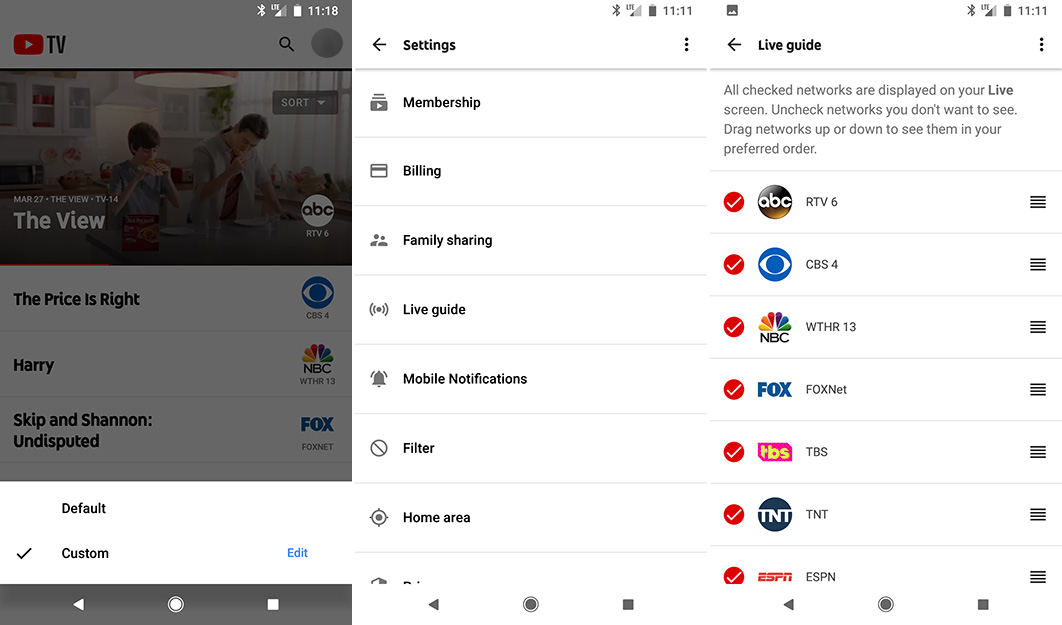

YouTube TV, the streaming TV service that Tim and I can’t shut up about, is getting a new feature this week that will let you customize its channel order or Live Guide.
Buried in the Settings, a new Live Guide option is rolling out now that lets you not only re-order your channel line-up in YouTube TV, but remove channels as well. As you can see in the screenshots here, you’ll get check boxes next to channels in case you want to hide or show them, along with buttons to drag and drop into an order you prefer. Then, once viewing your guide, you’ll now have a button that will let you toggle between the “Default” or the “Custom” Live Guide you just setup.
This really would have come in handy during those first couple of NCAA Tourney rounds where I had to dig deep in the depths of Earth’s core to find Tru TV. I did survive, but you get the struggle.
Again, the feature is rolling out now and will be available on the web and in the YouTube TV app. It does not appear to be triggered by an update and is instead a server-side change.
Google Play Link | YouTube TV Sign-Up
Cheers Brent!




Wife would like The Hallmark channels,If you get that and put it on firestickid be in
Fuggin awesome. Down to the bottom goes all these stupid sports channels. I’ll never understand the world’s obsession with watching people play games.
nice, coming from a custom windows media center this is a nice addition – just wish I could figure a way to start a show from the beginning as it’s being recorded
My only complaint with YouTube TV, is that their OnDemand offering is very limited. In order to get caught up on shows I need to go to the networks app and log in. PlayStation Vue at least gives you more shows on OnDemand to get “caught up” as they call it. However I hate PSVue DVR for sports.
Not sure why they just don’t put them in alphabetical order like PlayStation Vue
Now if YTTV can just add Hallmark and Lifetime for the wife then i can switch. Im liking the route that YTTV is heading.
this x1000
You can get Hallmark on YouTube
“I had to dig deep in the depths of Earth’s core to find Tru TV. I did survive, but you get the struggle.”
Exaggerate much? It took me all of 4 seconds to open the app, tap search, see TruTv, and start watching. ????
YouTubeTV, the gift that just keeps on giving.
They need a guide tab so you can easily see upcoming shows on each channel. It’s dumb that I have to start watching a channel in order to go to it’s page to see upcoming programming on it, so I can only see one channel’s guide at a time and it’s buried in some sub-menu.
huh.. Can’t you just go to live, and then go right to see whats on in the coming hours.
Well you have to go to live, then select a channel to start watching live in order to scroll through its upcoming shows. I just want an overall view of all channels and their schedules like the traditional TV guide channel or something.
You can do that now, at least on the roku app. Just click right on the channel and it shows upcoming through at least the end of the day.
on mobile, I think you’re correct. But at least on the TV platforms (apple tv, android tv, etc.), you have a more traditional guide.
All you have to do is go to the Live Tab (which is like traditional cable Guide), scroll down to the channel, and then scroll to the right to see upcoming shows. You don’t need to start watching Live like you mentioned. The Live tab is just like any other traditional guide iveI ever seen from cable.
Or just click on the network icon (on live tab) to see all upcoming shows and times…..not hard.
That’s cool that you can just tap the network icon to see the same guide I mentioned earlier without having to start the live TV, I didn’t know about that. But that’s still not any easier really and doesn’t show me an overall TV guide for all channels like I was referencing. I would at least like a more information-dense menu where I can see all upcoming shows for the next several hours without a lot of side scrolling too. It’s not a huge deal, but seems like an easy and logical fix for me coming from traditional TV guides.
ummm…again, what you are describing that you want is exactly what the Live tab shows. It is, to use your words, “an overall TV guide for all channels”….where you can see ” a more information-dense menu where I can see all upcoming shows for the next several hours without a lot of side scrolling too.”
unless you have some different version than the rest of us the Live tab is exactly that.
This is what it looks like https://uploads.disquscdn.com/images/bf2ee01206df3b537851d1ace3d66f6689458e5477d19ef01d31812d5949e9fc.jpg
I’m talking about in the mobile app, not the desktop browser.
So I will be able to uncheck all those sports channels I will never watch???
Yup, and that’s exactly what I’ll be doing as well. Seems 1/3 of the channels now are all sports.
Once they add the History Channel, I will be getting rid of Verizon. I will use HBO Now for that subscription, as YT does not have that option (yet)
I’m just waiting for Comedy Central now, it’s the last channel I miss since cutting the cord.
They also started rolling out thumbnails when rewinding/fast forwarding live programming. Previously the thumbnails would only show up after several hours on recorded programs.
still seems hit or miss for me on recorded content. I’m not sure what makes it work and not work
Now I just need a way to truly mark shows as “watched” or somehow hide them as if I was deleting them from a cable DVR.
Yeah, this is super annoying 🙂
see my comment above. YTTV already does this.
Yes, it shows as watched but it makes it extremely difficult to find repeat episodes that haven’t been watched that it recorded and put into an older folder. Just give me a filter to not show things that are “watched”
It automatically marks them as watched. Go to shows. Click on your show, it is nicely put in folders by season. Marks the shows as watched and if it is a partial, it shows where you left off. I have verified this on Roku, Android and Iphone. https://uploads.disquscdn.com/images/6e8154b0577b0205cc968dc9e9d5fa1d4cd5ce9ff03b7c4a2ff67e8ea09b323f.jpg
Nope. It makes an effort to do that, but it’s far, FAR from accurate.
How do I know if there’s a new episode from Season 6 that got recorded that I haven’t watched? I have to scroll through them all.
https://imgur.com/gallery/qllqlFf