

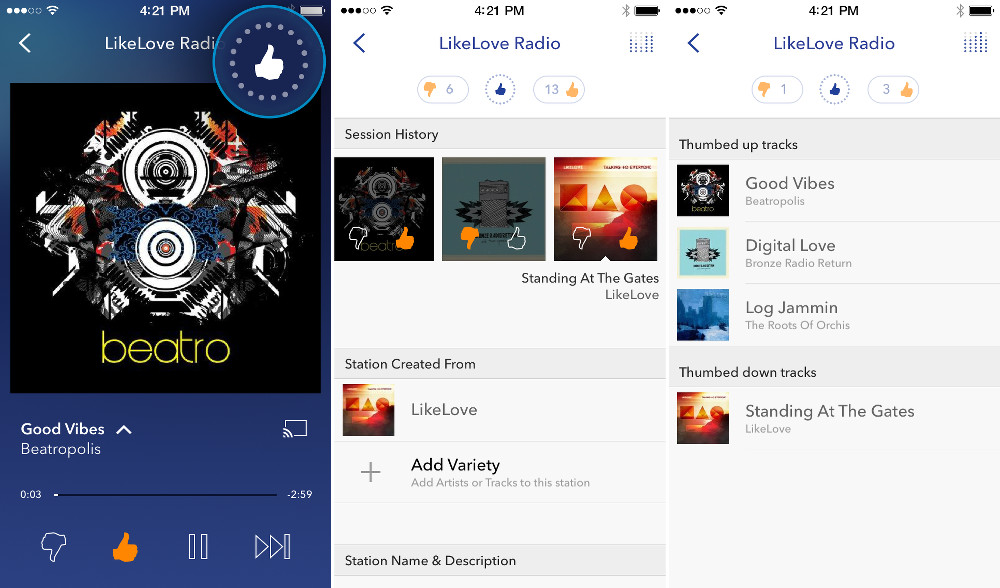

Pandora announced a “refresh” to their mobile experiences this morning, a refresh that includes a redesigned app interface, enhanced station personalization, and improved artist discovery. The new experience is currently in beta and available to about 3% of the streaming service’s base, but should rollout to all over the coming months on both phones and tablets.
The updated UI introduces listeners to a “fresh, evolved design” that will lay the foundation for future updates, but also includes new transitions and animations to drive a “sense of place into the listening experience.” Yes, that’s apparently a thing. There is a new Personalization Icon as well, which gives users a “more holistic view” of their stations, along with a comprehensive thumb history and an un-thumbing capability. Finally, users will now have easier access to artist information, thanks to “swipe and tap” navigation.
Here are the highlights in Pandora’s words:
- A Redesigned interface — Listeners now encounter a fresh, evolved design that brings station personalization to the forefront of the listener experience. The application’s new look builds on Pandora’s principles of simple and clear design and lays the foundation for future updates that will be driven by listener feedback. Also, with new transitions from the Station List to the Now Playing screen, listeners now have ultimate clarity on sense of place when navigating their listening experience.
- Enhanced station personalization capabilities — Through the new Personalization Icon, listeners have easy access to features that give them a more holistic view of their Pandora stations. These features include the ability to view comprehensive thumb history and adjust thumb feedback for previously listened-to tracks through a new “un-thumbing” capability.
- Improved artist discovery — With this redesign, listeners will have even easier access to artist information. Simple “swipe and tap” navigation gives listeners access to song details so they can learn more about new artists along with their favorites.
[responsive_vid]
![Google Photos: Privacy Nightmare or Memory Bliss? [Opinion]](https://www.droid-life.com/wp-content/uploads/2015/06/all-three-v4-e1433442612529-768x458.png)
![Google Photos: Privacy Nightmare or Memory Bliss? [Opinion]](https://www.droid-life.com/wp-content/uploads/2015/06/all-three-v4-e1433442612529-270x161.png)

They took long enough. Too bad most people have switched to spotify/google music/soundcloud
This is the first time Pandora has looked good since they changed to that Facebook look in 2011.
i like Pandora. i like the random play of multiple GENRE stations – all playing randomly. Spotify does not offer this. also – Spotify was using 10X the mobile data that Pandora was despite same quality settings.
Bitrates on Spotify are 96 / 160 / 320 while Pandora offers 64 / 192. Spotify uses Ogg Vorbis while Pandora uses AAC+, which is slightly more efficient. So I imagine the combo of the smaller bitrate + the more efficient codec is giving the results you see.
thanks for the reply. also Spotify had crazy “Background Data” usage too! never had that problem with Pandora.
It’s been a while since I’ve used Spotify, but is it possible it’s saving playlists / etc to your device? If not it’s really strange that it would be using a lot of data when not running.
no since i don’t/can’t save playlists – i was just using the FREE version. there are other complaints on the web about this.
did they stop hiding quit in the menu above the now playing screen? That was such a poor decision it’s maddening, its faster for me to force exit the application then it is to navigate up to the quit option.
agreed. no it’s still hidden. i would like to see a fixed “Quit” button on the top every screen.
I just wish the music wasn’t so repetitive. Haven’t used in a while, because of All Access. But would be good to revisit.
Looking forward to it. I got tired of accidentially “thumbs downing” a song and then having to go back and “thumbs up” it b/c I couldn’t simply “unthumb” it. Wow that sounds weird to say.
I would subscribe if they took Google play payments..
Tried spotify and Google play music paid,
but I keep coming back to Pandora.. idk
The simple controls are easy to navigate in the car.
You can shuffle ALL tracks.
Why cant spotify and play music do this?
Hopefully they add notification controls soon. In 5.0 there’s no more lockscreen controls.
One of the few cons of 5.0. :/ The much improved battery stats blows that con out of the water though.
I was using this update in like August or September, someone on XDA had it.
Tired of the iOS screenshots for an Android related post.
Sigh
Not a single word in that post said Android, how is this an “Android related post” more than a mobile app post?
The website is “Droid Life” and the only link provided was to the Play Store.
The video is for iOS, though.
Forgot this was iOS-life. O wait….
Any who, here’s a screenshot
http://m.imgur.com/1vTWERa
My favorite new song 🙂
Thank you!
Exactly and for the comment about the article does not expressly state Android this is still and Android site that iOS users do not frequent nor care about. I was thinkning the exact same as you though sir. I would much rather see screenshots of the actual app I might download!!
I don’t get why, no matter how many times they update their apps, Pandora insist on maintaining a really hideous interface for their Now Playing screen. Those icons for play, skip, thumbs plus the layout is all just so gross and low-budget.
Not bad, hope they use Material Design once it widely arrives on Android.
Not a chance. Pandora caters to iOS design guidelines and then just ports the whole thing over to Android.
The previous design was a fairly solid Holo design – and very different from the iOS version.
Nice, I love pandora. Glad to see a refresh.
Apk was out November 18th http://www.apkmirror.com/apk/pandora-media-inc/pandora/
I’ve had this in like September or August
F@#$ Pandora. They refuse to pay royalties to half the music I listen to (pre-1972) and barely pay royalties to the musicians that they do.
get your facts straight –
https://www.techdirt.com/articles/20140418/04085126953/course-labels-sue-pandora-over-pre-1972-recordings.shtml
Well, that’s news to me. I’ll have to share that with my fellow musicians.
if you say Eff Pandora for this, then turn off every radio station,Xmsirius, or streaming service etc. available
and start cutting checks directly to the artists.. You have no idea what your are talking about.
I’m a musician with plenty of published musician friends. We talk about their royalty checks plenty. My point was that Pandora gives absolutely zero to artists for works published before 1972 whereas most other media give at least something.
Foot, meet mouth.
Hey, not every post is a winner. LOL
I’m liking this, almost “unification,” of app designs that’s incorporating Material Design and iOS 8 standards, makes for some really beautiful app interfaces.
Did they add the notification controls? It’s been int he code for a while and I used exposed to enable it, but that doesn’t work in 5.0 currently.
I’ve got Verzion 5.4 on my Moto X and i see Notifications in those settings. Email and mobile check boxes. Glad too, I hated to turn it off in the Android App Settings. I still wanted to see the songs being played, just not the crap “new songs have been added” blah blah blah.
I believe he meant being able to skip/play/pause from the notification drawer.
Ah, yes. My bad!
It works in 5.0 for me – 2014 Moto X with Verizon. I’m seeing the album cover on the left, Track/Artist/Station with an “x” to close, and the thumbs down/up play/pause skip buttons.
And this is not with the newer pandora update
Really? I don’t see that on mine… I’m on Pandora 5.4.
are you on lollipop?
Yup, factory image on my N5 and N7.
That’s weird, I almost want to say they were there before, too. :/
I don’t think the notification controls show up until a song is actually playing, but it’s letting me play/pause/skip from the notification shade just fine.
I do remember it working before, maybe on my GNexus, I’ll have to dig that out.
Maybe it’s enabled per device or something…
it’s been awhile, but I finally got the update to the newer Pandora interface… and now I don’t have notification controls 🙁
So I have no idea why they worked before, but if I can find a way to enable them I’ll let you know.
well that was quick – just had to re-allow notifications in the app info screen from app settings. For some reason the box unchecked itself.
Damn that’s nice looking…