


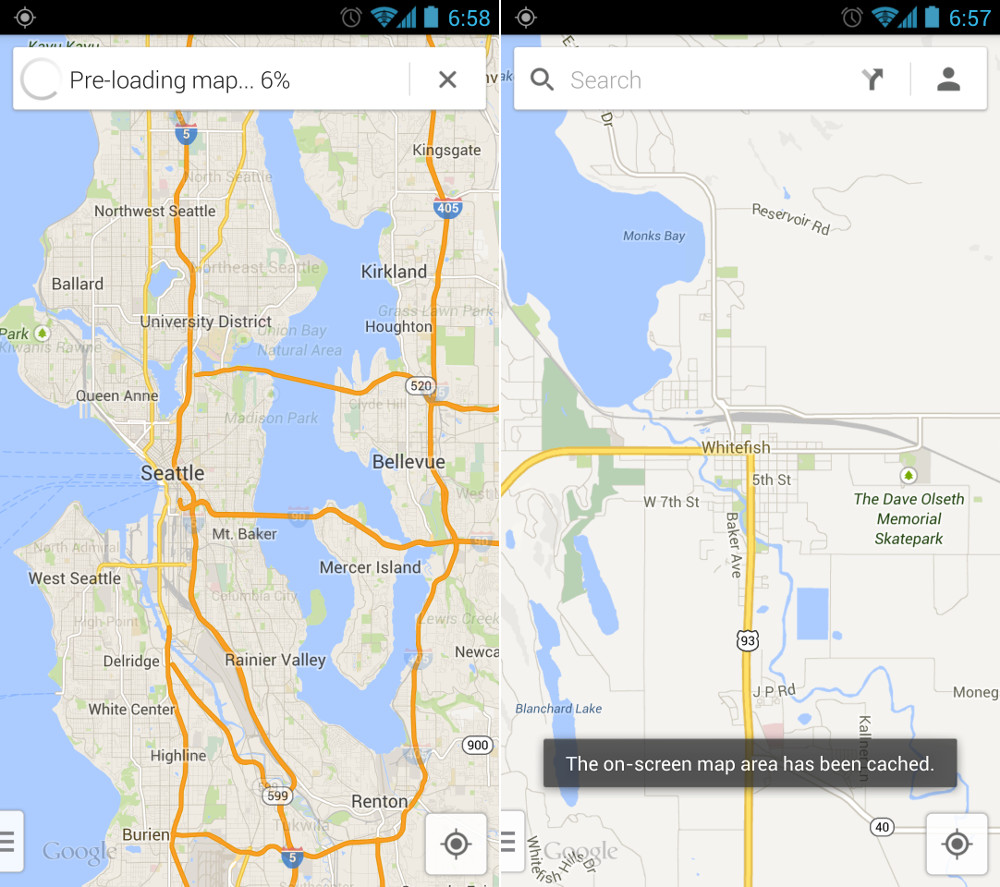
Moments after the new Google Maps v7.0 went live last night, the cries of “Where is Latitude!” and “What happened to offline maps?” spread throughout the internet crowds. Since Google had yet to push out a blog post detailing the new features of Google Maps prior to releasing the update, you can imagine that we were all scrambling and concerned. Now that a post has been issued, we have two bits of news – one good, one bad. Offline maps are indeed still there, but Latitude will retire on August 9.
In order to save a map for offline viewing, all you have to do is bring the area you would like to save into view, and then type “OK Maps” in the search box, press enter, and it will save the map for you (pictured above). Depending on the size of the map and your connection, it should take only a few seconds to save. We should mention that the My Maps section of Google Maps is not in this release, but Google assures us that it will arrive shortly.
In terms of Latitude, you should have seen this coming. Latitude service will officially shut down on August 9, as Google is pushing users over to Google+ and their Locations feature. That’s unfortunate for those of you who do not use G+, but that’s where we stand.
Here are the rest of the new highlight features from Google’s announcement of Maps:
- Explore: Explore is a fast and easy way to visually browse and discover new places without even typing. Simply tap the search box and you’ll see cards showing great places to eat, drink, sleep and shop.
- Enhanced navigation: In addition to current traffic conditions, we’ve added two new features to help you navigate around traffic. You can now see reports of problems on the road that you can tap to see incident details. While on the road, Google Maps will also alert you if a better route becomes available and reroute you to your destination faster. This feature is available only on Android and is coming soon to iOS.
- Designed for tablets: A dedicated tablet design brings all the features of this new app to Android tablets and iPads, which makes exploring the world from the comfort of your living room much more fluid, smooth and fun.
- Reviews, Zagat and Offers: There’s a new 5.0 star rating system that gives you a quick read on how your friends and others rate places like restaurants, bars and cafes. For an expert’s opinion, the Zagat badge of excellence and curated lists are integrated into search results so you can quickly spot the very best places. From “Best Restaurants to meet for a drink in NYC” to “Best Restaurants in the Mission” in San Francisco, Zagat’s there to help you uncover the local gems.
Via: Google Lat Long | Google Support

This update is horrendous. I don’t understand how developers think people want a more resource hungry “slicker” version – instead of making it more reliable and more efficient.
It also seems like they assume every android phone out there to be brand new. Even if this looks cool on a brand new Galaxy S4, its choppy and unreliable on the majority of Android phones out there that don’t have quad or octa core processors.
Thankfully we can still find an APK to go back to a variant of version 6.14… and once again listen to music and navigate at the same time without the phone having a stroke.
Good news! There is an update being sent globally today adding an offline button and a Where’s Latitude button.
http://www.engadget.com/2013/07/11/google-maps-offline/
yup, just saw this
does anyone know how location history will work now? i used that pretty regularly and it used to be on the latitude web site? FYI location history is where you can see all the places you’ve been thanks to Google’s passive location updating.
You can see the location history at maps.google.com/locationhistory and it will continue to work the same way. Not sure if it will be available on G+ app or not.
Google: it’s over for me.
Forcing me onto your sh*ttrain
of g+ is the last straw. When my
contract is up, I will be leaving the
Android OS, because you sh*tted
it up. Whatever. F U
That’s intuitive…
I wish we could cache a specific route…
Foursquare should jump all over this.
man KELLEX have you seen that GTAV gameplay trailer….LORD JEEEEZZZZUUUUSSSS only time im leaving my house is for the note 3
Come on Google, cut me some slack! You’ve just killed two of your most important services to me! At least Drive is safe.
The kill off of Latitude probably has something to do with Google’s recent purchase of Waze…
Maps driving navigation now works in Malaysia FWIW. Anywhere else try?
Does this mean Google Navigation might actually re-route me around upcoming traffic like it has been claiming it can do for years now but has never actually done in a single instance where Navigation was clearly telling me that I was about to plunge headfirst into heavy “red-dot” traffic!? Cause if it did, that’d be awesome >:-(
It seems that way, as traffic is now up front and center when you start navigation. Time will tell. The one navigation feature added I am interested in is it will supposedly “learn” that you’re going off the navigation route and determine a different one. I do this all the time if there’s traffic, it re-routes but puts me on the same path, hopefully this fixes that.
Fingers crossed, I suppose. Still hoping that one day Google will take a page from the ancient VZ Navigator feature–of all things–that allowed you to search for something ALONG your navigation route. Being able to find the nearest Chik-Fil-A off of the interstate I’m driving anyway would be amazing.
Sadly, this already did exist in in the mobile app. While using the navigation, open the menu, select more, select search, and BOOM you get stuff along your route in either map view or list view. I used it all the time once an exhaustive search showed me the way. But guess what?!?!? That is gone now as far as I can tell and is one of several reasons I’m considering going back to v6 until google removes their head from their lower exit port.
I just want a PAUSE feature. Yes, I know this isn’t the route, but I’m hungry and need a break, STOP REROUTING and give me a second. Or I need to stop in a store real quick and don’t want the nav still running in my pocket.
Does anyone actually use latitude?
Yes, my wife and I use it all the time. When one of us is somewhere new instead of having to send an address and then enter it into maps to navigate to, I just navigate to my wife’s location or vice versa. I can look and see if she has left work or gotten home yet to see if there is time to have her run by the store to pick something up. If she is running late for meeting somewhere, I can just look and see where she is and plan accordingly. Having it built right into Maps is very convenient and I will definitely miss it.
Yes, I use it all the time
When will they throw in the towel on G+, I dont know anyone that uses this regularly.
I use it WAY more than FB.
Same here.
Good try, Mr. Zuckerberg.
Love G+. I don’t use it as a “look what I had for lunch” network though.
The design language is all off. This app doesn’t match any of their other apps.
it matches the new desktop maps browser. the cards also seem to match the google now, google+ design.
What are you talking about? It matches the design of all their new card based interfaces.
How so? Only in the search section. The main UI is 100% different. Different menus, different typeface. It’s way off. Open Google+ then go back to maps and you’ll see the differences. It’s the iOS UI slapped onto Android.
It’s nice but will they change all their other apps? We’ll see I guess
I like the design a lot. I don’t expect Maps to be designed like G+ or Google Play Music because it’s delivering a completely different experience. Kind of like how in the Gallery there aren’t action bars and action overflow buttons everywhere – in apps where you’re mainly looking at visual content Google tends to place it front and center. So the floating nav bar button makes sense here, and the nav bar itself looks to be standard holo dark design. The typeface doesn’t seem to be any different either, and I don’t know why it would be considering the system controls fonts. In the search interface, everything also looks pretty standard with some Google Now-esque card UI thrown in. I think the design is 100% good to go, they just need to add some features back.
Would anyone want to start a petition for Latitude not to be killed off? Or at least a mass email to Google about our frustration?
Any interest here…
Wont do any good, there was one for iGoogle to be saved and nothing ever said about it, they are killing it off in November.
It’s going away, we’re not going to change that. But most likely it’s going away in name only. It will probably be rolled into G+ and improved upon there.
G+ is already better for location… what’s missing?
does G+ give you a map view of your friends/circled contacts? Latitude was priceless for this.
Yes, In the app go click on the red g in the upper left corner and go to “Locations” and it shows the map with your friends. Or you can view them in a list.
Sweet, I never used Locations in G+ before. Thanks
Yes, it shows up but it still doesn’t do timestamps of the latest location. It still doesn’t let me click the person and get directions right to them. If you ask me, it’s a step backwards. (I know, no one asked.) I just dislike when something gets killed off with a replacement that doesn’t have as many features.
I don’t mind the change, but they should have gave more of a warning before they just released the app without the feature.
Is there a way to refresh the Google+ one? like from my end? I dont have any friends on my maps on Google+. Thats why I am wondering. Everybody I have is on latitude
Anybody else find it odd that google is tracking our every move, but making it harder for us to access and share that location and location history information?
Navigation lost good functional UI. It’s a mess. I can’t use the
zoomed out map anymore because detail of route is tiny and blended too
much with other map details. Starred places list gone. Home button
sometimes half way down screen. App crashes when switching away. It’s
hard to back out to directions search to get alternate routes manually
when you know Maps too you through a town adding 15 minutes of traffic
lights it doesn’t account for. … I like that at least I could see the
one accident on the map this morning looks cleaner but lost a lot. 🙁
Starred places appear to be under your profile (click the head in the search bar)
That’s cool but I click direct to Navigation when I want to go somewhere. It had 3 panels. Starred, Recent, Contacts. ALL of that had been tossed in trash. So I guess I need to just open Maps first. They can trash the other shortcuts in my app drawer since they are worthless.
DITTO DITTO DITTO … I don’t know who they thought uses their app and how they use it but you and I are NOT their target obviously. They have made everything I do either not possible, or require more actions. Want to see your route overview while driving along (maybe to see where traffic is up ahead, or possible turn-offs), now requires two presses vice one. And the app crashes OMG they make the app useless. Leave Nav (but not exit) to do something, come back, and first you inexplicably dumped back into the route creation page, and then selecting your same destination and bam force close when you tell it to start navigating. rinse repeat until you X out from the status bar AND wait a few min (or use an app killer which I prefer to avoid).
Still using waze for police and camera traps.
Google just bought Waze, so expect Waze to go away and all the features to be absorbed into Google Maps over the next year or two.
haha, absorbed, right…
So you have to type something in the search bar to get to a feature? No one will ever know that except us nerds. Who, at Google, made that stupid decision? Also, how the hell do you delete an offline maps once it’s cached?
Something tells me they’ll fix this very soon. Wonder if they just wanted to get this pushed out. Doesn’t make it right, but I already cached what I had before so I’m not terribly upset.
Seems that way to me. On the bright side, I don’t think anyone could argue that the new design isn’t awesome. Plus within the next few updates offline maps and “My Maps” will probably be restored to their former glory.
As for Latitude, it sucks that it’s getting killed off but there’s nothing we can do. If you’re a user, the earlier you start researching alternatives the better. We can hope that G+ location sharing gets an upgrade to replace Latitude, but who knows if we’ll ever see that happen.
The design is awesome. But much like the iPhone, it’s pretty but lacking in features.
I’m with you, it seems like typing “OK Maps” is the background workaround they created while developing it. I would guess that the feature will arrive when they put My Maps back in.
“Who, at Google, made that stupid decision?”
Wish we knew. That user would be bombarded with all kinds of lovely email. 😉
What gets me is that this “OK Maps” feature is *new*. It doesn’t work in older versions. This means Google *purposefully* replaced how one access a feature with an esoteric, undocumented access method that no-one would ever logically or intuitively guess at.
…mind-boggling.
maybe there’s a reason for this. Perhaps the search functionality can open up the door for more features. This way you won’t have to even update the app to get these newly added features.
I had the same thoughts with the new browser version of maps. Granted that was a beta opt in, it looked nice but there were a lot of features missing, and not just advanced ones (such as making a trip with more than two destination points).
Looks like this maps update is following the same trend. Release an incomplete update and rebuild features in as you go (much like Google Music) which is a terrible business model.
Between this and the ridiculous way that history is accessed in the mobile version of Chrome, it seems like Google trying to bring us back to those fun DOS command line days. Usability wise this is 1 step forward, 2 steps back.
But is the 85MB map limit still in place? If there is no map limit size, I’d argue this is an improvement for anyone who knows of the easter egg.
It’s much, much smaller now.
What happens if you try to load too big a map? It was nice that with the old maps, it would tell you the map size when you were adjusting, so you could just save several overlapping 80MB maps covering the backwoods and your problem was solved.
It clear everything and you have to start over, zoom in, then retype “okay maps” Its truly a horrible experience.
That dumb restriction is still in place. You have to guess now, though…it doesn’t give you a nice square and MB guess.
Google really screwed up there. The restriction is completely artificial and serves only to make the user do something the app should do on it’s own.
The only space limit should be the remaining space on your device, or a percentage of it.
Google on a tear lately… killing or abandoning every service of theirs that I depend on daily.
And no, Google+ Location Sharing is not a replacement, in fact, its a pathetic underdeveloped POS. It looks like some intern scrapped it together for his/her summer project. Furthermore, what about on Chrome? How do I view my friends’ locations there?
I agree completely. Couldnt have said it better myself.
I’m so pissed that Google isn’t supporting Latitude anymore… Google+ is garbage. I relied on that app to coordinate different things due to the fact that my wife and I both work shift work. I could always tell when she left work or was on the move so that I could meet her for dinner. Anyone have a solid alternative?
https://latitude.google.com/latitude/b/0
Google Latitude is not an effective alternative for Google Latitude… which, if you haven’t heard, is being killed off.
The purpose is that it can be used while having the new maps app for as long as Google keeps the serves live. I would guess that will be a long time to come.
No. It is being discontinued, across all platforms. It will no longer be an option, not even via browser.
What the hell. What an idiotic move on Google’s part. I assumed it was just omitted from the maps app for now.
I’ve never used Latitude. How does it work? How do you set who can see your location? Also, how often does your location update? Is it more or less real time?
Latitude is amazing. You can ping people for updates. It’s close to real time anyway and all in the background. You share via gmail account and can limit specific people to detailed location or only city and state.
Well, let’s hope they replace it with Google+ location. I realize it’s garbage right now, but I suspect it will improve.
they will probably integrate latitude into G+ location
It isn’t real time like Glympse, but it updates based on the movement of your device. So for instance, if I’m at home for 8 hours, my location won’t update because I haven’t moved. But if I run to the store, my location will change.
honestly that is kinda creepy. what are the privacy features? i hope i’m not using it or have it activated haha.
You choose who you share your location with, and to what extent. Really convenient feature.
You and the person you are sharing your location with had to opt-in and confirm with emails. There was no way for you to have it on and not know it.
You’d know if you were using it, because you had to opt-in, plus Google emailed you every month(? I think) saying “hey, just FYI, you’re still sharing your location with people on Latitude”.
Texting.
Cerberus anti theft along with client cerberus could help with tracking/locating one another. Great security app otherwise too. Fyi.
Never understood why people cared so much for offline maps. WIthout navigation, it’s use is very limited.
They can be a lifesaver on backcountry roads and in the mountains. It’s an extremely useful feature.
…?
Offline simply means you have access to the map without a data connection. It still uses the GPS and can still be used to provide navigation.
No it can’t be used for navigation. Give it a try for yourself.
Enable data – enable gps – open maps – grab local area for offline – search for nearby address and select navigate – disable data – follow route, App will direct you, turn-by-turn.
Tested and working as of this morning at 9am CST.
Anything else?
go off-route / stop and start navigation and try your test again. You will find that it is unable to provide a route without data. But that is fine, you just have to manually follow roads, but you can’t get a route (as opposed to following an already loaded route as you describe) without a data connection. Despite having more than enough horsepower in our phones to calculate routes, all routing is off-loaded to google servers and then sent back.
You are correct…but that doesn’t invalidate my post, or support the argument of the poster I was responding to.
Does it surprise anyone there are some things Google Maps doesn’t do well??
There are apps with better offline routing and there are standalone devices that can do it all…No-one ever claimed Google Maps was the be-all-end-all of GPS solutions.
First of all, in most cities in the world, just looking at a map to find out where you are and how it relates to where you want to be is quite useful (that’s how navigation was done before people had computers calculating the route for them).
Second, with offline maps and no expensive data roaming, all it takes to have navigation is that you walk into a starbucks, McD or somewhere else with an open WIFI, tell the phone where you want to go and wait for the route to be sent back to you. After that you can use that route and the downloaded map to navigate wherever you want to.