


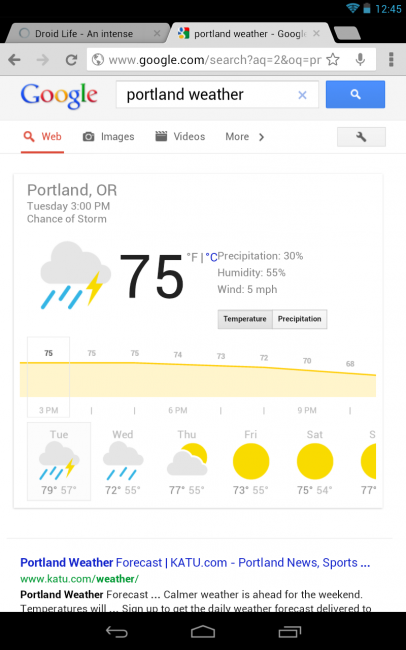
Weather searches from your tablet are now more beautiful than ever. The Google Search team introduced weather visualizations to bigger screened devices today, which as you can see, look a heck of a lot like the cards that are found in Google Now. These new visualizations are interactive, meaning you can slide the hourly temperature meter for up to 10 days, scroll day-by-day to check the forecast, and toggle between temperature, precipitation, and wind (not showing on my screenie for some reason).
To get the weather to be displayed this way, simply open a browser and type “weather” in the address bar.
Looks like the old Google News and Weather Widget with a white skin. It was “interactive” too and worked on the OG Droid……
Nice tip! Knew about just saying “What is the weather like today?” via Google Voice Search, but not about just typing Weather into google.com search. Awesome!
I love Google, but to say this is “beautiful”……….
Then you must be blind. lol
phone version is a little different but still not bad.
weird. works on stock browser, but not on Chrome (Razr, ICS)
Many like the Chrome browser but I prefer stock…..for now.
Holy sh*t statusbar!
Yeah, lol. I couldn’t stand the stock one on the S3
I’m so happy to say:
I saw it on my ~Nexus 7~.
🙂 Proud early owner.
Yay!
I simply don’t understand why the phone version of Chrome (and Google search results) and the tablet version of Chrome are so different.
on the phone its like a little slider, on the tablet its a little more in depth as on the phone you can only see weather, now wind and precipitation. just used a spoofer to see in on a xoom and it looks great!
or you could use Google Voice Search + Google Now
How are these different from the old weather results in android?
I think the theme might have changed a little bit. It’s a very big deal.