


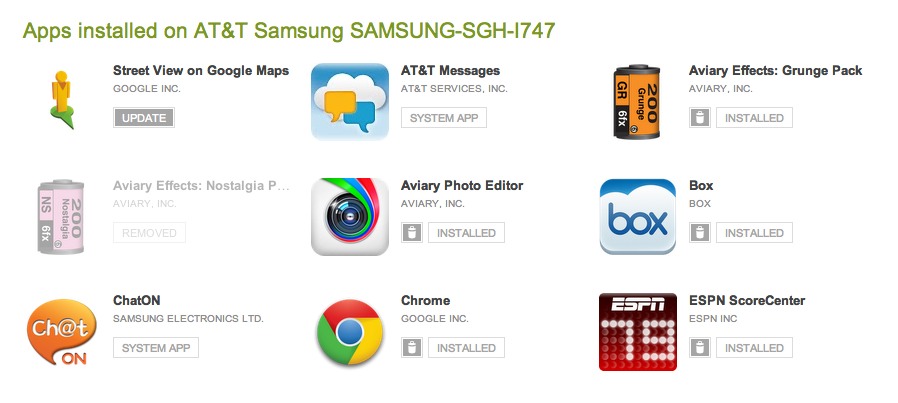
It appears that the web version of the Google Play store has also been included in today’s I/O festivities without much of a public mention. After loading up the store this afternoon, one of our readers jumped into a section called “My Android Apps” and fell onto some treats.
If you are signed into your Google account, you can now send remote updates to your phone, uninstall them if you’d like, and even view System level apps that are installed. I tried both updating and uninstall myself, and they work just as good as the remote installs do.
Cheers Anthony!


this is currently (26-Jan-2012) NOT available to me from either Firefox or Chrome (eastern US)
SlowPoke.jpg
GooglePlay has been able to do this for months now xD
Aha. I was wondering how the Q was going to work with no direct input device. I guess it will be web-administered.
On the google play store you can remove your old devices by going to Options (Gear Wheel) clicking on orders and settings then go to the settings tab and uncheck the shown in menus button
this is awesome. so tired of having my OG in there lol
If we could get rid of them completely it would be better but this works for now
Hiding doesn’t work for a lot of people. For me, it will only allow me to hide one device. When I attempt to hide the next device, it’ll unhide the first one. Frustrating, as I’ve had a bunch of devices (though probably not near as many as Kellex).
Edit: I see they’ve changed the visibility option from a drop-down to a radio button, and it appears to actually *work* now. Awesome!
The should have filters: For example in the Installed apps they should let you filter or at least sort on: “Installed” “System App” or “Update”
In the “Other Apps in my Library” section they all say “Install”. There should be a way to see which ones are free and which ones you bought. On the phone the one you bought say “Purchased” instead of “Install”. Those that are free you should be able to remove. I have A LOT of free apps that I tried out and decided I didn’t like which I’d love to just remove from the list.
Better yet, allow you to “favorite” apps…and then only restore the favorites on a factory reset or new ROM install.
That…would be awesome.
One thing I’ve had difficulty with is that the My Android Apps section doesn’t show ALL of your downloads. I think their page allowance might be limited. In alpha order I can only see apps starting with the letters A-O and nothing more after that. Anyone else have this prob (or am I the only one who needs app counseling)?
check to see if there’s a “page one” you’re not seeing
O_o
why can’t my razr use chrome ?
Why can’t I get rid of phones I don’t have anymore, Jeepers I’ll be scrolling forever soon!
You can.
But the lists STILL are truncated to 20 pages. Get your act together, Google.
Google, show me how to clean up “My Library”!!!
God bless you Google
tasty
I just accidentally my pants on this. So friggin’ convenient now.
I actually quite like this. Now if I could only have an option to delete items from the list of apps that are no longer on my device.
That always annoys me
I JUST UPDATED THE APPS ON MY TABLET FROM MY DESK AT WORK AS IT SITS IN MY CAR CONNECTED TO A WIFI NETWORK :3
Cool, but hope your car doesn’t get broken into. :3
The tablet is between my seat and the console. You’d have to look REALLY hard to see it, and all you’d see is the side of the silicon case.
/me heads to the parking lot and looks between seat and console. He was right Mei it was there.
Very cool! But you still can’t remove apps from your list of previously installed apps. So the ten various battery monitoring widgets I’ve tried over the years are all still there, and my list only makes it up to the “K’s” before running out.
That’s me!!
Thats me!!
so awesome! Galaxy Nexus is now $50 less too!
Finally. Something that was severely lacking, IMO.
These are some great features. Android is awesome!