


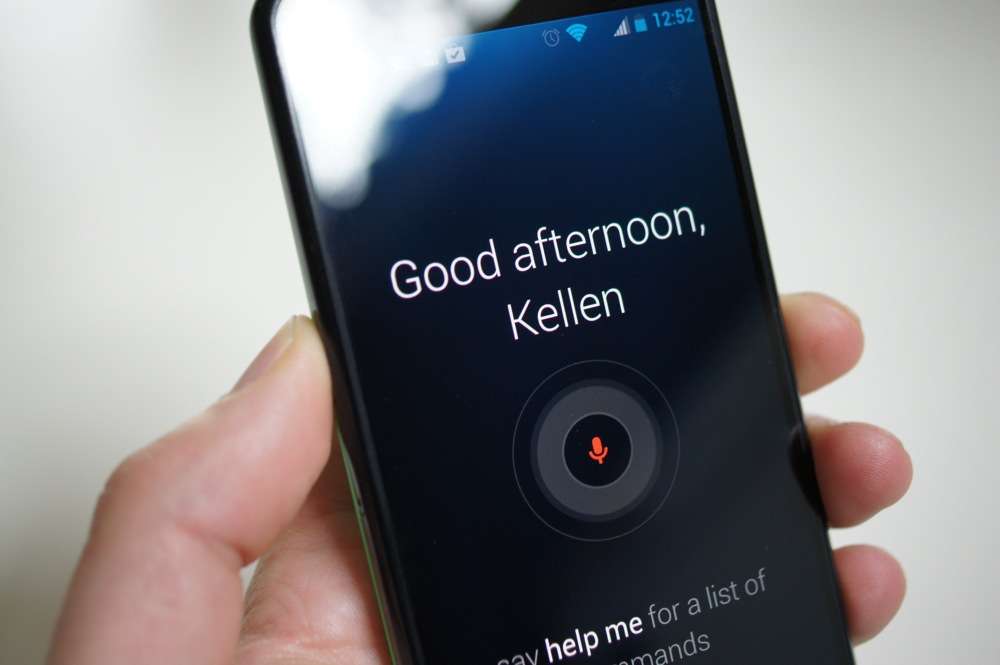
Motorola’s Touchless Control app, which is one of the leading features of the Moto X and new DROID line, was pushed to Google Play today. For those not familiar, Touchless Control allows each of these new Moto phones to partner with their natural language processors, so that they are always listening for your commands. After training them to only activate to your voice with a command of “OK, Google Now,” you can perform all sorts of Google voice actions from setting reminders to finding directions home.
We’ve put together an entire tutorial of Touchless Control that you can find here.
With its release to Google Play, we can only expect this to mean that Motorola has additional feature plans for it in the future. Rather than leaving it as a baked-in system app that can only be updated with system updates, this should allow Motorola to update it regularly. In fact, both our Moto X and DROID ULTRA devices received the newest build of 3.06.1.0.
We’re only seeing one noticeable difference so far, and that’s the addition of a “User speakerphone” option for when placing calls using Touchless Control.
As you would expect, the app is only installable on the ULTRA, MAXX, Mini, and Moto X.
Update: Here is the .apk file if anyone feels like playing with it.
Play Link
Cheers Droid Ronin!
Someone Please help me out. I am using touchless control on my moto x and cant seem to transition from, asking about Obama and then asking “who is his wife” it just will google search ‘who is his wife’. I already updated the app on the play store and still nothing.
hi guys i ve installed this apk and cannot open it , no crashes but theres no option to open it
Can we get the APK????…………Email me anyone with the APK… costallves@gmail.com
So how long till devs find a way to get this working on other devices? Thats the real questions. Love the Android dev community. They can do anything
A phone which always has the micriphone turned on……… how much further will this drain the battery ?
That’s the whole point of the MotoX. Dedicated hardware platform to allow these features without additional battery drain.
apk not working
the must be the NSA phone
Let’s cross fingers it’ll make its way to Android KLP.
Let’s hope it’ll make its way to Android Key Lime Pie.
I sorry Kellen, I’m afraid I can’t do that.
it won’t work unless you train it with your voice, which you can’t do without the “touchless control” setting in the settings menu of the above phones. that setting menu also has active display and smart settings too, so I doubt it’d be worth having it on your phone or if it’d even work correctly
Let’s get this working on other phones! 😀
Please change the title
I downloaded the apk and installed it fine, but there isn’t anything to launch it. It’s installed but not there basically lol. I keep my phone charger wherever I go so this wouldn’t bother me about battery life, but it doesn’t work unless someone hacks it to work for all phones. I’ve got a Galaxy S3 so its a no-go on this phone……for now
Has anyone tried this on a non rooted, non specified device yet?
We have the system dump from the Moto X hasn’t someone tried pulling the apk from there?
https://mega.co.nz/#!WtgQ1RQb!OKJoWAZ5Zuhp6oknPM7VF3N1e8lfe00EdIARgFpCDaQ
Here is the apk.
I pulled it from a system dump but it doesn’t seem to have a UI and I’m not sure what to do with it…phone doesn’t do anything from saying “OK Google Now” so I’m wondering if it relies on more or something…idk…I’m sure someone who develops can tear it apart and figure something out and maybe get a zip we can flash in recovery.
exactly. I got it from the system dump as well, i installed it on my CM Galaxy s4 to install, and i cant get anything to work. I dropped it in the system app folder and that did nothing, then I installed it as a normal app, and nothing happened. I guess we need another component it seems.
Need the Motorola settings app to set it up
Alright, im gonna try to get that apk, ill keep you posted.
Here is the Moto Settings apk, can you just install it normally?
https://mega.co.nz/#!Ow4WzbRT!aPpRszg_TecaTBuXdhJShWol7plirGjMPv-o62psoHM
You need root to replace your Google Settings app. Use something like ES File Manager in Root Mode. No guarantee it will work.
Thanks for the apk, i’ll try that now.
I still cant get the Moto Settings app to get instsalled, even after deleting the stock settings app. Any ideas?
I’m going to try it now. HTC One.
Nor can I
Wonder if anyone has gotten this to work…
http://db.tt/hS4ZOqEb From the system dump from another blog that I pulled from. Installs but then disappears. I can’t seem to find what to do with it. Good luck and hopefully someone can let me know.
Anyone got a name of the apk? I have the system dump so i have all the apk, but there is no obvious names that I am seeing.
it’s AudioMonitor.apk
thanks…uploaded
I like this approach to making apps like this updateable without a need for an OTA OS update.
I am less inclined to worry about new versions of the OS (i.e. Key Lime Pie) if the actual apps I use are being updated. The biggest reason I wanted Jelly Bean was for Google Now. As long as they can keep updating the apps without need for an OTA from Verizon, then I would be OK with delays in getting OS updates. I mean, it would still suck, but at least it would be tolerable.
Don’t be sad… Sure this’ll be in the next version on Android… Not much to wait…
the has sort firmware files that it is downloading, Im sure the firmware is for the NLP processor. This wont make it in to any other current phones or phones planned to be released till the end of this year, This needs hw to work.
How soon before someone cracks this and we’re all playing with it. Of course our phones would die fast. Still that’s the beauty of android. Freedom to explore.
Would love to give this a go on my S4 if I could get that apk and mess around with it. Hoping to find a flashable zip on XDA soon…I know the awesome developers out there can do it.
blah
blah what? I don’t compute.
So, Moto follows Google’s way to put “system app” into Play Store?!
And that’s how Moto’s phone would get faster Android update?!
Would this be related to GPE (unlocked) Moto X that was confirmed by Guy Kawasaki, It won’t loss any software feature…?
A GPE Moto X would almost assuredly NOT have these features, as it would be a totally stock phone.
If it’s an “app” then yes it will be able to have these features assuming the GPE or Nexus device has an X8 chip.
Actually no. It’s been confirmed by multiple reports that the GPE Moto X will be unmodified from the carrier versions (i.e. it will not be 100% stock Android, but will in fact have all the extra junk Moto baked in).
That’s exactly what I meant…
If Moto is taking this route to have the extra junk live in play store,
Then the GPE Moto X, could indeed be a pure stock android and still have all the lovables
Will work on Nexus 7 2013 or Xperia S?Can someone upload APK?
Doubt this would work on other devices without some hackery, likely uses some native code specifically for the hardware setup that will crash when the hardware isn’t found.
So, what if this is the next Nexus 4 like the rumors suggest? Doesn’t that mean this feature would work on a Moto X running vanilla Android?
The moto x with the “google play version” will come with the X8 chip and should be able to download this app. Also one would think that the next Nexus device which is rumored to be by Moto would come with the x8 chip as well and therefor be in the same boat.
It’s only available for the new Motos. For now.
So then what’s the point? Just so you can update it without having to get an ota?
You say that like it’s a bad thing?
Ha ha no it was a real question (no sarcasm) but then I thought about it for two minutes and realized what a good idea it is
So does this do anything that launching Google Now through a button doesn’t do? It just seems like a lazier version of something that is already dead simple. But if it does something I am unaware of then I guess that might be different.
Not exactly. BUT, the uses are much better. Voice control of your device while driving (and not having to hit a button)… controlling your device while your hands are preoccupied or from across the room.
In the early stages of development, it used to have a feature where if you said “OK, Google Now…What’s up?”, it would read you your notifications. VERY useful, but it was pulled since it caused problems with the app waking up on its own. Maybe this will be included in the next release after they iron out the bugs.
This is great, as that app needs some refining and additional features for sure… It’s nice, but it renders itself a bit useless when you have to pickup the phone and enter something at the end of a command anyway (i.e. texting someone… gotta read text then press send).
ok googlenow was the first sounds that my neighbor’s 18 yr old uttered that made sense.
Typical Android: Want a new feature? Buy a new phone. In this case, the “F” in Feature stands for Fragmentation. And this coming from an Android user (most of the time).
But hey, I’ll take any excuse to buy a new phone.
Isn’t that true for any phone? Want retina display (feature), buy a new phone…
Want Siri? Buy a new phone! Crapple does this too…it’s not an android thing. It’s a manufacturer thing. In fact, I’d say the core of android does it least of all.
Why would they make this available ONLY for the phones that ALREADY come with it?
So they can update it on a regular basis instead of it being a system app that can only be updated with actual OTAs. Since it was explained in the article, I decided to give you a tl;dr:
tl;dr it’s easier this way
Yeah, I read all that, too. I had tunnel vision on the fact that it isn’t an app that could be downloaded on any amoled phone. But I get it all now that I’ve calmed down a bit.
so they can release updates for it to google play directly.
Also there’s the fact that they’re going to be releasing google play versions of the Moto X as well as the rumored Nexus phone that’ll be be stock android. Users of stock android with the x8 chip will be able to download this app.
That was the quickest I’ve gone from overly-excited to depressed in quite some time.
Thanks a lot, Kellex.
Hes doing his best impersonation of Geller of BolloxGeniusReport
Ew.
Let cool get it, I’m sure it’ll be in the next cyanogen mod tweaked to our liking.
I can’t wait to get my Droid MAXX on Saturday.
Ditching my Galaxy Nexus for a Moto X when it comes to Verizon.
you probable need the language or contextual processor to make it work. Otherwise you will kill your battery. Right?
if it doesn’t, moto’s got some splaining to do. and i don’t imagine that it’ll kill it any worse than what Google Services is doing. f Google Services.
Anyone with a new DROID or Moto X willing to download and pull the apk for us to test on other devices? Most likely won’t work but worth a try.
Give me an idea on where it might be and I will see about pulling it.
com.motorola.auditomonitor.apk might be it. might need a file broswer to find it in systemapp or else where. i may be wrong on the name though im going based off the play link
Use Root Explorer, it would be either in /system/app or /data/app.
you don’t need root to pull it right? because I didn’t think we had root yet… just “adb pull /system/app/***.apk” right?
Have you tried Motochopper root method?
http://www.droidrzr.com/index.php/topic/15208-root-motochopper-yet-another-android-root-exploit-412/
or
http://forum.xda-developers.com/showthread.php?t=2252248
is it supposed to work? If so I’ll give it a shot then grab the apk for you… I see at droidrzr there’s an FXZ for the Mini now… would like to see one for the Ultra/Maxx for safety’s sake!
Yep, here’s the FXZ for the Ultra/MAXX:
http://sbf.droid-developers.org/obake/list.php
ok cool, give me just a few (if someone doesn’t get it first)
motochop failed… hmm
Both versions? I think S4 might be updated. Both might not work but those are the most recent versions. Can also try this one:
http://forum.xda-developers.com/showthread.php?t=2130276
S4 failed – didn’t realize they were different… downloading the one from droidrzr now, plus the one you just linked. Have you seen it working elsewhere?
Not for DROID Ultra yet at least.
Oh I misunderstood you above. Crap…lol. Just sent you a PM at XDA – I would ditch that droidrzr link.
Here is the APK that I think that it is.
https://www.dropbox.com/s/y9sre79hsftone2/AudioMonitor.apk
It is linked in the story now. Have fun.
APK Anyone?
I am still mad I have to wait for Moto maker. Screw you AT&T. You suck and your service sucks.
And with just a few tweeks to my build.prop….yep…touchless controls on my Galaxy Nexus. Thanks Motorola.
Can you upload the apk somewhere?
Well, it installs….then fc…so, I’ll save you the agony.
Alright, thanks for trying.
Could be a permission issue. Have you tried re-installing it as a system app?
Hmm! 🙂 Good idea. Just have to modify the device name or something?
have fun with that battery life…. lol
Another google like move…
Exactly. The more Google influence we see the better.
Can we get an apk? I’d like to know what/ if anything this will do on my GS3.
same
It’s linked above now.
I really want to see how fast Moto pushes out 4.3 before taking the plunge for the Maxx.
The conundrum: Retire the GNex or wait for next year’s Moto
NEXT YEAR? I don’t think Droid Life Fans speak that language
What’s next year?
It’s VZW consumer slang…
Curse these golden handcuffs
must be a CUBS FAN with that talk!lol
Nexus 5 or Note 3 are good options if you wait a few months
Another Eric R in the chats? Interesting.
Another Rees? -posted by kevin rees
reez nutz. haha sorry.
I believe you are looking for DEEZ Nutz. haha
Don’t worry, he’s an idiot.
You put CM10.2 on your G-Nex yet man?
I finally did and DAMN, 4.3 = brand new G-Nex!
I did…but the screen is still crap and the vibrator broke (Giggity) so I have to have sound on.
That sucks. I’ve been pretty lucky with everything holding up on mine.
Email me at Pakmann2k@gmail.com . I will reply with my address. You mail me an envelope with another envelope inside with postage and your address and I will send you the speaker module with vibrator. I have a spare. Should take about 5 minutes to swap out.
Seriously?! That’d be awesome, man. Is it hard to swap?
Nexus 5 would be great…but i’m on VZW. That’s why I’m looking at the Moto X. It’s like our Nexus now lol
Picked up the GS4 yesterday and retired my GNex. Don’t regret it one bit.
I said the same thing a month ago, but now I do regret it. first GS4: broken charging port within 3 weeks. Second GS4: overheats within 5 minutes of screen time use and reboots. I’m about to sell it and go back to Moto. =(
Next year does not compute
Retire the GNex when the new Nexus is released in October 2013, then go make that your next phone.
Man, I got all excited until I read the last line…
Yep. Even though I plan to buy the Maxx. It won’t be til Oct. So I was hoping to beable to use this app on my S4 til then….
Nah you should get the MAXX now!
lmfao… tell me about it.
Indeed. Clearly many of us did not expect it as the writer suggests. XD
Makes sense though. Only those devices have a dedicated core for an “always listening” mic. Without that, I imagine this thing could suck the juice right out of your device in no time flat.
Yeah, this is what I was thinking. If you have a previous Maxx phone or Note 2 or something though, I’m sure it would still be managable.
Yeah, I have last year’s Maxx HD, and using utter’s always listening mode drained my battery quicker than I expected, so I wonder if this’ll be a little more efficient.
Manufacturer’s should just go stock android and turn all the software into apps and then they could sell it in the play store if it becomes popular and make additional profit, while still keeping stock android for fast updates saving time and money of having to retweek their skin for a newer version of android. And you can still buy their phone which would come with all the app software which would be free with their phones
i cant even open the app after i installed it in my photon!
duh… no a listed Motorola device
It’d kill your battery anyway. No dedicated core like the Moto devices.
I bet the apk will be out soon and we will all be surprised that it won’t be draining the juice like we think.
In other words all the cool features on the X will be ported to all phones.
It definitely will kill your battery life. My phone is past the end of it’s useful life and every so often the wifi state machine doesn’t let the processor go into deep sleep mode. When that happens my 8-9 hour battery life becomes 3 hours if I’m lucky. Without the dedicated processor for the sensors your main CPU won’t go to sleep and your battery will be red hot and dead before you know it.
Who cares if it kills your battery if you only enable it while it’s docked (i.e. charging) in a car? I’d LOVE to get this working for my phone!!
No, it absolutely will kill your battery. These phones don’t have dedicated cores for language processing. The device will be in perpetual wakelock.
Lame. “incompatible with all of your devices”, all of which are from Motorola.
You don’t have an x8 acrt equiped phone I would guess.
Post the apk. Anyone?
Would it even work?
Worth a shot.
NO. You need the special processor and only the New Droids and Moto X have it. Its part of the computing system
Well it might work, but it sure wouldn’t work efficiently. If it works at all, it would annihilate your battery.
Apparently my Galaxy Nexus isn’t compatible with this app say google play
edit: nevermind, I really gotta read the whole thing lol
last line of the article. . “As you would expect, the app is only installable on the ULTRA, MAXX, Mini, and Moto X”