<?xml version="1.0" encoding="UTF-8"?><rss version="2.0"
	xmlns:content="http://purl.org/rss/1.0/modules/content/"
	xmlns:dc="http://purl.org/dc/elements/1.1/"
	xmlns:atom="http://www.w3.org/2005/Atom"
	xmlns:sy="http://purl.org/rss/1.0/modules/syndication/"
		>
<channel>
	<title>Comments on: How to:  Enable &#8220;Blocking Mode&#8221; on Verizon&#8217;s Galaxy Note 2</title>
	<atom:link href="http://www.droid-life.com/2012/12/02/how-to-enable-blocking-mode-on-verizons-galaxy-note-2/feed/" rel="self" type="application/rss+xml" />
	<link>http://www.droid-life.com/2012/12/02/how-to-enable-blocking-mode-on-verizons-galaxy-note-2/</link>
	<description>An intense Android news community bringing you the latest in phones, rooting, apps, and reviews.</description>
	<lastBuildDate>Sun, 19 May 2013 21:01:00 +0000</lastBuildDate>
	<sy:updatePeriod>hourly</sy:updatePeriod>
	<sy:updateFrequency>1</sy:updateFrequency>
	<generator>http://wordpress.org/?v=3.5.1</generator>
	<item>
		<title>By: bob</title>
		<link>http://www.droid-life.com/2012/12/02/how-to-enable-blocking-mode-on-verizons-galaxy-note-2/comment-page-1/#comment-2780162</link>
		<dc:creator>bob</dc:creator>
		<pubDate>Fri, 25 Jan 2013 17:57:00 +0000</pubDate>
		<guid isPermaLink="false">http://www.droid-life.com/?p=90790#comment-2780162</guid>
		<description><![CDATA[Thanks.  Works fine now.  What&#039;s with Verizon anyway...Idiots in charge again I guess.]]></description>
		<content:encoded><![CDATA[<p>Thanks.  Works fine now.  What&#8217;s with Verizon anyway&#8230;Idiots in charge again I guess.</p>
]]></content:encoded>
	</item>
	<item>
		<title>By: dstephens</title>
		<link>http://www.droid-life.com/2012/12/02/how-to-enable-blocking-mode-on-verizons-galaxy-note-2/comment-page-1/#comment-2776399</link>
		<dc:creator>dstephens</dc:creator>
		<pubDate>Sun, 20 Jan 2013 02:22:00 +0000</pubDate>
		<guid isPermaLink="false">http://www.droid-life.com/?p=90790#comment-2776399</guid>
		<description><![CDATA[I had the same problem but found it worked when instead of selecting &quot;Custom&quot; select favorites.  No error occurs if you select favorites, then only mark those contacts you want to always get thru as favorites.  Once I did that, I didn&#039;t get the error as you did.  For some reason, selecting custom doesn&#039;t work. Selecting favorites does which is just fine with me.]]></description>
		<content:encoded><![CDATA[<p>I had the same problem but found it worked when instead of selecting &#8220;Custom&#8221; select favorites.  No error occurs if you select favorites, then only mark those contacts you want to always get thru as favorites.  Once I did that, I didn&#8217;t get the error as you did.  For some reason, selecting custom doesn&#8217;t work. Selecting favorites does which is just fine with me.</p>
]]></content:encoded>
	</item>
	<item>
		<title>By: SexciiP</title>
		<link>http://www.droid-life.com/2012/12/02/how-to-enable-blocking-mode-on-verizons-galaxy-note-2/comment-page-1/#comment-2651309</link>
		<dc:creator>SexciiP</dc:creator>
		<pubDate>Wed, 05 Dec 2012 19:49:00 +0000</pubDate>
		<guid isPermaLink="false">http://www.droid-life.com/?p=90790#comment-2651309</guid>
		<description><![CDATA[Verizon does the darndest things.]]></description>
		<content:encoded><![CDATA[<p>Verizon does the darndest things.</p>
]]></content:encoded>
	</item>
	<item>
		<title>By: SexciiP</title>
		<link>http://www.droid-life.com/2012/12/02/how-to-enable-blocking-mode-on-verizons-galaxy-note-2/comment-page-1/#comment-2651307</link>
		<dc:creator>SexciiP</dc:creator>
		<pubDate>Wed, 05 Dec 2012 19:48:00 +0000</pubDate>
		<guid isPermaLink="false">http://www.droid-life.com/?p=90790#comment-2651307</guid>
		<description><![CDATA[I know right. Verizon does stupid things like this all the time, and never explain as to why. You can also use S-Voice to enable Wi-Fi too keep from going through the hassle of all the way to the setting and doing it.]]></description>
		<content:encoded><![CDATA[<p>I know right. Verizon does stupid things like this all the time, and never explain as to why. You can also use S-Voice to enable Wi-Fi too keep from going through the hassle of all the way to the setting and doing it.</p>
]]></content:encoded>
	</item>
	<item>
		<title>By: Steve Kolokowsky</title>
		<link>http://www.droid-life.com/2012/12/02/how-to-enable-blocking-mode-on-verizons-galaxy-note-2/comment-page-1/#comment-2651225</link>
		<dc:creator>Steve Kolokowsky</dc:creator>
		<pubDate>Wed, 05 Dec 2012 19:36:00 +0000</pubDate>
		<guid isPermaLink="false">http://www.droid-life.com/?p=90790#comment-2651225</guid>
		<description><![CDATA[Mine doesn&#039;t even work if I use the favorites list.]]></description>
		<content:encoded><![CDATA[<p>Mine doesn&#8217;t even work if I use the favorites list.</p>
]]></content:encoded>
	</item>
	<item>
		<title>By: LionStone</title>
		<link>http://www.droid-life.com/2012/12/02/how-to-enable-blocking-mode-on-verizons-galaxy-note-2/comment-page-1/#comment-2643101</link>
		<dc:creator>LionStone</dc:creator>
		<pubDate>Tue, 04 Dec 2012 15:11:00 +0000</pubDate>
		<guid isPermaLink="false">http://www.droid-life.com/?p=90790#comment-2643101</guid>
		<description><![CDATA[That&#039;s nice to have that option... the Inc4 and DNA have good options for enabling notifications and has call blocking built in. I don&#039;t know if other HTC devices have call blocking but these two I know do.]]></description>
		<content:encoded><![CDATA[<p>That&#8217;s nice to have that option&#8230; the Inc4 and DNA have good options for enabling notifications and has call blocking built in. I don&#8217;t know if other HTC devices have call blocking but these two I know do.</p>
]]></content:encoded>
	</item>
	<item>
		<title>By: Justin Swanson</title>
		<link>http://www.droid-life.com/2012/12/02/how-to-enable-blocking-mode-on-verizons-galaxy-note-2/comment-page-1/#comment-2640338</link>
		<dc:creator>Justin Swanson</dc:creator>
		<pubDate>Tue, 04 Dec 2012 02:06:00 +0000</pubDate>
		<guid isPermaLink="false">http://www.droid-life.com/?p=90790#comment-2640338</guid>
		<description><![CDATA[My wife has the Korean Note 2 (loves it) and it has the blocking mode. I thought it was a mistranslation for &quot;Driving&quot; mode though. (I think the S3 had that?)]]></description>
		<content:encoded><![CDATA[<p>My wife has the Korean Note 2 (loves it) and it has the blocking mode. I thought it was a mistranslation for &#8220;Driving&#8221; mode though. (I think the S3 had that?)</p>
]]></content:encoded>
	</item>
	<item>
		<title>By: bionicwaffle</title>
		<link>http://www.droid-life.com/2012/12/02/how-to-enable-blocking-mode-on-verizons-galaxy-note-2/comment-page-1/#comment-2637957</link>
		<dc:creator>bionicwaffle</dc:creator>
		<pubDate>Mon, 03 Dec 2012 18:24:00 +0000</pubDate>
		<guid isPermaLink="false">http://www.droid-life.com/?p=90790#comment-2637957</guid>
		<description><![CDATA[This could help some people:  Moto released this widget to toggle your notification LED on or off.  It&#039;s not just for moto phones.  They created it because some people, apparently depending on the phone they came from, ended up with a Razr HD/Maxx HD with a non-working LED notification light after setting up and syncing (to google) their new phone.  This Widget lets you enable the LED if it&#039;s disabled but you could also use it to keep your LED from coming on.
https://play.google.com/store/apps/details?id=com.motorola.ledwidget]]></description>
		<content:encoded><![CDATA[<p>This could help some people:  Moto released this widget to toggle your notification LED on or off.  It&#8217;s not just for moto phones.  They created it because some people, apparently depending on the phone they came from, ended up with a Razr HD/Maxx HD with a non-working LED notification light after setting up and syncing (to google) their new phone.  This Widget lets you enable the LED if it&#8217;s disabled but you could also use it to keep your LED from coming on.<br />
<a href="https://play.google.com/store/apps/details?id=com.motorola.ledwidget" rel="nofollow">https://play.google.com/store/apps/details?id=com.motorola.ledwidget</a></p>
]]></content:encoded>
	</item>
	<item>
		<title>By: Keith Sumner</title>
		<link>http://www.droid-life.com/2012/12/02/how-to-enable-blocking-mode-on-verizons-galaxy-note-2/comment-page-1/#comment-2637656</link>
		<dc:creator>Keith Sumner</dc:creator>
		<pubDate>Mon, 03 Dec 2012 17:52:00 +0000</pubDate>
		<guid isPermaLink="false">http://www.droid-life.com/?p=90790#comment-2637656</guid>
		<description><![CDATA[I think it&#039;s because VZW has their own service to block numbers, if you call VZW you can ask them to block a certain amount of numbers for free, after a certain amount of number&#039;s blocked you have to start paying them. So I imagine it&#039;s so you have to pay them for this feature.

Source: about a year ago I called them to find out how to block numbers and that&#039;s what they told me.]]></description>
		<content:encoded><![CDATA[<p>I think it&#8217;s because VZW has their own service to block numbers, if you call VZW you can ask them to block a certain amount of numbers for free, after a certain amount of number&#8217;s blocked you have to start paying them. So I imagine it&#8217;s so you have to pay them for this feature.</p>
<p>Source: about a year ago I called them to find out how to block numbers and that&#8217;s what they told me.</p>
]]></content:encoded>
	</item>
	<item>
		<title>By: Dan</title>
		<link>http://www.droid-life.com/2012/12/02/how-to-enable-blocking-mode-on-verizons-galaxy-note-2/comment-page-1/#comment-2637509</link>
		<dc:creator>Dan</dc:creator>
		<pubDate>Mon, 03 Dec 2012 17:40:00 +0000</pubDate>
		<guid isPermaLink="false">http://www.droid-life.com/?p=90790#comment-2637509</guid>
		<description><![CDATA[Thanks!  Works great with Nova.]]></description>
		<content:encoded><![CDATA[<p>Thanks!  Works great with Nova.</p>
]]></content:encoded>
	</item>
	<item>
		<title>By: Stephen</title>
		<link>http://www.droid-life.com/2012/12/02/how-to-enable-blocking-mode-on-verizons-galaxy-note-2/comment-page-1/#comment-2637157</link>
		<dc:creator>Stephen</dc:creator>
		<pubDate>Mon, 03 Dec 2012 16:59:00 +0000</pubDate>
		<guid isPermaLink="false">http://www.droid-life.com/?p=90790#comment-2637157</guid>
		<description><![CDATA[i understand what you mean with the DNA having only 16 gigs of non removable storage, but i use my phone A LOT (i guess not as much as others apparently), and on my galaxy nexus, with all of my apps, pictures, videos, and music, ive used about 4 gigs. i dont think it&#039;s that big of a deal anymore really.]]></description>
		<content:encoded><![CDATA[<p>i understand what you mean with the DNA having only 16 gigs of non removable storage, but i use my phone A LOT (i guess not as much as others apparently), and on my galaxy nexus, with all of my apps, pictures, videos, and music, ive used about 4 gigs. i dont think it&#8217;s that big of a deal anymore really.</p>
]]></content:encoded>
	</item>
	<item>
		<title>By: hkklife</title>
		<link>http://www.droid-life.com/2012/12/02/how-to-enable-blocking-mode-on-verizons-galaxy-note-2/comment-page-1/#comment-2636907</link>
		<dc:creator>hkklife</dc:creator>
		<pubDate>Mon, 03 Dec 2012 16:00:00 +0000</pubDate>
		<guid isPermaLink="false">http://www.droid-life.com/?p=90790#comment-2636907</guid>
		<description><![CDATA[No, all Note 2&#039;s are 16Gb partialy because Google and the carriers want to force everyone to stream (more $) and partially because Samsung has seemingly decided to wait until a device has reached middle age to use a storage bump to squeeze out a few more sales (see the 64Gb unlocked GS3 for an example of this).  Once again, microSD is great for storing multimedia or docs, but it&#039;s NOT for storing apps, as has been the case since Honeycomb. 

Sammy&#039;s original PR stated the Note 2 would come in 16,32,and 64Gb versions.  Now they are saying that they have no info on larger capacity peanuts.  While it&#039;s bad enough how Apple rapes their users ($100 for 2x the storage), at least they OFFER it.  The latest crop of Android devices seems to be permanently stuck in 16Gb land.   

The Galaxy S3 was available AT LAUNCH on nearly all carriers/bands (including VZW) in 16Gb and 32Gb versions.  Not doing the same 6 months later on the Note 2, a superior device in every other aspect, simply reeks of a huge conspiracy to F Android power users over and over again at every opportunity.   Make it a web-only item, VZW, or a special order, but at least give us that choice.  
Look at the DNA--HTC has already said it was VZW that requested the removal of the microSD slot.  Given the fact that app and game sizes are increasing daily, having 720p &amp; 1080p graphic assets will only make things worse as time goes on.  Gimped storage + a tiered data plan on a &quot;HD&quot; device heading into a 2yr contract is not going to be fun.]]></description>
		<content:encoded><![CDATA[<p>No, all Note 2&#8242;s are 16Gb partialy because Google and the carriers want to force everyone to stream (more $) and partially because Samsung has seemingly decided to wait until a device has reached middle age to use a storage bump to squeeze out a few more sales (see the 64Gb unlocked GS3 for an example of this).  Once again, microSD is great for storing multimedia or docs, but it&#8217;s NOT for storing apps, as has been the case since Honeycomb. </p>
<p>Sammy&#8217;s original PR stated the Note 2 would come in 16,32,and 64Gb versions.  Now they are saying that they have no info on larger capacity peanuts.  While it&#8217;s bad enough how Apple rapes their users ($100 for 2x the storage), at least they OFFER it.  The latest crop of Android devices seems to be permanently stuck in 16Gb land.   </p>
<p>The Galaxy S3 was available AT LAUNCH on nearly all carriers/bands (including VZW) in 16Gb and 32Gb versions.  Not doing the same 6 months later on the Note 2, a superior device in every other aspect, simply reeks of a huge conspiracy to F Android power users over and over again at every opportunity.   Make it a web-only item, VZW, or a special order, but at least give us that choice.<br />
Look at the DNA&#8211;HTC has already said it was VZW that requested the removal of the microSD slot.  Given the fact that app and game sizes are increasing daily, having 720p &amp; 1080p graphic assets will only make things worse as time goes on.  Gimped storage + a tiered data plan on a &#8220;HD&#8221; device heading into a 2yr contract is not going to be fun.</p>
]]></content:encoded>
	</item>
	<item>
		<title>By: Wayne Train</title>
		<link>http://www.droid-life.com/2012/12/02/how-to-enable-blocking-mode-on-verizons-galaxy-note-2/comment-page-1/#comment-2636882</link>
		<dc:creator>Wayne Train</dc:creator>
		<pubDate>Mon, 03 Dec 2012 15:54:00 +0000</pubDate>
		<guid isPermaLink="false">http://www.droid-life.com/?p=90790#comment-2636882</guid>
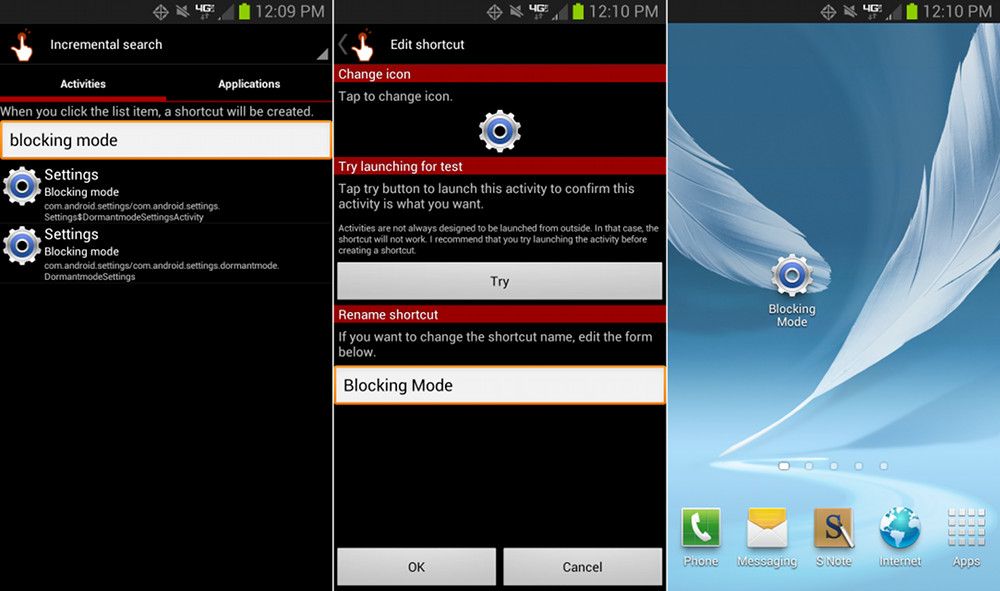
		<description><![CDATA[If you use a launcher, you can make a shortcut to it by long pressing homescreen &gt; shortcuts&gt;activities&gt;settings&gt;blocking mode]]></description>
		<content:encoded><![CDATA[<p>If you use a launcher, you can make a shortcut to it by long pressing homescreen &gt; shortcuts&gt;activities&gt;settings&gt;blocking mode</p>
]]></content:encoded>
	</item>
	<item>
		<title>By: KT</title>
		<link>http://www.droid-life.com/2012/12/02/how-to-enable-blocking-mode-on-verizons-galaxy-note-2/comment-page-1/#comment-2636764</link>
		<dc:creator>KT</dc:creator>
		<pubDate>Mon, 03 Dec 2012 15:18:00 +0000</pubDate>
		<guid isPermaLink="false">http://www.droid-life.com/?p=90790#comment-2636764</guid>
		<description><![CDATA[yeah, there&#039;s an SD card slot.]]></description>
		<content:encoded><![CDATA[<p>yeah, there&#8217;s an SD card slot.</p>
]]></content:encoded>
	</item>
	<item>
		<title>By: EC8CH</title>
		<link>http://www.droid-life.com/2012/12/02/how-to-enable-blocking-mode-on-verizons-galaxy-note-2/comment-page-1/#comment-2636716</link>
		<dc:creator>EC8CH</dc:creator>
		<pubDate>Mon, 03 Dec 2012 15:01:00 +0000</pubDate>
		<guid isPermaLink="false">http://www.droid-life.com/?p=90790#comment-2636716</guid>
		<description><![CDATA[blockception!]]></description>
		<content:encoded><![CDATA[<p>blockception!</p>
]]></content:encoded>
	</item>
</channel>
</rss>

<!-- Performance optimized by W3 Total Cache. Learn more: http://www.w3-edge.com/wordpress-plugins/

Page Caching using apc
Database Caching 7/38 queries in 0.049 seconds using apc
Object Caching 663/699 objects using apc

 Served from: www.droid-life.com @ 2013-05-19 14:21:11 by W3 Total Cache -->