
You now know that Google Home calling is starting to rollout and should be on your units within a week if it isn’t already. As fun as that sounds, blasting out Google Home calls to friends, family, and random businesses after an evening full of drinking, I’m sure you have some questions too. In this post, we’ll try to answer as many as we can with a little help from Google.
When is Google Home calling arriving?
Again, it started rolling out today! Google expects that to continue “over the coming week,” so you should have calling on your Google Home within a few days if it hasn’t already arrived.
How to place a call on Google Home
1. With a Google Home in house and connected to WiFi, just say, “Hey Google, call <insert person or business>.” If calling is live on your devices, it should fire right up and walk you through any additional steps needed. If it’s not available yet, you’ll be told so.
2. You can specify businesses by name to have them called, be more vague and suggest something like “Call nearest liquor store,” call individual people on your contacts list, ask Home to “redial,” or spell out a full phone number.
3. If you call someone who has multiple numbers listed, Google will read out the numbers and ask which you’d like to call.
4. To end a call you can tap on the top of Google Home or say, “Hey Google, hang up/stop/end call.”
5. That’s seriously it. If your Home is updated with the feature, you just make calls by asking it to call people or businesses.
Use Google Assistant while on Google Home calls
While in call, you can place people on hold and ask the Google Assistant info. You do this by either pressing and holding the top of Google Home (the touch sensitive part) or by asking for help with the “Hey, Google” command. During that Assistant session, the other person on the line can’t hear the Assistant nor can you hear the person on the other end. It’s very much a private Assistant session that ends once Google gets you your requested information.
Also, you can’t use all Google Assistant features on a call. Here is the list of stuff that won’t work while on a Google Home call:
- Listen to music, news, or podcasts
- Listen to My Day
- Use Apps for the Assistant
- Make another phone call
- Play games
Using Google Contacts with Google Home calls
Google Home uses your Google Contacts list to help it place calls to individuals. In order to get that synced up properly, you’ll need to head into the Google Home app, make sure you are on the same WiFi network as your Google Home units, then run through Menu>More Settings>Devices and choose the device you want to have access to your Google Contacts. For each device you want to give access, you’ll then toggle the “Personal results” option on.

Additionally, to sync contacts everywhere, make sure you head into the Google app on your phone and follow through Settings>Accounts and Privacy>Google activity controls>Device information. Turn that on if it isn’t.
Caller ID for recipients
When you place Google Home calls, they’ll show up as “unknown” or “No Caller ID” on the other end to the recipient. Google says that they will allow you to show your mobile number later on this year, but not right away as the option isn’t ready for prime time. However, if you are a Google Voice or Project Fi user, you can have your number show up from day 1.
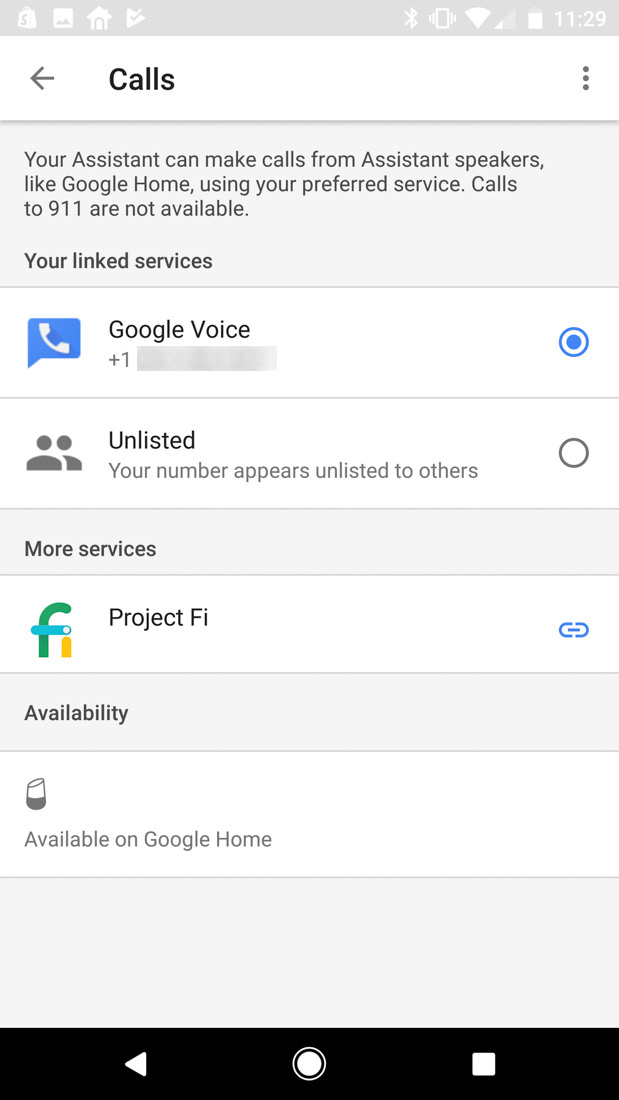
To set that up, head into the Google Home app, slide out the side Menu>More settings>Calls. Once in there, you’ll see the screen below and can choose your Google Voice or Project Fi number. If you’d rather your Home calls remain unknown, there is an “Unlisted” option too. My guess is that when the option to show your mobile number arrives, it’ll be found in this exact spot.
Google Home calling multi-user access
Since Google Home supports multiple users by voice, Google Home calling does as well. Google will use each person’s own contacts list when placing calls to individuals. This, of course, only works properly if you’ve setup multiple users.
Can you call 911?
Nope! At this time, 911 is not supported.
Can you accept incoming calls?
Nope! Google says that this option isn’t currently possible nor do they have details to share at this time. This also means you can’t block people, which makes sense since…they…can’t…call you anyway.
Does Google record your calls?
Nope! Google records the “OK Google” or “Hey Google” command each time it is said, but then stops recording once that has finished. So should you ask Google Home to call someone, it won’t continue recording as you talk – it’ll stop the minute you finish the “Hey Google, call Bob” line.
For more info on Google Home calling, head over to Google Support.