


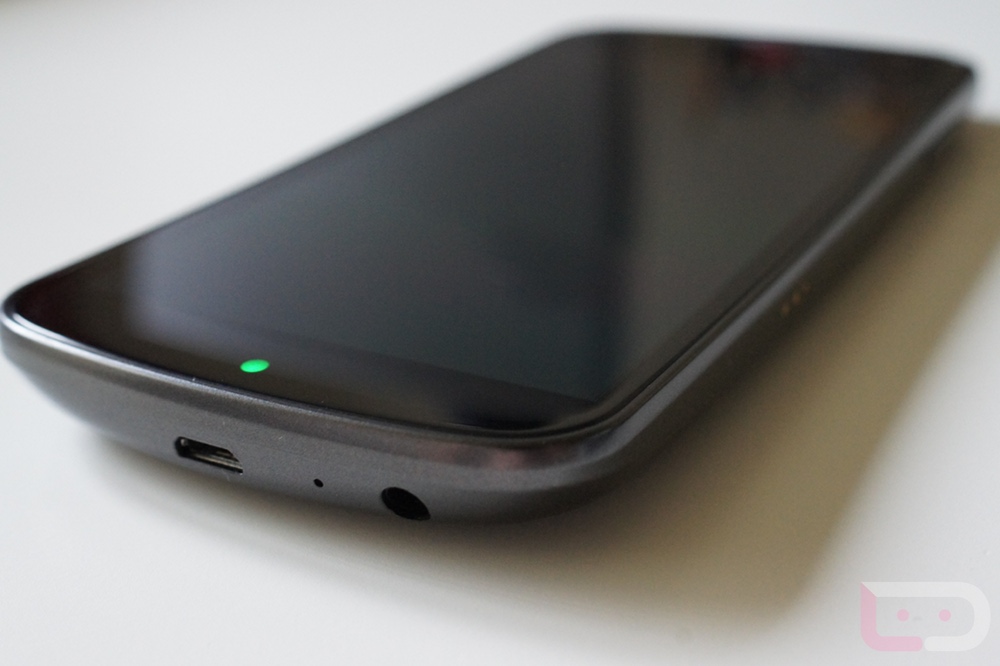
We may be just days away from the release of the Galaxy Nexus on Verizon, and I’m sure that many are starting to think about this whole bootloader unlocking process. As a Nexus device, the bootloader does not have to be bypassed or hacked like you have probably had to do to your last couple of phones. It’s a developer device that is made to be open. You can unlock your G-Nex within a couple of minutes as long as you have all of the right tools in place.
To get you prepared, we have put together a set of instructions that should cover the whole process. The big trick here is to get the Android SDK installed and to have it recognize your device through adb. Once you have done that, you should be able to unlock your phone with 2 simple commands and a quick volume press on the device.
And we are telling you about this now, because unlocking the bootloader of your Nexus should be step 1 before you get into customizing it to your like, downloading your favorite apps, etc. Unlocking the bootloader wipes your phone clean, so you will want to take care of this step from the get-go instead of having to start over on your phone down the road. Once your phone is unlocked, you won’t have to worry about unlocking it ever again.
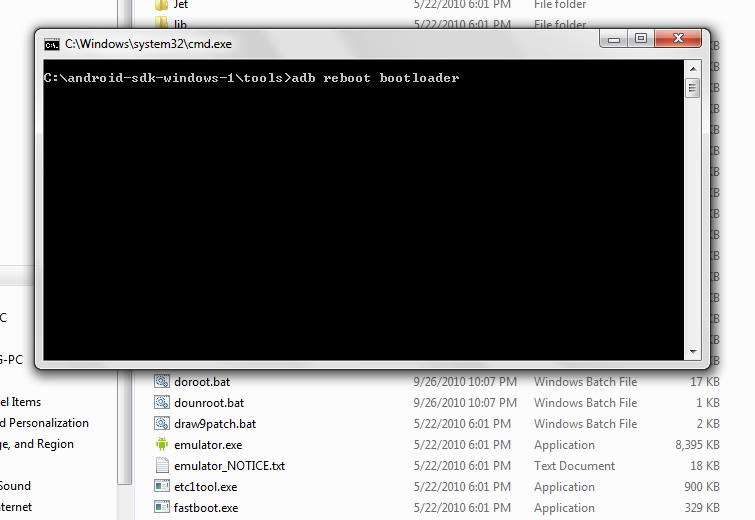
So your homework until the phone arrives, is to check out the first 7 steps that we have below to get your Windows computer all set up for adb through the SDK. If you can get your phone to reboot to the bootloader by typing “adb reboot bootloader” then you should be all set. Your current Android phone should work just fine in getting this all set up.
Ready?
Instructions:
*Windows only.
*You will need to install this Samsung driver.
*If that driver does not work, you may want to try this one.
1. Most important piece to this, is getting the Android SDK set up properly. [Instructions]
This can be one of the most difficult things to get set up, however, you cannot go forward without the SDK and adb set up and working. The instructions we linked should get you setup. Once the SDK is installed, you can move on to step 2.
2. Place a fastboot.exe file in your SDK/Tools (or Platform-Tools) folder (same as your adb.exe file) if it is not there already. [Download]
*You may also need to move AdbWinApi.dll into the same folder as your adb.exe and fastboot.exe if you are running into issues. I believe in the latest SDK, that everything defaults to SDK/Platform-Tools rather than SDK/Tools. Just depends on the version you are using. The big thing, is to get adb.exe, fastboot.exe, and AdbWinApi.dll into the same folder.
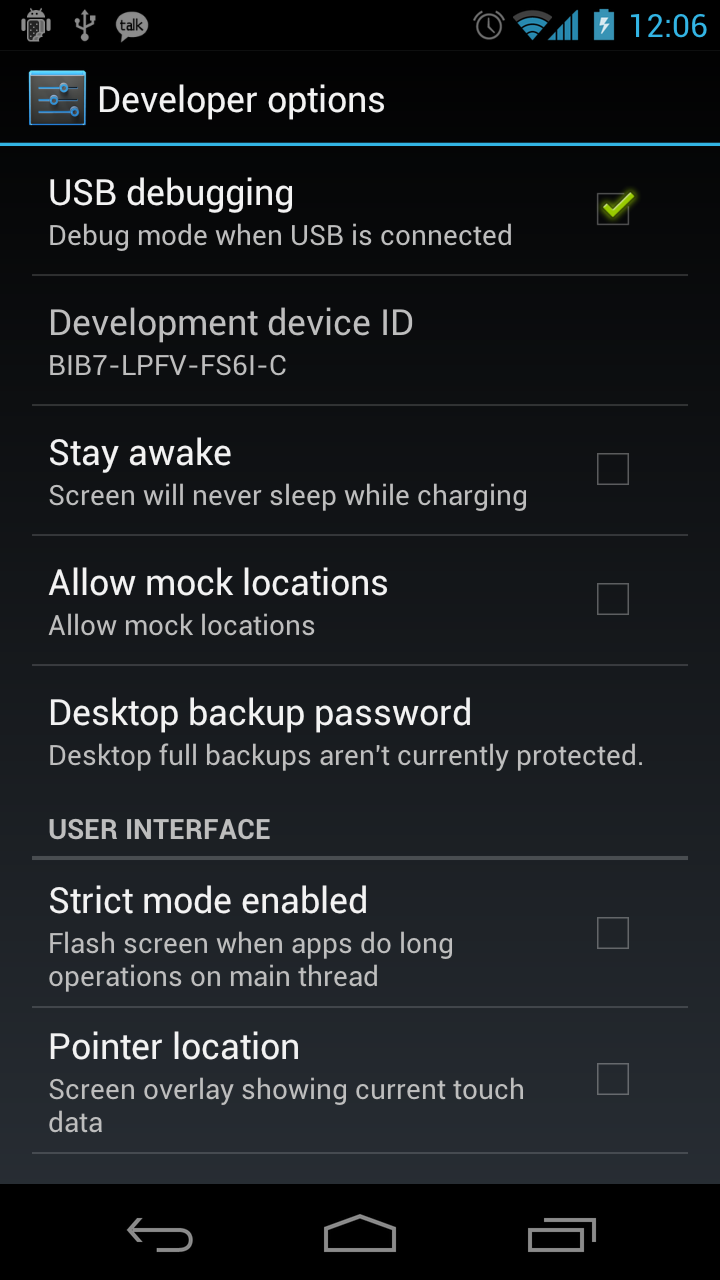
3. On your device, turn USB Debugging on.
Settings>Developer options>USB debugging
4. Plug your phone into your computer.
5. On your computer, head into your SDK/Tools folder or wherever your adb.exe and fastboot.exe files are.
6. Hold SHIFT and right click – choose “Open command window here.”
7. Type the following command:
adb reboot bootloader
8. Your phone will turn off and reboot to the bootloader.
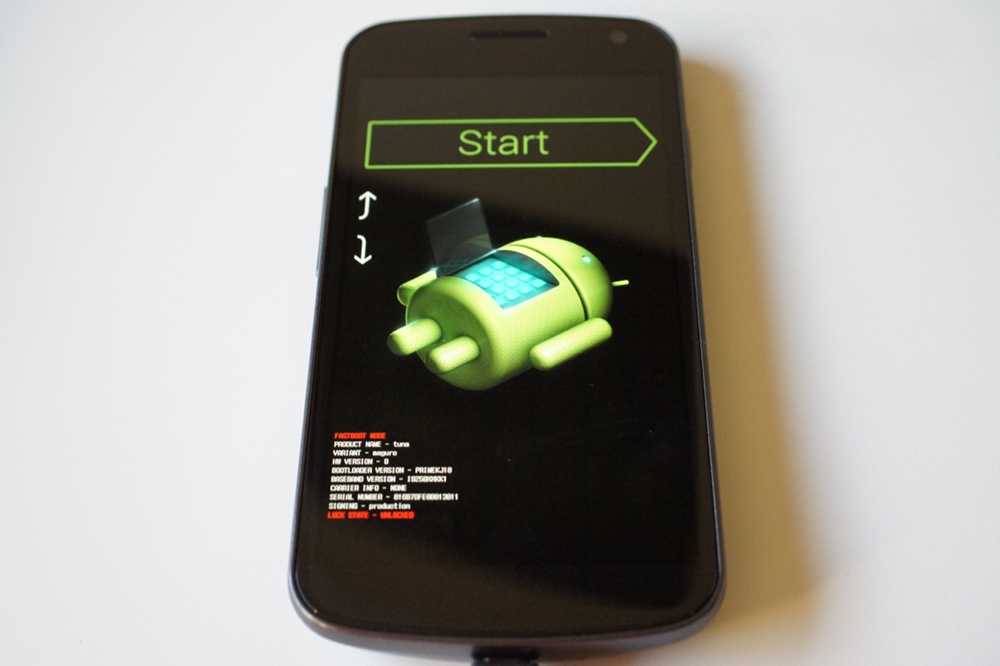
9. Type the following command:
fastboot oem unlock
10. Your phone will then ask if you want to unlock.
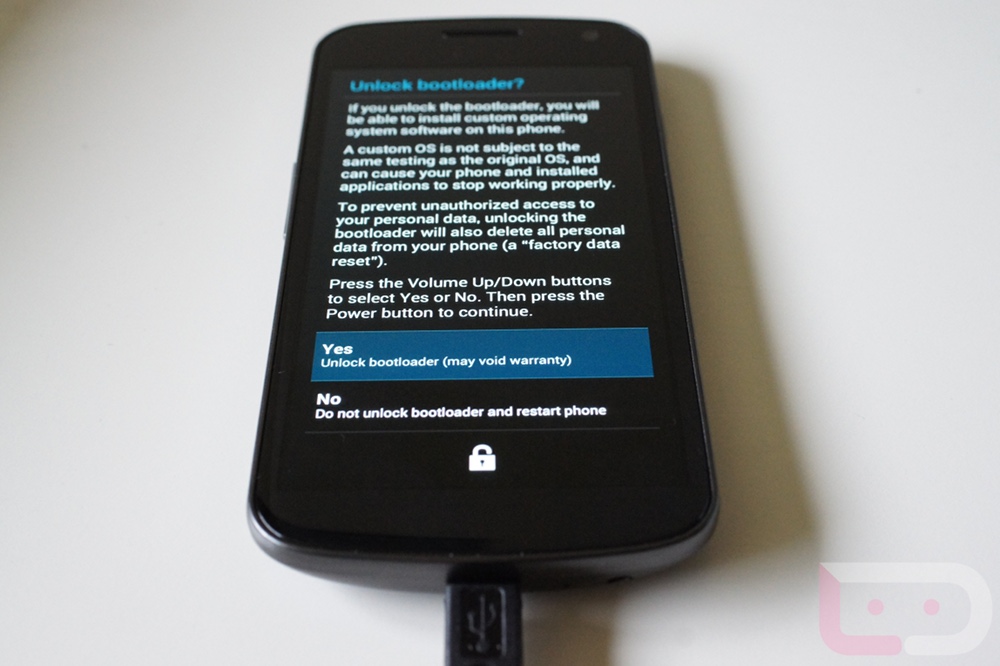
11. Using the volume keys, highlight “Yes” and then press the power button to select it.
12. Your bootloader will now be unlocked.
13. Choose to start your phone and it will factory reset itself and reboot.
*During reboot, DO NOT BATTERY PULL. The phone may loop and loop, but battery pulling will soft brick you and you will have to flash factory images to reset yourself. I was able to unplug from the computer while it was looping and the phone then rebooted itself. Or you may just have to wait a while since it is factory reseting during this first boot.
14. You are now operating with an unlocked Galaxy Nexus.
Quick video instructions:
[youtube]http://www.youtube.com/watch?v=PC9DmgtE80A[/youtube]
Tips:
-We know that many of you are running into a “waiting for device” issue when apply the fastboot oem unlock command. This is a driver issue and one that a reader has a suggestion for:
1. Open device manager on your PC.
2. Right click on Android 1.0 with the yellow ! mark on it.
3. Choose update driver.
4. Choose browse my computer.
5. Choose Let me pick from a list.
6. Scroll down and find the Samsung driver with newest date. Should be the driver you downloaded above. (Possibly dated 11/25/2011 ).
7. It will give you a warning about installing the driver, just click yes.
Alternate USB driver:
-And if that driver still does not work, try this one. [Download]
Questions:
–Can I still receive OTA updates after unlocking the bootloader?
–Answer: Yes. Your phone really does not change at all when you unlock the bootloader. You will still receive updates from Google. Now, if you start putting on custom recoveries and rooting, you may run into issues with receiving OTA updates. The good news is that Google usually releases the system image files for their Nexus phones which makes it a breeze to go back to stock for updates.
_____________________________________
If you run into issues along the way, be sure to drop them in the comments and we will all do our best to help you get through them. The SDK portion will be the most difficult, but there are countless resources out there to get you fully up and working in that department. Once the SDK is ready to go, this really only takes about 5 minutes.



Hello,what can i do to be able to use my locked samsung galaxy with a another carrier?Thanks
How I cat lock my phone again? I heard its not safe when my cellohone unlocked…
thank you.. everything it works like you said..and my nexus stop rebooting.. love ya!!
Confused by the stuff above?
Wugfresh Nexus Root Toolkit is seriously a lifesaver for backing up, unlocking and rooting for someone like me who has not rooted a phone in over 2 years and has no idea what he is doing. I was about to walk away from the idea of rooting but my mostly android clueless ass was able to follow his instructions and app very easily.Hope this helps someone out there!Just putting it out there in hopes that more people use it!
hey guys not sure if anyone knows whats going on with my galaxy nexus, but after performing an unlock on my hone it’s rebooted into it’s factory default i guess, but it’s in chinese?I don’t know what to do
when i run ‘adb reboot bootloader’ it gives error: device not found. My phone is connected as media device and the drivers are updated and show up as Galaxy Nexus in the other drop down under Device Manager. I don’t see Android 1.0 though, but I think that’s the driver thing I already have as Galaxy Nexus. Please help
i got a question when i type in
fastboot oem unlock it doesnt go the unlock the phone and in my command screen it says waiting for device please help
Thanks guys! Just got my Nexus Friday and just unlocked it today. Your directions are spot on. Oh and the driver update tip is priceless!!
Hey for ppl having problem w/ android 1.0 and/or adb. What you can do is install the drivers for the samsung galaxy (ie i897,i9000). I had the galaxy and when I plugged in my nexus, it already worked with those drivers
Is there a way to save all my apps before I do this? Or am I doomed to buy them all over again? 🙁
After i unlocked the bootloader and started the phone all my apps said error when then tried to reinstall so i went to market and tried again and it said error? so i did a factory reset and it seems to be working just fine now. so if this happens dont worry a factory reset should fix it
Awesome, worked like a charm.After trying for a few hours off my mac I finally moved to a PC. and of course followed all of the instructions and BAM. Boot loader is unlocked and I couldn’t be happier.
Just use the pdanet usb drivers, so much simpler…
i’ve got failinvalid argument when i type “fastboot oem unlock”
Ah shoot, I think I really screwed something up. I finally got around to unlocking my gnex (I told myself I wouldn’t touch it until I got my law school apps out of the way)…
Anyway, I did everything (correctly, I’m pretty sure) and not its just bootlooping. Its pulling up the Google screen with the unlocked icon. I believe the problem was when it was booting for the first time after unlocking, my roommate accidently stepped on the cord and detached the phone from the comp. Maybe that’s not the problem tho. Anyway, I tried to turn it on, and its now just bootlooping. Any help would be beyond appreciated!
Question…and before i ask i know i should have unlocked my phone before i even started toying with it. Well at least now i do. I want to unlock my phone but i have pictures and music (i think that’s all) that i want to save. Some music is on the cloud so that’s fine. I’m thinking my best bet is to move them from my phone to my computer right? And what about apps. I have about 77 apps. Will they all sync when i sign back in to my Google account? Anything else i need to know about as far as things being erased from my phone? Thanks
Looks like I did everything right.. its unlocked and i hit “start” and it boots up but the “3g” signal doesnt appear so i can sign into my google account.. Any thoughts on this?
I got the “Unlock Bootlaoder?” message and I don’t want to. Unfortuantely, phone does not offer the yes or no choices when the volume controls are pressed up or down. How do i get rid of this message without unlocking bootloader?
i cant get past the fastboot oem unlock… nothing happening… just “waiting for device”
I have some doubts if I help to do this first clarify my nexus updates will be automatically ie version 4.03 is coming to fix a bug with verizon coverage and whether to unlock my nexus can not get this update would be fatal, and another question is my nexus would be free to use any sim from another company to say at & t, thanks for your responses and apologize for my ignorance.
BEWARE! THIS WILL WIPE YOUR PHONE! INCLUDING PHOTOS, BACKUPS, ETC. EVERYTHING GONE!
this was very good work. Very easy to use, thanks man
Never rooted or did anything with my OG…got my GNex the day after launch and still had no plans to do any of this…finally couldn’t resist and just joined all of you in having an unlocked GNex. Very first time and worked perfectly! 😀
Let me just point out that when I rebooted the bootloader I noticed in my taskbar that the install drivers thing came up and said it was installing Android 1.0. I waited until it was finished and it told me my device was ready to use (showed up as Android ADB Interface–I think–at that point). THEN I did the fastboot oem unlock. No problems at all.
I see it, but there is no exclamation point ant ideas?
It does not show up for me. Any ideas?
Well this sucks. I have tried every damn thing and i cant get past the waiting on device part. I have installed/uninstalled everything multiple times. I dont see the yellow ! in device manager, i tried changing the usb from mtp to ptp and back nothing.
http://forum.xda-developers.com/showpost.php?p=20279142&postcount=128
So I get into the Bootloading screen and and in the command i type in the Fastboot oem unlock. It says that it is “waiting for device” and thats it ! please help!!! thanks in advance
http://forum.xda-developers.com/showpost.php?p=20279142&postcount=128
I am stuck on this. I have downloaded the SDK and I am following the instructions on the Cyanogenmod Wiki but when I get to step 4 (launching SDK Manager) but instead of giving me any options it just flashes what looks like a terminal/cmd prompt screen and then nothing. Is there something that I am doing wrong?
anyway you guys could post instructions to unlock the nexus on a mac?
You have to make the WIPE OUT part bold!!! I lost all my data by doing it.. T_T
All I wanted is to change the boot animation…
Thanks for the detailed instructions; worked great. A few questions though…
#1.
How can I verify that my Nexus is now indeed locked? I thought the intro screen icon will show the padlock open instead of closed… though after following the steps above I still see the locked padlock.
#2.
My Galaxy Nexus was over-the-air updated to 4.0.3 after activation. Now after unlock it shows 4.0.2… I clicked on “check for update” and did not find an update. Is this normal? Will my phone no longer get automatic updates?
Thanks!!
I have issue where why screen is not responding to my touches. I have already unlocked bootloader but need to return to verizon. Is there any way for me to enable usb debugging from my computer. Currently when I type in adb devices the list doesnt show anything. I assume this is because usb debugging is not enabled?
Worked liked a charm for this unlock/root newbie. I’m so exited to have found this community (a close second to the excitement of having my new Nexus!) Thanks.
The SDK instructions need updating……
Installing SDK
The only package we are
concerned with at this time is “Android SDK Tools, revision 15”,
“Android SDK Platform-tools, revision 9” & “Google USB Driver
package, revision 4”. You can reject all the others if you are not
interested in them. All these version numbers are increased by one now but for the Google driver, its still 4, but I continued.Unzip the file & inside you will see android_winusb.inf. Copy this file to C:android-sdk-windowsextrasgoogleusb_driver replacing the “stock” android_winusb.inf. There is no “android_winusb.inf”
to be found. There is no such path as “extrasgoogleusb_driver”.
There is an empty “add-ons” folder. I put the recommended .inf in
there.
Also know if you get stuck at with the command prompt window still open go check for splats again! Aha! Now update the driver. BAM! Continue on…….
when i enter adb devices into cmd prompt it says “list of devices” but lists no devices. Samsung adb onterface and galaxy nexus are both listed in device manager but no exclamation points. Does this mean Im all set?
I am running XP on my computer. When I try to do the Shift and right click, I don’t get the open cmd prompt option. Anyone else have this issue?
Alternate USB Driver worked like a charm!! GREAT THANKS!!
I’m also stuck at the waiting on device screen. I opened device manager and got to the let me pick from a list. I dont see any samsung driver on the list but i know i downloaded it. any help please?
http://forum.xda-developers.com/showpost.php?p=20279142&postcount=128
Dalton
Thanks much for the clarification…worked like a charm! Onward to root!
Phone doesn’t recognize ADB – have used every conceivable method – downloaded Samsung drivers. Downloaded PDANet. Uninstalled Samsung and tried Naked Samsung. I got the phone unlocked. But I CANNOT get the PC 64 to recognize ADB when I am in fastboot. HELPPPPPPP. I’ve been working on this for TWO DAYS, and it is RUINING my Christmas holiday.
I soft bricked my phone. These instructions worked great to get in back working.
You just do:fastboot flash boot boot.imgfastboot flash system system.imgfastboot flash userdata userdata.imgfastboot rebootWorked great to fix my phone
http://rootzwiki.com/topic/12054-how-to-flash-factory-images-to-fix-your-brick/
This guy saved my ass!
So I followed all the instructions, installed SDK and downloaded Samsung driver, when I enter the prompt “adb reboot boatloader” it just restarts my phone…
any help or suggestions? first time unlocking a phone
Once you do that it will bring you to the Android with his chest popped open. That’s the bootloader menu. From there you issue the other commands to actually unlock the bootloader.
it didn’t go to that menu, it went straight back to to rebooting the phone and to the home screen
like everyone else, i ran into the waiting for device message and encountered Andrdoid 1.0 in the device manager after running adb reboot bootloader. when i went to manually update the driver from a list, i saw the samsung android phone listed, but when i clicked on it, no drivers could be found. i tried all this on a machine running windows xp sp3.
i tried again on a windows 7 machine and everything worked just fine.
i suspected that the os might be my problem. i’m in xp sp3 too. damn. thanks. now i need to find a windows 7 machine…
http://forum.xda-developers.com/showpost.php?p=20279142&postcount=128
Just gonna toss this out there.. but if you notice in the video he has PDANet installed on his machine. For those having driver issues, you may want to uninstall the samsung crap, reboot your PC, then install PDANet (follow the prompts) and then proceed to unlock the bootloader. Worked for me on my win xp 32bit machine.
Thanks for this. I’ll have to try it tonight.
this worked.. did exactly what you said and it worked! Thanks man!
Help – I’m stuck at the bootlader screen. I am unable to select the start button. Actually I can’t select anything at all. I was at the Bootloader screen and my computer failed to recognize the phone. At this point my computer has been restarted and can’t communicate with the phone. I’m afraid to do a battery pull, but I’m not sure what else I can do because the phone isn’t responding at all.
Figured it out, battery pull fixed all.
ive went through the whole process. and when my phone boots, it shows the unlocked paddlelock, but all the apps that need root access say that my phone is still not rooted? any suggestions? when i ran thru these instructions again, the phone said already unlocked?
Please, oh please droid life help me. What the **** is going on?!??!? I am on yet a THIRD different computer and this one is running Win7!!!! So I’ve tried Vista, XP and now Win7 all unique computers. I installed the samsung driver on my computer that was linked in the article. I then went here:
Howto: Install the Android SDK – CyanogenMod Wiki
and installed the “latest” sdk and as he suggested used the .zip file. I extracted it to the root of my c drive (then later moved it to the desktop and tried it there too-no luck). I ran the sdk manager as administrator. The window popped up asking me if I was sure and I said yes, then the firewall popped up so I also said yes, but then when it didn’t work I shutdown the firewall.
EVERY SINGLE DAMN TIME I got a small, fast black DOS screen that popped up and quickly went away. EVERY SINGLE TIME!!! and that’s it……is that all I’m supposed to get or is there something else? I thought there would be some options as what to install. Is there a different sdk I should use? Am I being punked?
can i re-lock the bootloader using the reverse method? Having a problem with the phone and need to exchange for a new one!
See this post.
http://www.droid-life.com/2011/12/16/how-to-unroot-the-galaxy-nexus-re-lock-the-bootloader-and-return-to-a-factory-state/
QtDL, thanks for that link. Does it matter that I’m not rooted? Still follow all steps from that link? (Wow, you have it all- Chick, tech geek and a doctor!)
Lol. No clue. Last night was the first time I unlocked/rooted any phone and I cheated using Superboot. Maybe one of the experts will chime in….
Holy Sh#% I am a moron.
For those of you getting “waiting for device” at the command prompt, go into the USB computer connection settings on your phone and change from MTP device to PTP device (like a camera). MTP device is for Mac computers – why the hell would this be the default setting?!? I was unlocked and rooted in under 2 minutes.
http://forum.xda-developers.com/showpost.php?p=20279142&postcount=128
finally got my GNex today. Unlocked the bootlader, will now root it. Thanks Droid-Life!
Any suggestions on how to get my PC to find my Nexus? When I plug it in
it says “There was a problem installing this hardware: Samsung Mobile
MTP device. An error occurred during the installation of this device.
The required section was not found in the INF.” I already installed the
Samsung driver on my computer.
which USB drivers did you use?
I installed the one from the samsung site, and the alt one (unzipped and extracted to C:). When I plug the phone into the computer I get the error message before (with USB debugging off). With the USB debug off, nothing shows up – not even that yellow exclamation point thing. When I turn on USB dubugging, it will show up in my device manager as “Samsung Android ADB Interace” but it is still not working properly.
interesting – glad it worked out. enjoy!
my original comments disappeared…
i get to “waiting for device” before the computer “fails to properly install” the phone as soon as it’s in the bootloader and when i go through the “tips” section to install the proper driver, in step 6 the list where i need to choose it from is empty. on my home computer i get the same problems. i know that drivers are installed, because i can use the adb reboot bootloader command to get into the bootloader, so i’m at a total loss as to what’s happening. i’ve uninstalled and reinstalled many of the packages with no results.
I had the same issue. I even updated the driver manually and tried again – but there was one thing I didn’t pay attention to. In XP, I noticed every time I rebooted the bootloader step 7) a pop up appeared asking me to install adb drivers again. I just selected the defaults and it worked fine.
same here.. when i go to type “fastboot oem unlock” nothing happens on with the phone.. all i get is “waiting for device” on the command prompt.
http://forum.xda-developers.com/showpost.php?p=20279142&postcount=128
http://forum.xda-developers.com/showpost.php?p=20279142&postcount=128
I am stuck the bootloader screen. The command window said “waiting for device”. I browsed to the drivers but after installing them it says “cannot start device code 10”. I tried the alternate drivers as well. I since closed out the command window and unplugged the phone from the computer but it is stuck on the bootloader screen and I cannot shut it off. What should I do from here?
I had to pull the battery and then restart the procedure. I got it working.
http://forum.xda-developers.com/showpost.php?p=20279142&postcount=128
Working on the android sdk and stuck on step 11.2 “Copy this file to C:android-sdk-windowsextrasgoogleusb_driver replacing the “stock” android_winusb.inf.”. I don’t have an”extras” folder. The only foldwrs i have in android-sdk-windows are add-ons, platforms, platform-tools, temp and tools. Do I just create the extras folder or did I do something else wrong?
OK, same problem on this computer. The other one was with Win Vista, this computer is Win XP. It’s all with this step:
4. When you launch the SDK Manager for the first time it will ask for which packages to install. The only package we are concerned with at this time is “Android SDK Tools, revision 15”, “Android SDK
Platform-tools, revision 9” & “Google USB Driver package, revision
4”. You can reject all the others if you are not interested in them.
It just opens a black window and then closes. I have no chance to select anything. I have it extracted to the root of my C drive as it said
I am getting a waiting for device error, but when I got to device manager I don’t have an android 1.0 line with a yellow exclamation point….
I have a few problems after unlocking/rooting the phone. I thought it was a SIM card issue, but it’s not. After I unlocked and rooted the Gnex, my 3G/4G service just disappeared, I had none. So I re-locked and unrooted it, and I got data service back. Any thoughts? (I did go to Verizon a couple hours ago to see if it was a SIM card issue)
What are some advantages of unlocking the bootloader? Im coming from a unrooted OG Droid.
Thank you so much for these instructions. Very easy to follow and the only issues I ran into were caused by me not reading the instructions closely enough.
When I plug my device in it says it can’t find the driver and before that it couldn’t set up the adb driver
nevermind I fixed it
wait so if u unlock the bootloader it erases ur gmail and contacts
Anyway to root the Nexus with a Mac?
anyone know of a way to do this on a mac yet? or is there a step by step guide on doing it
+1 If I find a way I’ll post here.
Heads up, if you are getting a message that the device is offline, perhaps you should try another USB port on your computer (probably better to use one on the back). I had this problem and was so confused, because searching around gave me no answers.
HELP!!! Don’t see Android 1.0 in Device Manager, only Samsung ADB Interface and I’m stuck at waiting for device. Not sure what to do next, please help!
Make sure you’re launching the command window from the folder containing adb.exe (it’s not necessarily the Tools folder, could be in Platform Tools).
Any Win 7 users having trouble I tried and was successful with these instructions from Droidfroums:
http://www.droidforums.net/forum/galaxy-nexus-development/186129-how-unlock-bootloader-root-galaxy-nexus.html
How lond did this one take? I have been looking at 3 or 4 different methods and got as far as
installing adb, then I saw your post and can’t decide..
If I’m this far which one should I use?
Hello Everyone, RW-1 Here …
I finally grabed a Nexus tonight!
ADB install went somewhat okay, got a couple of error messages related to renaming of a folder, however it did detect my Nexus, and I had installed the Samsung drivers prior.
I did have to do the Android 1.0 manual driver find, but after that I ran it, half expecting it to boot loop.
It sat there, and like Kellex, I decided not to panic, unplug it from the computer, and let it sit. Came up to the logon, and I’m good to go unlocked!
is anyone else having problems with the sound being low when you touch/select apps or type? the keypress volume is really low?
worked perfect just take your time and walk through the steps before doing
Completed the unlock process without any issues. On reboot of the nexus get the Google logo and unlock icon. Phone pauses for a few seconds and reboots.
Phone is now in a continuous reboot? What did I do wrong and how do I fix this?
Mine was in boot looped a few times… I just let it sit there and do its thing, its fine now?
Disregard – for anyone having this issue find the post by Joseph Yonke – that’s the fix. many thanks Joseph
hey guys… Got my Nexus and I just gotta say Im cvoming from an OG droid ….I cant get the SDK sto install properly.. is there anyone who would be willing to take over my computer and install it for me? you guys are such wizzes Im sure it would take u no time and thats actually how soemone rooted my Droid for me in the beginning.. Im not lazy Ive tied 6 times… all yesterday and today and Im missing something. plus Ive redownloaded everything so many times I think i messed it up.. goldenboy504@gmail.com is my email for any kind soul…
I don’t see any way this plan can backfire. Godspeed.
im getting a hang after fastboot oem unlock…. ” waiting for device” ? any help
im getting the same thing…
Ok so I’ve gotten to the point were I need to reinstate the driver for Android 1.0, and I open the Samsung USB Driver folder that was installed when I installed the drivers I downloaded from this sight, but there are like 24 sub folders named like “Simmental” and “Siberian”. Help? I don’t know what to do to update the driver. Can anyone help me step my step? O.o
just getting waiting for device after first command.. bootloader does come up, i have the driver installed, but no lulock screen.. wtf? Help?
Just finished – did it in Parallels (Windows 7) on a Mac and worked well. After the OEM unlock portion mine took about 5 minutes on the first boot, rebooted itself and then came back up into the sign on screen. I had it connected to the guest VM throughout that but – just a note that at least one reboot seems “normal”.
I’m getting a “Device cannot start. Code 10” error after updating the USB drivers. Any thoughts?
I’m getting the prompt. I attempted to open the device manager and right click and update driver, but there is no “update driver” option…. HELP!!
Email me if you can, tomgillottiATyahoo.com
Thank you!
Got it… nevermind
When I try this,(
Open up the android-sdk-windows folder and launch the SDK Manager. ) Command Prompt just flickers and nothing happens?
Had the same problem. You need to install the Java SDK..download and try to install the installer_r16-windows.exe from http://developer.android.com/sdk/index.html instead of the zip. It will tell you that you need to install the Java SDK and take you to the site.
just wanted to add my 2 cents. have to boot to bootloader, waiting for device, installed Samsung drivers manually, unlock, yes, start…
went into boot loop. on second loop held volume up/down + power, went to start screen. done.
Samsung drivers no longer available on the Samsung site.
click on software
How can I do this on a MAC?
Got to the end where its rebooting phone, went to boot animation hung there for few min, then i unplugged the usb and it was the same for a few min. Then i removed the batt and powered back on now its looping at the google screen!!!!!!!!!!!!!!!!!!
HELP!
cant seem to get abd to work, keep getting “‘abd’ is not recognized as an internal or external command, operable program or batch file..” Help…
I cant seem to find the driver to update the android 1.0 device can anyone walk me through it please. when you say manually find the driver where do i go?
thanks for any help
I had same problem with it waiting for device. What I did at that point was:
1-open device manager
2-right click on Android 1.0 with the yellow ! mark on it
3-choose update driver
4-choose browse my computer
5-choose Let me pick from a list
6-scroll down and find Samsung driver with newest date. Should be from driver you downloaded and installed from DL link. ( mine was dated 11/25/2011 ).
7-It will give you a warning about installing the driver. just click yes.
That should be it. It worked for me but no guarantees. I take no responsibility if you try this!
Hope it helps.
my samsung driver has like 20 folders?
I don’t understand. fastboot oem unlock doesn’t work. it says waiting for device and it does nothing. I’ve installed all the drivers, I still don’t know what “AdbWinApi.dll”. The instructions say I may have to put that into platform-tools, except it doesn’t say what it is or where it comes from. And I haven’t gotten any “AdbWinApi.dll” specific errors. But it’s installed all the drivers, so I don’t see what the problem is.Anyone?
I had same problem with it waiting for device. What I did at that point was:
1-open device manager
2-right click on Android 1.0 with the yellow ! mark on it
3-choose update driver
4-choose browse my computer
5-choose Let me pick from a list
6-scroll down and find Samsung driver with newest date. Should be from
driver you downloaded and installed from DL link. ( mine was dated
11/25/2011 ).
7-It will give you a warning about installing the driver. just click yes.
That should be it. It worked for me but no guarantees. I take no responsibility if you try this!
Hope it helps.
Just to clarify.. You mean device manager ( ie printers etc.)
I see the Android 1.0 with the yellow exclamation but no option to choose update driver…just trouble shoot ..then nothing…
Maybe I did not install the driver correctly in the first place? Is this the driver link form the Samsung website ?? file version 1.4.6.0???
Can instructions for Mac OS X be added to the OP? The SDK part is easy enough (although I should update my SDK version) but it’s the fastboot.exe portion that leaves me scratching my head. As well as the face my phone won’t arrive until tomorrow.
Thanks!
X
Ok. So ive got the list of Java SE Development Kit 7u2 on my computer screen. Which one do i pick?
So say I had to take it in for a hardware issue. If I relock the bootloader can they tell it was ever unlocked?
Since more employees will simply attempt to boot the phone, and won’t see the unlocked icon, meaning its still locked, they will assume nothing. They don’t plug it in a run a diagnostic test on it.
Hey guys, quick question. This is my first Android device, so I’m new at this so please bear with me! I have the SDK all installed, and followed the directions linked above in the Wiki. When I initially run “adb devices” it kicks back a device, but it is listed as offline. Then, when I try to run “adb reboot bootloader” it says error: device not found. Any ideas? Thanks!
Same here – did you find out what the problem was?
I figured it out – put the phone back in usb debug mode
Great instructions guys. Worked like a charm.
Thank you
@Kellex – can you please post another Sammy driver link? Original is 404.
Where do i type “fastboot oem unlock” ??
For those who are stuck in the Google boot load. There are some instructions for getting out of this that might be getting burred down in the reply’s. So here it is again at the top.
Pull your battery and boot into the bootloader by holding down down volume buttons and the power botton at the same for a few seconds. The bootloader will load up. Now go back to your tools/platform tools folder. I used put my files in the platform tools folder. Run the command prompt out of that. Type “fastboot oem lock”. Now do it again and type fastboot oem unlock. Accept to unlock your Nexus and LET THE BOOT LOADER RUN. It colorful bootload screen took a while, then it went back to the Google screen, then the colorful bootloader again and then it was fine. just let it go, it will be fine.
After going through a broken GNex with 4.0.2 update, using Superboot is the easiest and only method that worked. Follow those instructions, wait for up to 10 minutes on the softboot. Yes, it takes a very long time. Just wait. Once done, you are rooted.
theres no drivers on the link above?
when i try “adb reboot bootloader” it tells me “error: device offline” any help with that?
Does unlocking delete the contacts on the phone?
I’m having a problem after doing adb reboot bootloader. It shows the Start screen with the android on it but my computer doesn’t recognize it anymore. When I fastboot oem unlock it says waiting for device. I installed the Samsung driver and the SDK.
same here
ADVICE: If you get stuck in a loop with just the Google screen and the unlock icon, DON’T freak out (I took the video to mean to reset your device manually if it keeps showing the colorful animation for a few minutes- that’s a bad idea). Enter the bootloader by holding down both volume buttons and then the power button, lock the bootloader, unlock it again, and then just be a bit more patient for the first couple of boots and resets.
How did you get past the command prompt? It will not recognize that the Nexus is attached while its in the bootloader.
I get to the point of running fastboot oem unlock, however my computer can’t seem to find a driver for “Android 1.0” I’m pretty sure I followed the instructions exactly even the SDK instructions.
I am right there with you. I followed everything to the T. Even replaced the driver file, ran the update in device manager. What the F?
I’m having the same problem.
I ran into the same problem. I ended up downloading the driver from here http://forum.xda-developers.com/showthread.php?t=1362957
“If you get “waiting for device” you might need the USB drivers: DOWNLOAD” – This is the section where you should download the driver if you get this problem.
Once downloaded, go to your device manager and update the driver manually using the zip (which you extracted somewhere). You can then run the “fastboot oem unlock” command and unlock your device
Perfect. Exactly what I needed to do for the “Android 1.0” driver issue. Thanks!
HELP! I have done EVERYTHING. My computer will see my phone as an adb device under command prompt in normal mode. When in bootloader mode, my computer will not see it. I get all the way to the “fastboot oem unlock” command and I get the “waiting for device” message.
Can someone help me?
I have the same exact problem
Scroll down, Nadeem has the solution. Run the first step and get into bootloader mode. The go look for the Android 1.0 under device manager. It will be there. Do the fix exactly how Nadeem says. You will get the driver to install then. Enter the “fastboot oem unlock” after. It will run. It will seem to bootloop, but just wait.
Welcome to unlocked Galaxy Nexus baby!!!
Thanks Droidlife!!!!!
As do I….
I have the “waiting for device” problem as well. but in the device manager, I do not get the “android 1.0” choice. The only weird one I have says “USB Device” under “other devices”. Any advice?
I am right where you are. It seems the computer sees the device until its in bootloader mode, then the device is not visible.
Help, everything went fine, it said it was unlocked, I have the unlock symbol when the phone starts up again, but it keeps rebooting itself, never leaving the google logo screen. Please tell me I did not just throw $700 out the window
Got it, had to go back to fastboot and relock, the unlock again, and after a couple loops, it started. Thanks for the directions.
Yeah, mine did 2 complete reboots before it came up. I wonder if that is part of the wipe process…
First off, be patient. Worked fine after a couple of glitches. MAKE SURE you have the right path, otherwise you will get the “not recognizing” command. Then, AFTER “adb reboot bootloader” install the driver dated 11/25, (thank you gentlemen for the tip!!) and then DO NOT pull battery. The phone will cycle for a couple of minutes. LEAVE IT ALONE!!! That’s what worked for me. Btw, after “fastboot oem unlock”, it wouldn’t reboot by itself. I had to turn it off and then back on. Thanks again for the tips…..
How can I get root access to install titanium backup and restore from that?
I did everything and I unlocked the phone, but it’s under a reboot cycle and it won’t stop even if I unplug the phone. I held down power and volume down and it says, “Downloading…”
Did I brick this thing already?
took about 5 min and 3 bootloops for it to finally boot up for me
just unlocked the phone. Had the looping issue too but just connected the phone to my computer and fired up the command prompt screen and did fastboot oem lock then fastboot oem unlock. It unlocked the bootloader again. I waited for the device to boot up and do the whole color looping thing and it was fine
I ended up having to install PDANet and use the drivers from there, then on reboot the phone stayed at the google screen for 20+mins.. I ended up doing adb root and finished my rooting process just fine, then did a battery pull
LOOPING AFTER UNLOCK….
So jut like at the end of this video, I had to pull the USB plug, however, now all that the phone will do is loop on the black Google screen over, and over…
sorry looks like others posted the same problem, but not seen a solution yet….
Sinp3cadoCollapse
In case someone else has this problem, Skillz posted a response:I was stuck at the google looping screen too, i made the mistake of taking the battery out while it was looping through all the colors. Hold the volume up and down keys at the same time along with the power button. This should take you back to the bootloader screen. Next you need to connect the phone to your computer and fire up the command prompt screen and do fastboot oem lock then fastboot oem unlock. next unlock the bootloader again. the device should boot up and do the whole color looping thing. i left mine plugged in and after 5 minutes it finally came back on. i guess the key is not to power down while its looping through the colors. just be patient and it will go to the login screen. hope this helps
Question, is there a way to get it in DIAG mode?
I am boot looping on the Google start up with the unlocked lock… Any help?
uhhh…yeah, me too…fun, eh? Wife: “so you’ve already wrecked your new phone?” Me: “But I need to get my titanium backups…”
In case someone else has this problem, Skillz posted a response
I was stuck at the google looping screen too, i made the mistake of taking the battery out while it was looping through all the colors. Hold the volume up and down keys at the same time along with the power button. This should take you back to the bootloader screen. Next you need to connect the phone to your computer and fire up the command prompt screen and do fastboot oem lock then fastboot oem unlock. next unlock the bootloader again. the device should boot up and do the whole color looping thing. i left mine plugged in and after 5 minutes it finally came back on. i guess the key is not to power down while its looping through the colors. just be patient and it will go to the login screen. hope this helps
w00t! I guess I was being too impatient…didn’t think to relock the unlock to recyle!
Tip, you can do this on Linux too. I just did. Download this: http://www.filesonic.com/file/4047388074 Then extract. From terminal, run ‘./adb-linux reboot bootloader’. Then run ‘sudo fastboot-linux oem unlock’. The rest is the same.
i actually cant reboot to the bootloader… typie in abd reboot bootloader and “‘abd’ is not recofnized as an internal or external command, operable program or batch file..
what gives?
anyone?
Noob here how do i open command prompt windows xp? Dont know how to open within folder? Shift and right click doesnt seem to work.
HOLY CRAP! just ran a speed test, im getting 32mb/s!!! Almost twice my normal internet speed!
Is there a list of complete updated instructions with all the changes(in instructions) that have been recommended by the posters on this topic?
To those confused about getting a waiting for device message: Android 1.0 will appear in Device Manager AFTER you run adb reboot bootloader. Once you see that, navigate through and manually add your SAMSUNG Android Phone device driver (“Let me pick”) – should be dated 11-25. This is the driver you downloaded from Samsung.
Promote the above comment. This happened to me as well and this is exactly how I fixed it. BTW, you have to be an admin to update from the device manager (or under printers and devices.)
I was hung up there for awhile on this. Thanks for your help!
Thank you so much!! I was stuck on this for hours. Worked after first try!
thank you dalton
That did it. I, like others, was stuck at the damn waiting for device. I followed the instructions posted further down but did nothing. Found the Samsung drivers I downloaded and it worked great.
Thanks bro. Worked perfect.
Thanks a million that was about to get the best of me. The easiest way is to pick from a list of drivers and find the Samsung driver there. Thanks Again
This took me hours to figure out, finally found a fix on XDA’s site.
http://forum.xda-developers.com/showthread.php?t=1392310
under “1. Installing ADB/Fastboot Drivers”
and “Note: 1”
same here thanks ALOT! for the link. fixed it right away after hours of messin with it… wish i had read this a few hours ago lol
thank you very much sir.
Well done, Sir. Fixed my “waiting for device” issue. Much relief.
Thank you for this that stumped me. Mad props!
Thanks man!
Can someone please help me, I am getting the waiting on device message but when I go to my devices it is listed as unknown device?
Thanks, man! Very helpful.
Thanks for the info, but I am still having some trouble. I downloaded/installed the driver at the link provided. However when I try to manually select the driver, in my SAMSUNG/USB Drivers folder I have a list of ~25 folders. nothing is labeled Samsung Android Phone device driver or dated 11-25. What am I doing wrong? thanks in advance for your help
finally figured it out! Thanks for the help!
i’m not having any drivers populate the SAMSUNG Android Phone device driver list…
“(Unable to find any drivers for this device)” despite installing the samsung driver linked above. please help. thanks.
none of mine are dated 11-25 and is it under Google Inc. or Samsung Electronics cause there is ADB Interface for both of them
Hi Dalton I am having major issues. I tried your way where i did pick the driver but it says there is a code 10 error? Do you have any idea what that is or does anyone cos it is totally bricked atm
+1 to @twitter-15596546:disqus .was stuck on the “waiting for device” error, then i scrolled down and read this. IT WORKED FLAWLESS. this tip should be added to main post
i already ran adb reboot bootloader and android 1.0 still isn’t showing up – please advise!!
it appears as “Unknown Device”. not sure what to do
Richard Melcher post was the solution for me with the same issue.
This took me hours to figure out, finally found a fix on XDA’s site.
http://forum.xda-developers.co…
under “1. Installing ADB/Fastboot Drivers”and “Note: 1”
So glad I scrolled down all the way through this post before going through the steps. Your tip saved me from what would probably be hours of head hitting off my desk. Great tip @twitter-15596546:disqus
And to think, the comprehensive advice was in the user COMMENTS section. +1
Thank you so much. The combination of this tutorial and some thoughtful comments from people having the same issue I was having (“waiting for device”) has really empowered me to do some basic Android hacking. Enjoy!
can the bootloader be re-locked later?
Thank you guys, it worked great, even the FIX for the Drive issue… Android 1.0 driver could not be found, you have to PICK the Samsung driver you just installed… and I did have the reboot reboot reboot issue ever after I unplugged from the computer… but it did finally boot up ..
what is the exact name of the samsung driver. I go to update driver once I see Android 1.0 and then if I select ADB Devices I can choose from 3 different sammy drivers.
I don’t see the “extras/google/usb_driver” area…anyone know why?
I didn’t have one either. Now I’m stuck after trying to move ahead (added the directories myself) because the device showed up in the list, but nothing else is happening.
the problem he had at end of video is happening to me and my phone is unplugged. Can anyone help?
wcdave wrote these instructions for everyone having problems.
OK! I’ve worked it out (much like others here)
I had windows 7 so it made it a bit more confusing.
if you’re stuck at the part where it says waiting for device, you’ve already downloaded the drivers, and it’s saying ‘android 1.0’ on device manager,try this
Go to device manager, right click on android 1.0, click ‘properties’
click ‘update driver’
click ‘browse my computer for driver software’
click ‘let me pick from a list of device drivers on my computer’
click ‘show all devices’ then ‘next’
click ‘have disk’
click ‘browse’
go to the folder you saved the new usb driver in (/extras/google/usb_driver) – you dont need to go into the subfolder
it should offer 3 options – choose the top one
that should do it!!
I don’t know if I am doing this correctly but I can’t find
“C:android-sdk-windowsextrasgoogleusb_driver replacing the “stock” android_winusb.inf.” to copy the new driver into?
You are the man!
Thank you!
I was getting the wait for device… when i went into devices and printers ( wrong spot ) but i saw the android 1.0 with a yellow exclamation point. I clicked on it and properties/ update driver. manually browse and then choosed driver from list. I saw samsung android phone… proceeded with fastboost oem unlock etc…boom all went well
you choosed what driver from list?
I installed the driver from samsungs website for the phone.
when i found the android 1.0 = update driver/ browse computer for selected driver/ (when directory list comes up) select: let me pick. and then chose samsung mobile MTP device for 11/25/11
The only way I can get to the samsumg drivers is by choosing to browse form the list. I choose ADB Devices and have 6 options for samsung – ADB Composite Interface, ADB Interface ver. 5.14.0.0 and ADB Interface Version 2.9.104.921 each appears twice. What do I choose?
Choose the option with the date of 11/25/2011
i’m having the same prob and none of mine have a date on them and under google inc and samsung there are choices for adb interface and under samsung there are 2
worked for me too. I picked the Samsung Android phone from the device list, then the ADB Interface from 11/25/11
Same problem here and as soon as I updated from the devices and printers section, good to go.
You the man
I am getting hung up too after typing in “adb reboot bootloader” once I type in “fastboot oem unlock” it just says waiting for device. Can anyone help?
Installed “Verizon_Wireless_I515_Galaxy_Nexus_USB_Driver_v1.4.6.0.exe” as linked. Windows detects phone when first plugged in. But after adb reboot bootloader command, windows searches for drivers again and can’t find them. fastboot oem unlock doesn’t work because drivers don’t appear to be properly installed. Also tried “Samsung_Mobile_USB_Driver_V1.3.800.0.msi”
PS, manually choosing the “android_winusb.inf” file did not work. And yes, I followed the instructions here: http://wiki.cyanogenmod.com/wiki/Howto:_Install_the_Android_SDK#Windows
I little digging turned up this: http://dl.dropbox.com/u/4174784/usb_driver.zip
This manually installing the driver works. Thanks to the folks at Android Forums: http://androidforums.com/galaxy-nexus-all-things-root/452146-how-root-samsung-galaxy-nexus-2.html
Rebooting to see if it works…
This did the trick for me also! Thanks for posting this!
Been working on this. When I do the “fastboot oem unlock” the phone just sits there. Any help? Did all downloads and followed all instructions.
Same here
same here
got it fixed. was the android 1.0 issue.
thanks all.
This is a guess, but I think your USB drivers aren’t properly installed. Open up your device manager and you’ll see an “Android 1.0” device (most likely). Update the driver and chose the option to manually update the driver. Go to C:android-sdk-windowsextrasgoogleusb_driver and click OK. The computer should show a few driver options. Choose the most recent and click ok through any warnings. Once installed, restart the phone and the ADB process and things should work.
Without sounding stupid, did anyone else get stuck between steps 8 and 9? it allowed me to adb into fastboot mode, but then as it restarts, it boots back up in device monitor as ‘android 1.0’ – if i try ‘fastboot oem unlock’ it says ‘waiting for device’ and just sits there.
it’s happening to damn near everybody. the instructions were shoddy, and nobody’s around to help. you’re supposed to update that driver, but when i point it to extras/google/usbdrivers, it does nothing.
Im having the same problem. I can navigate all the way to usb_drivers/i386 but I can’t select any of the files located in the folder. It wont even show them.
NVM, figured it out
HOW??
Seriously, when you figure it out, don’t just say it, TELL US! I still don’t have it, I’m exactly at this point and can’t get past it. No drivers show up.
OK! I’ve worked it out (much like others here)
I had windows 7 so it made it a bit more confusing.
if you’re stuck at the part where it says waiting for device, you’ve already downloaded the drivers, and it’s saying ‘android 1.0’ on device manager,try this
Go to device manager, right click on android 1.0, click ‘properties’
click ‘update driver’
click ‘browse my computer for driver software’
click ‘let me pick from a list of device drivers on my computer’
click ‘show all devices’ then ‘next’
click ‘have disk’
click ‘browse’
go to the folder you saved the new usb driver in (/extras/google/usb_driver) – you dont need to go into the subfolder
it should offer 3 options – choose the top one
that should do it!!
perfect thank you!!!! your instructions worked.
I’m glad I was able to help!
you are the effing MAN!
You’re awesome! Was having a hard time with that, went as far as deleting the android sdk and reinstalling. Thanks for post
I have all the drivers installed but I don’t see ”
android 1.0″ in device manager.
All I see is:Under “Portable Devices” >> “Galaxy Nexus”
and Under “SAMSUNG Android Phone” >> SAMSUNG Android ADB Interface”
any help?
you’ve already booted into fastboot mode right? It shouldn’t be showing you SAMSUNG Android ADB Interface if you’ve booted into fastboot mode!
oops I wasn’t. thanks for clarifying that out.
So now, I’m stuck at
“go to the folder you saved the new usb driver in (/extras/google/usb_driver) – you dont need to
I have no idea where i saved it.. When i downloaded the “Verizon_Wireless_I515_Galaxy_Nexus_USB_Driver_v1.4.6.0” from the samsung website. i saved it to my desktop, and so, when I try to search for it in desktop, its not show. its asking for a “*.inf” file type??
NVM, found it//
THANKS!
Glad I could help!
Ooookk.. that isn’t the right driver. I think you’re getting a little mixed up!
Did you follow all the instructions on the link given in step 1 above? Somewhere near the end, it has you download a zip file with a .inf file that updates the google USB driver you downloaded using the APK manager. This hasn’t got anything to do with the Samsung driver.
The Samsung driver just makes sure your phone is recognised in the first place, allowing you to adb to it. If you’re able to go to the command prompt (following the steps above on the post by Kellex) and do adb devices, and it lists anything, then that is all good so far.
Then, when you do adb reboot fastboot, it should reset your phone into fastboot mode, and THAT is where it should try to recognise the driver as android 1.0 in device manager.
Until you actually have your phone sitting in fastboot mode, it won’t show you the android 1.0 driver issue, so you can’t fix it until that!
Let me know if this works for you 🙂
Okay, I’m having issues. I got the .inf file replaced from above. I right click on Android 1.0 in device Mgr and go to the file like in the instructions, but i only have the 1 option, the .inf file I replaced. when I select it, it says “The specified location does not contain information about your hardware.” Also, when i picked the device, the only one showing was Samsung Android Phone. Never says Samsung ADB Interface anywhere. Please help!
Kellex, get this into the original article pronto!
Hurry! Took me a while to find this comment 😉
Thank you!
Thanks a lot, man!
I’m having the same problem.. sits at
‘waiting for device’ after i input ‘fastboot oem unlock’
ok, i just wanna use my phone. is there a way to reboot it either from the phone or adb if i’m stuck in the bootloader and my PC won’t recognize my phone as a device?
i had to open the device manager, then find ANDROID 1.0, and goto properties
then i had to manually choose the driver from the SDK google/extras/usb_driver
i went to the i386 because i dont use lolamd, also i had to choose from a list of 4 drivers, i did the topmost one that looked like it corrosponded with the video above
those stuck at waiting for device have some sort of driver problem like i did
are you stuck in bootloader now too?
I can’t find Android 1.0
i got bootloop after ota then unlocked… now what?
I appear to be having the same issue…. wait… EDIT: it went thru the boot animation for about 3-4 minutes, then rebooted to ‘Google’, went thru animation, now back to initial setup screen
Ok, I need help. stuck on bootloader screen.
Using Win7x64, in my device manager it says “unknown device”
After waiting 5 minutes for “waiting for device”, I X’d out the Command Prompt window, reopened a new one in the platform-tools folder because that’s where my fastboot and adb files are together. Still says “waiting for device”.
I unplugged the USB cable and plugged it back in (still on bootloader), and retried “adb reboot bootloader” and it says “device not found” and still says “waiting for device” if i try “fastboot oem unlock”.
What do I do? Is there a way to reboot the device?
Unlocked the bootloader and now its stuck at the “google” prompt, with an unlocked lock. It won’t boot. Please help!
pretty sure 2.5 hours of frustration before work is enough for me to say ill wait until the process smoothes out a bit
Win 7 (x64) drivers installed successfully. When I type adb reboot bootloader the phone reboots into bootloader, but when I type fastboot oem unlock it just says . fastboot and adb are in the same directory. Any suggestions?
goto device manager and find android 1.0, goto properties and choose the driver manually from the android SDK, (extras google usb_driver)
we’re in the same boat…so much for help, huh?
how long does it usually take? mine says waiting for devices after typing in fastboot oem unlock
Read the comments just below. When you reboot the bootloader it loads it as a different device without driver support. You need to update this driver to the updated drivers.
How do you do this step?
Yes, how do you do this step. Repeating the same thing over and over again does not help us. Please be a little more specific, thanks!
Curt……You da man. Thanks a ton. UNLOCKED!!
After running the adb reboot bootloader command, my device was showing up as Android 1.0 device in my device manager, and my command window was stuck on “waiting for device”. Just update that driver and point back to the same updated USB driver in the Extras/google/usbdriver folder and then it worked just fine.
Yes, listen to him. This works!
so the updated river gets added to the extra/google/usbdriver folder and not into platform-tools?
Yes. you move fastboot to the platform-tools. The updated driver gets loaded to the usbdriver folder.
this did it.. thanks a lot man!
Mine isn’t showing up as an Android 1.0 device, it’s showing up as an Unknown Device. What driver do I update it with?
Same as people below…..reboots bootloader….just waiting for device after “fastboot oem unlock” have adb and jdk installed correctly. Have newest drivers installed from Samsung
“waiting for device” in console after fastboot oem unlock. nothing happens…..
I have double checked everything. Fastboot is in the right folder, new drivers downloaded, etc. I cannot get fastboot oem unlock to do anything, just sits in bootloader.
worked for me!
make sure to download that new usb driver and replace.
my mac recognized the phone and installed the drivers in my virtual machine running Win7 but fastboot oem unlock doesnt do anything. just sits in bootloader and hangs out. yes i have fastboot in the same folder.
Go here:
http://www.samsung.com/us/support/downloads to get the drivers for the GNex… only problem is once you boot into the bootloader, no driver support.
I’m getting no device connected too. It’s pissing me off.
The USB drivers for mass storage work fine, but I’m not seeing ADB drivers in my device manager at all.
OK, now I have the ADB driver showing up, but no devices found when I run ADB from the cmd prompt
Done, on my new LTE GNex!
i cant get my device to fastboot oem unlock. it just says waiting for device
Hmm, how did you guys even get abd to work? My laptop (win 7) automatically reads it as the Galaxy Nexus and it won’t let me install the drivers
NVM…
is anyone able to get the fastboot oem unlock to work?
I had the same issue. Wait until the phone is recognized via USB before doing the fastboot. It worked just fine after that.
how do you verify its recognized
on a Windows PC, on the system tray. Once it says that the device is recognized, then put in the fastboot oem unlock command. Also, like SBH said, make sure your fastboot is in the correct folder.
Also if anyone is having issues having their computer find the abd devices, try switching your phone from media to camera mode when it is connected to your computer. That is what worked for me.
When the phone restarts into the bootloader, the driver comes up unrecognized as “Android 1.0” and I can’t find anything to make it install as a recognized device so that adb works at all
http://androidforums.com/galaxy-nexus-all-things-root/452146-how-root-samsung-galaxy-nexus.html
IF YOU DONT HAVE THE ANDROID 1.0 DRIVER FOR ADB YOU CAN FIND IT HERE:http://dl.dropbox.com/u/4174784/usb_driver.zip
How do you get these to work in ADB?
Nm figured it out, update drivers, and make sure you have all the files (fastboot & adb) in the platform tools folder
which updated drivers did you use, the CM ones?
what updated drivers are you referring to? Can you post a link?
I got it to work just now. Make sure you have Java Development Kit installed. There is a link to it in at the Step 1 instructions above. Also make sure you have fastboot.exe in the same folder as adb.exe, not just in the main folder. My adb.exe was in c:android-sdk-windowsplatform-tools (which is also the folder you want to open the command prompt from). It did it almost instantly once I had everything setup correctly.
what do you guys recommend, using this method or modaco’s superboot? also, since this is a nexus device, when installing the sdk, is it necessary to use the modified driver inf file from CM?
all set got my razr to reboot into bootloader. now need nexus in hand tomorrow to finish these instructions
Windows computer ? Jeez,i don’t have a windows computer nor do I know anyone who owns one. This is a linux phone, how bout some instruction for linux computers.oh well never mind we will figure it out
Wow, you sound absolutely retarded. If you’re going to be elitist, at least pretend to not be completely technologically illiterate.
My anti virus does not like that download link for fastboot. Is there another location to get it? Thanks
Kellex: I recommend you add some common resources that are good to have on your “sd card” prior to doing this so it’s much easier to recover after “soft bricking” a device. Otherwise, it is HELL trying to get files onto the “sd card”. This is going to be one of the major pain points with hacking the GNex.
Since there is no SD Card to take out and put files onto, once you bootloop it, you have to jump through a lot of hoops in order to get files on there. Additionally, because of the “media partition” instead of an internal SD Card, not all “Mount USB” type resources work in recoveries right now.
Well no release in the US yet. They moved it past the 9th and supposedly its going to be the 15th. That’s only two days away. I could care less when they release it because im not on Verizon and ordered the International version. However if they don’t release it soon for the holidays they will loose a lot of money.
As far as the unlocking goes this was the case with the Nex-1 as well. Google provided a factory unlock process. (too bad i recently broke it [insert sad panda face] ). I’m not sure if this was the case with the Nex-S though. I skipped that device
I followed the instructions and got the phone to reboot to the bootloader screen, but when I typed in “fastboot oem unlock” it says and I don’t see the “unlock bootloader?” screen. what did I do wrong? Please help!
I got my nexus this morning and i’m stuck at the same point
Real step 1: Finally. Obtain. Nexus.
Probably a stupid question, but what about us few that are working on Macs (Intel)? I noticed that the same SDK build is on both Windows downloands and Mac as well. Do we have a option, or is it a “find a PC or Boot Camp” solution for the moment? First thing I’ll be doing when I get this is unlock, reset and root, so I’m just making sure if I can do it this way right now.
I just tried to reboot my Droid to test it out using “adb reboot bootloader” and it just reboots, not to bootloader. Is there something I missed?
Mine did the same thing, just simply rebooted. Can anyone confirm if this means it worked?
same here but on a mac
The simple fact that these instructions can be published prior to the release of the phone shows how amazing having an unlocked phone will be. I’m not sure who’s more excited, me about getting the phone or my OG Droid about me no longer pushing it beyond its limits.
if all i want to do is unlock the gnex, do i have to instal Eclipse or JDk before downloading the SDK? (this will be on a mac if that matters)
So this bootloader is actually locked? Or will odin work without having to actually fastboot unlock?
does this method not work for macs??
It does, but you have to download the SDK for Macs.
Very helpful. Thanks
I’m sure there will be an odin package that will make this much easier for those who want to just go straight to a custom rom. Maybe Humble Nexus, or Gummy Nexus?
Will this work on the European version?
I was under the impression that all you had to do was hit the little lock button on the bottom of the screen during bootup… Adb not needed at all. Is that completely wrong?
Mine too, however perhaps that is only a status indicator, I would hope that if unlocked, it goes away …
Yes, that is incorrect.
Ready to go, your move verizon
So if I install super user I cant get OTA updates?
Has this method been confirmed working on a Verizon Galaxy Nexus?
I know the one in the pictures above is the HSPA+ version…
What about MacAndroid fans? For me it’s Mac Computers + Android Phones.
http://forum.xda-developers.com/showthread.php?t=878446
Will be the same as as the Nexus S but image file name will be different…
Dumb question, does this void the warranty?
linkhide.com.ar/47632
Any Macintosh instructions?
Google “mac adb how-to”
what about mac os X?
Kellex, this is awesome info and the reason I come to DROID-LIFE first for all news android. thanks!!
Finally – a real Android dev phone on Verizon (not that the OG wasn’t)..but still damn excited.
Will unlocking the bootloader make me have to reactivate my phone?
this is so major!
So, I’m kind of new to this whole thing, but what is the reason for unlocking the bootloader if we already have the newest stock version of Android? I’m just a little confused, can someone explain the benefits of me spending sometime doing this on Friday.
You now have root access to the phone. Which opens up new possibilities. For example:
– Verizon Wireless tethering no longer requires Verizon permission (f’ck Verizon they’ve made me wait too long for this phone)
– Remove apps like the Verizon useless garbage without the phone barking it can’t
– Install advance ROMs that either have better file system support like AndroidRomHD with ext4 (I know it also has its disadvantages, journal tisk tisk)
– Overclock CPU/GPU
– endless possibilities
These are just a few.
I have a question that has been bothering me ever since VZW initiated the tiered data plans. If you purchase a phone with the tiered data plan, why should VZW make you pay extra to tether your laptop to it? I could understand why they didn’t like people on the unlimited plans tethering, it could take up way too much bandwidth and all the problems associated with that. But with the tiered plans, if you tether and use massive amounts of bandwidth, and that takes a large amount of data, you will eventually hit your limit and have to pay extra.
Are there so many people grandfathered in on the unlimited plans (who also are power users) that VZW still needs to try to control the tethering?
u make a great point. there certainly still are plenty of people grandfathered in like myself. but over time that number will only go down and they should certainly consider this option.
As someone who relied solely on a tethered LT for 6 months I can tell you it ain’t worth the time it takes to install the tether app on 3g. VZW will throttle you down in moments and surfing will be ruined for the rest of the day on your phone and pc.
Unlocking the bootloader does not root the phone. They are two separate things.
it basically gets ur phone ready to install cm9 when it comes out. u can customize the buttons at the bottom(ex. add the old search button and menu button permanently) and u can also install google wallet
Go iPhone!!
JK, Android rules. Getting the Nexus on VZ as soon as it comes out.
Question… will wiping the Verizon software build and installing the Google System image files allow me to use Google Wallet and still maintain my Verizon Wireless account?
I think there is still an issue with Google Wallet. Hence why it appears nowhere in this phone or any other phone GSM/LTE for that matter.
I have wallet running on both my Nexus S on ATT and on my HSPA+ Galaxy Nexus.
Yes you should be able to use it. Google wallet has been ported to the HSPA+ version of this phone so it should work on this LTE verizon one if not needing minor tweaking.
Am I the only one who wants too see video on this? What happened to all the how to videos that you used to make? I remember I rooted my OG via a walk through video on this site. It used to really make sure that us dedicated readers had everything we needed to make this happen. Come on, make a video.You know you want to. You know that about 99.99999999% of us are getting a GNex, so let’s start that taping…
I may do this just to get a search button back in the bottom right permanently.
yea thats the great thing about rooting. u can do whatever u want. im sure at some point themes will be available to even change the icons and colors of those buttons thats y software buttons rock!
How about a walk through video? That would be nice.
just went through my OG, and the only reason I REALLY needed root there was Overclocking and Wireless Tether (which I really never used anyway since I have Verizon Broadband on my laptop)…
That being said, I think Im gonna stick with stock, and enjoy the experience…
I don’t think I’ll even need Titanium Backup, since I can just disable and hide apps directly…
This might actually be a relaxing experience….
I just tried it with my OG Droid as well. I can reboot into recovery, but not bootloader. Did yours go into bootloader?
Hey Kellex,
I would have suggested adding adb devices to the list of commands. As a matter of fact is should be the first command you should run before running any other command on adb to make sure your computer sees your device.
jamdev12
Just a quick question, can you tell me (or give me a link to read) about why and what unlocking the bootloader is/does? I know it allows you to put on custom roms and such, but is there anything else?
sorry for being a noob but what does unlocking the bootloader do exactly?
I love that picture of the Android with its chest open, brilliant.
Google has stated that the GSM version is the official developer device. Don’t be surprised if the Verizon version is locked up tight.
source or you’re a liar
Glad the 1% that actually care about this are getting it. For the rest who cares.
I’m not clear on why I’d want to do this. Isn’t the point of getting this phone that you get a clean slate with it, free of most bloat etc? Why would I want/need to root a stock phone like this?
There are many useful apps which require root, such as Titanium Back-Up. Even if you don’t put a custom ROM on, you may want to make back-ups of your apps and/or data periodically.
http://www.droid-life.com/wp-content/uploads/2011/12/nexus-fastboot-unlocked.jpg
ZOMG zoomed in pentile shot what a piece of shhiiiiiiiiiiiitttttttttt!!!!!!!
LOL
The screen is hideous.
The bootloader app is not optimized to use the 720p screen. Why would it be?
Why would a bootloader screen be optimized for 720p? Dude if you’re gonna troll at least pick a stronger argument, you’re embarrassing yourself.
It’s a pentile screen genius. Really too hard for you to comprehend?
he’s a cum sucking moto faggitt nut hugger, he doesn’t know any better.
As a gay man, I resent that.
can he have the phone first in are hands. By the time this phone is out we all are gonna be galaxy nexus pros
Warranty will be permanently voided. This will be checked.
FUDMonger
What an ass, you SBF back to stock before you turn it in for warrenty issues…
And before you talk about a brick being turned in, if it’s bricked for you, it’s bricked for the 7.95/hr warehouse guy that tries booting it at the return warehouse, if at all ….
This is a Samsung phone, not a Motorola locked down POS. No SBFs here.
The bootloader keeps track of how many times you flash unsigned firmware to it. It also does this on the SGII phones and the Stratosphere. They can tell just at the download mode screen if you hacked it.
However, if you brick it to the point that the bootloader is fubar’ed, then they might not be able to tell… depends if they have a mechanism built in to read that part of memory. Who knows.
Of course if it is bricked and they can tell you can always unbrick it anyways. All you have to do is rewrite the data values on the main memory. Not hard considering that the info needed to default the Hex values is readily available for most phones. If you don’t know how to do this all you have to do is get yourself a copy of a jig or jtag and make your connection board for the phones main board that houses the memory. Connect it the board to the computer and run the process and tah dah! Phone has been de-bricked.
Though actually hard bricking your phone is rather difficult. Most people get soft bricks (aka boot loops, sticky booters, ect) mixed with hard bricks which means the device won’t turn on at all. (just to clarify)
This will be the first phone I don’t really have a need to unlock or root. A completely unlockable phone…A NEXUS…oh, the irony. I will be perfectly happy with the stock ROM…AT LONG LAST! Screen shots are built in…AT LONG LAST! Apps can be frozen…AT LONG LAST! I will just have one app to disable. OMG…this is such a dream come true. Bring it on Verizon…AT LONG LAST! : )
very true, other than custom rom’s, there is no reason at all to unlock or root this phone
With ICS, and updates str8 from Google…who needs custom roms? : )
totally agree
Totally disagree. To be honest, most of ICS’s most lusted after features (screenshots, swiping notifications away, data management, camera from lockscreen, folders, quick response for incoming calls, etc) are borrowed from CM7 and MIUI. What makes you think android development going forward is going to be any different?
Not saying that ICS doesn’t look amazing, but it seems like most people don’t understand that a LOT of the “new” features have already been available for a while now with custom roms.
Ummm no. They are borrowed from WebOS. Look who designed both…the same person.
yeah, especially the pull-down notifications.
I honestly couldn’t say because I haven’t used a webOS device (who does really?). Doesn’t matter where the features originated, my point is still the same.
Unfortunately I have been using one as a temporary phone for the last month while waiting for this phone to come to Verizon…
completely agree with you. two things i will dearly miss in the short time i have this till cm9 is out is the battery percentage at the top right and the notfication bar toggles. dont understand y this isnt included in ics. even iOS gives u the option to display ur battery percentage.
Totally agree, even if you don’t want to use a full ROM, there are small things that we will want to do, like getting rid of the constant Google search bar and adding in a search “button” at the bottom.
I don’t think anyone will need custom ROMs for this phone really? They’ll just break the functionality that Google intended. That’s the whole point of a nexus device, so you don’t have to “fix” it like you have to do every other Android phone. I’ll root it just so I can theme, but no way is any lame custom ROM going on my Nexus
i totally agree, just saying that’d be the only reason to unlock and root
Even though I have no reason to unlock it, I will just so I can take in custom ROMs if I want.
This phones release is so messed up that the bootloader unlocking instructions come before the phone. lol.
The phone has been out in the UK for sometime.
Fixed.
Why unlock it? It has the best ROM on it, PURE!
You said this to me last week and that is so false. Google can only release at a certain schedule. If an individual feels there is a missing aspect or something is done in a poor, user un-friendly way, they can unlock the bootloader, cook a custom ROM, and really have a device to behold.
The reason people love pure Android over an OEM customization is because the former is very malleable. You can make your own customization (or download a popular one such as CM) based off the stock Android and have a better device as a result, something not fully possible when trying to modify an OEM-customized Android install. This malleability is also one of the many reasons geeks prefer Linux to Mac OS and Windows (just like they prefer Android to iOS).
If you aren’t tinkering with Android (and you are the type of person who visits Android news sites and blogs), you are doing it wrong.
Yes, yes, and yes. Hit the nail on the head with this one.
Dumb question: theres no way to do this on a mac??
Completely unrelated but less dumb question: does the gnex have a FM radio? Haven’t heard that mentioned anywhere. (Yes, I listen to the radio and using a FM radio is much easier than streaming radio over data network, for a variety of reasons)
not a dumb question at all. i dont know about either one.
I got mine unlocked via my mac, but the fastboot file gave me an error. I just left it alone and let it reboot. It’s unlocked but I’m not sure if I’ll be able to root until the fastboot works.
ok….I just want to root the phone…I dont think I need the bootloader unlocked for that….do I?
I don’t plan on ROMS or anything…just my apps that require root from my OG
Can someone help those of us that talk in plain dumb language, and NOT techie…
You need to unlock the bootloader in order to Root, the OG was already unlocked so it never needed it, the other Moto phones are all encrypted so no one can unlock them, thats why they need a bootstrap in order to achieve root.
Someone tell me when i can flash that Prime Loadscreen that was posted before http://www.droid-life.com/2011/09/07/remember-the-droid-prime-boot-animation-its-now-available-for-download/
What’s the procedure for doing this on a Mac?
I can’t give you links because I’m pressed for time atm, but the overall idea:
Initial Android setup (not specific to unlocking):
1) Download and extract Android SDK
2) Run Android SDK setup to get latest set of Tools and Platform Tools
3) Download a Mac OS fastboot binary and place it in the same folder as your adb binary (I think it’s platform-tools/)
4) Add platform-tools/ and tools/ to your PATH
After you do the initial Mac/Linux setup as per the 4 steps above, you can follow Keller’s guide above, starting at step 3 and skipping steps 5 and 6.
Mapekz is pretty much right. Just download the SDK: http://developer.android.com/sdk/index.html
Download the fastboot:http://cdn.androidcentral.com/sites/androidcentral.com/files/uploads/tools/fastboot-mac.zipCopy the fastboot-mac into the “platforms” subdirectory of the SDK.Restart your Nexus & hold both volume keys/power button on boot. Once it has booted into the fastboot mode, connect the USB cable.From that platforms directory type:
./fastboot-mac devices (This will show whether your mac recognizes the Nexus)
./fastboot-mac oem unlock (Unlocks the phone; use volume keys to select “yes” and power key to commit change)
WOOO, unlocked phone via Mac!
This takes me back 20 months to when all the posts on here were like this…..ahh, memory lane
and, here come all the dumb questions associated with following directions
sorry, let me rephrase that, here is where i marvel at some people’s patience threshold
Once the bootloader is unlocked, are there any custom roms that allow you to use wifi tethering?
All you should need is root and it’s already rooted so it’s ‘Wireless Tethering’ capable
Like Tres Nugget stated there is no need for a custom ROM. Custom ROMs are only needed if you want other capabilities like NTFS support, a different file system on the device or you want USB mass storage capabilities. The only and useful app that I currently run for tethering on my OG Droid is Open Garden Wifi Tether.
Tethering functionality has been built in to stock android for a while now. It’s the carriers that cripple the devices and make it so you have to root to tether (for free).
Personally, I’d be surprised if Verizon let this phone through with the tethering functionality intact. In that case, you would need to root, no need for a custom rom though, just an app.
Meh, i won’t root/unlock this until … They’re no longer sending updates to the phone. Or maybe I’ll have a new phone by then.
so is there any way that this can be done on my Linux Mint system??
could you explain what an SDK is? It seems that assumptions are made about what all these things are
The SDK is the Android SDK, which developers uses to develop Android apps. It includes adb, which allows you to communicate with an Android device over USB.
thank you for the explanation.
Is this possible with my Linux Mint system?
Just Google superboot for Linux. No need to mess with all this stuff unless you want to do it manually
If I unlock the bootloader and don’t root what can I do?
Carry around a phone with an unlocked bootloader.
Take a dump and wonder why you blew $300 on that piece of crap.
I know this is a silly question, but can anyone confirm that it works this easily on the LTE version? After the Razr, I have a bit of a hard time trusting Verizon.
Why doesn’t it just come unlocked?
So they know if you’re warranty is voided or not if it dies
Help..I’m having trouble getting my G-nex to reboot to the bootloader, I keep getting the error message “no device connected”
Any help on this Verizon? 😉
haha that was cute : )
Yes, get an iPhone 4S. Its superior in every way to any android device on the market.
Umm no its not and get outta the droid forum with such bull$hit!!
Okay enjoy your buggy firmware because it will NEVER be as smooth as iOS
The isheep is at it again!!1
There should be a troll auto-ban function.
and you should be the first one banned!!!
Quiet kid.
Lol
Oh and you forgot it will never be as one dimensional as IOS either, or as non customizable or as far behind technology as that crappy IOS.
http://cdn1.sbnation.com/entry_photo_images/2302259/woz_and_us_2_large_verge_medium_landscape.jpg
Sorry to crush your dreams Woz =P
He’s trolling you guys. Lighten up everyone. Lol.
haha. soo true. Siri is totally the shit. iOS firmware is like total win. hahahah. silly google haven’t a clue what they are doing. http://techcrunch.com/2011/12/04/galaxy-nexus-iphone-4s/
They don’t so they copy Apple. Google has been ripping off Apples ideas since it started.
Totally. Which is why the new iOS 5 has a pull-down status bar. Apple is is so avant-garde.
i’m liking this not only because i agree with you, but because i love the use of avant-garde. well played, friend.
it’s superior…. assuming it’s 2005… but it’s not… sooooo….
Oh you silly hooligan…crashing Droid Life with your nonsense 😀 You amuse me you may continue
Trolfag
Nobody knows for sure if you can unlock the bootloader on the VERIZON Nexus….everyone just assumes you can because its a Nexus.
Im telling ya I think y’all are in for a rude awakening…..
I hope you are not right, but if you are I will be throwing the phone and everything else at Verizon employees, expecting my money back and cancelling my account with them. My contract is already done and I can renew or just move to Sprint.
Im just sayin cuz Google has said when talking about the Galaxy Nexus on Verizon “its their phone”.
The phone and OS have been done for months….its already released overseas…..what has Verizon been doing this whole time with it?
Make sure debugging is turned on, and your system has finished installing drivers for it.
Are you on Win 7?
See here:
http://forum.xda-developers.com/showthread.php?t=1362957
Download both sets of drviers (usb_drivers) and the ones from Junefabrics (the samsung ones).. That sorted it for me. 🙂
That worked for me thanks!
So what do you do? put all files in the tools folders?
Thanks.
I already had all the files in place since i just got done rooting my new Xoom last week. So now i am even more ready for the g-nex and will be able to unlock the moment i make it to the house after i get the phone in my hands. So once we unlock how do we get root is it already done with this easy process?
Im sure the good folks at Verizon will have a little station set up so we can do this before leaving the store!
Also, if it’s not out by the end of the work week – I can’t wait to watch the riots on YouTube
I’m sure they’ll have a station set up to ass rape their customers before leaving the store, as always 😛
You mad, Bro?
Yeah, right after they flag your account and never allow you to return the phone for repairs.
I’m bringing my MacBook Air with me to unlock the bootloader as soon as the device is activated by the rep.
Wow that is pretty lame…
Wow…. Seriously bro? You dont date much do you?
he’s a virgin, bro.
i am doing it in the car. with a netbook running slackware linux.
Will unlocking still allow signed OTAs from big red to come through?
OTAs should come from Google since this is a Nexus, but yes, you will still receive them even after unlocking.
I have a problem, verizon still won’t release the phone, and I’m hearing it may be pushed back again, past December 9th…
Well we aren’t even to December 9 yet, so we shouldn’t get too crazy until that date arrives at least.
this is ridiculous already -.-
Now if we can just get the device already…
I thought about it ever since they said Nexus.
Thanks for the heads up Kellex! — Be sure to set stuff up here soon. I also need to start removing a bunch of apps from my phone so I don’t have to download a bunch when I first get it!
Just get Titanium Backup. Makes restoring downloaded apps a breeze. Also keeps your data.
seriously i talked about this to my gf for like 2 hours earlier. I just can’t quite seem to talk her into the fact that this is waaaaaaaaaaaay cooler than it is leading on to be.
I’m sure my wife feels the same way about it your GF does. I remember getting my Xoom and showing her how easy it was to unlock it.
Her response? “Is Jersey Shore on?” o_O
can you still receive OTA updates if you just unlock the bootloader?
yes you can recieve ota updates with no problems, Im pretty sure, but you will lose root access, which with this phone wouldn’t take long to get her fired back up.
Yep, unlocking doesn’t mess with updates. Custom recoveries and rooting on the other hand, do.
wait- so unlocking and rooting are different things???
Completely different.
What would be the advantages of unlocking and not rooting?
Nothing
except the option to root later without losing all your shiz
so what does unlocking the phone gain me? (as opposed to rooting)
Unlocking the phone gains you the ability to flash a custom recovery, which will streamline the process of rooting your phone. Also, the custom recovery will allow you to make nandroid backups as well as install custom roms.
I sense a new article….
If I try this and miss a step or do something wrong will it mess up my phone or it just wouldnt get to the unlock bootloader screen? Thanks.
ok cool thanks. i don’t plan on rooting anytime soon with it, cause i love the OTA’s, but i will definitely unlock this baby on day 1
Rooting in of itself is not going to do anything to mess with updates. It’s only if you run a custom ROM or recovery that blocks the updates. You can root and use root only apps and still get updates just fine. Theming is one thing you can do which won’t mess with updates and requires root.
when receiving an OTA update it should NOT lock it back. At least thats the way the N1 was.
never done anything like this before – will I care to now?
trust me if you really want to “unlock” your phones potential (nyuck nyuck) then you def wanna do this. If anything for the free wifi tethering with no monthly $20 charge
would verizon really allow this to happen? In reference to the tethering
Well, thats why if you root the phone they void your warranty
so don’t ever go into the store with a rooted phone. Its easy enough reversing the process before you take it in there so they’ll never know
Are we sure about that? I’ve just never heard anything definitive one way or the other. There’s not some “I’ve been unlocked” switch that gets flipped the first time, which can then be checked by the factory even if you relock it?
I know I returned my formerly-rooted OGD and they replaced it without me ever hearing a word… but that required a hack, whereas a Google-sanctioned unlock (i.e., the Nexus line) might have a more permanent indicator…
hmmmm…I do likes my warranty…what If i drop it in the toilet cause i can’t put the phone down even while i pee
Not covered under warranty. Insurance still applies, though, regardless of what you do to the bootloader.
oh right…insurance DOES cover unlocked devices…good to know
i have a question, if they void your warranty would it void the insurance if you pay for that monthly?
No, and if it does you could just say u dropped your phone in a lake and they have to replace it (at least for Asurion).
Have to be rooted for that…
annnnnnnnnd, again… woot woot
And again… what?
Dang its that easy with Nexus Devices? How sick!
It really is this easy.
adb reboot bootloader
fastboot oem unlock
Say yes. Done.
que bella!
one small thing that delayed me a bit was when i moved my fastboot exe file to my adb folder it added a small (1) to it maybe because it was a shortcut file or something. Thus when i typed “fastboot” the prompt wouldn’t work until i deleted the (1) and just renamed the file “fastboot” then bingo everything was fine.
at first all the instructions seemed daunting but i just took it step by step and viola, hello unlocked nexus! i feel so freaking nerdy and smart now haha
I can’t get the fastboot devices command to show anything any ideas?
Now I need the phone to actually do this to