
Like Gmail, both Google Docs and Google Keep are getting their own live experiences. They are similar too, in that they want you to just speak naturally to Gemini and have it get things done, even if you pause or hesitate or your ideas aren’t spoken in the clearest of ways.
For Google Docs, you could fire up a live session and put together a speech that pulls from all sorts of attached Google apps, adds proper structure, provides ideas based on the subject, and so much more.
Here’s how Google describes it working:
- Think it through — and write it out — with Docs Live: Docs Live acts as your thought partner and co-writer to help you get to a first draft faster using just your voice. Just talk, and Docs Live handles the heavy lifting — organizing your thoughts, structuring your document, and, with your permission, pulling relevant details from your Gmail, Drive, Chat and the web. Whether you’re rambling a stream of consciousness or brainstorming an idea, Docs Live helps you outline, refine your tone, and create seamlessly.
To get the full picture of how powerful this could be, you should watch the demo video below.
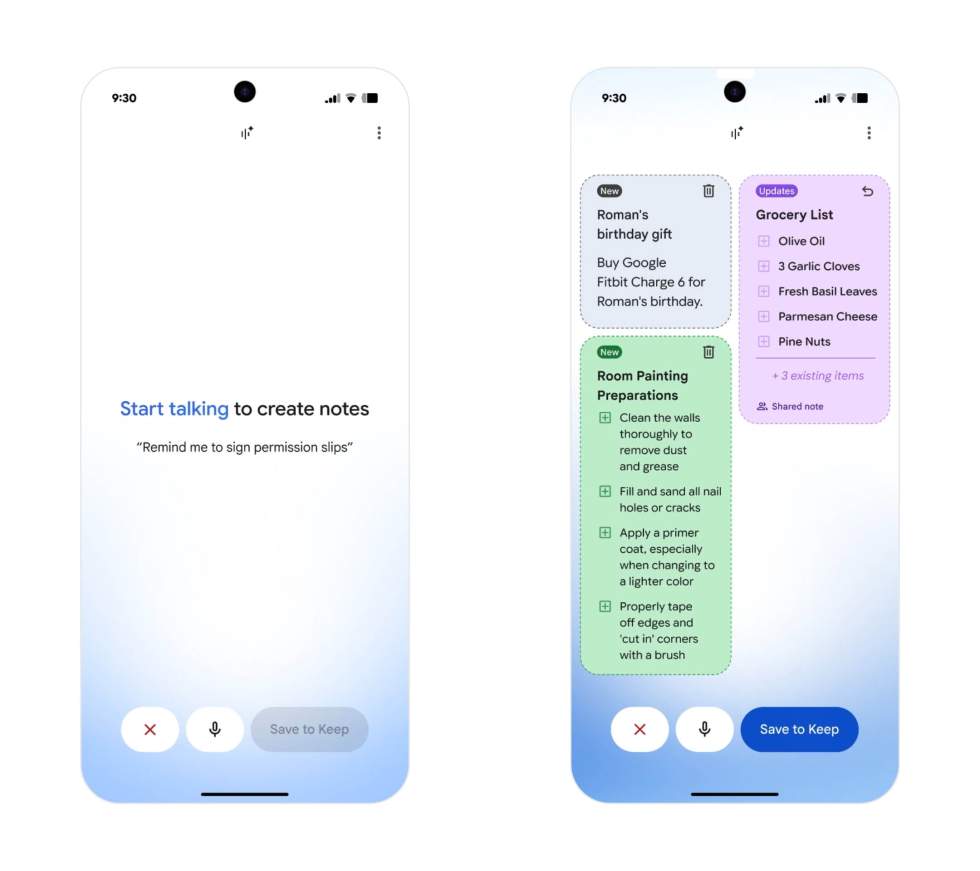
As for Google Keep, you can probably guess how this works. You fire up a live session and can then describe multiple lists or notes that Keep (with the help of AI) can organize for you. Google describes it below, plus they offer an example of someone going live and putting together a birthday list, shopping list for a recipe, and then a to-do list for room painting preparations.
- Just talk to Keep to organize your thoughts: In Keep, you’re usually just trying to capture a quick idea or note that crossed your mind. Now, you can just “brain dump” and Keep not only understands your rambles, it gets to work in the background — turning what you say into organized notes and lists.
Like with Gmail, these live features will hit Docs and Keep this summer for Google AI Pro and Ultra customers.