

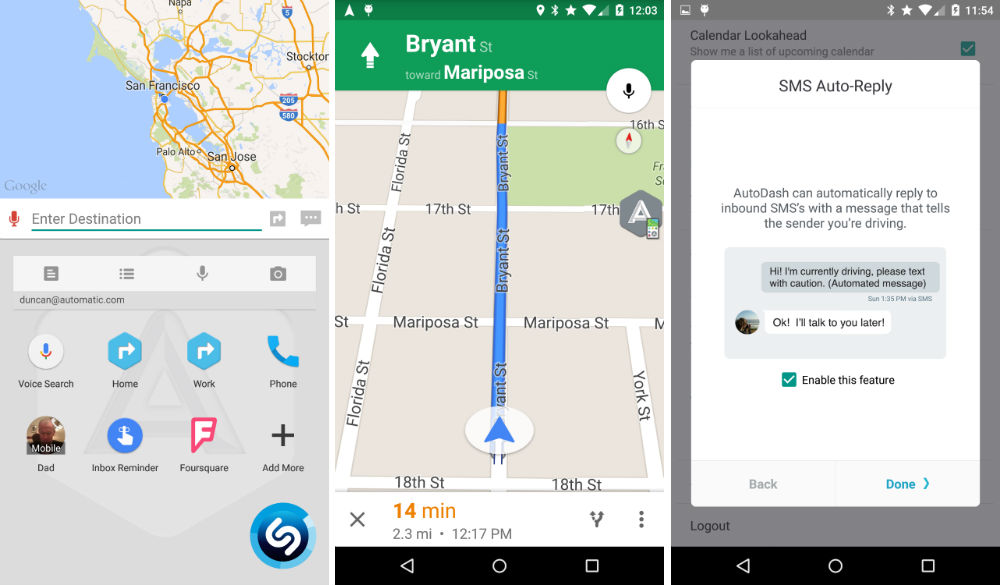

Automatic, that little dongle you can stick in your car to see your MPG, time driven, and other various info from your car’s computer, released an app called AutoDash for Android users this week. With it, you can set up a screen for when you are driving, offering quick access to apps, Shazam, and Google Maps navigation.
When you open up the app, you set shortcuts through various applications. For example, you can set a navigation shortcut to work or home, and also set shortcuts to conversations inside of your messaging applications. To make the app even sweeter, users can even pin widgets, giving quick access to Shazam, Google Keep, or anything else.
The app is free to download from Google Play, available right now. And no, you do not need to have an Automatic dongle in order for the app to work. Although, a bit of added functionality is available if you do.
Features
- Auto-navigate to home or work
- Record voice memos
- Create quick to-do lists
- Pay for parking and set a timer
- Recognize a song on the radio
- Quickly call the important people in your life
- Use dozens of supported music and audio apps
- Integrate IFTTT triggers to power your connected devices
Play Link
Work at Home~Follow this guide to make $97/hour…I just purchased themselves a McLaren F1 when I got my check for $19993 this past 4 weeks and just over 17 thousand lass month . this is really the nicest-work Ive had . I began this 10-months ago and straight away started making more than $97… p/h .learn the facts here now .
in…
➤➤➤➤ http://GoogleCyberTechHomeJobsEmploymentNow/get/chance/top…. ✱✱✱✱✱✱✱✱✱✱✱✱✱✱✱✱✱✱✱✱✱✱✱✱✱✱✱✱✱✱✱✱✱✱✱✱✱✱✱✱✱✱
Its a user friendly version of torque, with far less options….but more easy setup
Very ios friendly
I really want an app that allows me to set intervals for maintenance (by mileage and time) and then, through bluetooth, checks the cars mileage and alerts me when I need to perform maintenance. Then I could perform said maintenance, log it, add pictures and notes if needed and set it for the next interval (based on when I actually performed it).
Is there an app that does that?
One thing I miss about Google Maps is just being able to put it in navigation mode without having to input a destination, just like the interfaces to those GPS units you can buy. I don’t know why they got rid of that.
this
Waze has that, but yeah, would be nice to have in Gmaps again
+1 for Waze. Also seems to have better traffic info plus all the other features it offers.
Totally just had a flashback to the OG Droid and its car mode.
Hah, ya know, I’ve always missed that magnetic docking mechanism (where the dock would have a weak magnet on it and would activate car or alarm clock mode) on the OG Droid and wished more phones would go back to that. I guess you could do the same with NFC tags, but it’s a lot more clunky that way.
Yeah that was a cool idea. Kind of forgot how innovative that phone was especially for its time.
What would be pretty great is if Google made Android Auto work even if you don’t have a dashboard radio that’s compatible. What I mean is, you open the Auto app and select an option that changes your phone into the Android Auto interface so you can still get the simplified car UI without having to get a whole new radio for your car (or just a new car).
I’ve thought the exact same thing and don’t see why they won’t do this. It just makes sense to have that option!
If you didn’t notice it already, check the AutoMate Beta at the top of this conversation. It basically does exactly what you’re describing. I agree though that it’s something that should be baked into Android, especially since Google’s location services can already tell when you start driving.
I had it on my droid razr and razr m, I missed it when I switched to a lg g2
I’m intrigued, will certainly take a look at it
AutoMate Beta is the best!
Explain, please?
It is an app that’s based on the Android Auto SDK. So it runs as close as anything can with a little bit of customization to work like Android Auto on any newer phone/tablet. It can launch the app as soon as it connects to a (specific) bluetooth network, and automate settings based on that. I have been using it for a couple months already and have enjoyed every bit of it and not experienced any lag. Definitely worth checking out
https://plus.google.com/communities/102908788212710276577
love me some automate…is this app any better or offer anything different?
Just downloaded… Exactly what I was looking for! Thanks !
WORK AT HOME::Get $97/HOUR…I just purchased themselves a McLaren F1 when I got my check for $19993 this past 4 weeks and just over 17 thousand lass month . this is really the nicest-work Ive had . I began this 10-months ago and straight away started making more than $97… p/h .learn the facts here now
hv….
➤➤➤➤ http://GoogleSuperTechJobsHomeEmploymentCash/get/top… ✱✱✱✱✱✱✱✱✱✱✱✱✱✱✱✱✱✱✱✱✱✱✱✱✱✱✱✱✱✱✱✱✱✱✱✱✱✱✱✱✱✱
This is why I always scroll down to the comments! This works surprisingly well in my first few tries! I’m now actually motivated to get a car dock so that I can easily use this.
Work at Home~Follow this guide to make $97/hour…I just purchased themselves a McLaren F1 when I got my check for $19993 this past 4 weeks and just over 17 thousand lass month . this is really the nicest-work Ive had . I began this 10-months ago and straight away started making more than $97… p/h .learn the facts here now .
in..
➤➤➤➤ http://GoogleCyberTechHomeJobsEmploymentNow/get/chance/top…. ✱✱✱✱✱✱✱✱✱✱✱✱✱✱✱✱✱✱✱✱✱✱✱✱✱✱✱✱✱✱✱✱✱✱✱✱✱✱✱✱✱✱
That first screenshot doesn’t look car friendly at all.
If you thought that was bad, trying viewing the images in this article on a mobile device.
yes thankyou useless on mobile, give me pinch to zoom or click picture to full screen something.
1. Long-press picture.
2. Select “Open Image”
3. Zoom and scroll to your heart’s content.
(in Chrome)