

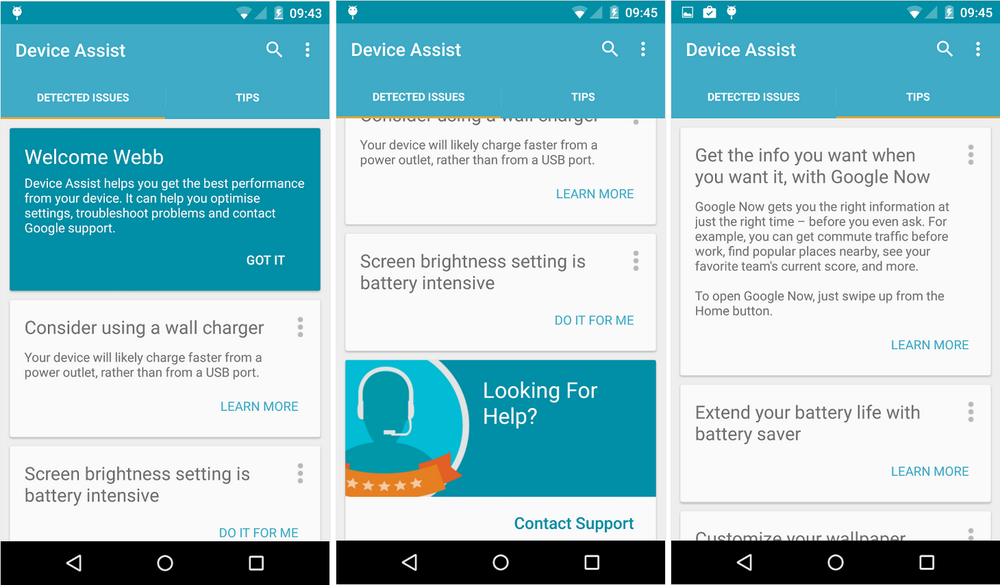

Websites and forums can be helpful in diagnosing problems with your smartphone and/or tablet, but even better would be an easy-to-use, dedicated application. Perhaps in recognition of that fact, Google released Device Assist today, an app for Nexus and Google Play Edition devices running Lollipop that can troubleshoot issues and proffer tips.
Device Assist tries to proactively prevent problems by offering suggestions. It’ll recommended changing your screen brightness setting to save battery, for example, or charging via wall port instead of USB. For more complicated issues, a handy button allows you to contact Google support and, if you so choose, submit device information for a presumably better tailored experience.
The app also provides a list of common tasks and how to perform them, like taking a screenshot and customizing notifications. Presented in the form of cards, most contain instructions in the form of either text or a video that can be saved or archived at will.
Device Assist is barebones now, but it might save you a few minutes on hold with Google support sometime. That alone is definitely worth the download.
If your device meets the requirements, you can grab Device Assist from the Play Store.
Play Link


Fix being able to mute all volume but my alarm on my nexus 6
This is great. I’m looking forward to downloading it and reporting some bugs.
US only. Why???????
This looks like it could have been a part of the Android Silver program but with that now defunct they’ve chosen to release as a stand alone app.
Can you submit bug reports with this app? That would be a nice feature if not. Also, if I use the ‘submit feedback’ option under settings will that push bugs to the google team?
I love that 5.0 has been out for a month, and no one can get it through ota, and the nexus 6 is not on Verizon… que people saying they got an ota, or they bought the phone unlocked and popped in a VZ Sim (which is in no way the same thing)
K.
I just hope they get the Security lag/ bug fixed when I buy the N 6 in Jan, I was going to buy a Moto X 2nd gen till I found out the N 6 will work on Verizon.
FYI anywhere you buy a N6 it will work on Verizon as long as you have an already active sim
“que people saying they got an ota” because we did.
I wouldn’t be surprised if they stalled the rollout. My mother’s Nexus 5 got the OTA and it has serious wake locks.
“que people saying they got an ota…”
cue – a thing said or done that serves as a signal to an actor or other performer to enter or to begin their speech or performance
queue – a line or sequence of people or vehicles awaiting their turn to be attended to or to proceed
que – what (Spanish)
I can’t intall it in my OG N7
I did. Are you on lollipop? If so maybe you need to factory reset your N7.
Yes, I’m. According to Android Police it’s US only, but we can sideload it.
Anyone have issues with Hangouts syncing between PC and your phone? I got the Nexus 6 and since the day I got it I havent been able to see messages sent and received on my PC on my phone.
And yes, I know this app should be of some assistance to my issue.
I am today. Its delayed by several minutes.
Yeah, it has been happening to me since the day I turned on my N6. It syncs between my G3 and the PC just fine but no sync whatsoever to the N6. It is kind of frustrating…especially not knowing how to fix it.
This is great. Google is making strides towards making the Nexus Android experience more consumer focused.
“…It might save you a few minutes on hold with Google support sometime.”
Wait, people actually call Google for support?
I did 2 nights ago
Thank god, been wondering how to use my Android device since 2009.
When Stock Android needs a guide.
http://www.reactiongifs.com/r/4OVLKQc.gif
This Bill Cosby meme touched me in the right kinda way.
my classmate’s mother-in-law makes $81 an hour on the internet . She has been fired for five months but last month her check was $19416 just working on the internet for a few hours. visit this site.,.Read here
Please go away.
Can I ask it when will I get OTA Lollipop on my 2013 WiFi Nexus 7 ;P
Yes, you can ask.
Will it give me an answer xD
I doubt it, I haven’t got an answer yet to the same question.
You can, but you’ll need to have Lollipop installed first.
I’m just manually flashing it.
I was going to flash it, but then I read about the bugs and decided to wait. Now that they are releasing 5.0.1 I’m going to wait for the OTA just in case this has bugs.
As soon as you give the adb commands. It’s really up to you.
I did that on my Nexus 5 but owning a Nexus device really defeats the purpose if I have to adb releases.
Sounds like you are doing it wrong. It’s a developer device the last time I checked.
Sounds like you haven’t checked since announcement date. I checked subsequently and it was available in public retail channels with heavy marketing campaign.
Every….f*cking….post….
Did it just for you ;P
I just found out a few minutes ago that a friend with Nexus 7 (2012) still isn’t getting OTA yet. What is Google doing? Also no white 64 gig Nexus 6 today at the playstore as of 12:21 pm PST.
I have a Nexus 7 (2012) and I haven’t gotten the Lollipop OTA yet either. It’s a WiFi only version too, so can’t blame any carrier. What’s up, Google???
factory images have been out for weeks BRUH