


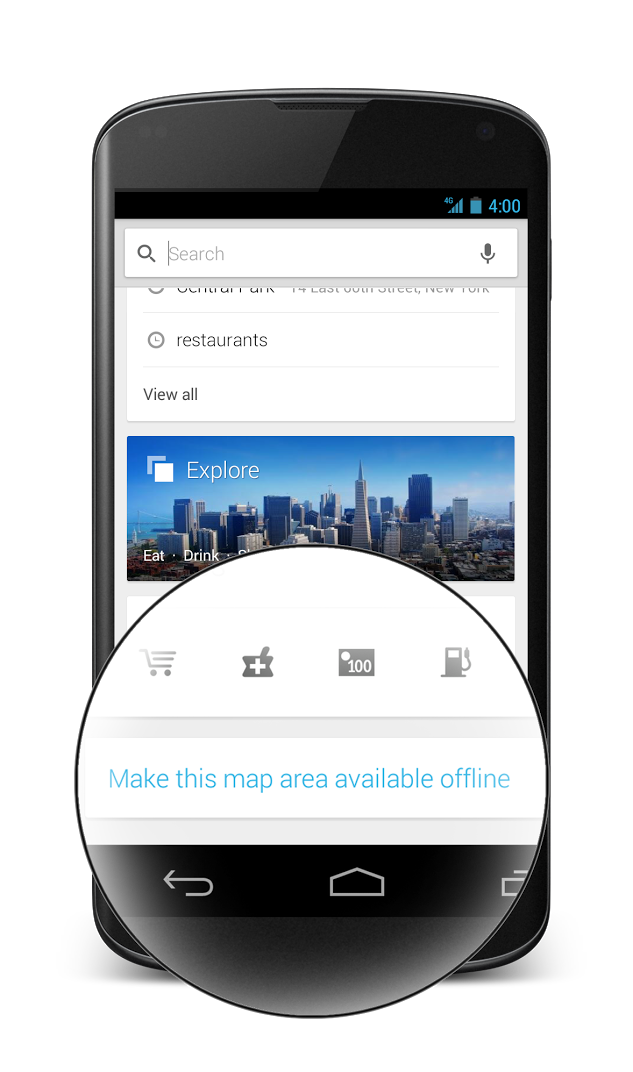
The freakout that ensued after the release of Google Maps v7.0 over the thought that both Latitude and Offline Maps were missing was heard loud and clear by Google. We know now that Offline Maps is still there, it simply requires that you put an area of the map you’d like cached in view, then tap Search, and finally enter the words “OK Maps” to save it for later. Seems simple, right? Not so much. But as I just mentioned, users also noticed that Latitude, the popular person tracker, was missing. Google addressed both issues in a blog post hours after the update was released, confirming that Latitude was being retired and that Offline Maps required an extra not-so-intuitive step or two to work. Apparently, that was not enough as they are preparing to push another update to make all of this as clear as ever.
In a Google+ post last night, the Google Maps team recognized that users are missing the easy way to access offline maps. They mentioned that their engineering team has been working “around the clock” to add a “Make this map area available offline” button in the search box (pictured above), so that you no longer have to type “OK Maps,” though that option is still available.
They even included a “Where’s Latitude?” link at the bottom of the side menu that will direct users to more information about the retirement of the service.
Both additions will join an update that will roll out globally starting today. Let us know if you receive it.
Via: +Google Maps



My biggest problem with the new design is that navigating to a place now takes 3 extra taps (first world problems). Used to be that when I searched a place and tapped the result, I could just hit “Navigate”. Now it’s hit Directions, hit a route (which seems to be taking much longer to load now that they give us multiple options), then hit start. Just a little annoying, and if anyone has a better solution, do let me know.
I’m not understanding, navigation still works, the maps IMHO are nicer, and the app more closely resembles the desktop version… The lack of latitude to track people is a non issue because it’s a phone and you can call them, and the majority of you complain about 4square so why all the sudden love for latitude?
What about the soft menu button on the phone not working with the app anymore? or that the update route option has been removed. What about for right handed people, where the on screen menu tab is on the left? Doesn’t really help if you have a phone bigger than an S4.
Love my job, since I’ve been bringing in $82h… I sit at home, music playing while I work in front of my new iMac that I got now that I’m making it online… http://www.Pro67.com
I followed the “Where’s Latitude?” directions — there is no “Location Tab” in Google+. I went to my phone and re-enabled sharing — still no tab.
Definitely a step backwards. Sucks that it does not have all the conveniences of the prior beta version: navigation to contacts, starred places, shortcuts. Also lacks speak destination and go home. All of these were soooo easy to use. Way to screw it up Google!
Ok, i really hope someone can help me here….. Im a delivery driver, and I use navigation ALL the time.
BUT
I used the dedicated navigation application, which with this new update is gone. It a pain, and annoying really. Is there a way to turn this back on? Or am i just going to have to uninstall the updates?
I too loved the dedicated navigation app and could not stand to see it go. Sadly the only way i have found to bring it back is to go into settings and uninstall the update from the apps menu. It stinks cause the new UI looks pretty good but I gotta have the dedicated nav app.
Why mess/change a good thing??? I use Google navigation everyday and it is perfect and very accurate..more than many Sat/Nav units sold out there. I like the fact that they were all separate i.e Google maps, Google Navigation and Google Earth. At least they should all have their own icons under this new MAP umbrella. Seriously when i used maps this morning trying to navigate, i wasn’t happy. Pls do a course correction ASAP b4 Google maps faces a backlash.
I completely AGREE. I’m so disappointed.
Yup…i don’t see street view images of your destination location when you get there or options to input by voice or text is not there or am i missing something. There should be a way to keep Google navigation the way it was and just add onto it some of the new features. I WANT MY OLD GOOGLE NAVIGATION BACK, while they figure out how to fix what has angered so many loyal Google map users.
AGREED! It was so great before, a pleasure to use. Will post more later…
And the award for the worst use of “working around the clock” goes to… Google’s Maps team! If they’re seriously working day and night to add one button to their UI shouldn’t they be done by now?
Somebody at the top made a very poor executive decision. Who is in charge of the Maps department? Where is Sergey or Larry? What the??
Google makes excellent products. Apple admitted they make POOR products and to use alternatives (http://www.apple.com/letter-from-tim-cook-on-maps/). Its as clear as day. Google Maps was flawless from day 1. Apple Maps was horrible from day 1. This update has severely lowered the quality of Google Maps. It is one the most used applications I have ever used, as with most people, and will continue to use more and more. Why would Google incorporate any of Apples sub-par programming into their apps. It was already almost 100% flawless. Now its not. New Maps = MAJOR FAIL. Listen to the CEO say it himself (http://www.youtube.com/watch?v=SUo9RHWvZEY) – USE ALTERNATIVES (coming directly from the CEOs mouth). We know what happened to Scott Forstall (http://www.businessinsider.com/tim-cook-why-i-fired-scott-forstall-2012-12). Is someone at Google next?
People can’t wait 12 months-multiple years for you to fix your maps. They need it now and already depend on it.
Links are working:
businessinsider.com/tim-cook-why-i-fired-scott-forstall-2012-12
youtube.com/watch?v=SUo9RHWvZEY
apple.com/letter-from-tim-cook-on-maps/
Big SETBACK on Google’s part. Apple is hindering innovation. FAIL.
Enough Said. Its coming directly from the CEO of the company. FAIL
Google Maps is now less accurate and less precise than it used to be. DARPA needs to step in here. We will never have self driving cars or any of the things Google has planned for the future with this kind of work. This is major step BACKWARDS for Google. And for everyone who uses Google Maps for that matter (the enter planet). MAJOR FAIL.
Thank the most overvalued company in history, Apple. Fail.
Nav mode without destination is gone. I used it almost everyday. My Maps is also gone with was also very useful.
Useful is an understatement. Its vital and mandatory. Use it everyday…
I am looking for alternatives. Screw Google and this BS.
BOOOOOOOOOO!!!!
Will never ever ever use G+,
ever ever ever.
Or Twinkle and Winkle or whatever
those other stupid places are called.
I agree, google can stick G+ where the sun does not shine! I hate it more and more the more google tries to jam it down our throats.
No kidding. We cant even use Zagat anymore! Fail.
Offline Maps is critical. What about all of us who are on subways all the time? Need offline maps. That was one the best features. Google Maps was nearly 100% flawless until this update and Apple butting in. New maps = MAJOR FAIL. Google let the world DOWN with this update. David Pouge overlooked so many things in his piece.
I like to create personalized maps with pre-saved places of interest when I go on vacation, now I dont see how i can access “my maps”…………. where is the option? is it completely missing? what if i want to create a future points of interests map for myself, i wont be able to find that inside the google maps app for android ! GOOGLE, PLEASE BRING THIS FEATURE BACK !
Ever since the last update, my Google Navigator shows everything upside down. Anybody have any idea what the hell to do about this? It’s driving me crazy. Thanks much.
Revert back to version 6. Version 7 sucks
Ok, so it’s not just me. Yeah, it is a shitfest since the last update. I mean, how the hell do you screw it up so badly that it now runs upside down?!
By Google having their heads up their G+ and Apples rear end. That’s how!
New Google Maps = MAJOR FAIL. Apple admits they make CRAPPY products (Tim Cook admitted it folks)
I have the 7.0.1 update, and there’s no “make this map area available offline” card when I go to the search box. In fact, there’s no “Explore” card at all. If this is because I’m at home, that’s STUPID. Many people will want to load offline maps from home, before they go on travel! So they’re supposed to use the “okay maps” hack?!
Plus, this update is not at all car friendly. If I’m stopped at a red light and want to zoom, I used to be able to press the +/- zoom buttons … now I have to try to pinch when my phone is mounted on my windshield? Not easy.
This update definitely has a nicer visual look, but seriously lacks in functionality.
scroll all the way down.
Im not saying googles new maps app is without fault, but the whole ‘apple influence is showing!’ is very bizzare.
I dont see missing map data and i see a visual aesthetic that matches google now and googles own native apps… Just because it looks like it does on ios doesnt mean its apples aesthetic.
Or do we all have more experience with ios devices then we lead on to believe? 🙂
Getting rid of latitude and integrating the functionality into G+ would be fine if they at least duplicated the functionality. Use latitude to track where by field techs are as part of my business. Can easily see where they are, and hit a button and get directions to them to do spot checks on work. G+ location services aren’t accessible from the web like latitude was, can’t pull up a map to see where people are can only do it from the app. If you use the G+ app you can’t pull up a person’s location and generate a route to them. At least when they moved “talk” into “hangouts” most of the functionality stayed the same. It would seem that the location feature integration into G+ was done by people who never used latitude for anything.
I agree what a failure where is the labs and measure tool…
Google Maps was a nearly flawless app. The ENTIRE WORLD depends on it. We won’t have self-driving cars anytime soon with inaccurate maps. Apples influence has severely deteriorated the accuracy of Google Maps. MAJOR FAIL. MAJOR SETBACK.
Well, I’m really loving the new UI and controls so far. I never really used Latitude …except when traveling and meeting family on the interstate from different directions.
The new UI is nice, but some of the functionality is missing…especially the car mode.
I guess I never used that… what is [was] car mode? larger buttons/ voice control only?
Yes. It also puts the map into the landscape view for when the phone is in the car dock.
This latest update sucks! Used to quickly be able to choose a contact for navigation, now you have to search. Silly! Reverted back to previous version.
I was able to choose a contact that I have an address for and it took me right to maps. I’m not sure why it isn’t doing the same for you.
My contacts are not stored on Googles servers. I use Touchdown which updates the contacts. When I choose one of those contacts it says it can’t find the address. Not only that the new maps navigation link used to have a nice contact list you could quickly navigate. This new one everything takes longer to accomplish if it even works. Very disappointed in new version and won’t be using it until Google now fixes all that they broke.
I am not looking for some fancy crap interface changes. I want the functionality and this new version sucks compared to version 6 for overall functionality and ease of use.
Tweet and G+ Google Maps. Maybe if enough people complain about other things like Latitude the functionality will be added in quickly like with the offline feature
This was either a common question from beta testers or Google is undeniably awesome to fix this so quickly. Dang.
Can’t change route mid navigation! Also, I have navigation shortcuts on my home screen, so it’s one tap navigation to places I frequent. No option to avoid toll roads once you hit them. Even tried to set new shortcuts because I hoped the option to avoid tolls was in there, but wasn’t. How do you avoid tolls on this thing?
When you set your destination, there is a menu at the bottom you click to avoid dirt and or toll roads. It is next to “start” button
I’ll wait till I’m more certain that the new apps is in fact better than the old app.
Yea I’m gonna wait too…kinda funny…at first people were, “look how beautiful the new Maps!”…then quickly that changed to, “WTF! Maps sucks now!”
Well, thanks to those that downloaded and gave up the feedback…saving others from downloading it too.
Unfortunately, the new maps have been implemented already. Even in the desktop versions. Apples influence has deteriorated the quality and accuracy of Google Maps. Not good.
Has anyone figured out how to use navigation without putting in a destination? Sometimes I just want to drive my routes, but be able to see what is happening with live traffic in the direction I am traveling.
nope you can just use the map itself with the compass mode but to actually be nav interface, I don’t see away to do it.
Thanks. Yes,I tried that but the search bar takes up too much space and is unacceptable. Change should not be this painful on a “Smart phone”! Give us some options…
send feedback through the app. I did specifically about this. I think if enough people make noise it may get addressed.
Yes, I did that too. Thanks again.
This is absolutely crap. The nav without a destination is something I use daily for traffic. Seeing myself in map view isn’t helpful, and can be very distracting while driving. Horrible update all around.
I got my update..
I’m pretty confused by this – I did get the update the day it was released and the screenshots in google play show the new features discussed here… but there are no actual updates in the app. This is the case on my Rezound and Nexus 7, both running 4.0.3. I’ve restarted with no success. Am I missing something?
Mine is still 6.14 version…no update here! Frustrating. Also on Rezound.
So far I am very DISAPPOINTED with the new Google Maps. Any influence Apple has had on Google Maps has decreased the quality of the app. This was a a nearly perfect App. It is one the most used, most useful, and most well written applications I’ve ever used. Apple’s influence has lessened the quality and accuracy of the maps. I hope to elaborate more when I’ve had more experience with the maps and app itself. What does the Google community think? I’d like to hear everyone’s opinion, both positive and negative.
P.S. The App is still great, but why would you take any influence from Apple and Apple Maps when they were admittedly “VERY POOR” and “INACCURATE” . Why would you try and mimic an admittedly (i.e. Tim Cooks admission) poor and inaccurate product.
Agreed. I especially don’t like the Apple influenced circular icons they are now using. Booo.
Exactly. Tim Cook and Apple admitted it was an inaccurate and crappy product. Why would the try to mimic that?
I don’t understand (maybe since I haven’t received either map update yet), but what is Apple’s influence that you are talking about?
Have you used Apple maps (the Maps app Apple ditched Google maps for; the native maps app on iOS)? Their are many similarities/inaccuracies.
Is anyone else not seeing the Explore option under the search bar? All I’m getting is my search history and I loved the Local shortcut to see restaurants nearby and such in my city, but sadly it’s also been replaced with my search history screen.
I’m seeing a “nearby stuff” bar when clicking on the search bar. Starts out behind the keyboard though.
Wow, yeah I don’t even have that card with the icons, just the top one with the last couple of searches and then the Nearby from history followed by the offline cache option. Wonder if this is device specific or ROM dependent. I’m currently running CM 10.1.1 on the VZ Galaxy Nexus
Also, if I try going through the Local app shortcut all I have is the search bar with the top card pictured there that has my last couple of searches, totally worthless now compared to what it used to be.
The new interface is very fluid, but feature wise, I totally get the feeling it’s half-baked. Disappointing, Google.
Mine is on an unmodified Verizon S4. It seems pretty to me, but I haven’t delved into any of it. Can’t say I was a Maps power user to begin with in any case.
FYI Adam and for anyone that stumbles on this, I was able to resolve my issue by doing a force stop, clear data, uninstall, then re-install the Maps App. Finally I can enjoy the new Explore feature!
FYI for anyone that stumbles on this, I was able to resolve my issue by doing a force stop, clear data, uninstall, then re-install the Maps App. Finally I can enjoy the new Explore feature!
Shrug
Huge FAIL on google’s part. My wife and I used Latitude to keep track of each other while living here in Guatemala. When I follow the steps for the new Goggle + option in maps, it says “Location Reporting not Available in your Region”
FAIL, FAIL, FAIL
i’ll just say…it’s a phone
I’m getting such a laugh out of the rending of clothes and pulling of hair over this… oh, especially the one who indicates he’s moving to iPhone all because he doesn’t like this version of Maps.
IT’S JUST A FREAKING PHONE PEOPLE. Besides that, IT’S JUST ONE OF DOZENS OF MAP AND NAV APPS. Fak, use something else if you don’t like it that much: Waze, Locus, BCNav, Trimble, Sygic, Orux, MapFactor, EveryTrail, OsmAnd, Polaris, Scout, NavFree, Maverick… just for starters. Lots of them have traffic displays, lots have “where is so-and-so on the map” functions, most will let you tap your contacts’ address and show it on the map.
Buncha freakin’ whiners. Go on Play Store and type “navigation” in the search, but try not to hurt yourself in the process.
I wasn’t even commenting on that, I was more commenting on the whole ‘how am I supposed to know where my significant other is at’ complaint
AGREE, AGREE, AGREE
Anyone else remember Google’s purchase of Waze? In addition to all the traffic stuff, Waze lets you track friends much the same as Latitude. Maybe it’s just wishful thinking, but it seems to me once they start to roll in Waze features, Latitude itself would become redundant.
I’m thinking they bought the Waze team, and not the app functionality.
I could be wrong, but I think they are asking people to use G+ as the alternative. That’s pretty bad, especially for people who doesn’t have a G+ account. With latitude all you need is their gmail and their permission. They aren’t going to join a social medium just for this. I’m assuming Waze software/ programmers that Google acquired before will probably work on G+ location service.
if you have gmail, you have a G+ account.. You may not have set it up totally, but it’s all yours.
Everybody I talk to still don’t understand that having a gmail account automatically allows you to use the other apps seamlessly like G+ & Drive, I told them if you use your gmail account you just download and log in and its free to use, but they don’t. They think there is some weird catch or something and refuse to do it. I can understand old people fearing change but these are 20 and 30 somethings
Agreed, but that’s the thing, they have to go set it up. With latitude, they don’t need to. Just accept the location invitation and that’s it.
Totally agree. I used latitude to track my sister who travels to see me during holidays. Without it, I can’t tell where they are on their trip. This is really really dumb on Google’s part. G+ doesn’t cut it. If they continue to cripple their services, I may just be forced to jump the fence into a walled garden…..oh god I hope I won’t have to do that.
I totally AGREE! They virtually DESTROYED Google Maps. Google should design apps for Android/Google and not Apple/iPhones. Android is the Dominant platform, not iOS. What don’t you people understand? Get rid off your obsolete Apple products. They are worthless. Apple has always been worthless and will always be worthless. Support Google. iPhones are so 2011. Its over for Apple. They can’t innovate and they are hindering innovation for other companies. It’s as clear as day! The CEO admitted his products suck!! WAKE UP PEOPLE!
Is everyone really turning a blind eye to what Google just did? They’re once again trying to get away with taking away more and more offline features to push us to their always-on cloud services.
They knew this, why else do you think they programmed the feature in anyway, but made it hidden? When was the last time you’ve seen an update pushed the next day with such a ‘critical’ feature included so quickly? They’re backtracking after the complaints.
Android is becoming more and more encapsulated like iOS, and I don’t like it at all.
I totally AGREE. Don’t let Apples influence destroy Google.
How was it hidden? They told you how to do it in the release blog post. Did you even notice that you can now press and hold to drop a marker and get info or directions to that location, that’s a way more helpful feature.
Only the tech-experienced crowd will know about it, and even then it’s a removed feature that requires extra effort for no reason.
The new maps screwed me yesterday in Phoenix. I used the alternate route traffic view to choose the best route to get to places since there are multiple highways here. The listed time is usually wrong but the traffic colors were accurate. Now it only lists times and I can’t press a button to see my alternate routes with the traffic colors. I also can’t switch routes in mid-route.
My wife and I are trying to buy a home and I was a half hour late. I am gonna have to restore my titanium backup.
Bummer. I haven’t used navigation yet. Google maps was nearly 100% flawless before Apples influence has started destroy it. Not good.
Huh? In what way is Apple influencing this? The blame for this is totally on Google.
This is the Apple version of Google Maps. It was designed to keep Apple Maps dead and gone for ages to come. However, it is definitely an app designed for Apple users. It’s dumbed down and limited. They made it all one button so you don’t have to think too hard to open the app. Instead of being able to click Navigation (the only maps app I used), I now have to navigate an appleesque field of nonsense to get a now glitchy and insufficient navigation app. I downgraded in a heartbeat.
You swipe between route listings to get alternate routes. It’s actually more intuitive than the previous implementation.
Where do I find this? This attached pic is the only route options page I get. As I said, in this area the minute estimate is always wrong, but the color of the traffic (green, yellow, red) is accurate. I want that view back where multiple routes are displayed with the traffic on one map.
You would have to select one of the routes first. Then you can swipe between route options, pulling down to reveal the route. You cannot actually get all the routes on one view like you could before. You can still display the traffic like before.
I still don’t have this update, anyone else not seeing it?
It didn’t show in the Play Store for me, I sideloaded using the APK on the post about it yesterday.
Tried many times yesterday but it was rolling out in stages I guess so I had to get it from Android Police. So….. this morning, there it is ready to be updated. Lol, my impatience!! Still didn’t get this second update where it addresses the Latitude and Offline Maps issues others are talking about.
Wasn’t in the play store for me yesterday, found it an hour ago when I checked again. It didn’t come up as a not-up-to-date app on my list, but on the app page the update button was available.
Good day everyone. I received and uploaded the new Google Maps this morning. The 2 above items are included in the update I received. I played with the Navigation this morning driving to work. For some reason (which is good), the voice navigation came back. (I’ve had this longtime issued with “Searching for GPS” in navigation – it’s now gone). The “Make this map area available offline” is there, as well as, the “Where’s Latitude?” information. All of my prior saved locations are still there. I may be heading out of town tomorrow for a couple days. I’m itching to try out this new update.
Can someone who has installed the new version answer this:
Does the new offline feature work the same way as the old one?
-The old one would allow you to select an area and download all the map detail for that area.
-The new offline feature appears to work more like saving an image; as in it is only saving the detail on the screen at whatever zoom level you are at.
Does the new version save all the detail for a given area? OR just the detail at the zoom level you are at when you use that feature?
Thanks
I’ve seen people say this, but to me it appears to save the whole area… I tested by saving an area and then turning on airplane mode… I was able to zoom in and out of the area I saved offline without issue.
I heard someone say yesterday that it works like the old one on 4.2 but that 4.1 saves it like an image. I’m not sure if thats true or not but on my 4.2 its working like the old way.
They are vector maps so there is no ‘zoom level’ it saves all the data for that area.
I, generally, think the update is fine. However, I’m totally bummed they pulled Labs… I loved the measure/distance tool. I used that all the time.
Agreed. I like it, just took a few steps back in some areas. I’m sure Google will bring back a lot of things eventually.
I feel like Google is jumping the gun a bit nowadays. Both maps app and Google Maps are improvements over the core system but lack other basic features.
Received it this morning.
i got the update and promptly restored my backup. labs and settings are pretty much completely gone. i want my scale bar and zoom buttons back. not everything needs to be pinch-to-zoom just because it’s a touchscreen. this is a huge step backwards.
is the double tap and scroll feature still there? i use that all the time as a much easier, one handed way to zoom the map. i wish it was available on more apps like chrome.
yups its there, I didn’t even know that existed!
What is this scroll feature you speak of?!
its more of a zoom feature than scroll. double tap the screen with your finger and keep it on the screen after the last tap. then drag your finger up to zoom in and down to zoom out.
very useful using your thumb to zoom while holding your phone with one hand
Woah that’s awesome! Pinch to zoom is such a pain I’m using this from now on!
I did not realize this, thank you for the heads up!
Agreed! I did the same thing! This goes along with the menu button no longer being able to be used (yes, I understand it’s obsolete but I have it on my Note 2 so why not use it) and the majority of my saved places disappearing. I saw no tab to access my saved places, correct me if I am wrong please, but even if there was a place many of mine were no longer on the map.
Yeah, I finally found a mirror where I could download it and love the improvements……except the ones that you mentioned that have been removed. No biggie but I was using this frequently.
Got the initial one this morning. Now for another 48 hour wait for the other.
Don’t let Apples influence destroy Google.
Agreed! We need to support Google.
Still wish it included Latitude. I don’t use g+ (or any other social network for that matter).
Well Latitude would be considered a social network.
I said any OTHER social network… meaning I DO use Latitude, not g+ or any other…
Now to only bring back navigation UI
Always someone downvoting.
I am DEVASTATED by the new Google Maps. I loved that app. I could CRY. I especially don’t like the Apple inspired circular icons they are now using.
Still waiting for the initial update…
I waited and waited yesterday. Forum membes had links but those didn’t seem to work on the Note 2 (running 4.1.2) so I finally went down a different avenue and found 4 Mirror links on Android Police. Downloaded and works just fine. Just search Google Maps update when you get there. Hope this helps.
I got the update from them as well. This morning got the bugfix version from play store
I got the update from the Play Store this morning as well but didn’t notice the fixes. I’ll have to open it up and double check.
haven’t even received the maps updates let alone this update
But this is a good thing, they are fully utilizing the roll-out feature. Some people get the updates and notice bugs or missing features and notify Google. Google can then patch the app before everyone has even received the first update.
Good point – this is a pretty good example of what the rollouts are for in the first place. Besides, if we weren’t such Android fanatics (most Android users aren’t), we probably wouldn’t even know that a Maps update was rolling out 😛
Very true. The only time I can see it being confusing is say a non-techy husband and wife both have S4’s the husband get’s the update and is using new features and the wife did not. She is confused and try’s to update the app but doesn’t see any updates in the Store. Confusion.
google needs to have an opt-in for power users so you can be in the front of the line for their rollouts.
I know there was a mention of some type of BETA opt-in for apps but I think the developer has to manage this group on their own. I tried to look for this option in the Store yesterday but could not find anything.
Gotta love’em sometimes…