



The Google app (formerly known as Google Search) received a note-worthy update today to version 4.1.21.1657903. In the update, Google is introducing new Google Now card settings and also Google Now card history.
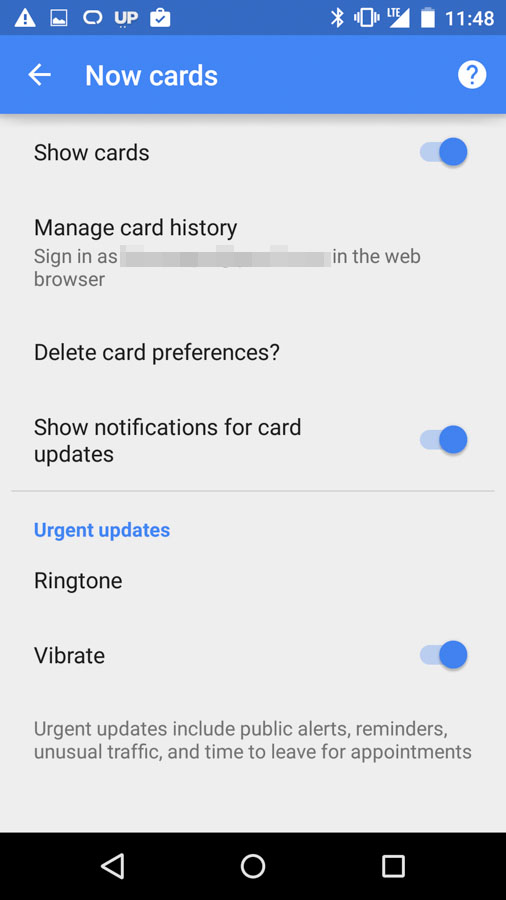
Once updated, if you jump into the slideout navigation settings, you will see a new option for “Now cards” that when accessed includes things like the ability to delete card preferences, manage card history, show cards, and show notifications for cards.
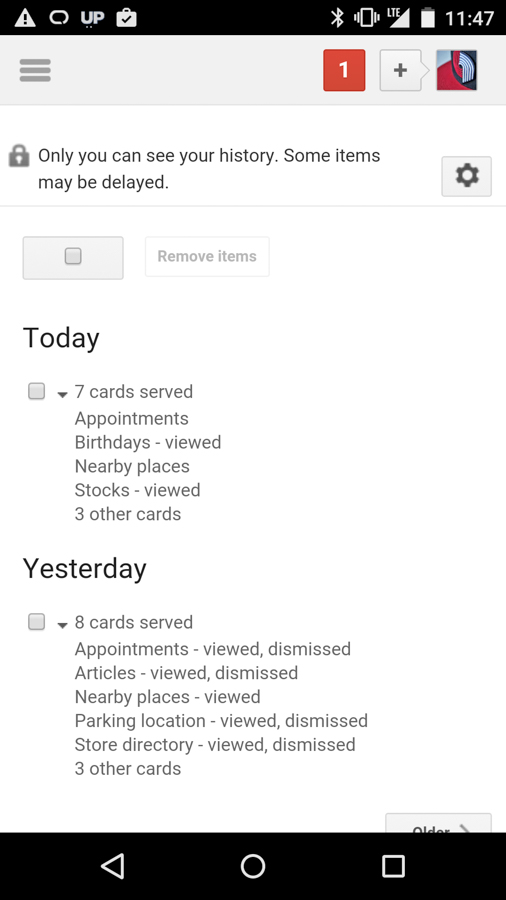
If you tap in to the card history, a browser window will open into your Google account that does indeed show your Google Now card history. As you will see in the screenshot below, Google is able to track which cards are being served to you, if you have viewed them, and then what you did with them.
If we find other things, we’ll try and update this post. If you find other new goodies, be sure to drop them in the comments.
The update is rolling out now to many, but if it’s not showing up in Google Play for you, feel free to sideload it with the .apk below.


Is it just me or did the voice input button change on the keyboard after you hit it once this updated.
My 2014 Moto X is still on version 3.6.16.1614640.arm and I have no update available in the play store. I downloaded the .apk but I am wondering….Why am I still on version 3.6? Is that right??
Updated on my 2013 Moto X, and it also changed all of the Google launcher to Lollipop Material Design. White search bar, white app drawer, flattened folders (that look really ugly and lack depth, in my opinion).
My Only Complaint about Google Now is that you can’t control what content shows up like Blink Feed does on the HTC One.
Google gotta decouple Android Wear G Now from Phone’s G Now. I don’t want to swipe away weather and commute cards from my watch every morning because it’s annoying and I also want to keep them on my phone (it’s nice to see all your cards in one place).
Hangouts was just updated for me as well
If you are running xposed gel, this kills all settings and no longer works. Hopefully it updates soon
No one’s going to mention that it changes the app drawer, search bar, and folders to lollipop theme? (moto x2 AT&T stuck on kit kat)
…for KitKat devices. Those already on Lollipop wouldn’t know this change. Google and their crappy change logs.
Which is now 40%+ of all android devices. And i do believe I mentioned I’m on KK.
Now bring back manage the now notifications please.
Man, the white faced Moto X is really really ugly with all those sensors staring you in the face.
*Said no one ever*
Oh? I mean, I guess if staring at a bunch of sensors making the design appear to be asymmetrical is your bag, by all means. I just think its pretty obvious the black front hides virtually all the sensors making for a far more clean and minimalistic look. Bring it up on MotoMaker and swap between the two.
https://www.motorola.com/us/motomaker?pid=FLEXR2#exterior/frontplate
I have a Nexus 6, but I was glad to go back to a black bezel phone. I liked my white 2013 Moto X, but it had a small speaker and, like, one mic, and the camera.
Still waiting for more granular control for the notifications about card updates – currently, it’s either all or nothing. There are some card updates where I like having notifications on; others where just the card is sufficient, no need to clutter notifications with info about the update.
Now if only the Commute Card would alert me without having the Appointment Card needed instead for my work travel.
Driving 45 miles one way I need to know in advance not whenever Google thinks it’s important. Having an appointment with Work address fixes the alerts.
The commute card with map never shows up except for drive home as soon as I get to work if the Appointment card is shown.
Usually if it doesn’t show up for me, I tap MORE and it loads my commute card. It typically shows me by default around the time I usually leave, so it has learned my habits.
I work non standard hours of 10-7 but with the long commute it doesn’t know when I am supposed to be driving.
Does the MORE show up for you when the commute card isn’t showing? I’ve just been getting in the habit of checking Google Now before I leave from work or from home to see if there’s stupid on the road.
It’s one or the other. If I have the appointment setup that card shows. The commute card shows as expected but almost never notifies in time of moderate traffic. Seems like has to be a delay of 15 minutes or more. Few minutes delay is often underestimated in two problem areas.
It may be better now but still get time to home as soon as I get to work mocking me.
Usually a 5+ minute delay gives me a notification. It might also factor increasing delay times.
but when I install the new update and open it the app close automatically and say app is stoped and my device is galaxy s5… thank for listening
Try to reboot your device. Maybe that helps.
I tray but is same think
I think my android version is problem because my android version is 4.4
I think it’s for 4.1 and up now
but my device has 4.4 android version but the app still don’t work and I didn’t know the problem
I don’t either. It’s working on other peoples KitKat devices. Maybe its a TouchWiz thing? I don’t know.
maybe and thank for answer ☺
It works on my Galaxy S4
All I want is a dark theme. Is that too much to ask?
it actually is. its not as simple as just making the font white and the card dark. there are a lot of factors and legacy items that’ll need to be updated let alone how long it’ll take for the proper “dark theme” implementation to be decided on. as google now evolves, so will the customization options (now that they’ve got some traction as a viable solution) so i’d say wait a year 😛
I think it is until they get rid of Matías Duarte. I like to blame everything I don’t like about Android on him, including too much white and no MicroSD cards on Nexus devices.
I fail to see how the design chief can be blamed for an engineering decision, but ok.
Because he has publicly stated that he believes that “having an SD card … is just confusing for users. It’s just too complicated. With a Nexus you know exactly how much storage you get upfront and you can decide what’s the right size for you. That’s simple and good for
users.”
I completely disagree with this. Having a SD card is an option. If you are smart enough to know how to buy and insert a SD card into your device you should be smart enough to know how to save your media on to it. All they are doing is limiting our options and forcing us to rely more on cloud based storage which doesn’t cut it for me, especially on tablets where I want to have large amounts of pictures and video available to me while not connected to the internet.
I own a 32GB Nexus 7 now which I mostly love, but it is almost completely full. I will never buy another tablet without a MicroSD slot.
This isn’t an ideal solution, but try inverted colors in settings. It effectively changes this to black, but there are a couple of down-sides…..
Rekem, with Nova Launcher, I’ve changed a lot to a dark theme. The app drawer white card is switched to black as well as the folders on the desktop are black instead of white. I like it, looks nice. But it would be welcomed to get some Google Apps themed dark too.
Indeed – KitKat on my old Moto X has been updated with Lollipop items, including the app drawer icon and the app drawer itself. Fun.
There are a lot of little changes. Commenters over at Android Police have been pointing them out. Some noticeable ones are, the look of the voice to text when hitting the microphone icon on the keyboard has been updated. The “glow” effect when tapping on apps in the launcher is now a slight brightening effect. The “Ok, Google” hot word has become more reliable when the screen is off and charging.
I hope this means the “OK, Google” hotword is more reliable when using the Nexus 6 with the screen off and not charging. That thing is terrible.
calling it terrible is being wayyyyyyyyyyyy too kind!!
Google Now has been outright annoying lately. Hopefully this provides the controls to make it awesome again!
Annoying how?
I said OK Andrea, today and it activated, when on my office line with a co-worker.
I tried saying that and it didn’t work for me no matter how may times I said it. lol
My Nexus 5 has been doing it all the time lately it seems to trigger on the keyword OK, it’s primarily only when it’s charging. when the screen is on and it’s not plugged in it’s OK
you don’t have a moto x and named the device andrea did you? lol
Nope, Nexus 5 plugged in for it’s mid-day charge
I need more control over when cards appear. Sometimes it gives me travel times to places I don’t care about and I can’t get them to stop. One time I swiped a card accidently that I wanted and there was no way to make it come back. I would also like the ability to control when travel cards appear. For example, my commute card appears when I never commute. The app just needs a refresher. Google has added more and more cards, with no way to control when they appear. That’s my main issue. I look forward to seeing the improvements in the latest update.
When a travel card appears that you don’t want, hit the three dot menu over it and choose to not show travel to that location. When you swipe something away on accident, an undo banner pops up so you can bring it back. Travel cards come up when you have locations set for your account (work, home, etc). They pop up when you are away from them or if you have calendar events related to them
It also changes the look and feel of KitKat. At least it did on my Droid Maxx
The things Google Now does is crazy. Knows where I parked, when my flight is, when my package is arriving, sports scores, weather, music, I love it.
I don’t fly, don’t own a car, don’t like sports, don’t have money for new stuff…yeah, Google Now isn’t really made for me.
But you’ve got money for a smart phone..
Third world citizens have money for a smart phone nowadays. Its the go-to computer in a lot of areas.
True. I see folks from Nigeria fighting on the Internet on CNN.
And sending me e-mails claiming to be my long lost relative and looking to make me rich!!
Nigerians aren’t that poor you know.
Nah here in America we’re taught they live in mud huts and try to steal your money.
misinformation although some of us do actually try to steal your money though
At least you’re honest and upfront about it.
All I see in CNN comments is that the entire world and everything that happens in it is Obama’s fault
No that’s Fox
Do you walk, do you ride a bike, do you like movies about gladiators, do you have money for used stuff? Yeah Google Now really is for you.
Google Now is the very essence of Android. Why are you on this site then?
Haha it’s always telling my eta to home….stupid…
It’s a little scary and not good if you ask me. Good in some ways, bad in others
This is awesome and as per apk mirror this should work now with API 16 aka jellybean and higher. The last versions of search 4 only worked with API 21 aka lollipop. I saw this earlier and was wondering is it safe for everyone with kitkat to update? I only have my maine phone with me at work right now or else i would have tried this out already. Anyone have this app working fine on kitkat?
Yes, I have it installed on my 2013 LTE Nexus 7, which has not yet been updated to Lollipop; it’s on KitKat. It works just fine.