
Google announced two ad-related changes to Search today that I think you’ll actually enjoy. Instead of finding ways to further fill your search queries with advertisements, they are instead making ads clearer to see and giving you the option to hide them.
As you scroll through Search results going forward, you’ll see text for “Sponsored results” that is in a new, larger label that is visible as you scroll through that section to continue letting you know that you are in a sponsored/advertisement section.
In a somewhat surprised move, they are also going to put a button at the bottom of those results that lets you “Hide sponsored results.” If you hit that button, it’ll shrink the ad section to put those results away until your next search. Of course, it would have been even better if this “Hide” button was at the top of the ad section, but then they would make a lot less money.
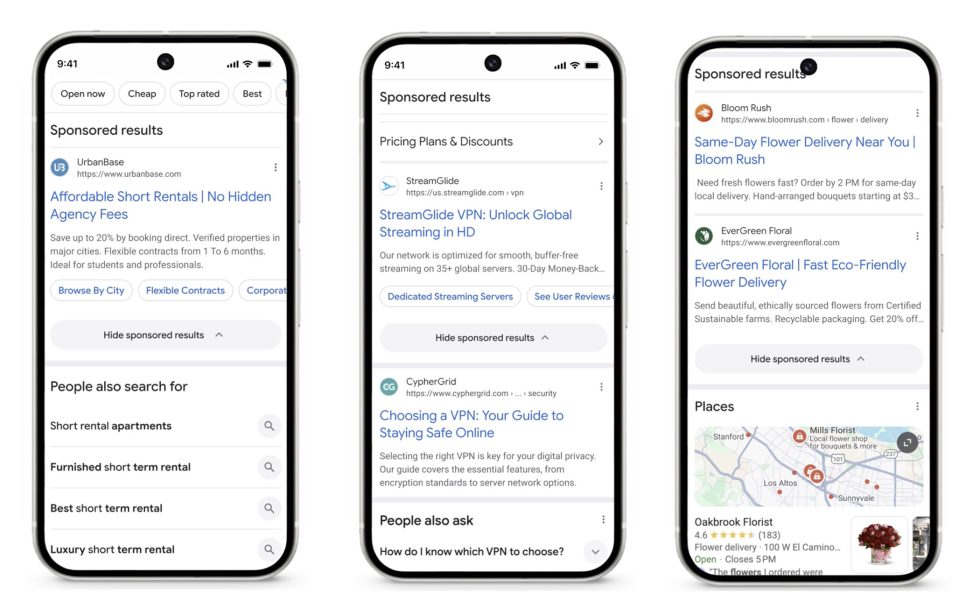
This is rolling out on desktop and mobile starting today.