

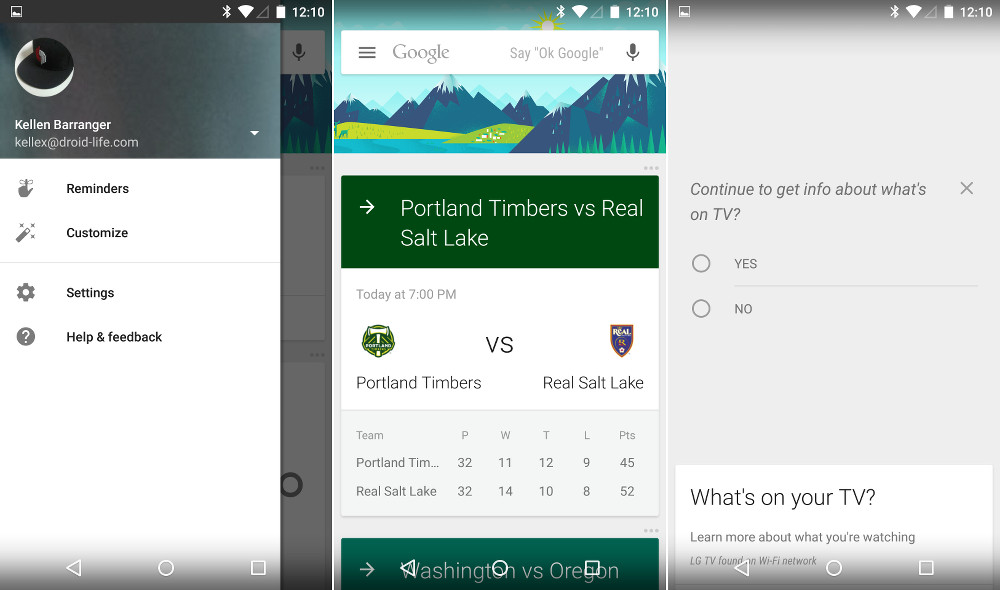

Google Search is going to receive a massive update to version 4.0.26 in the near future that not only brings a full Material Design make-over, but we are finally getting multi-account support!
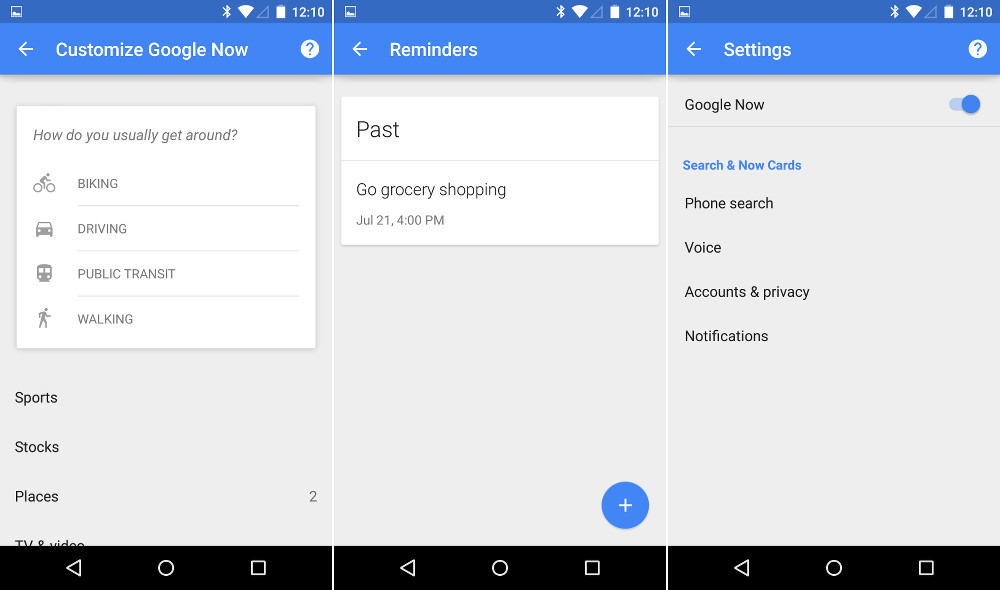
As you can see from the screenshots, the new UI in Google Now is beautiful. Some cards have big, bright and colorful headers. All of the menus have been redone, some with floating buttons to create new items like Reminders. The hamburger menu up top has slid out from the edige and includes that mesmerizing new rotating arrow animation. But maybe more importantly, when you slideout that side menu, you can switch between accounts. For those of us who use multiple Google accounts per day, this is insanely huge news. You can now setup multiple Google Now profiles, in a way.
Also, the new Google Search brings some new features to the Google Now Launcher, like a white home button and a new white-backed app drawer.
Note: The update to 4.0.26 was included in the new Android 5.0 “Lollipop” build that was released for the Nexus 5 today, so unfortunately, not everyone can have it. In fact, I have posted the .apk for it below, but it doesn’t seem to be working on anything not running Android 5.0. Both Tim and I experienced nothing but force closes after installing it. If you want to take it for a spin, feel free to install it and the newest Google Now launcher .apk. Just be warned that things likely won’t work.
Download Links: Google Search 4.0.26 | Google Now Launcher 1.1.1


Has anyone on kit kat or jelly bean gotten an updated Google Search 4.0 with material design yet? Heard anything about it releasing for those Android versions?
I just got the HTC one M8 update from Verizon. i’m on 4.4.4 now. will this update work with it now? I tried this the other day before the update and Google Search just kept force closing.
I downloaded both on my HTC one M8 and it just kept saying Google search was force closing
Works perfectly on my LG G2 running SlimKat 4.4.4.
Keeps crashing on my nexus 7(’13)…. Guess will have to wait.
In my very limited testing, it seems to work great on my 1st gen Moto X (4.4.3)
Worka great on HTC but OK google feature doesn’t wor . If there is a fix let me know
Got it to work fine on my HTC Desire 500 with android 4.1.2. Looks great… Works after turning the voice controls off… 😀
It’s working for me. But anything that’s supposed to have a shadow in the UI in Google Now just has a bad white box. Yuck. But Google Now Launcher works fine but as with the last version folders are sometimes buggy. I add an app to a folder and try to open the folder, the contents fail to show up til I do a reboot. Doesn’t happen every time.
Edit: just read it’s because of the OK Google command not wanting to work. Using a 2013 Moto X, Touches Control/Moto Voice negates Google’s own option, so that’s why it’s working for me.
It seemed to work on Galaxy S4 but not on my nexus 7 2013, weird
I need to get my hands on the Play Music APK!
Why can’t you swipe away your recent searches anymore?
Working Great on Oneplus One Stock, do google play music please!
If you want this to work you have to install the new google store as well that was posted a while ago.
IF you use Xgels…DO NOT install this. It’ll break the hell out of it. Wait for the dev @Thekknut to release xgels that’s compatible.
HTC One X CM11 doesn’t get force closes (yet)
Both apps working fine in a LG G2 running 4.4.2. Had to disable “OK Google” detection to get rid of all the FCs. Also, did GNL support resizing widgets before?
why not release it after the OTA…
Installed on Moto X 2013, working perfectly OK running ART… App drawer looks ugly!
Keyboard apk next please you lovely people!
I just want the Play Music app apk D:
It’s beautful!
http://i.qkme.me/3qv5js.jpg
Raiders reference = Automatic +1
Also working on my OG Moto G, albeit without hotword detection (turned on, but won’t work).
I have problem with this version on Note 3 Android 4.4.2 SM-N900 Force Close
I have a Google I had already installed the new Google Now Launcher. I installed Google Search, and had 1 FC the first time deslisei to Google Now. Afterward, it’s working perfectly so far. (Galaxy Nexus 4.4.4)
Is hotword detection working on your GNex? It’s turned on on my phone, but only works when tapping the mic icon.
Yah. I noticed that now. But dont have FC or other bugs.
EDIT: Need a lib for Hotwork detection: “libgoogle_hotwork_jni.so” put on “/system/lib” (replace if already exists) set permission rw-r–r–
Extracted form Nexus 5 image.
Working hotword detection too. 🙂
Files here:
https://drive.google.com/open?id=0B6dOkp_UqbIRVWNvdFJDVmhYd1k&authuser=0
Where does the lib file go?
Wow! where to put that library?
Thanks a lot ! But where have we to put it ?
Ok where does that lib file go?
So that actually works! I copied the lib to data/data/com.google.android.googlequicksearchbox/lib. Set permissions to RW-R–R– and you are ok to go!
I saw a lib folder there. Is that where you put it or right in data/data/com.google.android.googlequicksearchbox? Just checking because it’s not working for me.
Yes, sorry, it’s in lib folder.
Awesome, thanks! That did it for me (after a force stop of Google Search). Unfortunately, I don’t root access on my Moto G, so I can’t access the Data folder on that device.
Do I need root to find this folder?
Yes, it’s in the root directory.
Yes, you do. Though maybe it’s possible via ADB without root? Not sure.
Works fine on my galaxy note 3
Works great for me on my 2013 moto x running art. Google search keeps force closing on my lg gpad 8.3 gpe
Works fine with Droid Maxx if you turn off the “Ok Google”. No FCs.
Seems to work only after turning off the “ok google” voice command. Htc one m8
Same here.
Same here!
worked after doing this
I use “Ok, Google” a lot. Deal breaker for me. Thank God for HTC Advantage and should be receiving Lollipop rather sooner than a few years later. 😛
This won’t break OK Google functionality at all. Mine works fine, you may have to just turn voice back on in Google settings perhaps but it doesn’t “break” it.
EDIT: YES, it WILL break “OK Google” after a reboot especially +1
To be expected it’s a leak and not official anyways.
No reboot necessary. As soon as you turn it back on the app force closes
How did u switch it off bro?
Via Google settings > search and now > voice
Works on my S4 running cm11. I installed it and it was nothing but fc’s. Uninstalled. Installed from play store. Turned off ok google and installed the new apk. Works mint. Looks sweet too. Thanks for the tip Chris.
Thanks for the tip it works now.
I had the same problem and turning off OK Google worked. Hopefully, the bug is fixed in official release.
Damn I have hotword detection from any screen on. I really wanted to try this but I guess I’ll just have to wait till the official release
Disable the hot word, try it out then Uninstall the update and revert back to before
Working on my Verizon Galaxy Nexus, but I think the new app drawer is awful. I also liked the old transparent search bar. Scrolling in Google Now seems much faster and smoother.
Actually, looks like OK Google hotword detection is not working.
Yeah. The KitKat search bar and app drawer look much better. If Nova could implement a swipe to the side for Google Now I would use it instead.
I’m able to download it but when I get to the page for installation it won’t let me tap “install” I can only browse through the permissions or click cancel. Any help here guys ? (Moto X Verizon 4.4.4 2013)
Some app is messing with the install process. That’s a security measure when an app overlays the instalation. Maybe you have something like flux or any other screen filtering? Also Snowball beta does this. Just disable that app momentarily and try again.
Awesome thanks ! I had a white balance app running … It worked after disabling it for a bit.
Is it only me or app drawer on google now launcher became really ugly?
I wouldn’t say ugly but it looks like a giant folder and I’m not a fan of the white background.
yeh by ugly, I meant that stupid white background.
I have to agree I liked the transparent better myself
Works fine – 2013 Moto X 4.4.4
Google search working on M7 4.4.2
Same specs here. FC every time. Had to uninstall. Too bad.
You have to turn off the ‘OK Google’ option in settings to get it to work correctly. Even then, it’s pretty buggy and not that much of an upgrade (if at all) over the play store version.
Doesn’t work on LG G3 how do I revert back
Go into Google play, find the app, and then ‘uninstall updates’. When that’s done, click update and it update to the latest official, stable build.
Thank you!
No problemo
Ha lucky you, mine completely borked, its endlessly stuck in startup for me (Nexus 5)
Same here, can’t uninstall the latest version…
I had to do a hard reset in recovery mode, that got me up and running again.
I used same process, worked fine. +1
It works fine on Nexus 5 ONLY if OK Google is toggled off
Probably because this will eventually be able to leverage the DSP core in the Nexus 5 for hardware assisted hotword detection (always on listening) that’s coming in Lollipop. It’s probably somewhat broken in KitKat because of that.
Makes sense to me. Can’t wait for Lollipop to get here officially.
Worked for me. Your GNL link is the same with Google Search btw.
Everything seems to be working fine on stock 2013 Moto X.
REAL SALT LAKE!!
Downloaded it and now it immediately crashes every time I try to use Google now. How do I revert back
just clear app data n update again from play store.
just uninstall app updates n update again from play store.
it Installed on my 2013 Moto X. 🙂
Mine too. Just quickly flipped through everything and got no crashes.
and is it working? Did you install the launcher too, or just search?
Is it me…or are those links just google now?
Sorry, fixed Now Launcher link.
Maybe new services needed?
install fine on my 2014 Moto X….but it does give me goole search has stopped error…every couple of mins
How did you get it to work I got 2014 moto x and it didn’t work
It’s working great for me.
What device are you using?
What phone?
Moto x 2013 for me is working fine. Kellen…the link for Google Now Launcher is the same as Google Now. Can you fix please?
I’m using a Moto X (1st Gen 4.4.4)
Turn off “Ok, Google” detection and it’ll work normally on 4.1+. 🙂
I installed it on kitkat and its so buggy.
By the way, you guys are on a roll today!
http://i.imgur.com/AkIPT8l.png
I cant hit F5 fast enough on the main page.
Hey, thanks…I did not know you could do that!
Okay, is this the final build or just another developer preview build?
This is the final developer preview build. The next release after this will be the official, finalized system images for the various Nexus devices.
Thanks, but did you really up vote your own post? lol
Of course he did. You think the president voted for the other guy? 😉
THE TIMBERS? DAFUQ?! I like you guys but I don’t like you THAT much.
To be fair, they are in Portland. I got family up there too and if I had a nickel for every #RCTID Twitter post I saw from them….I’d have a lot of nickels. More a Sounders guy myself, personally.