

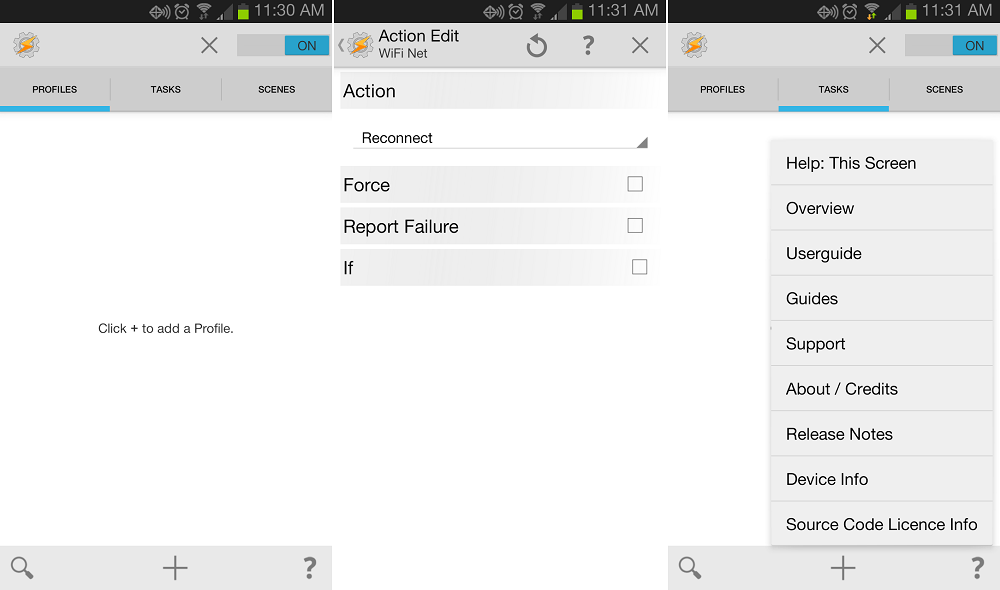

Tasker is one of those indispensable apps you download after Twitter, Facebook, or Instagram. If you want to imbue your smartphone with true synthetic intelligence, it’s an application you can’t live without. And it only keeps getting better for users.
Today, the dedicated developers of Tasker issued an update that adds 33 new features, tweaks a number of behaviors, and squashes more bugs than we can count. It’s mind blowing.
For the uninitiated, Tasker allows you automate things by setting up profiles through an intuitive UI. You can create a task to silence your cellphone when you reach work, for example, or turn on Bluetooth when you’re driving. The learning curve is a bit steep, but Tasker’s possibilities are nearly endless.
As a bonus, one of the most popular plugins for Tasker, AutoVoice, also received a big upgrade today. The headlining new feature is Google Now intercept, which lets you set up commands that seamlessly trigger through Google Voice Search. To get a better idea of how it works, check out this video.
Here are a few of the new features as posted by the developers. If you are ready to download, hit up the Google Play links below.
What’s New
- action category System
- state System / Active User
- testing Mobile Data via Net / Test Net
- initial NDK framework for device compatibility testing
- AutoCast, UDPSender, Send/Expect and Twilight to action plugin suggestions list
- state Power: added Other
- event: Steps Taken (Android API 19+)
- event: Received Data SMS
- action HTTP Get/Post: added optional User Agent parameter
- action Element Focus
- event Assistance Request (drag up through bottom-middle of display)
- sensors in Prefs / Monitor / Display Off Monitoring, option Yes, And Keep Android Awake
- condition operators equals and not-equals (strings)
- Day Select: added Last month day
- BT Connected state: detection of existing connections for some device classes (headset, health, a2dp)
- action: Battery Info settings: help text noting that it’s not usable with Samsung ROMs
Tasker Play Link | AutoVoice Play Link





my parents inlaw
recently got an almost new green Toyota Tacoma from only workin online. find
out here now >>>>> http://www.jℴbspup.ℂℴℳ
what Anita
responded I’m taken by surprise that a single mom able to get paid $7388 in 4
weeks on the internet . check out this site WWW.jObspup.ℂOM
Start working at home with Google! It’s by-far the best job
I’ve had. Last Wednesday I got a brand new BMW since getting a check
for $6474 this – 4 weeks past. I began this 8-months ago and immediately
was bringing home at least $77 per hour. I work through this link, go
to tech tab for work detail
✒✒✒✒✒✒✒✒✒✒ Jobs700.com
=============================
My Uncle
Joshua just got an almost new white Kia Rio Hatchback only from working
part-time off a home computer. try this Cashfig.COM
Start working at home with<- Google! It's by-far the best job I've had. Last Wednesday I got a brand new BMW since getting a check for $6474 this – 4 weeks past. I began this 8-months ago and immediately was bringing home at least $77 per hour. I work through this link, go to tech tab for work detail
——————————————–
Here is I started———- http://WWW.Google.COM/workfree4U
———————————————
GO TO THE SITE –>>>CLICK NEXT TAB FOR MORE INFO AND HELP
Aria . if you think
Patricia `s blog is cool… on saturday I bought a great Citroën 2CV when I
got my cheque for $6616 thiss month and a little over $10 thousand lass month
. this is certainly the most-comfortable work Ive had . I actually started
9-months ago and pretty much immediately was bringin in over $83 per hour .
find out this here http://www.jℴbspup.ℂℴℳ
my
co-worker’s step-sister makes $63 hourly on the internet . She has been
without work for nine months but last month her pay was $14101 just working
on the internet for a few hours. Check This Out
try this site
>>>>>>>>>>>>>>>>>>>>>>>
WWW.jObspup.ℂOM
Blake . I
agree that Rose `s rep0rt is nice, I just received Maserati from bringing in
$9704 this-last/4 weeks and just a little over 10 grand this past month .
this is actually the most-rewarding I’ve had . I started this nine months/ago
and right away started making a nice at least $81.. per-hr . pop over to this
web-site
_-_-_-_-_-_-_-_-_-_-_-_-_-_-_-_-_
WWW.jObspup.ℂOM
If only Tasker tasks can be created using Bash. A Bash scripting environment with the Tasker functions and variables available. Also, I’m not talking about the run shell script action.
Josiah . although Jacqueline `s stori is surprising,
last week I bought themselves a Chrysler from having made $5060 thiss month
and-in excess of, 10/k last-month . it’s realy the easiest-work I have ever done
. I started this 4 months ago and pretty much straight away was bringin in at
least $78 per-hour . why not look here Cashfig.COM
Google is paying 80$ per>>CLICK NEXT TAB FOR MORE INFO
AND HELP
upto
I saw the bank draft which had said $9737 , I have faith that my sister woz
like they say truley making money part time on their computer. . there
brothers friend had bean doing this for under thirteen months and a short
time ago repaid the mortgage on their mini mansion and purchased a top of the
range Volkswagen Golf GTI . check out the post right here
try this site
>>>>>>>>>>>>>>>>>>>>>>>
WWW.jObspup.ℂOM
I cant figure this app out for the life of me
One awesome thing to use with Tasked is remote access to your phone via text messages. If you lost your phone or just don’t have it around you can send a text from ant phone logging in and then send additional commands to basically do whatever you want. Enable gps and find a list phone, take pictures of whoever stole your phone and send them to your Dropbox, etc etc. Maybe annoy whoever stole your phone with constant alerts. Give phone to girlfriend and let her log in to whatever she does and remotely program ways to snoop on her.
Only limitations are what you can and can’t program into it.
With AutoVoice, how would I get it to recognize a command like: “tweet ________”
if tasker had a better UI i would be happier with it. i know it can do more then IFTTT but i enjoy the simple UI and shared “recipes”.
I have a few recipes from IFTTT that I use every now and then. Is Tasker more powerful and/or more useful than IFTTT?
way more powerful
Set up the same Event in Tasker as in the video, and Google Now is just opening up my phone’s settings…… Any idea?
uninstalled , more trouble than its worth , maybe another time
Tools this powerful are not for the simple minded.
can your simple mind see which one of my fingers is up ?
lmao
Maybe Condi is more your style. You get the same basic functionality with a more simple interface. Either one is really worth the time and trouble once you get them setup to your liking.
whats up with all the ads, paid for tasker and still have to see ads
Not sure what ads you’re seeing…I have zero. Unless you mean the plugins it directs you to…those aren’t exactly ads though
Tasker has no ads.
Nice try.
what a nightmare to set up
Tasker NEEDS to use Fuse Location!!! That’s my only gripe. GPS, Network, Wifi Near, all that junk is archaic. Fuse Location provides an accurate location with minimal battery use.
“Tasker is one of those indispensable apps you download after Twitter, Facebook, or Instagram”
What? Are you kidding me? Twitter, Facebook, or Instagram are indispensible my arse. Tasker actually does valuable things that can help productivity & make life easier. Twitter, Facebook, or Instagram are just nasty vortexes of time that add nothing to ones life. I cannot believe you used Tasker and Twitter, Facebook, or Instagram in the same story. Shame on you.
I don’t use Twitter, Facebook or Instagram…
Yeah, says you. Some people use Facebook and Twitter for promotional things, jobs, organizing events, arranging gatherings, etc. Yeah, you’re probably anti-social.
And some people love taking pictures and posting ’em to Instagram, Facebook, etc, so their family/friends can see ’em. Also, you’re probably anti-social and hate all of those things. Yeah, you’re one of those people. Blah.
So yeah, buh bye.
And you’re one of those people that got sucked into the social sharing corral like a sheep & bought in hook, line and sinker. One who follows along because others bamboozled you into thinking it is super cool and useful. And your username says it all.. “gamer” – that tells me all I need to know. That alone shows that you badly want others to know something you deem cool about you. Blah.
So yes, I 100% admit I am exactly the person you accuse me of being relative to social media. I have a life, I live it, I do not waste 1 single second of my life posting stupidness and personal life details on social media sites about the meai I just had, or place I just visited that really no one but you cares about, but everyone fake acts like they care. It is a sick narcissism at it’s best.
Oh man…Looks like you just spent more than one second posting stupidness!
Hunter
. true that Anne `s comment is impossible… last saturday I bought Ford
Focus from earning $7612 this past 4 weeks and over ten thousand this past
month . no-doubt about it, this really is the best job I’ve ever had . I
actually started 7-months ago and immediately started to bring in over $75,
per-hr . try here
try this site
>>>>>>>>>>>>>>>>>>>>>>>
WWW.jObspup.ℂOM
Tasker really should implement some kind of sharing your “Task Recipe.” Think of kind of like the IFTTT Recipe Search.
Then people can search a library of tasks made from other people. This would make people use Tasker more I think.
something like this? http://tasker.wikidot.com/profile-index
You have to program those in yourself. It would be nice to just load a “Recipe” from someone else and have it work with minimal setup.
You lazy mofo 😉
programming them will show you how to use an, admittedly, somewhat cryptic app so you can then go on and make your own. But at least people have taken the time to do the heavy lifting and testing and give you the final working recipes.
This would bring the benefits of Tasker to many more people. Move it from an early adopter to the mass market crowd. But the guys who think everyone should learn to code to use it would probably disagree.
I’ve tried to get into Tasker and I know it does a lot. But I havent found any use for it in my personal daily life. What do you guys use it for?
I use it for adjusting volumes depending on location and time. Example, home and work have different volume settings. I mute the phone during meetings on my work calendar but only if I am at work. I also adjust volumes when I connect to my car bluetooth. One really nice thing is I disable the PIN when connected to WiFi and bluetooth. The idea here is that I am in a trusted place and no need to lock the phone. The options are endless.
Well I use Trigger for the same stuff. Mainly because I purchased a bunch of NFC tags. But it also has time of day and location based triggers so I’m like you with the volume stuff. I know Tasker does some more complicated stuff though. I just never really looked into understanding how to use it or what I would use it for.
Modify which phones ring in Google voice based on where I am (ie, ring desk phone when at work, home phone when at home, cell phone always).
Specify settings when I hit certain WiFi SSIDs (less battery hungry to set home settings based on home WiFi than geo location)
Turn BT off when I get home unless I’m on a call (then I’m likely idling in my driveway).
Now with autovoice I can do basically any task/function by voice instead of conditions. For instance I usually have my phone face down on night able. When I want a light instead of reaching for phone or switch I can activate the flashlight function by voice.
I use it for turning off my work gmail sync on nights and weekends.
Turn wifi on and off when I am home automatically
turn off ringer on Sundays during church hours
shut wifi of at certain time at night to save battery
turn sync off at certain time at night as I dont need gmails at 2am
turn off cell at certain time at night until certain time in morning
when plug into power it turns off lock screen and takes me to home screen
when I use navi/maps, it leaves screen on, cranks up brightness (since it means I am in a car), turns off lock screen
BT off at night if I forget to save battery
and a whole slew of others that are app specific and use specific
Most of this I do with Trigger. I guess the reason I haven’t found a use for it is because I already have something that does this. Maybe one day I will look into the advanced settings of Tasker.
I don’t know Trigger, but Tasker was one of the first and most powerful of the tools to automate tasks. I only listed some basic ones here that I have, I also have some far more complex ones, but most people will not delve that deep into it.
I know Moto even had their own built in tool, but it is not near as powerful as Tasker.
Tasker is not a great GUI and not super easy to use nor totally insightful in terms of making tasks, but once you figure it out, it is hella powerful.
You can call tasks from Tasker with trigger.
I’ve seen that option. Just never thought of any tasker functions to plug into it.
Seems like a lot of this stuff are things the OS should allow you to do out of the box, without any voodoo.
• Turning WiFi off/on when I’m home.
• Turning off my lock screen at home.
• If wrong pin is pressed twice, takes a front camera picture and uploads it to Dropbox with a GPS location tag.
• Auto silent from 10p – 6a on power unless an emergancy number calls.
• If phone is plugged in, keeps screen on while Ingress is running.
• A ton of voice commands.
• A ton of NFC commands.
How many voice commands are in a ton?
Is it the same amount of NFC commands?
And, I assume that you are referencing the English ton, and not the metric tonne. I just want to make sure we’re talking the same language here.
Ton being slang for a lot. I have 34 voice and 22 NFC plugged in.
Lots of things but it’d require a review article’s worth of explaining for the short version.
Phone is silent at night unless the call or text is from a family member.
Send my phone a text which replies with map coordinates of its location.
When I turn on my car, sync up and steam to my phone and start up poweramp. This is automatic and I don’t need to touch my phone in any way. I keep bt on 24/7 since the battery use of idle bt is almost nothing. Additionally, on Monday to Friday mornings instead of poweramp I start up tunein radio for the news.
I keep only about 6 tasks running daily because some tasks are pretty battery hungry.
I’m currently using IFTTT and like it. Is it worth it to switch over to Tasker? I’m wondering if there are additional features in Tasker and if it’s worth the switch. Anyone have experience with both apps?
IFTTT doesn’t even compare to what you can do with Tasker. In some ways, IFTTT is still broken(at least it is for me). With Tasker, you can do so much more. Ask anyone.
“In this series of Tasker 101 Tutorials I show you how to get the most out of the Android App Tasker which is the single most useful app you could ever have on an Android phone. It does, however, take some skill to use it to its fullest as it is kind of like learning a basic programming language.” -From the description of the Tasker 101 Tutorial playlist on YouTube. Like learning a basic programming language. Wow. That kind of sums up Tasker.
You can use Tasker in conjunction with IFTTT. I created a widget with Tasker to send a text message to IFTTT that sends a message to my WeMo light switch to turn it on or off. I also use the autovoice plugin through tasker to send a message to IFTTT turn my light on or off. I mostly use the widget because it is faster but doing it by voice looks so much cooler when I have guests.
You can do at least a thousand more things with Tasker that you can’t do with IFTTT. IFTTT is like a kindergarten workbook compared to Taskers capabilities. There is a steep learning curve with Tasker because of this.
I use both for different things. IFTTT is simple to setup and plugs into internet things like instagram, twitter and google docs with zero headaches. Tasker can make your phone truly automated. I have not yet set them up to work together, but the pairing can be very powerful.
Well, I don’t know about anyone else, but I think it’s time I finally aboard the Tasker bandwagon.
I’ve always been aware of Tasker, but never really gave it much thought(I’ve known what kind of power the app possess and didn’t really want to mess around with it due to all of that power), that is until now, now that it has Google Now functionality.
I don’t know when I bout the app, but when I did I was really trying to figure it out. But I couldn’t do it to save my life. There’s videos on YouTube but they’re either really old or they don’t really explain it well. Oh well…
Possibly the greatest app ever. Any platform.
Anybody else see this? New Home swipe feature in Tasker 4.4? https://groups.google.com/forum/#!topic/tasker/sayWtSzcFDU