


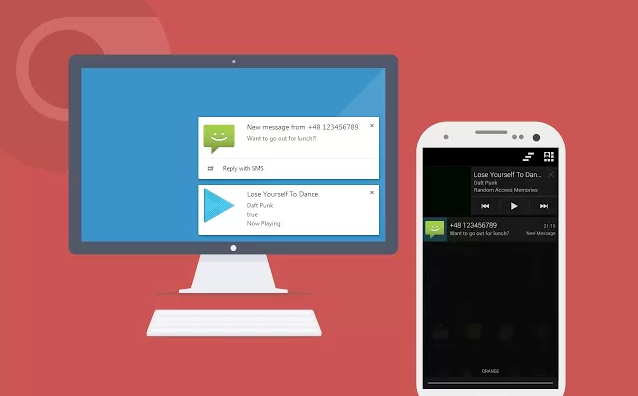
Introduced recently for Google’s Chrome desktop browser, rich notifications are cards that appear on your desktop, informing you of notifications on your account, such as new emails and Google+ activity. They are great, but with a new app called Krome, you can now also receive your Android device’s notifications right on your desktop. Once configuration is complete, you can even begin replying to text messages you receive right from your browser.
To use Krome, your computer will need to be running Chrome v27 or higher, with rich notifications enabled. For now, they are only supported on Windows computers and according to Google, Mac OS will be supported sometime soon. So until then, sorry Apple users.
The app costs just $0.99 through Google Play, so go give it a whirl if you’re interested.
Play Link ($0.99) | Chrome Extension

This was pulled from the market
I’ve been using Android Desktop Notifications for Chrome for the last few months, this looks like a much more complete version of this. Love it.
I dunno if its just because I’m on the beta channel but I have chrome notifications on my mac already.
Does it clear the notifications from your phone?
and how about chrome os users 🙁
All i get on PC is: a “Missing Android Device” Screen; does not take key.
Same here. Past my refund window too. Ugh…
I got that too and realized in the passcode the Zero’s were o’s and it then linked.
Did you get it to work yet? I’ve had the same problem since yesterday. Dev said his server was down.
Gmail notifications don’t seem to be working for me. Might have to do with the many “installed apps” that I chose to disable in the Krome settings. Anyone know if there is any app besides Gmail that nees to be enabled for my email notifications to work?
Hello. Im developer of this app. It may not work right now, because website like this kills my server :/ Sorry for issues.
I’d say that’s a good sign!
…or just use Google Voice and Hangouts
just sayin
Sweet! Works like a charm om Nexus 4! http://i42.tinypic.com/m7yqh1.jpg
My last pay check was $9500 working 12 hours a week online. My sisters friend has been averaging 15k for months now and she works about 20 hours a week. I can’t believe how easy it was once I tried it out. This is what I do, http://www.Pro67.com
Not working here.
Works perfect with my Nexus 4 😀
Does this work without turning on the very buggy accessibility options on the Galaxy S4?
“To use Krome, your computer will need to be running Chrome v27 or higher, with rich notifications enabled. For now, they are only supported on Windows computers and according to Google, Mac OS will be supported sometime soon. So until then, sorry Apple users.” —- Sad to read that news. Would be nice to have Linux support…I would think they would embrace Linux more with developing Android and all.
user base… linux support will probably come at the same or similar time as OSX
I see what you are saying and I do understand that. However I have been using Linux since around 1996 and I have heard that excuse over and over again. The user base will never grow unless developers focus on it and make products that perform as well as or better than Windows and release it at the same time.
Google, working with Android which is running the Linux kernel, should work on releasing the new Windows, OSX, and Linux version of Chrome or not release one at all until they can do so across all 3 of the platforms.
Works in Chromium 28.0.1 (latest stable?) for me.
I use mighty text. Works mighty fine. It’s mighty easy to set up. It’s mighty simple to use. Makes me feel mighty right.
I’ve been using Mighty Text since reading about it here, and really like it. I’ll have to read up on the differences.
Didn’t work for me… I’m blaming the proxy my desktop is behind. Had to get a refund, neat idea – hoping I can find something similar that will work for me.
This is free and looks the same? https://play.google.com/store/apps/details?id=org.hcilab.projects.notification Thoughts?
I use this and it works very well. It lets me know what song is playing as well.
I’ve been using this for about a week now and it’s great!
I use it and it works good
Thanks, you’ve just saved one my buck.
Thank you I saved money with your tip 😀
Can’t reply to text messages with the one you are suggesting unless I am missing something.
Hmm… doesn’t seem to work on my Firefox browser. No notifications come through.
Better, since it seems to have been removed from Google Play Apps!
I bought it…It is worth it for someone like me who is never on Wifi since I have unlimited data, I would rather have my LTE speeds than my bogged down wifi network at work…So this is much better than AirDroid for me. So far, so good!
You can also get text messages on your desktop with Google Voice
We need this, but from google. I wouldnt mind keeping chrome open for it to happen. I hope we see overlapping with chrome and android next week
You can do this in browser with AirDroid.
Only if you’re on the same network, I believe this would work regardless of network
Correct, this is the reason I bought it.
Nice!
IIRC, AirDroid now works over cell connections now.
You can already send/receive texts from your desktop with MightyText for free. There’s even a Chrome extension.
One problem with MightyText is that it doesn’t mark SMS/MMS on my phone as read. Not really a big deal, but quite annoying. Worth a $1 if Krome can handle that…
@ianwoloschin:disqus – it works for me — all my sms/mms on my phone are marked as read — as long as you go into the text.
I’ve never had it work right, as long as I’ve used MightyText. This is on a VZW GNex, running various ROMs and Android versions.
@ianwoloschin:disqus – I’m running rooted Verizon S4 – not sure if that means anything……but the thing is pretty solid. My only complaint is that many times I leave my computer running through the weekends and when I get back I literally have to close out of a hundred notifications (or more) on my computer screen.
Yeah, that happens too and it’s pretty annoying. I typically just close and reopen Chrome since it’s the fastest way to get rid of them.
It’s probably just time to cancel my SMS/MMS service and just make everyone email me. Everyone has smartphones now, so I don’t really understand why SMS/MMS is ever used anymore…
Will Chrome OS be supported?
The notifications work on my Samsung ChromeBook, but replying to text messages doesn’t seem to do anything.
Related question: How do you see what permissions an app requires on the new Google Play web store?
Edit: I guess you just pretend you are buying/installing the app and the permissions list shows up on the confirmation page.
Click purchase or install. Before anything is completed, the permissions will be listed.
taking Mighty Text one step further.
yeah Im betting this will have a takedown notice in a few days with that name
i wonder if they’ll recive a notice about that
It seems it is already down.
Just noticed that, that didn’t take long.
Update, it’s back.
set messages as readed
Lol
Seriously. First, and hopefully only, chink in the armor.
Got it to work? Does it have to be on the same network?