


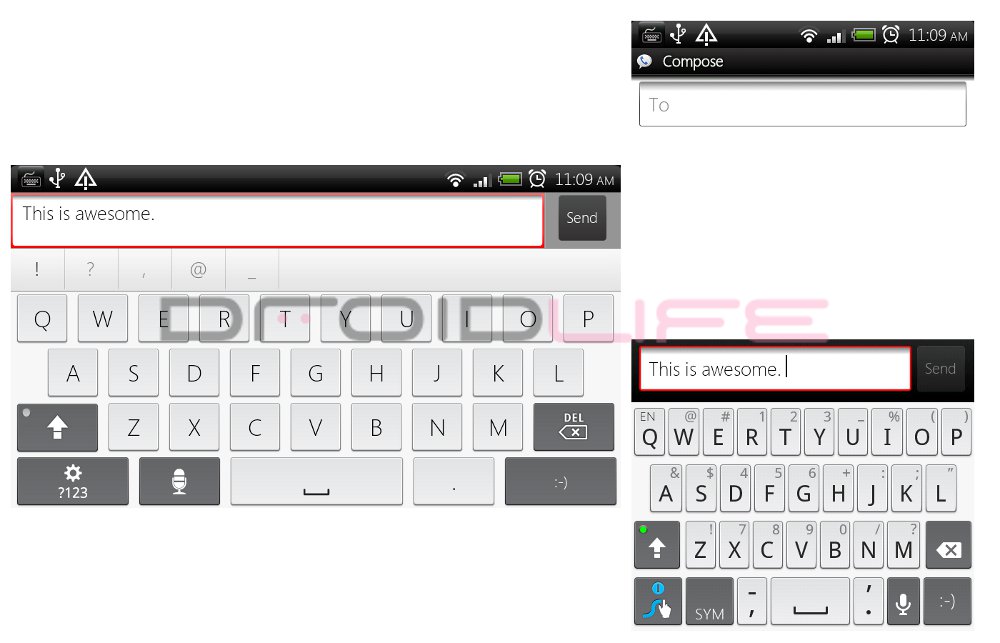
When using any of my phones, I tend to use Swype in portrait for quick replies, but if I’m working through a long email then there are times when I choose to go landscape and pop up the multi-touch keyboard on my Droid X as it gives me better accuracy. The only problem is, when doing this, you have to long press and manually change the keyboard each time which is somewhat of an inconvenience. Well, until now anyway. Thanks to XDA member ne0fhyk, rooted users can now used an app called Keyboard Manager which will allow you to choose your preferred keyboards depending on phone orientation. Can you say, “Genius”?
Download: KeyboardManager.apk
Instructions:
*ROOTED USERS ONLY.
1. Download KeyboardManager.apk to your SD Card.
2. Using Root Explorer, copy the file into /system/app.
*You will need to Mount R/W in order to place it here.
3. After pasting in /system/app, long press on KeyboardManager.apk and choose “Permissions.”
Set to:
-User: ‘Read/Write’ checked
-Group: ‘Read’ checked
-Others: ‘Read’ checked
4. Mount R/O again and exit Root Explorer.
5. Reboot your phone.
6. When it boots back up, you should now see Keyboard Manager in your app drawer.
7. Open it and set up your keyboard preferences!
Full support thread can be found at XDA Forums.
Cheers imronburgundy!




So awesome, works great! Only thing is sometimes when I switch from Swype to M.T. it makes me force close Swype. Definitely worth it!
I can't just install the APK? Ehh… maybe I can use Terminal Emulator. Now, if only I could remember my shell commands…
Works great so far…thanks!
DX
Does anyone know if this app lets you set the onscreen keyboard to be OFF when in landscape mode? I never want Swype nor the tap keyboard to show up in landscape since I have a Droid 2 and if I'm in landscape I have a real keyboard.
I couldn't get this to work on my Droid. I wanted Swiftkey in landscape and Shapewriter in portrait. It tried every iteration to install and configure with no luck and YES I am rooted.
I cant get it work either, it doesnt even ask for root access…..sad
Anyone know if the Droid x or Droid 2 multitouch keyboard has been ported to OGs running Froyo or rooted froyo?
you have to be rooted: http://forum.xda-developers.com/showthread.php?t=753156&page=27 it's my favorite keyboard on my droid incredible
Exactly what I've wanted!
Been wanting this for a long time. Thankyouthankyouthankyou.
Cool but if I want to just type with out swyping I dont have to do anything, swype alows for both, so why would you need to have an app to switch??
because the MT keyboard is much smoother and faster
Really??? “Long pressing” to switch input methods is too time consuming or difficult? I am not “tech savvy” enough to root, nor do I want to void my warranty. BUT I can “press and hold”!
(See? No name calling…..)
rooting couldn't be easier.. and SO worth it.. and yes, pressing and holding can be annoying for those of us who like to use multiple keyboards
really, the warranty issue isn't an issue at all. it's very easy to unroot and they can't tell when you send it back. and if it gets completely bricked and you can't restore it then they won't be able to see if it's rooted. and also i've heard from a few people who break their phones quite often modding that vzw doesn't even check.
Interesting concept, but it doesnt work the way I would like it to.
I should really read the instructions before I start getting frustrated that it's not working…. Live and learn then forget I guess…
kind of buggy on liquid 1.9, doesnt always switcj keyboards.
anyone else having problems with the keyboards not loading? i keep having to hit back and what not
Yet another reason to be rooted! Yay!
MT keyboard ported to DInc for landscape…
red-themed Swype for portrait…
Keyboard Manager FTMFW
😀
yeah why people think there badd ass on the internet is beyond me. I am rooted but I understand why people wouldn't want to root so for you to be a dick for no reason is uncalled for.
dude. what r u talkin about?
this works swell!
This was the most awesome thing I found for Android today. Definitely had to share with droid-life and all the droid'ers out there.
I'm rooted, but not going to do this, because I don't give a hoot about root manageer, especially not at 4 bucks or whatever it is. Make this app self sufficient and I'm totally in though!!!
You don't need root manager. Just learn some unix.
Download the file, put it into the root of your sdcard using Astro or anything
Go into terminal emulator. Type:
su
cd /
mv KeyboardManager.apk /system/app
cd /system/app
chmod KeyboardManager.apk 644
exit
exit
You're done. The chmod command changes the permissions.
Two things wrong with this. First you need to mount system r/w. You can use a free app from the market (mount system r/w).
Second, the chomd command is chmod 644 KeyboardManager.apk
4 bucks omg cheap
I'm getting a weird error message. It says “Exception caught:Java.lang. securityexception: using null token requires permission android.permission. write_secure_setting” Does this have to do with Super User permissions? I am rooted btw.
It's cuz you didn't do any of the root explorer stuff. I had the same error.
Yeah sorry, my bad… should of read the whole posting, noob mistake…
Sweet, multitouch and swype switching is pretty flawless for my few tests. Tested in sms, talk, and kik
Love it. Now if only it could start at boot.
I just installed it and its a little buggy and slow but its definitely a step in the right direction!
THIS IS GIZZ IN MY PANTS AMAZING.
Seriously though, I freakin was talking to my friend about making this, but we stopped when researching it because Android doesn't let you access this…… but a rooted app! Now that's something else!
If you're not rooted, just root. lol
Is there a way to do this without root explorer? I don't feel like paying $4 for that app just to use it once.
Root Explorer is extremely useful, if you buy it I'm sure you will use it more than once. If you don't have a file manager with root access I'm sure you could download it on your pc and use ADB's push command to put it in /system/app.
You could do that but I'm not sure how you could change permissions from adb
This is epic. Love it.
Great idea, but it didn't quite work for me. I put Swype as my portrait keyboard, and Swiftkey as my landscape keyboard. It switched from portrait to landscape ok, but when I switched back to portrait, I got a FC on Swiftkey. I tried it a few times, with the same result.
I've had a similar experience, except that it doesnt FC it just lags like crazy or displays the same keyboard. I have to hit the back softkey to get it to go back to the selected one.
No reason to be a dick. Kinda blows your mind right?
There's a “reply” button for a reason. Kinda blows your mind right?
amazing! cause i hate swipe in landscape but love it in portrait. this solves it for me, hope it works as advertized
Wow, this is awesome, I was just thinking about how convenient this would be yesterday. Also has anyone figured out how to get swype on the Incredible? I still can't get it…
Awesome! I was looking for something like this because I love to use swype in portrait mode but cant get used to it in landscape and would rather use the default keyboard.
I wish this was also for non rooted users, I've been wanting somethign exactly like this for a long time!
Now to get swype installed on my Droid incredible
awesome idea!
YOURE DOING FIRST WRONG!!!
sorry i dont “brag” bout being “first”
That's what I said to your women last weekend…. strange.
If I am recalling tbaybe’s gender correctly… You have just implied that she is a lesbian (as well as a player with “women”). Good job!
Oh she is a player we all know that already.
that you brag to much about being first? Youre doing that wrong too buddy
how do you comment on errthang, tbaybe? and often first. GET BACK TO WORK (see what i did with the caps lock?)
Ohs get back to sitting around ur house all day doing nothing but messing things up.
someone make this for non rooted peeps.
Android doesn’t allow any program to choose your input method for security reasons. The only way to get around that is to have root access.
It only takes a few minutes to root anyway.
thank you for explaining why and not being a jerk about it.
Or here's a wild idea… get rooted? Kinda just blows your mind right?
No reason to be a dick. Kinda blows your mind huh?
Well these people are busting their balls to make a working product for those of us that want to do it, why should they have to find more workarounds for non-rooted users because people are too lazy to root? I'd rather they be working on other cool stuff for us
That is really dumb logic and you dont need to be an ass about it. All he asked if they could make it for non rooted users and if the dev wanted to throw it up on the market for a 1 dollar so all there hard work wont be a waste. Some people dont want to root because there not tech savy and dont want to waste their warranty. So be a dick on the interenet you are so badass man loser
You should really try to get the correct usage of their/there/they’re. It will greatly enhance your credibility.
I agree and understand why someone would not want to root. from an application developer, especially from xda, they usually make an app that works for them, and share it for everyone else. not many people have the time to sit back and make a working app for standard phones, especially if they are using root only commands.