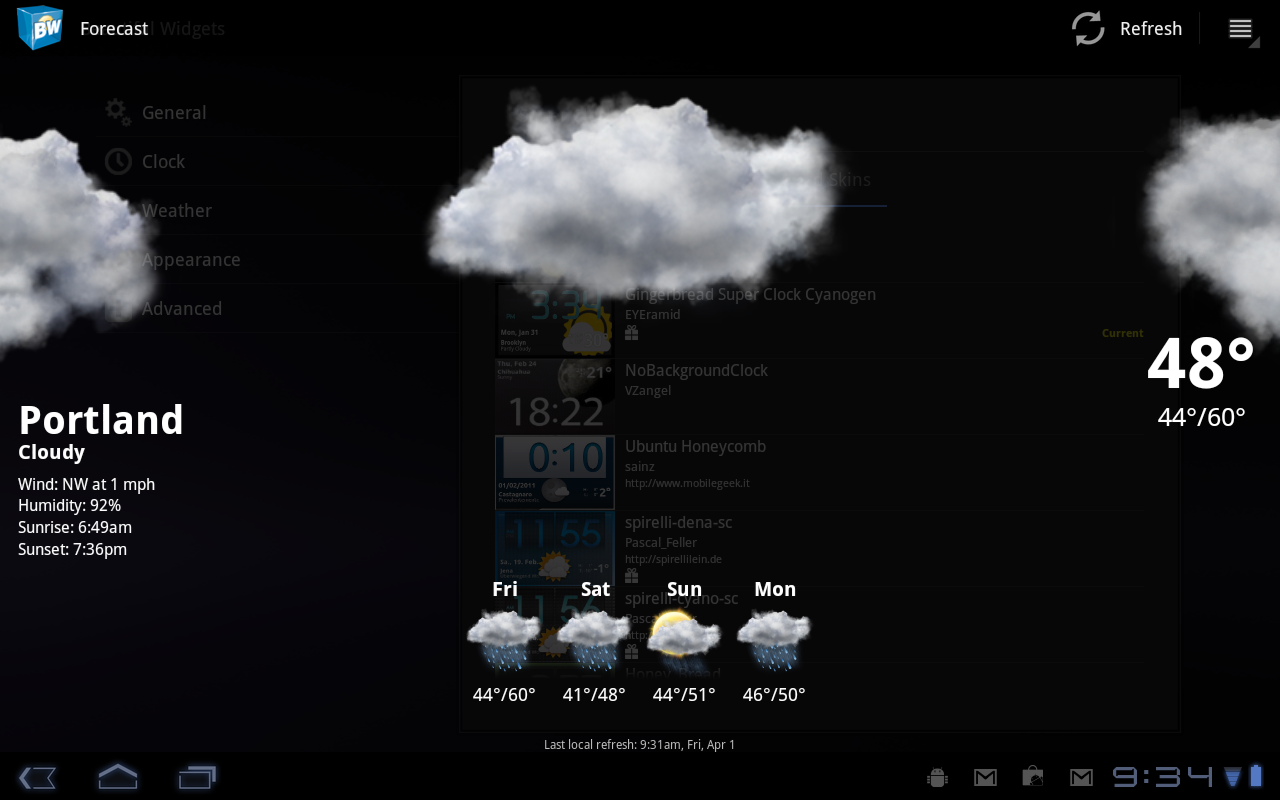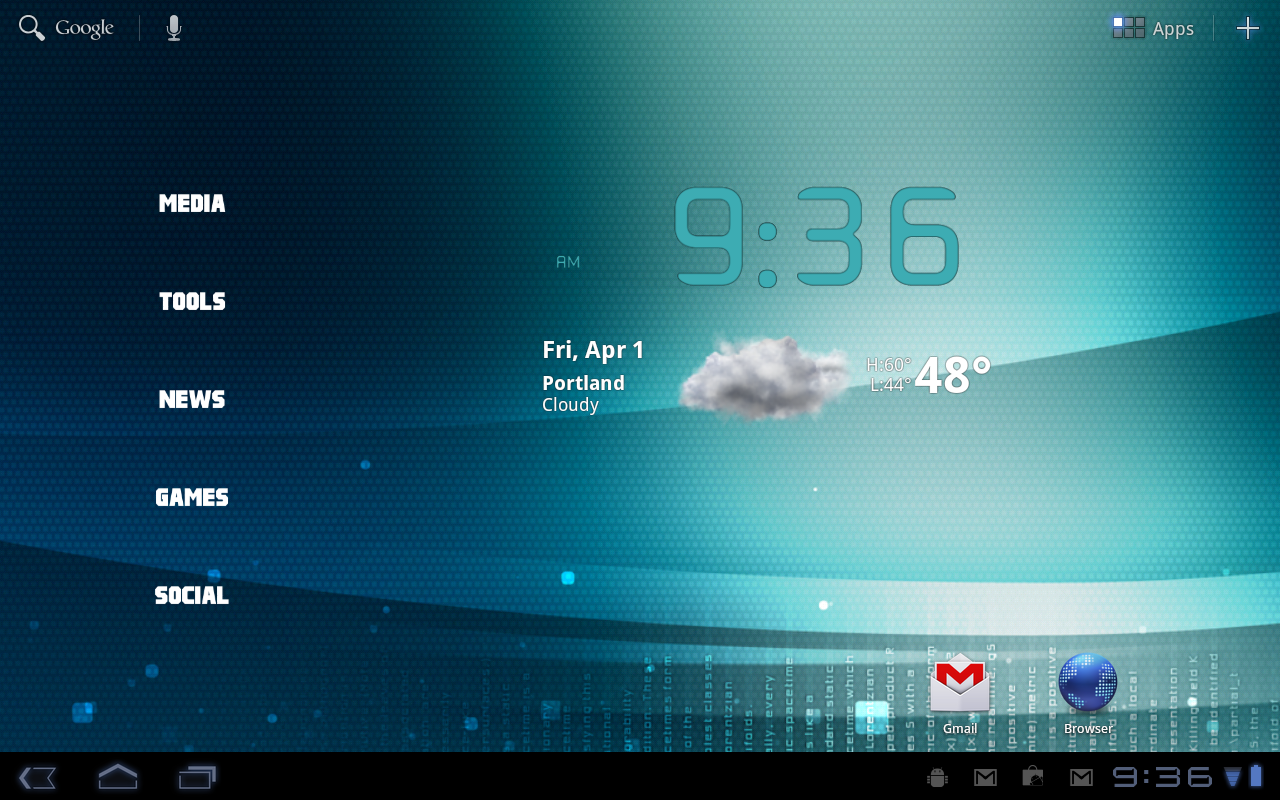
A beta version of Beautiful Widgets has just been released and is the first version to include a tablet-specific clock size of 4×3. You can see from my screen above that it actually doesn’t look all that bad, especially once you start skinning it just as you would with any other version. You won’t find it on the market yet, but there is an .apk below to get you going. Install as you would any other .apk file.
Download: bwbeta.apk
Via: Twitter
Cheers @el_bori1!

thank you for your great Article. your website is very interEsting. please Com to see my weBsite and comment my website please. my web is also about ‘i’ game. iphone game, ipad game, ipod touch game. if i have any interesting thing to post, i will tell you first
It comes incorporated with thermo-electric batteries that convert heat into electricity which further will pump your devices with energy through electromagnetic induction. Just wedge it near the entrance, and as soon as you open the door it will great you and your devices. Now no need to hunt for ugly black colored entangled wires, TESLA is here to iron out all your charging woes.
Its not working? some one help please. i cant install the file that i download onto my xoom
i like the transparent skin on the post image..what is the name of it.
Seems to work fine on my XOOM, however if i select the “Forecast Opening Effect” under Advanced, it will force close when trying to open the forecast screen.
will this work on phones?
I can’t get back ground to go transparent anymore any ideas
I cant get it to work either
This is awesome and runs flawlessly on my XOOM. Love the notification of weather and animation. Also the refresh on wakeup is super cool. Does this beta expire or something? It seems fully functioning.
Aw….man u are in the wrong place this is DROID life kid
Quick tutorial for homescreens posted: http://www.droid-life.com/2011/04/01/how-to-organize-your-motorola-xoom-home-screens-using-circlelauncher/
Works great on the NC CM7 RC4
Is the APK a timed trial or something. I own BW on my OG Droid when the update comes out can I install it on my Xoom and it just gets the Tablet features or is there going to be a Tablet Version?
You know, changing your widget to have a 4×3 clock really isn’t enough of an upgrade to call this “tablet support”
You can check in the configuration settings for superclocks there is fragments.
Ahh I see some of you are liking my organized icons on the left. Let me whip up a quick post for it.
DVR?
what is that icon next to the gamil that looks like a android but a bug
Oh, that’s just a part of the wallpaper.
its the debug icon
ok where do i find it and do i have to be rooted?
Plug into your computer with the USB cable with USB debugging enabled.
No root needed
No root needed
that’s sick, broh!
I want those launchers on the left!
I just sold my XOOM and bought an iPad 2. How do I install this on my sweet new iPad 2?
I find your joke to be quite distasteful. There are actually people out there who have iPad 2s who are suffering. I can’t believe that you would stoop so low as to actually laugh at those poor people. Grow a heart.
😉
like making fun of handicap people
Ha ha april fools! ; )
You don’t its not for iPad… You just downgraded
Beat me to the post Frenchy
How did you get those launcher icons along the left side?
Do tell…do tell, Kellex
If u have launcher pro plus…..you can choose how many rows and columns you want your tablet to have so if u want to put something on the side of your flip clock make the home screens have 5 columns then your 4×3 clock will have space on the side to add icons or whatever u want there and u can also take the standard standard 4×2 bwidgets clock or for a tablet use the super clock and stretch it to 4×3 this also works great with the regular clock on any 3.7″ or bigger display phone if u enable 5 row home and auto fit Widgets to stop overlapping in landscape. Launcher pro plus and bwidets is a must on any android phone or tablet!
Are you apple ppl having fun with your icons? Maybe some day your devices will support these things called Widgets. Hah i can make my android phone emulate ios home screen in one click, its called opening my app drawer lol Gawd how boring it must be to not be able to change anything and not have a desktop…even the most ghetto of prepaid phones have a desktop style home. Why don’t liephones/lietabs
..awesome! And what are the folder categories on the left? What application is that my xoom needs it! Thanks in advance!
Oh that is beautiful. Does anyone else wish they had a tablet?
It’s damned pretty, I just can’t justify purchasing a tablet.
Nope. Cause I got my Xoom yesterday 🙂
My WooTab (Viewsonic GTablet) showed up today, so I am good on the hardware, I just want the Honeycomb source released so they can get a build made for it.