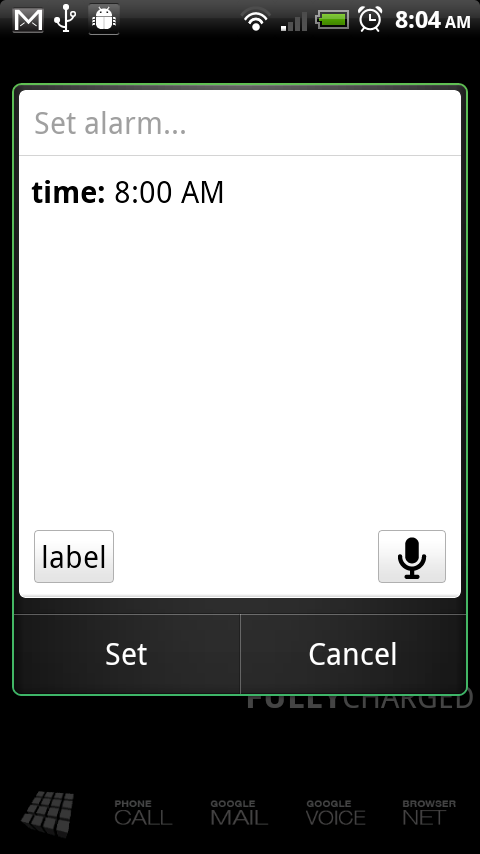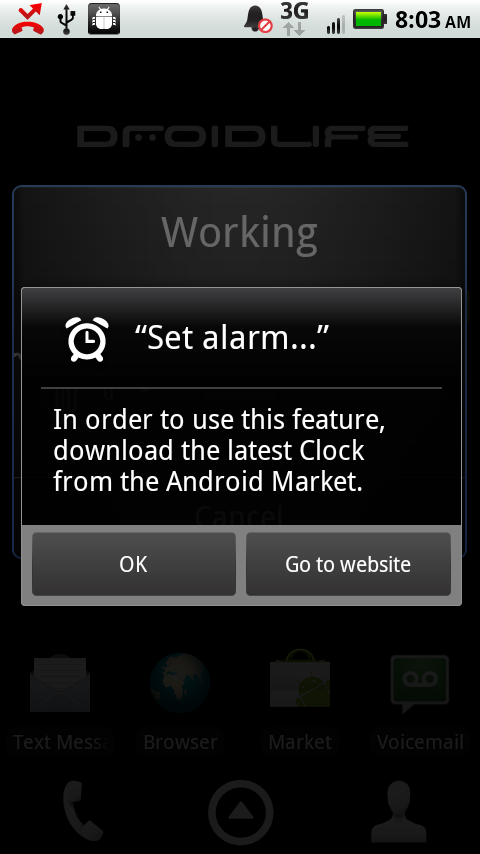
When Google announced “Voice Actions” for Froyo, there was one in particular which they advertised but appeared not to work correctly for, well, everyone. Luckily for us all, the G2 leaked system build keeps pumping out awesome updates to our favorite apps including a “set alarm…” voice action that had previously not been available. As you can see from the screenies above, the one on the left is the old version, with the right screenie showing it working flawlessly.
Download: DeskClockGoogle.apk
Install as you would any other application, just make sure you have Android 2.2.
Source: XDA Forums
Cheers garbaged!
Didn’t work for me on desire. Replaced my 7 screen desktop with one, showing the clock and weather, and still asks me to get a proper app from the market when I use the voice action “set alarm”…
HTC desire, froyo 2.2
HOW CAN I GET THE MUSIC AND GALLERY BUTTON TO WORK ON MY DROID INCREDIBLE?
anyone else have trouble disabling or silencing the alarm once it goes off?
The slide show and music functions don't work (Stock Incredible w/2.2).
anyone else having issues with the alarm clock disappearing from the status bar with this new clock? i dont know if the alarm works still or not, will know in the morning if i'm late for work
a QR code for it:
http://qqrr.it/http://www.megaupload.com/?d=91H3HZFL
thanks for posting this. to bad I fell in love with Alarm Clock PlusV2 and sadly, when you use this voice action it places the alarm into the stock Clock app only
Anyone have the issue of the “search” softkey no longer working since installation. I'm on D1 with Lithium Mod running…help!
What about the “listen to” feature not working with the music app? Is there a new music app also included in the G2 leaked system?
Sweet. Thanks again Droid life for keeping my phone super kewl.
Installed without asking to update on
my Droid. Works great. Been waiting for this.
Does anyone have a walkthrough on how to install this update for the clock on my Droid 1?
Still can't get this installed on BB 0.4.. “Application not installed” error.. Opened Root Explorer, deleted the APK in the system folder and now rebooting. Going to see if it installs now. 🙁
how do you get this to work, it just installs as a regular alarm on my phone. i dont see any voice actions
“Navigate to…” and “Go to (website)…” work great for me, but my DInc won't recognize any of my contact names for calls or texts.
The other day I said “Call Dad at home” and one of options was a google search for “call Yankee stadium”
i downloaded and did a test. works great! except now since it was only a test i looked to shut it off but i can't find the alarm anywhere. it's not in my alarm and timers, and i can't clear it from the notification bar. anyone know how to cancel the alarm went to set it with voice?
what phone do you have? if its not stock you'd have to open the application named clock
i found it! Thank you very much. I'm on a droid x. i was looking in the wrong place. i see that i can change the alarm tone after i set it, but is there a way to be defaulted to the tone i want to play when I use it?
I don't have a droid x, but i believe it should use the default notification tone set in menu, settings, sounds. i'm not sure if the BLUR-ish ness of the phone changed that. if so i'm sure a fellow Droid X-er can advise
thank you again for your help. i'm at work so i don't have a lot of time to play with it right now. but i will see what i can figure out. i'm not very keen on the alarm clock that shows up with the voice action alarm. the alarm clock on the droid x allows for a tap to snooze and a slider to dismiss. I really like that one.
Kellex,
I would like to know if the Droid X is your personal phone now. I noticed that you are using your in most of your videos. I just ordered one because I think it is time typo move on day from the original Droid.
Tim-o-tato what is your personal phone
Kellex is your droid x your personal phone if not what is?
Even if Kellex has a Droid1, Droid2, and Droid x, wouldn't they all be his personal phones? just sayin…
This is cool, but I really want a “Voice Action” for snoozing my alarm!
I would kill for that….”STFU!!!” then i hear “snooze activated” lol +1
Thanks Kellex and those involved in this….this is so cool.
Parse Error….”there ia a problem parsing the package”/
im running stock 2.1 on my DX???
downloads but then get error when i try to install.
Have to have Android 2.2.
ok, the directions seemed a bit fuzzy to me. im dissapointed bc i have issue with the stock dockscreen on my DX. weather widget and whatnot is junk.
UPDATE: It should install on the DROID 1 just like any other .apk. It will just ask you to “upgrade” during installation.
Have fun!
What about on droid 2
What clock version should this be? It seems to be installing version 2.0.1 on my D1 with SS 4.7 ROM. Confusing as I already have 2.2 installed. It didn't ask me to upgrade, it just installed it along side the other clock app, and it force closed every time I tried to set an alarm.
I had to uninstall my 2.2 alarm clock manually
I didn't have to install it since all I did was used Root Explorer to rename the /system/apps/DeskClockGoogle.apk to /system/apps/DeskClockGoogle.apk.old and then copied this file there and reboot. Like you, the original version is 2.2 and the new one is 2.0.1 which by version numbers would actually be a downgrade unless it was really 2.2.1 and they somehow mistyped the number in the code before it was packaged.
For the Droid i just hit install on the apk, it overrides the existing one and just works!
Oh really? OK, nice!
Hey Kellex is your DX rooted and on 2.2?
Yep
Thanx. Can I download the icon pack and dock from my phone or do I need to
use my computer? Like your DX setup.
You can do it from your phone. You'll need Astro though since its in a zip file.
Thanx, for the fast replies. How do I get the stock icons back once I
change them?
Never compliment his quick replies… Lesson learned.
Point taken.
Nice find, will await instructions for rooted D1!
First! Yeah my first first
lame.
FAIL. Joe beat you by a minute! BWHAHAA
Win!
Nice!
Sorry joe!
HAHAHAHAHAHAHA, you don't see it lol!