More Reading

Post navigation

122 Comments

  • Is there are any launchers that is going to support immersive mode?
    I am desperately waiting for it!!

  • I must say, I like immersive mode, but not on every app. For movies, photos and TV, sure, it makes sense and enhances the experience, but it annoys me that I can’t see notifications while playing CandyCrush or other games without swiping down. I don’t really see any benefit to it for those kind of apps and wish I could turn it off.

  • Hey, that’s my post on reddit! Thanks for bringing attention to this…can’t wait for more devs to take advantage of immersive mode.

  • I’m pretty interested in the apps that have the transparent nav and status bars like GEL. I’ve seen it in only one or two apps, the one I remember being QuickPic.

  • Super Hexagon does not do full immersive mode. The navigation buttons still show up while playing the game.

  • Today is when I discovered this odd pull down looking at photos on the N5. I had no idea there was a new mode. Hopefully it will not become practically unusable like win 8.1 without a touchscreen.

  • I was about to recommend comickrack but you guys already listed it. Good, that app is AWESOME.

  • Doesn’t tapping on the screen instead of swiping down from the top do the same thing? Moto X owner

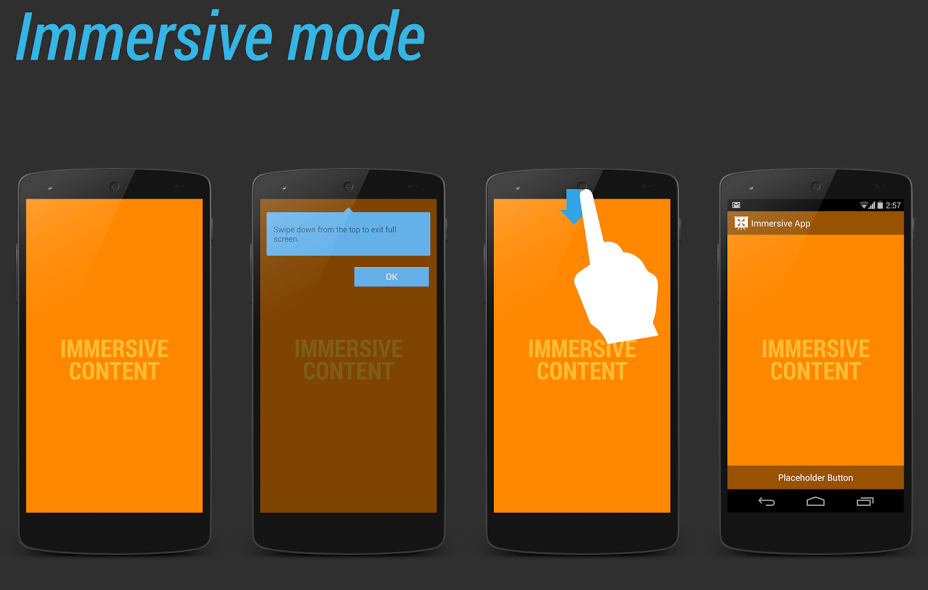
    • No. Immersive mode doesn’t capture inputs like that. If it did you wouldn’t be able to use it with games and such. You might be thinking of the older “lights out” mode that was used to dim the navigation buttons prior to 4.4.

      • On my Nexus 5, when I’m using an app with immersive mode, both tapping the screen and swiping from the top brings back the controls.

  • Or, you can just download the app ‘immersive full screen’ which enables immersive mode on all apps. of course you also have to be running 4.4

  • love this feature in Netflix, esp since it pauses the video to get a quick peak at the notifications

        • Its not wasting screen space, it’s adding screen space where the hardware buttons would have been, which is awesome to have for features like this one.

          • You are incorrect. The S4 and Note 3 have hardware buttons in a space smaller than the bezel of the Nexus devices.

          • It is not adding space. It turns the 5″ display of the Nexus 5 into a 4.75″ display. The only place it adds space, is to the bezel!

          • Most people like their screen for browsing, not just videos. You have no more need for a 5″ display in a video, than any other app. That is silly.

        • I prefer overlay buttons over hardware buttons that will not disappear if I go in landscape. I am on a Nexus 5 and this is my first device without capacitive hardware keys. Less bezel too. Bigger screen, and no increase in phone size. List goes on.

          • i thought we were talking about bezel? when did i mention how much screen real estate is lost? on screen keys (i used the moto x as an example) have the capability of seriously reducing size, and it’ll only be a matter of time before this efficiency is common, so i’m going to leave. since you have no answer to this, instead focusing on another aspect because you realize i win, bye.

          • How old are you, 12? If you read the posts, you would see that both points were being debated. My very first comment stated that on screen buttons waste screen space. Read, comprehend, get your panties out of a wad, then come back. : )

          • so they were. did i address both points? if you read the comment i replied to, you would have realized i do not intend to have a say on the loss of screen real estate because i agree.
            seeing as how you only address the framework of the debate and not the actual argument… you continue to concede my point. at least i gracefully admit you are right about losing screen space.

            EDIT: no need to throw around insults either… did I ever insult you?

          • I agree that it is possible to have smaller bezels, but that rarely happens. My point is that even with smaller bezels, even the Moto X suffers from a loss in screen space. To compensate for the loss of screen space, they would have to make a bigger device. Samsung with its hardware buttons suffers from none of that.

          • So, in immersive mode (the topic we were discussing), the display is cut to 4.45″? No, you can use the full 4.7″ of the display. Without hardware buttons/capacitive keys, you don’t have a massive bezel on the bottom, or at least, not on the Moto X. IMO, on-screen keys looks much better, but different strokes for different folks of course.

          • Exactly. Different strokes for different folks. I would never push for no devices with on screen buttons. That is why I get bothered by people dogging other options. I like the Samsung way of doing buttons. Options are a good thing.

        • On screen buttons can be contextual. The ability to change what the button looks like can be useful. For example, when the keyboard is present, the back button becomes a down arrow indicating hat hitting it will close the keyboard.

          Considering on screen nav buttons allow the bottom bezel to be smaller and thus the screen extends to where the capacitive or physical buttons would have been, it’s no different. There are only upsides, ex. The buttons disappearing while watching a video allowing very nearly the entire front of the device to be a screen to show the video.

          • There’s a major flaw in your argument. Samsung has hardware buttons….and small bezels. Maybe you should tell Google your idea of extending the display further down. The buttons don’t need to be contextual. The back button does the same as that arrow down button on the keyboard.

        • I have no screen space wasted since I use an app that can hide the nav bar any time I want to. Unlike those phones with hardware buttons you can’t remove them.

          • There’s no reason to remove the buttons on a Samsung phone. The bezels are as small as they can be. You have the convenience of the buttons always being there and not having to hide/show them all of the time.

          • The bezels on the side are small, but that chin could be small if it wasn’t for those hardware buttons.

          • Have you seen Samsung’s phones? The top and bottom bezels are tiny. They could not make the chin smaller, even without buttons. Look at the pic below comparing the GS4 to the Nexus 5.

          • I have. I’m looking at my brother’s Galaxy S4 and Note III right now. Those bottoms bezels could be small if it wasn’t for those hardware buttons.

          • They’re already small! You have to have some bezel. Look at that Nexus 5. That could stand bezel reduction.

          • You are making the argument that no buttons should equal smaller bezels. The Nexus 5 does not have small bezels. The Note 3 is a big device, and has the smallest bezels of any phone out right now. I’m holding one right now. It would be ludicris to have a smaller bezel.

          • That’s because the Nexus 5 is the most horribly designed phone after the galaxy series. Have you even seen the Moto X?

          • The Moto X has only a slightly smaller chin than the S4, but with concessions. They only accomplished that by making the top bezel bigger, and making the screen smaller.

          • The Moto X chin is bigger than that of the Note 3. It is only slightly smaller than the S4. It accomplished that only by reducing the screen size and making the top bezel bigger

          • Which proves my point even more. It’s a galaxy S4 which is supposed to have smaller bezels. And nor Sir, I am not blind I just got new glasses last week. 😛 But if you don’t believe see for yourself.

          • That does not prove your point, it proves mine. The bezels on the Note 3 are smaller than the S4. They made the screen bigger, and slimmed it down. I originally stated that the bottom bezel on the Moto X is slightly smaller than the S4, but at the expense of a bigger top bezel and a smaller screen. I then stated that the Note 3 bezel has a smaller bezel than both…and posted a picture as proof.

          • All phones have a bigger top bezel than a bottom bezel! That’s where the earpiece is located. The Moto X screen size is smaller because Motorola wanted it that way not because they had to keep the bezel small.

          • Dude, I thought you looked at both the S4 and Note 3. Both of those phones have the same size bezel on top and bottom. The Moto X, G2, and Nexus phones do not.

          • I guess you were right. I actually saw that the top bezel was bigger than the bottom bezel. I think it’s that SAMSUNG logo that made it looked bigger. haha. You’ve actually made me look at Samsung phones a different way now. If only it didn’t have that Verizon and Samsung logo and that oval button were arranged in the right order I have might considered getting one.

          • The Verizon logo on the back doesn’t bother me on the S4 and Note 3. I absolutely hate front Verizon logos. The Samsung logo isn’t so bad. It blends better on the white version. But, if it weren’t there, I wouldn’t be mad haha

      • Yeah nothing so great as having to tap the screen to activate buttons as opposed to already having them there and ready one hundred percent of the time. The only thing Samsung needs to do is make the home button a disappearing capacitive button as well. Faster, not obtrusive, not ugly and doesn’t waste screen real estate.

          • This from the person who wants to have to tap the screen to make a button appear so they can push the button instead of just pushing a button.

Comments are closed.

back to top