

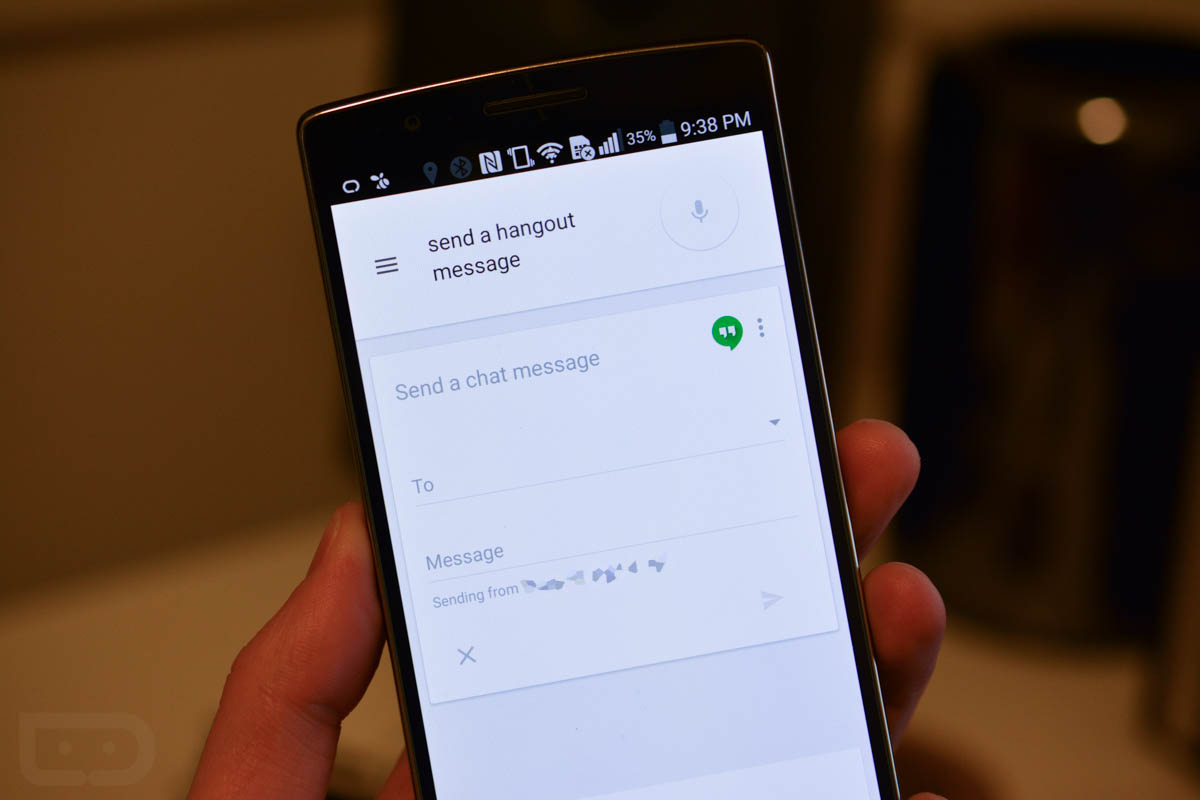

That title isn’t clickbait. I’m not even kidding with this one. You can say “send a Hangouts message” in Google Now, with your voice, and it will actually send a message in Hangouts with your voice. I don’t know when this went live, but it’s live. It will ask who you want to send it to, then what your message is, before confirming that you want to send. We aren’t talking SMS here – this is legitimate Hangouts messaging with your voice.
You still think I’m joking, I know. I get why you would think that I’m joking. Seriously, though, go try it.
You can finally send a Hangouts message with your voice in Google Now.
I always use Hangouts. I use voice when synced w/ my Android Wear device.
About time.
It worked for me
This might have been introduced with the new google search update from a day or so ago. Didn’t get that yet and didn’t side load, and when I say ” send a hangouts message” it opens up browser articles…
ok so i installed the new search update. still no go…
Doesn’t work for me. anything I should try?
Probably needs new Hangouts or GN. My N6 doesn’t do it either
Likely getting everything ready for Android Auto, I assume.
Worked first try on Droid Turbo. If someone wants to send me a 360, I’d be willing to test that too!
Why no on android wear 🙁
Can they please just give it Material design, please!! This UI is so bland!!!
This wasn’t there before? I’ve been able to respond with voice on my Moto 360 for a while, never really tried sending a message, but as I remember, you could do it with Google Now and Google Voice, I’m surprised Google Hangouts didn’t have support.
Reply, yes. Initiate, no.
you should have titled this post “You can send a Hangouts message in Google Now now”
Yet still can’t send a video in Hangouts
Doesn’t work here, just updated the Google app too. Is it a US only thing? It just searches Google
Sweet
I stopped using my wear watch because of frequent Google server errors. But if they get this working on wear plus let me send gv texts with wear I might use it again.
Not working here with Hangouts 3.0.87531466 and Google app 4.2.16.87075793 on 2013 Nexus 7, Android 5.0.2. That’s okay though. If it works like sending a text, I’ll tell it to send a text while driving, and when Google Now confirms it will ask “do you want to send this?” without reading it back to me, which borders on useless. I’m working out the final kinks in my own Hangouts via voice solution using Tasker and AutoVoice, which actually reads back the message as part of the confirmation. Until Google’s solution arrives on my phone, and works as well as or better than my own, I’ll stick with my own.
Doesn’t work. >:( 😉
If only hangouts worked with mms when you were on wifi 🙁
It does. I do it all the time. Use airplane mode with just Wi-Fi at work and it never had a problem since they integrated mms.
only if you use Google Voice. He means through Carrier WiFi calling (Sprint or Tmobile). Hangouts does NOT work for this.
Oh. Gotcha.
Its a start. Now I need it to be a default so when I say “send a message” it sends an SMS through hangouts (google voice) and then when I say “send a hangout” it sends it through hangouts. Or better yet, Just have “send a message” default to hangouts and it use whatever method I had previously used with that person.
Yes this is what needs to haired next. I figured with this command it would send the message through whatever method you last used hangouts with for that contact (GV, carrier sms, or instant message), but it doesn’t :(.
I thought you were going to say: Finally you can send videos in Hangouts
Nice, but not working from Moto 360….
Maybe I’ll finally get readouts while I’m driving on my moto x from hangouts
That’s pretty awesome!
Worked like a charm. I have Google App 4.3.10.88581490, maybe you need to update to that to get it working. You can get the apk from here http://www.apkmirror.com/apk/google-inc/google-search/google-app-4-3-10-88581490-arm-android-apk-download/
I dunno what kind of voodoo you pulled for it to work on your phone, but I get nothing my KK G3 nor my Lolli N5. Maybe someday …
Works great on my vrz Note 3 on KK 4.4.4 I just tried it after reading the post. The only problem with mine is that I have hangout locked and I have to unlock it for the message to be sent.
Tried it. Didn’t work on my moto x 1st gen. It understood me just fine, but only searched google for “send a hangouts message”
Same here.
I just tried it on my first gen Moto X and it worked like a champ, will wait to try it on my 360 because talking to my phone is enough weirdness at work for one day.
I just tried it on my 360. No go.
Nice! Now we just need Google Voice support, and we’re set.
I have hangout as my default messaging app and every message that is sent out even using my GV number gets sent out through hangout… You haven’t set your device to send your GV Messages through hangout? It would be nice if Google wakes the heck up and brings the ability of making calls with GV without having to install a 3rd party app.
Try sending a text via voice commands, especially from Wear, and see what number it uses. Spoiler: it won’t be your GV number, no matter what your defaults are.
And yes, looking forward to them giving us the calling abilities without needing the Gingerbread app.
good catch…I didn’t noticed that when I sent out the text this morning…
Did not work on Droid Maxx
I wish it would read back the message to you so you know if it transcribed it correctly. Have sent too many gibberish messages and didn’t know until after I parked the car and looked
Sweet!
Too bad it still doesn’t work via Android Wear.
Damn. I was hoping. That’s what I actually needed.
that’s what I thought was fixed here 🙁
This. I thought for sure it would work.
I guess we’ll have to wait for a Wear update. Or maybe just Wear’s version of Google Play Services.
So you are saying we can finally send Hangouts messages with our voice?
Maybe. 😛
What magic is this?
THIS DOESN’T WORK!!!!
“OK Google, revamp the Hangouts UI.”
^^^^
true story!
I use hangouts because I use google voice for everything now since I use data only.
What phone and network do you use?
I use att and am using a nexus 5. Signed up a tablet and then just swapped Sims.
Thanks. How many gigs do you need a month for data only? (no unlimited voice/text)
;.
-
-
-
-
-
-
-
-
-
-
-
-
-
-
-
-
-
-
-
-
-
-
-
-
-
-
-
-
-
-
-
-
☞☞☞get $86 per hr@ae14:
Going Here you
Can Find Out,,,
►►►► https://TravelWorkOnline.com/get2/position…
$45/month for 30 minutes and unlimited data on Verizon with GV/Hangouts FTW.
I still use Hangouts, no point in having multiple apps tracking the same thing.
Same here even though the UI is not good. it’s so bad my wife (who has GV as well), went back the the google Voice app for her text.
I have zero issues with the TXT/MMS, I thought it worked well haha
I stopped using Messenger when I discovered Textra and AwSMS
Where is that AwSMS???
It’s in alpha right now but they have the expandable heads up notification where you can type your reply right in the heads up deal. It’s broken right now and it’s the only reason it’s not my daily driver. As soon as they get that fixed I’ll ditch Textra
People use Hangouts? Everyone I know is uses Verizon Messages for messaging
People use Verizon Messages? Everyone I know is uses Hangouts for messaging
Most of the people I know use Whatsapp or their device/carrier messaging app. I use Hangout in combination with GV since I’ve been using it since it came out unless I had to send a MMS than I would use the verizon messaging app. ….and whatsapp with those who use this one.
What the eff is verizon messages? LOL
Verizon bloatware lol
I use Verizon since I can access it through the web. Once Hangouts will access SMS through the web I will switch but not until then.
You can text from the web with Verizon Messages? I had no idea… that actually makes it semi-appealing…
The best part is you don’t even have to use the Verizon Messages app on your phone to do it! I use the Google Messenger app for my SMS but I can still log into my VZW account and text from my PC. It’s actually really cool. I also use it to text from my tablet.
You can call and text with Hangouts on the web, and any Android and iOS device.
I call and text from my Moto X, iPhone 5s, iPad Air 2, Nexus 4, Galaxy Tab Pro 8.4, and MacBook Pro.
You can only use your Google Voice Number though. If you have Pushbullet though, you can use whatever messaging app you have to use your carrier number.
Mighty Text is a free app that lets you text from your PC browser & tablet… very handy !
Every time I try MightyText I love it until it stops working right or something hangs. It just hasn’t been as reliable as I’d like it to be to use for texting. I might give it a try again as it’s been a few months.
Motorola connect is a web interface too, if you’re on a motorola phone.
I use Messenger. Verizon Messages… I can’t even deal with that comment. Yes, I know a lot of people use it since it comes on pretty much all Verizon Phones as the default messenger.
Not working. Do I need an updated Google Search?
Hmmm, not sure. Let me check my version numbers on Hangouts and Google Search.
Edit: Hangouts is 3.0.87531466 and Google app is 4.2.16.87075793.
I’m on 4.3.10.88581490.arm for Search and 3.0.87531466 Hangouts on a 2014 Moto X 5.0
Same. It’s probably server side
It’s a server side change. It may or may not require the latest Play Services (7.0.97.1791429) & Google App (4.3,10.88581490) updates to finish rolling out.
Google Now and Voice Search are now 4.3 version. Head over to Android Police for the download.
Could be a partial deployment. Server side switch since it doesn’t show up in the latest APK teardowns.
Oh my god! How long have I waited for this. All I can say is it’s about time
I assume this means I can send a hangouts message with my voice on my moto 360 now. If so, about time! We just need to be able to modify the quick responses now.
Nope. Tried it several ways
Same here…the fun part is that all it did was bring up this article.
Comments are closed.