
We finally have an outline of how Android app sideloading will work on Android. Last August, Google announced strict enforcements on applications not distributed via Google Play. After a lot of backlash from users, the Android development team took the feedback and detailed that it would rework the plan. This week, we now know Google’s new workflow for users and it does seem improved.
Moving forward, there will be 3 routes based on where you get your apps. Verified developers will be able to distribute apps freely from a website or other channels. Nothing changes from how sideloading works today. Limited distribution accounts will be able to publish apps for sideloading onto a small number of devices (20 total) for internal testing. Then there’s the new advanced flow for unregistered applications.
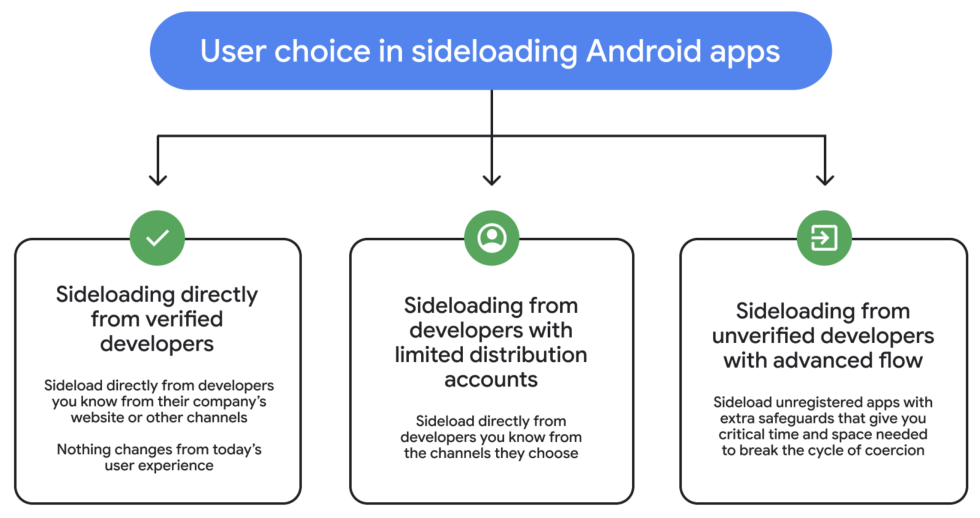
Multiple steps are designed as “friction points” to make scamming more difficult. For example, there’s a coaching check, device restart (which will terminate any remote access or ongoing phone calls), plus a new 24hr waiting period. This eliminates that sense of urgency that scammers utilize on victims.
Advanced Flow Breakdown
- Enable Developer Mode: Must be manually activated in system settings.
- Coaching Check: A prompt to confirm the user isn’t being pressured or directed by someone else.
- Device Restart: Users must restart their phone and reauthenticate, which terminates any active remote access or phone calls a scammer might be using.
- 24-Hour Waiting Period: A one-day “cooling off” period is required before the change can be finalized.
- Biometric Verification: Final confirmation via fingerprint, face unlock, or PIN.
- Flexible Permissions: Once complete, users can allow unverified installs for 7 days or indefinitely.
Google says that limited distribution accounts and advanced flow for users will be available in August before the new developer verification requirements take effect.
For the power users who want access to sideloading, this all seems completely reasonable. Google wants to protect users, while also allowing you to use your phone how you see fit. What’s your take?