

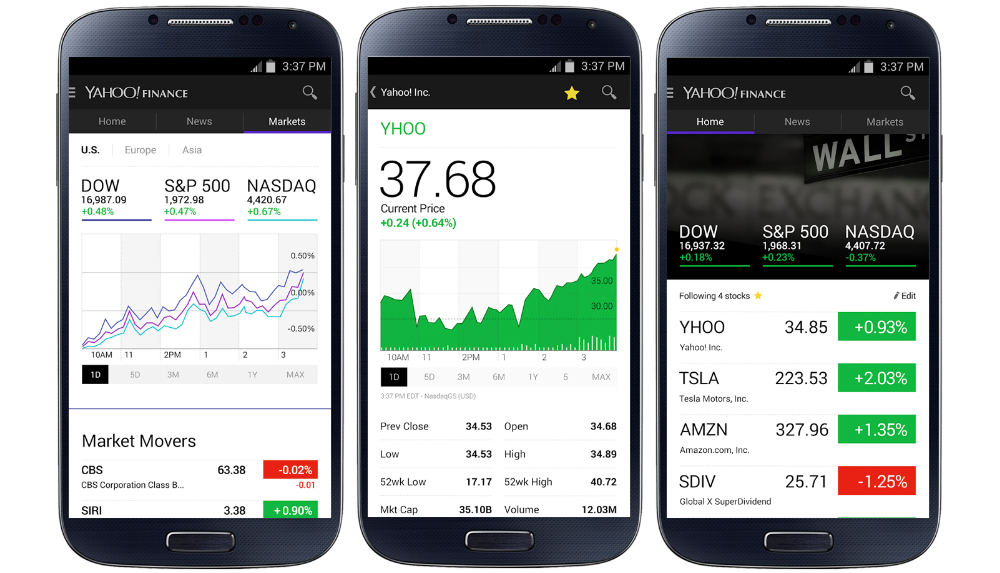

For the financial savvy among us, Yahoo has updated its official Yahoo Finance application for Android users. Included in the update, which is now live on Google Play, a revamped user interface awaits you, full of interactive graphs and intuitive navigation menus.
Also included in the update is a new “watchlist” feature, which allows users to add certain stocks to a favorite list. This way, finding stocks that are important to you with higher detail is much quicker. Finally, push alerts and breaking news on stocks will let you stay on the top of your game, giving you up-to-date information on the Wall Street happenings as it goes down.
You can pick it up on Google Play for the price of free.
What’s New
- Add stocks to your watchlist for real-time quotes and personalized news.
- Brand new interactive graphs.
- Get push alerts and breaking news on stocks you follow and the general market.
- A completely redesigned experience with sleek, intuitive navigation.



this Yahoo Finance app is not that great. and it’s in desperate need of some WIDGETS. Google Finance may be neglected but it is better.
Google Finance: the most neglected Google app?
That thing hasn’t been updated since 2010
Technically, it was updated in Jan 2013 (API fixes) … but yea, no UI updates. The UI is still stuck looking like it’s part of Froyo from 2010.
It’s weird how that app has been stuck in limbo … no UI updates since Froyo, yet not killed off either. Google has claimed that all their apps will be updated to Material Design, so there’s hope they will update it. But, my pessimistic guess is that it won’t get updated, and will just linger on as a forgotten app that they have effectively abandoned.
Big time neglected! I love it just as it is, but it’s broken. I use it several times a day, but having to keep assigning an email address to it and agreeing to the TOS all the time is ridiculous. Plus there are stocks in my portfolios that won’t even show up on the app, but will on the web version.
I’ll be giving the Yahoo Finance app a try now. I like how it displays the symbols in large letter with the company name below like Google does. All these other 3rd party apps seen to leave symbols off the list.