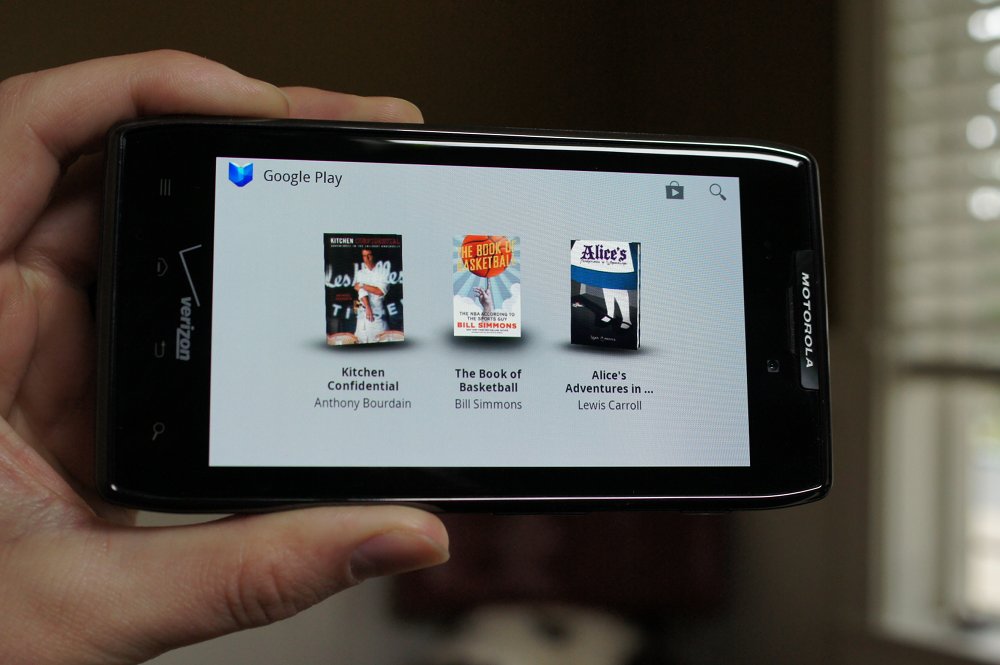
If reading on your Android device is something you do from time to time, then it may have become a bit easier today, thanks to an update that Google pushed out to Play Books. The update adds a few features that basically makes it a brand new app. When you open the app after the update, you’ll find additions such as a quick translation tool, a dictionary feature, the ability to highlight and take notes, and even Places, which shows you a certain location on Google Maps when it’s mentioned on the page.
Go pick up the update and let us know what you think.
Via: Android Blog
iBooks has had Dictionary, highlighting and notes since version 1
I would love to take more advantage of this, but I still think the price of many ebooks is just too high. For example, a series of children’s books that I have been buying my daughter in fully illustrated hardcover with about 20-30 pages each for $5 a piece is $13 a piece in Play Books. It would be nice to buy the collection for when we travel, but at over double the cost of the hardcover it seems a bit ridiculous. Now, I don’t know if this is Google’s fault or the publisher, but it sure does not make me too eager to buy. Also, the Audible versions are just $0.95 a piece.
iSheep got iLost: Watch it. hahhaha :p
http://www.youtube.com/watch?v… ,.
Won’t use of until you can import PDFs. When will they learn
People still read?
Stupid people don’t.
Still the dumbest app name ever. They should have left them all as the simple names and reference the payment store to the Play Store, not name them all as it.
Also agree the name is stupid, but one benefit is that they are all next to each other in the app drawer (Play Books, Play Music, Play Store etc.)
Never thought of that. Though the same could be accomplished with either play books, or Google books.
Google has been playing around a lot lately :p
http://androidome.com/why-google-play-store-should-be-renamed-as-google-market/
LOL. Like the droid RAZR would have enough battery power after the buggy ICS update to read a book on it.
Does anyone know if you can download books bought from the Play Store so that they can be viewed on a Kindle? I am planning on getting a Paperwhite (easier on my eyes that already stare at an LCD for 10+ hrs a day) but I have a pretty big selection of unread books from Google.
Maybe you can root/rom it and grab the market.
I could be thinking about the Nook though.
I know you can on an old school nook, if you go to the play store (on a pc/mac),select a book you own, and click on the “how to read” tab, it gives you options like epub and pdf. I knownothing about paperwhite and if it can read epub, but I’d guess pdf would work. I think you need Adobe Digital Editions for epub and nook. Again, not sure about kindle.
Go to the book on Google Play.
Click “how to read”
Select epub or pdf
Download to your computer
Install Calibre (free)
Convert your book to a kindle format
Email it or sync it over a wire to your Kindle
Thanks!
I would suggest just buying the book from Amazon and using the Kindle app on your Tablet/Phone. It is much easier, and then you also get Whispersync.
I plan on making most future purchases on Amazon, the question was how to read my current library of books from Google Play, on the Kindle. I don’t want to purchase these books all over again.
Love “The Book of Basketball.” But it is seriously lacking with out the footnotes on the e-book version.
They just need to add the ability to import your own books and I would use it every day.
Just realized there’s a few free books already on my phone. I’ve actually seen a few books that have caught my eye while browsing the Google Play store. Maybe I’ll start using this more!
If the app still does not support importing, I’m still going to use a crappy 3rd party alternative…
Just use Kindle (drag and drop on to sd card)
This has a terrible design anyway.
Agreed. No PDF / other eBook format support, no go for me. Too bad too, it’s such a nice app.
RepliGo PDF Reader is number 1 for me right now.
can i upload my already bought ebooks? if not, its not worth it.