
As a part of the new Android 16 QPR2 Beta 1 that dropped this week, Google said they were adding an “Auto-Themed App Icons” feature. We fired up the beta and immediately looked for this first, as Google’s attempt at icon theming up until this point has been lackluster. They’ve essentially let app developers off the hook and refused to force-theme app icons, leaving our home screens looking awful.
In this first beta, there are now three options when you got to change icons. There’s the “Default” option that leaves your icons in their traditional colorways. Then you have “Minimal,” which will not only flip your icons that can match your phone’s theme, it’ll even take those that haven’t been officially supported with icon theming and apply a light color mask to them. You can see this below, where apps like Pokemon GO, FordPass, Eufy, and Swarm have only flipped to having a lighter blue mask on top, instead of the proper icon switch.
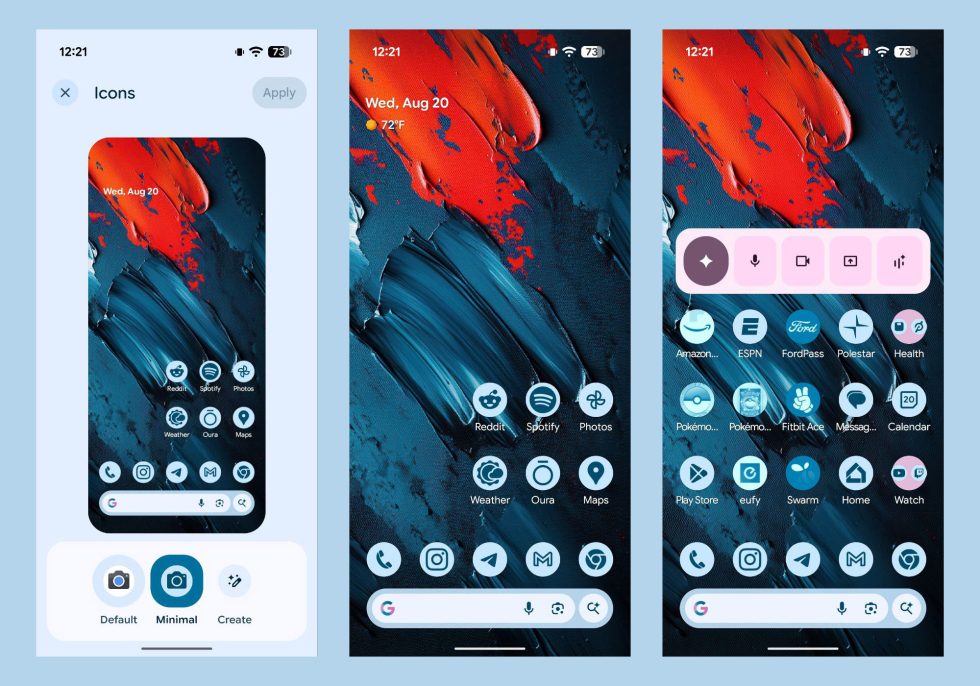
There is also a new “Create” button that doesn’t currently do anything. In fact, if you tap on it, it tells you that the “App isn’t installed.” I’m just going to assume that Google will release a new system app in later QPR2 builds that allow this setting to work. That setting, based on previous leaks, should bring a lot of customization to icons, with different shapes and sizes.
Guys, our home screens can actually be themed now.