Download: Google Keyboard Version 4.0.2, Features Light and Dark Material Themes

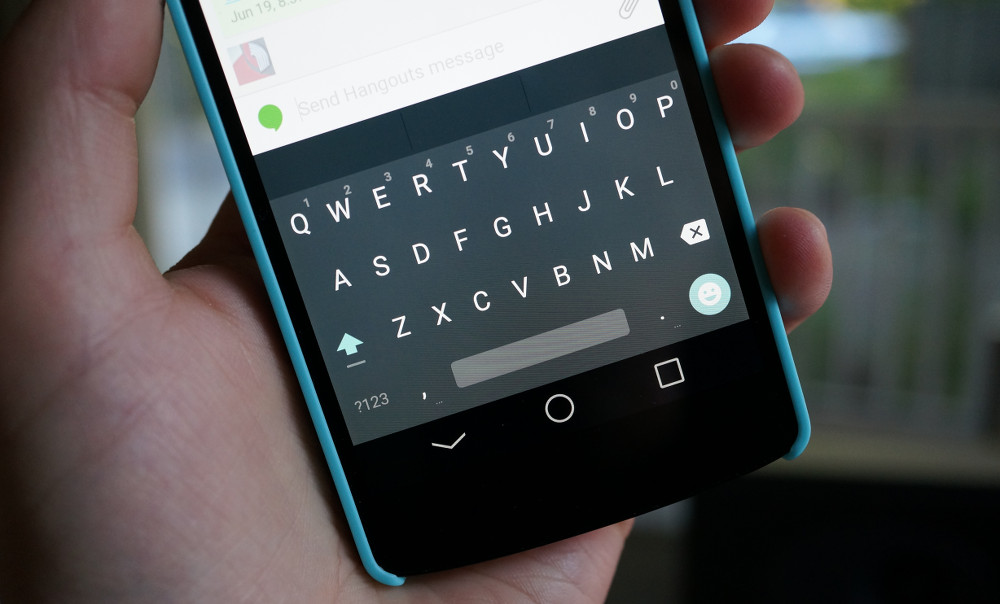
Wait no longer for the updated version of the Google Keyboard app, featuring the much-desired Material themes as seen in Lollipop. In version 4.0.2, both the Light and Dark themes are available, allowing you to match up your device however you see fit. 

We have the apk downloadable for you below. Once downloaded onto your device, sideload the apk as you would any other.

Have at it.

Download:  GoogleKeyboard.apk [mirror]
Comments

78 responses to “Download: Google Keyboard Version 4.0.2, Features Light and Dark Material Themes”

  1. SanBolo Avatar
    SanBolo

    Light or dark..light…dark…light… dark..aaaaaaagggh!

  2. plwjr Avatar
    plwjr

    Does anyone have the problem with the long bar thing that happens when I press a letter (It’s too long)

    1. plwjr Avatar
      plwjr

      I’m trying to add a photo but, it’s not showing

  3. Guest Avatar
    Guest

    Does anyone have the problem with the long bar when I press a letter?

  4. NorCalGuy Avatar
    NorCalGuy

    Just want the middle finger emoji
    Edit: and if they could add gun to the head for a description for work

  5. c_topher_v Avatar
    c_topher_v

    I will try this until not having the feature to automatically remove the space behind punctuation (comma, exclamation mark, question mark) drives me back to swiftkey.

  6. Aaron Avatar
    Aaron

    Got update without side load, however did not give material. Had to go into advance setting (Lang/input->Google Keyboard settings->Appearance/layouts) menu now have 4 options on Holo White/Blue and Material Light/Dark. Guess they didn’t want to freak people out that weren’t expecting design change.

    1. jmoon35 Avatar
      jmoon35

      Thanks for the heads up, Aaron- had to do the same as you.

  7. Kaushik N Avatar
    Kaushik N

    I want a keyboard as smooth as google keyboard, excellent swipe gestures as swiftkey, multiple predictions like touchpal, autocorrect like fleksy and dictionary importing from whatsapp, fb n hangouts. developers pls do this 🙂

    1. AMTrombley89 Avatar
      AMTrombley89

      Would you like some fries with that?

      1. Kaushik N Avatar
        Kaushik N

        And a bowl of raspberries too. Thank you

    2. uzo ufondu Avatar
      uzo ufondu

      I think that Swype’s gestures are just amazing. It is just really slow after a while. Honestly, I would love to switch from Swype because of its performance issues, but the gestures just keep pulling me back.

      Side note, I got the Galaxy Note 4 and it seemed to be pre loaded with an early version of Swype that (mercifully) does not have the performance issues that the Swype + Dragon version has, but it has the awesome gestures. The only nit pick is that I cant pick themes.

  8. Scott Kart Avatar
    Scott Kart

    I got this pushed from the play store a few mins ago..how do I change the theme?

    1. Carlos Lopez Avatar
      Carlos Lopez

      Input settings probably im still waiting on it

    2. jbdan Avatar
      jbdan

      under advanced settings

    3. JWil Avatar
      JWil

      go in to Settings –> Language & Input —>Google Keyboard Settings —>Appearance an& Layouts

  9. JWil Avatar
    JWil

    Wow, this keyboard is so much better than the original stock Google keyboard. I might even ditch Swiftkey for this one…time will tell.

    1. Tailor00 Avatar
      Tailor00

      I ditched SK a month ago. The lag became unbearable.

      1. JWil Avatar
        JWil

        I haven’t had lag using SK per se, but exiting the keyboard, there was lag. Frustrating a bit.

      2. Chris Avatar
        Chris

        I keep switching from the Google Keyboard to Swiftkey and back. SwiftKey has better auto-correct and prediction, but the Google keyboard is so much faster. But with this update the Google Keyboard has damn good auto correct. But the swiping gesture isn’t as good as SwiftKey for me so far.

  10. Daniel Russell Avatar
    Daniel Russell

    Couldn’t hit the install button for some reason, but after a quick reboot, I’m updated. Thanks DL

  11. DanielMena9 Avatar
    DanielMena9

    I thought we were going to get Lollipop today?!

    1. JSo Avatar
      JSo

      Nothing confirmed. Just high hopes.

  12. clobberedchina Avatar
    clobberedchina

    Lollipop is hitting the Moto X.

    1. Evan Yaffe Avatar
      Evan Yaffe

      Say what? Which model?

      1. clobberedchina Avatar
        clobberedchina

        2014 Moto X, Pure edition. It’s here.

      2. ostesnibly Avatar
        ostesnibly

        pure edition.

  13. hyperbeatser Avatar
    hyperbeatser

    odd at first not having individual “keys” but nonetheless is nice to use

  14. grayson360 Avatar
    grayson360

    Can we has on iOS 8? Please? PLEASE?

    and where’s that xda developer that had android on the iPhone 3g….. Need some 5.0 on my iPhone 6.

    1. Tyler Avatar
      Tyler

      You sir made a terrible mistake… I don’t know if that mistake is admitting you have an iPhone on an android site or actually buying an iPhone. 🙂

      1. grayson360 Avatar
        grayson360

        Eh maybe for the software side of it but I’m actually surviving pretty easily. The hardware is amazing though.

        And I take no shame for admitting on this site. I love this site and always will.

        1. DanielMena9 Avatar
          DanielMena9

          There is no doubt Apple has superior hardware (aside from the average battery life, just a millimeter thicker to cram more battery, and LESS BEZELS, but minor gripes to the best hardware out there).

          1. grayson360 Avatar
            grayson360

            Yea the battery can be great, but can be easily destroyed as well. I can have it last two days with normal usage but can kill it super fast using gps and spotify.

          2. Tyler Avatar
            Tyler

            I would say iPhone 5/5S was a great design, 4/4S being a great looking design just that glass back was fragile, but the iPhone 6 imo is very poor in terms of hardware design. The whole bending thing along with the fact that it titters when set on its back and that the sides are to small to hold causing it to be slippery, all things that the iPhone 5S did right. Unfortunately all those things besides the bending wont get fixed until the iPhone 7.

  15. nabooska Avatar
    nabooska

    Hopefully hangouts is the next update…

    1. Chris Avatar
      Chris

      Is it just me, or has Hangouts gotten much more sluggish since they integrated Google Voice? Also, I like the old Hangouts interface way better.

      1. AMTrombley89 Avatar
        AMTrombley89

        It has been a little slower lately, but I didn’t think to connect that with the Google Voice integation…perhaps that’s the reason…

  16. Droid Ronin Avatar
    Droid Ronin

    Finally, a signed APK that updates the Google Keyboard properly! Now I can safely switch from Shen Ye’s Android L preview keyboard. 🙂

    1. DanSan Avatar
      DanSan

      ugh finally!!! i didnt want to load the leaked ones, who knows what those keyboards were capturing and if sending info to somebody. uninstalled the L preview and went back to the google one! material white design looks so good!

  17. TheDave1022 Avatar
    TheDave1022

    They really need more long press keys for punctuation marks. I cant get off swiftkey until that happens. It’s just so much slower using the long press on period for a select few and then needing to go into ?123 for more.

    1. LionStone Avatar
      LionStone

      I like the cleaner look much better… You can also speed up the duration of the long press, it’s set at 300 now but I reset to 200, blazing!!

    2. Guest Avatar
      Guest

      edit: Re-reading your post, I guess you were talking about adding more longpress menus. I get that! My bad.

      See my comment below: “Long keypress duration setting is finally back with this version. Its absence was the only reason I wasn’t using it anymore!”

      It was always an option but it was removed from the first dev preview version back in July. This new version adds it back in. The default setting is 300ms– I like it at around 120ms. Like you, it was a deal-breaker for me and I was using SwiftKey because I considered Google Keyboard unusable without the setting. This was the biggest deal with this update, IMO. Surprised the article didn’t mention it.

    3. c_topher_v Avatar
      c_topher_v

      This may be an obvious question, but what about using the gesture to swipe from the number key to display the symbols?

      1. TheDave1022 Avatar
        TheDave1022

        That helps a bit, but it’s still a bit slower vs quickly holding down on the long press key. Also if you want to use =, you have to go into the = < key.

  18. Patmw123 Avatar
    Patmw123

    Awesome I love the material light layout

  19. Cameron Laudick Avatar
    Cameron Laudick

    These apk’s update like normal, right?

  20. ddevito Avatar
    ddevito

    I hate this keyboard – no key separation – unless you’re rocking a 6′ phone it makes it difficult to type on without pressing the wrong button

    1. LionStone Avatar
      LionStone

      Who “presses” anymore?

      1. AMTrombley89 Avatar
        AMTrombley89

        Me…and I know I’m not the only one…

        1. bobbyp Avatar
          bobbyp

          No you are not.

      2. Dark_Laser Avatar
        Dark_Laser

        Oh come on, nobody uses only words in the dictionary.

        1. LionStone Avatar
          LionStone

          I know, I make my own up from time to time 🙂

  21. Alex Avatar
    Alex

    Long keypress duration setting is finally back with this version. Its absence was the only reason I wasn’t using it anymore!

    1. Kyleinstyle Avatar
      Kyleinstyle

      THANK GOODNESS! Mine was stuck on 0ms!

      1. Alex Avatar
        Alex

        Mine was default 300ms which is painfully slow. Made it unusable for me. I like it at about 120ms.

    2. Reginald Spence II Avatar
      Reginald Spence II

      No FREAKING way. I don’t believe it! Up vote for pointing it out. Thanks bro!

  22. d-rock Avatar
    d-rock

    Ugh!!! Give us an optional dedicated number row like the LG keyboard…our screens can handle the extra row…I promise.

    1. eddiegotsole Avatar
      eddiegotsole

      If it’s optional, I’d say why not! Although I don’t mind long pressing for the numbers and have got very efficient at it.

      1. custo Avatar
        custo

        I just wish we could customize long presses for all the buttons.

        1. Daniel Maginnis Avatar
          Daniel Maginnis

          I can on my droid. Settings > language and settings > hit the settings button for google keyboard > advanced. There you go. I shortened mine to make it more efficient.

      2. d-rock Avatar
        d-rock

        I’ve got several numbers in all my passwords, so the LG Keyboard is 100x more efficient, but google keyboard has better predictions…still no perfect keyboard!! #1stworldproblems

        1. Justin Myers Avatar

          SwiftKey is what I use mainly. Both decent predictions plus material themes and a dedicated number row. I am trying out Google Keyboard since the update though.

      3. red014 Avatar
        red014

        I wish they’d bring back the “swipe up for numbers” from Gingerbread or CM or whatever it was from, I can’t remember. Either way, that was the best solution.

        1. Brian Avatar
          Brian

          Try Touchpal. That’s the way it works.

    2. Tone Bone Avatar
      Tone Bone

      That’s why I jar multi ling O keyboard

    3. xzombiex66 Avatar
      xzombiex66

      I’ve been saying this for a while now, not sure why they wont give the option. this is the one thing that stops me from using the Google keyboard.

    4. Jack Bauer Avatar
      Jack Bauer

      You can get it (the number row); it just shrinks the other keys a bit.

      Go into Google Keyboard Settings
      Choose Languages then, Uncheck “Use system language” (make sure English (US) is checked under Active Input Method)
      Go back and Choose on “Appearance & layouts”
      Choose ‘Custom input styles’
      Choose the “+” icon
      For Language, choose English (US)
      For Layout, choose PC, then Add
      At the popup, choose Enable, then check English (US) (PC) under ‘Active input methods’

      Now once you’ve backed out of the settings you can choose “English (US) (PC)” as an input method and have a dedicated number row.

      1. d-rock Avatar
        d-rock

        I don’t mind that it makes it smaller, but losing the dedicated keys for . and , hurt this too. I don’t want a PC keyboard. I want a phone keyboard with a number row! Thanks for the info though. This may help some!

    5. DaveIsAwesome Avatar
      DaveIsAwesome

      SwiftKey has this option.

    6. RavnosCC Avatar
      RavnosCC

      Just use gesture typing and set your long press delay to 100ms, acts almost like a dedicated number row.

    7. Brandon Avatar
      Brandon

      There’s an option to enable it. I have it on mine.

  23. Pootis Man Avatar
    Pootis Man

    Yes! Moar Material! On a side note: I really would like Material YouTube next please.

    1. Joseph J Pfister Avatar
      Joseph J Pfister

      …and the widget back

      1. Pootis Man Avatar
        Pootis Man

        In doubt that’s going to happen.

Leave a Reply