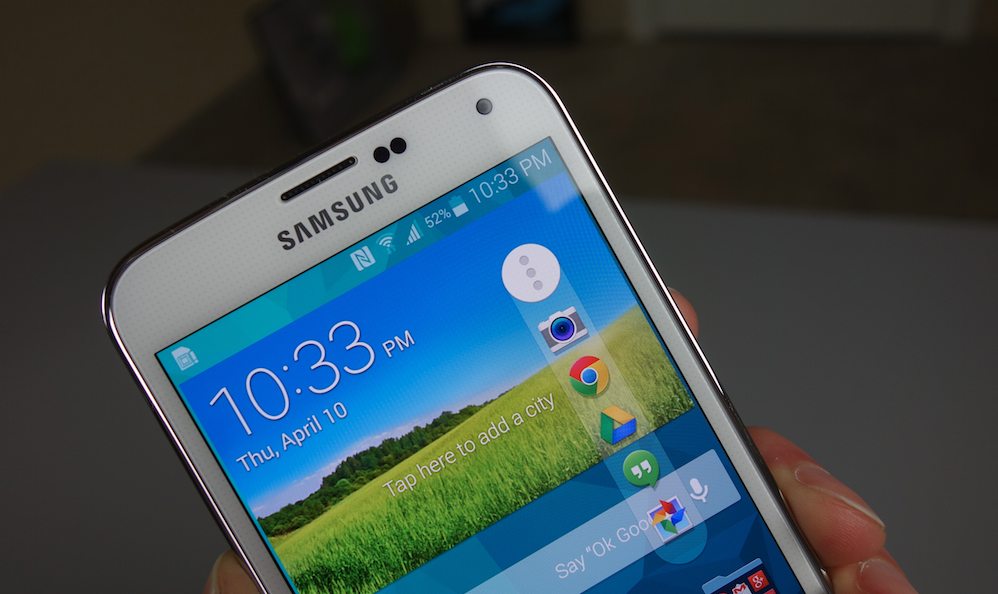
Samsung is known for tossing all sorts of gimmicky software features into its flagship Galaxy phones. Some are neat tricks that you’ll seldom use, while others look great on a press event stage and almost no where else. But the new Galaxy S5 has one in particular that is actually pretty useful – it’s called Toolbox.
Toolbox is in a way a lot like some of the floating apps we have seen over the last year (Chat Heads or Floating Notifications), in that it displays itself as a circle that floats with you to any screen. It can go transparent if you aren’t using it much and light back up the minute you touch it. It’s useful, though, because you can attach five of your favorite apps to it, making them accessible anywhere.
In the video, you’ll see how you could use it to jump back into the browser to grab a phone number while starting out in the dialer. Or maybe you are in the middle of browsing Droid Life and then realize you need quick access to the camera – a tap on Toolbox could provide you with a shortcut to the camera app.
To see it in action, along with a quick setup tutorial, check out the video below.
[responsive_vid]



Is smart scroll gone on the S5?
It’s like the “superman” app. Or even better than those is “side bar” that does not get in the way at all and is activated by touching the invisible bar that you place where you want, and the apps appears, and not just favorites but “home” button and alike as well as “drawer” So this “toolbar” button is not impressive and a waste of time really….
Thanks to visit my Website: http://WWW.SOGARED.COM, We are China wholesalers!
Here you can buy lots of merchandise brands! The Secret,Super Good
High quality,Cheap,and save 30%
Do not miss the opportunity to surprise waiting for you!
24 hours for your service! Thank you!
I HOPE YOU LOVE IT,IF YOU NEED SOMETHING,CAN CONTACT ME DIRECTLY
Welcome to http://WWW.SOGARED.COM ,Please click http://www.sogared.com 2222
This looks pretty good, but I have been using Sidebar for a long time and it can hold an unlimited (as far as I can tell) amount of apps and it also shows up by swiping from the side from inside any other app.
I’ve been using sidebar and swypepad simultaneously for 2 months and I still find myself using swypepad far more often. I prefer knowing where all my shortcuts are without having them rearrange based on usage. That way I can still pull up shazam or others without looking. I can’t get sidebar to pull out everytime on my G2 either. Maybe I’m not starting close enough to the edge with these tiny bezels 😉
Bezels just kill it. I guess I’m spoiled
Or just not knowing much about smartphone tech LOL
Jesus Christ that phone is fast. I was shocked at how quickly Chrome opened there. The only reason I’m not feeling the S5 is because my S3 is lag central… it takes forever for anything to open. But if the S5 is really this fast then I might stay with Samsung…
there’s faster out there
Bro WE KNOW…
You have to remember that the S5 is a major improve over the S3 and is running a quad core CPU
The S3 I9300 has a quad core processor.
I was talking about the U.S LTE version
4.8-inch HD Super AMOLED display (1280 x 720)
Android 4.0 (Ice Cream Sandwich)
Dimensions: 5.38 x 2.78 x 0.34 inches
Qualcomm Snapdragon S4 1.5 GHz dual core CPU
Weight: 4.73 ounces
2GB RAM
16GB Internal storage
Up to 64GB expandable memory (microSD)
2100mAh battery
Bluetooth 4.0
MicroUSB
4G LTE / HSPA+
8MP Camera w/ LED Flash (4x zoom)
1.9MP Front-facing camera
S Beam capable
I don’t just post without doing my homework.
YOU FAIL
If that’s the way you see it, fine.
Kit Kat + Quad-Core Snapdragon 801… I’m in love with my Note 3. Such a BEAST. But still can’t wait for KitKat update
Wish that you could do more than 5, if you could i wouldnt put anything else on my home screen
Well … The good thing about Samsung features like this is that devs create mods, like they did for Multi-Window, that build onto features like this to add more apps, different apps, etc.
Check out swypepad with the extra space add on. It’s amazing.
Circle Launcher is a great app that might give you what you’re looking for
rigid flex circuits are also involved in industrical equipment manufacture. In industrial field, FPC connects steadily with conveniences in large machine equipment.
Anyone else think it’s a nice idea, but they went about it the wrong way? I would be super annoyed by that thing
Well … Then you’d turn it off/disable it. Or just not buy the phone … Problem solved.
=)
Can you move it up on the notification bar?
its like floating toucher feature https://play.google.com/store/apps/details?id=com.boatmob.floating.touch
……Beats Music? Is one of your fav five?
He amended “At least for demo purposes.”
I hope it was a mistake