ASUS MeMo Pad is Official, Features Android 4.1 and 1024 x 600 Display

MeMo Pad

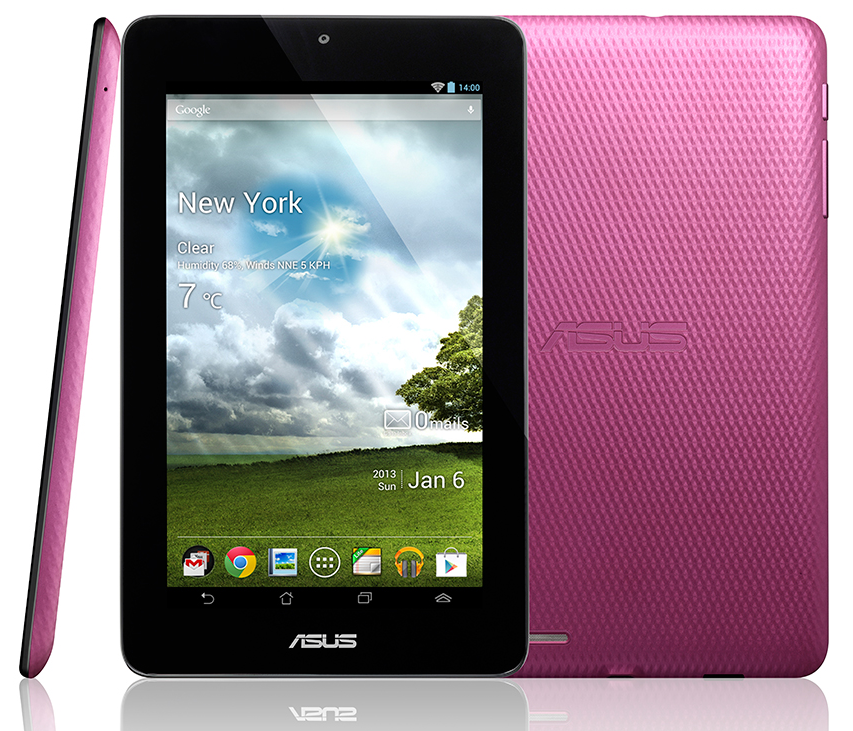
This morning, ASUS’s budget-friendly MeMo Pad 7″ is finally official. We have seen plenty of render leaks and spec leaks, but we are sort of surprised that they have gone ahead and launched the device right before MWC. Either way, it’s out now, and the specs have not changed since we talked about them previously. 

The tablet features a 7″ “HD” display with a resolution of 1024 x 600, runs Android 4.1 aka Jelly Bean, claims to have up to seven hours of battery life, and even has a microSD slot. Correct me if I’m wrong, but I think ASUS is misusing the term, “HD.” That resolution might be HD for something such as a calculator or possibly even a toaster. And get this, the MeMo Pad is perfect for helping the youth vandalize our cities one wall at a time. Check out 0:43 in their promo video, as an apparent juvenile defiles a public wall with graffiti art. Thanks, ASUS!

But in all seriousness, what are your thoughts on the MeMo Pad? We know it’s a cheap tablet, said to be priced at $150 and due out in retailers sometime soon, but that doesn’t mean it’s cheaply made. We wish it had a better display, because at such a low resolution, I wouldn’t even think to pick one up. What do you think?

[youtube]http://youtu.be/UtpNOSWuUfk[/youtube]

Via: ASUS
Comments

21 responses to “ASUS MeMo Pad is Official, Features Android 4.1 and 1024 x 600 Display”

  1. bc Avatar
    bc

    Nice little throw away for the nieces.

  2. wireless G Avatar
    wireless G

    Wow, those awesome built-in Asus apps really set this tablet apart from the crowd, said no one ever.

    1. Raven Avatar
      Raven

      Actually, I do think that Asus App Backup and Polaris Office set the ASUS Transformer tablets apart from other tablets and have used them as examples when recommending them to people over other tablets.

      I also personally really like their Asus Day Scene live wallpaper and default widgets on their home screen. When an average person that doesn’t know a Jelly Bean from a Gingerbread sees them side by side in a store with something like the Nexus 10 with no widgets and a boring wallpaper, which do you think they are going to be more interested in.

      http://www.droid-life.com/wp-content/uploads/2013/02/ASUS-MeMo-Pad-10.jpg

      http://www.droid-life.com/wp-content/uploads/2013/01/nexus-10-official-650×357.jpg

      1. wireless G Avatar
        wireless G

        Well I can’t speak to what an “average person” finds attractive in a store, but I find the practice of advertising proprietary software as a selling point for Android hardware to go against the grain of the OS’s open source philosophy. And that philosophy is why I buy Android products to begin with. I’m sure Asus makes reasonable apps, but there’s no way I’d buy one of these over a Nexus 7, even if their hardware stats were the same.

        I know OEMs want to distinguish themselves, but I sure wish they’d do it with great hardware instead of proprietary wallpapers. Regarding your examples, “App Back & Restore” is a great app that more than fulfills my needs, while Polaris Office is available to anyone on the Play store (though I prefer Kingsoft Office). And that’s as it should be in an open marketplace of interchangeable hardware — I don’t want to have to buy one company’s hardware to get the best software, and in fact, that’s why I don’t buy Apple products.

        Anyway, I don’t begrudge OEMs for trying, but I personally spend more time figuring out how to remove their pre-packaged apps than using them.

  3. Scott Martin Avatar
    Scott Martin

    $150? i’m sorry but an extra $50 for the nexus 7 or galaxy tab ii 7″ is so much more bang for your buck

    1. Chris Avatar
      Chris

      To be perfectly honest, say a really budget friendly person was buying this for his 9 or 10 year old kid? The $50 saved on this one would probably be worth it, as that kid wouldn’t notice the difference in screen resolution. Just a thought.

  4. Kevin Rees Avatar
    Kevin Rees

    Would be a pretty good in-dash carputer me thinks

    1. S2556 Avatar
      S2556

      I was thinking about using a nexus 7 as a head unit. It would be dope!

      1. Kevin Rees Avatar
        Kevin Rees

        yes indeed

  5. benjamin forehand Avatar
    benjamin forehand

    Eww @that screen resolution

  6. ddevito Avatar
    ddevito

    looks familiar…where have I seen this before?

  7. Capt. Crunch Avatar
    Capt. Crunch

    What a God awful name for a table imho

  8. Nexus_FrEak Avatar
    Nexus_FrEak

    They should have just stuck with Nexus… It’s budget friendly but so is the N7 and with (hopefully) an updated version on the horizon also made by ASUS this was a waste! Still love ASUS though!!

  9. Kiril Avatar

    What does the 4th button do?

    1. Tim-o-tato Avatar

      Looks like a home button inside of a home button. Homeception…

    2. Bryan Avatar
      Bryan

      My guess would be for the mutli-window apps that they show in the video. Samsung does something similar with their Note 10.1 multi-window apps.

    3. Good_Ole_Pinocchio Avatar
      Good_Ole_Pinocchio

      One button Fatality

  10. Jonathan Bunch Avatar
    Jonathan Bunch

    how is 1024×600 “hd” ???

    1. Raven Avatar
      Raven

      I agree, I think “technically” the vertical needs to be at least 720 to count as “HD”. So, the 1280×800 Nexus 7 is HD, but this, is not.

Leave a Reply